Most outages aren't caused by bad code. They're caused by good code deployed in the wrong order.
Senior developers don't rely on memory before a deploy. They run a checklist — every single time, even for a one-line change.
Here's the exact checklist, and why each step exists.
Why checklists exist
Pilots don't skip the pre-flight checklist because they've flown 10,000 hours. They do it because they've flown 10,000 hours — enough to know exactly what happens when you skip a step.
The same principle applies to production deploys. Every step in this checklist exists because someone, somewhere, had an outage from skipping it.
The 12-step checklist
| # | Check | Why it matters |
|---|---|---|
| 1 | Env vars validate at build | Silent undefined in prod = 3 AM alert |
| 2 | Migrations run BEFORE deploy | New code can't see old schema |
| 3 | No drizzle-kit push in prod | Applies changes without migration files |
| 4 | Feature flag OFF for new features | Ship code off, turn on after smoke test |
| 5 | Error monitoring configured | First error hits Sentry, not a user |
| 6 | Health check endpoint responds | Load balancer needs /api/health |
| 7 | Rate limiting on auth endpoints | Login brute-force = account takeover |
| 8 | Secrets in env manager, not code | Rotating a secret ≠ a new deploy |
| 9 | Stripe webhooks tested | Webhook signature fails silently |
| 10 | Rollback plan ready | Know the previous deploy hash |
| 11 | Smoke test the critical path | Log in → do the main action → verify |
| 12 | Alert channel exists | Errors go somewhere humans actually see |
Step 1 — Env vars validate at build time
If you're using process.env.THING directly, your app will start and fail at runtime when THING is undefined. The error happens in production, at 2 AM, in front of your first real user.
With t3-env, the build fails — which is exactly what you want:
// src/lib/env.ts
import { createEnv } from '@t3-oss/env-nextjs'
import { z } from 'zod'

export const env = createEnv({
  server: {
    DATABASE_URL: z.string().url(),
    CLERK_SECRET_KEY: z.string().min(1),
    STRIPE_SECRET_KEY: z.string().min(1),
    STRIPE_WEBHOOK_SECRET: z.string().min(1),
    SENTRY_DSN: z.string().url(),
  },
  client: {
    NEXT_PUBLIC_CLERK_PUBLISHABLE_KEY: z.string().min(1),
  },
  runtimeEnv: {
    DATABASE_URL: process.env.DATABASE_URL,
    CLERK_SECRET_KEY: process.env.CLERK_SECRET_KEY,
    STRIPE_SECRET_KEY: process.env.STRIPE_SECRET_KEY,
    STRIPE_WEBHOOK_SECRET: process.env.STRIPE_WEBHOOK_SECRET,
    SENTRY_DSN: process.env.SENTRY_DSN,
    NEXT_PUBLIC_CLERK_PUBLISHABLE_KEY: process.env.NEXT_PUBLIC_CLERK_PUBLISHABLE_KEY,
  },
})
If STRIPE_WEBHOOK_SECRET is missing from Vercel, next build fails. You catch it before a single user sees anything.
Add every new env var to env.ts the same moment you add it to .env.local. Never add one without the other.
Step 2 — Migrations run before deploy, always
This is the most important rule in production database management.
❌ WRONG:   Deploy code → Run migrations
✅ CORRECT: Run migrations → Deploy code
Why: during a Vercel deployment, both the old and new versions of your app run simultaneously for a few seconds. The new code expects the new schema. If you deploy code first, new code breaks on the old schema during that window.
With Drizzle:
# Never in production
npx drizzle-kit push

# Always in production
npx drizzle-kit generate   # creates the migration file
npx drizzle-kit migrate    # applies it to the database
Run migrations manually from your CI before Vercel deploys, or use a migration step in your GitHub Actions workflow — covered in Step 12 of this guide.
For the full breakdown of safe vs dangerous operations, see the zero-downtime migrations guide.
Step 3 — drizzle-kit push is banned in production
push applies your schema changes directly, without generating migration files. It's designed for development — fast iteration, no noise.
In production, it means:
- No audit trail of what changed
- No ability to roll back a migration
- Risk of accidental data loss with no undo
Add this rule to your CLAUDE.md and your team's internal docs:
## Database rules
- Never use `drizzle-kit push` in production
- Always `generate` then `migrate`
- Migration files are committed alongside the code that requires them
Step 4 — Feature flags for every new feature
The classic failure mode:
❌ Ship → Users see broken feature → Emergency rollback
✅ Ship (flag OFF) → Smoke test in production → Turn flag ON → Gradual rollout
With Vercel Edge Config feature flags:
import { get } from '@vercel/edge-config'

export async function isNewDashboardEnabled(userId: string) {
  const config = await get<{ enabledUserIds: string[] }>('new-dashboard')
  return config?.enabledUserIds.includes(userId) ?? false
}
New feature ships disabled. You test it in production with your own account. When it works, you enable it for 5% of users. If something breaks at 5%, you turn the flag off — no rollback, no deploy, 10 seconds to fix.
Step 5 — Error monitoring before go-live
The key word is before. Your error monitoring must be live and verified before you ship the code that might error.
// sentry.client.config.ts
import * as Sentry from '@sentry/nextjs'

Sentry.init({
  dsn: process.env.NEXT_PUBLIC_SENTRY_DSN,
  environment: process.env.NODE_ENV,
  // Sample 10% of transactions in production — 100% in dev
  tracesSampleRate: process.env.NODE_ENV === 'production' ? 0.1 : 1.0,
  beforeSend(event) {
    // Don't send events in development
    if (process.env.NODE_ENV === 'development') return null
    return event
  },
})
Verify it works before deploying: throw a test error manually, confirm it shows up in your Sentry dashboard.
Full observability setup from day one — Sentry, PostHog, and structured logging.
Step 6 — Health check endpoint
Load balancers, uptime monitors, and deployment systems all need a URL to ping. If you don't have one, the first sign of a database outage is a user telling you.
// src/app/api/health/route.ts
import { db } from '@/lib/db'
import { sql } from 'drizzle-orm'

export const runtime = 'nodejs'

export async function GET() {
  try {
    await db.execute(sql`SELECT 1`)
    return Response.json(
      { status: 'ok', db: 'connected', ts: Date.now() },
      { headers: { 'Cache-Control': 'no-store' } }
    )
  } catch (err) {
    return Response.json(
      { status: 'error', db: 'disconnected' },
      { status: 503 }
    )
  }
}
This checks the actual database connection, not just that Next.js started. Set up an uptime monitor (BetterStack, UptimeRobot, Checkly) to hit /api/health every 60 seconds. If it returns 503, you get alerted before your users do.
Step 7 — Rate limiting on auth endpoints
Auth endpoints are the most targeted on any public app. Without rate limiting, a brute-force attack on your login endpoint is trivial — a script can try 10,000 passwords while you sleep.
// src/app/api/auth/login/route.ts
import { Ratelimit } from '@upstash/ratelimit'
import { Redis } from '@upstash/redis'

const ratelimit = new Ratelimit({
  redis: Redis.fromEnv(),
  limiter: Ratelimit.slidingWindow(5, '15 m'), // 5 attempts per 15 minutes per IP
  analytics: true,
})

export async function POST(request: Request) {
  const ip = request.headers.get('x-forwarded-for') ?? 'unknown'
  const { success, reset } = await ratelimit.limit(`login:${ip}`)

  if (!success) {
    return Response.json(
      { error: 'Too many attempts. Try again later.' },
      {
        status: 429,
        headers: { 'Retry-After': String(Math.ceil((reset - Date.now()) / 1000)) },
      }
    )
  }

  // proceed with auth logic
}
Full rate limiting guide with Upstash.
Step 8 — Secrets in your env manager, not in code
Three rules for secrets in production:
- Never in code — not even encrypted, not even in a comment
- Never in git —
.env.localis gitignored for a reason - Rotate without deploying — secrets change in Vercel's env dashboard, not in a commit
For a full breakdown of secrets managers, AWS Secrets Manager, Doppler, and Vault — see the secrets management in production guide.
// Wrong — rotating this secret requires a code change + deploy
const stripe = new Stripe('sk_live_abc123')

// Right — rotating means updating the var in Vercel dashboard, nothing else
import { env } from '@/lib/env'
const stripe = new Stripe(env.STRIPE_SECRET_KEY)
If a secret leaks, you want to rotate it in 30 seconds — not in 30 minutes including a deploy.
Step 9 — Stripe webhook signature verification
This is the step that bites almost everyone. Stripe sends webhooks with a signature in the Stripe-Signature header. If you don't verify it, anyone can POST to your webhook endpoint and trigger fake payment events.
// src/app/api/webhooks/stripe/route.ts
import Stripe from 'stripe'
import { env } from '@/lib/env'

const stripe = new Stripe(env.STRIPE_SECRET_KEY)

export async function POST(request: Request) {
  // Must use raw text — JSON.parse() breaks the signature
  const body = await request.text()
  const signature = request.headers.get('stripe-signature')!

  let event: Stripe.Event
  try {
    event = stripe.webhooks.constructEvent(body, signature, env.STRIPE_WEBHOOK_SECRET)
  } catch {
    return new Response('Invalid signature', { status: 400 })
  }

  // Safe to handle now
  switch (event.type) {
    case 'customer.subscription.updated':
      // handle...
      break
  }

  return new Response(null, { status: 200 })
}
Test before every deploy that touches webhook logic:
stripe listen --forward-to localhost:3000/api/webhooks/stripe
stripe trigger customer.subscription.updated
The full idempotency and webhook guide is in the SaaS Stripe webhooks article.
Step 10 — Know your rollback plan before you deploy
Before clicking deploy, answer this question: if this breaks, what's the first step?
On Vercel:
- Dashboard → Deployments
- Find the last working deployment
- Click "..." → "Promote to Production"
This takes 30 seconds. But you need to know where it is before you're in panic mode at midnight.
Rolling back code doesn't roll back the database. If your deploy included a migration, rolling back the code leaves the new schema in place. This is why every migration must be backward compatible with the previous version of your code.
The expand-contract pattern ensures your migrations are always safe to roll back.
Step 11 — Smoke test the critical path
After every deploy, manually run through the one flow that would destroy you if it broke:
- Sign up or log in
- Do the core action (create a project, submit a form, process a payment)
- Verify the outcome (data is saved, email sent, webhook fired, UI updated)
This takes 2 minutes. Skip it once and you'll spend 2 hours recovering from the deploy you didn't check.
The critical path is different for every product. Know yours before you start deploying.
Step 12 — Alert channel that humans actually see
"Errors go to Sentry" is not an alert strategy if nobody checks Sentry.
The pattern that works:
Sentry error  → Slack #alerts (immediate)
503 health check → PagerDuty or email (immediate)
Stripe webhook failure → Slack #payments (immediate)
Daily summary → Slack #ops (every morning)
Set this up once. When something breaks at 2 AM, a human sees it within 5 minutes — not discovers it at 9 AM when users have been complaining for 7 hours.
The full deploy sequence
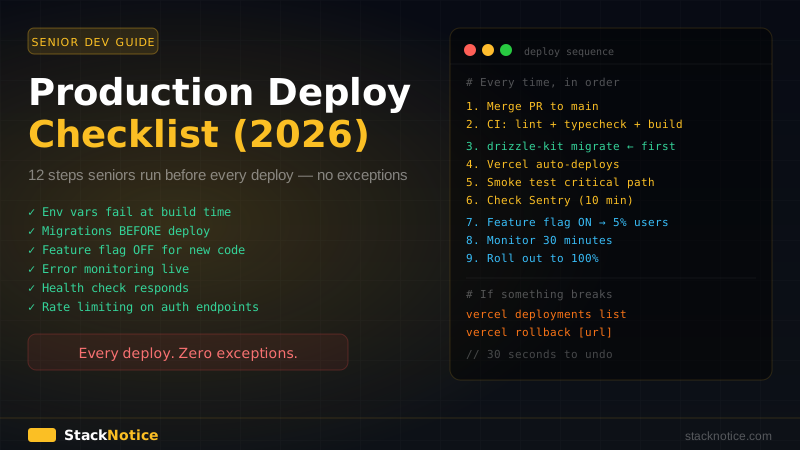
In order, every time:
1.  Merge PR to main
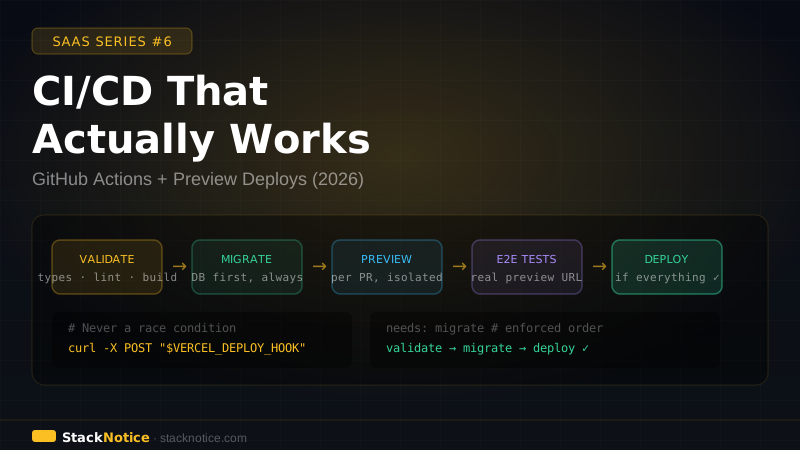
2.  CI runs: lint → typecheck → build (validates env vars)
3.  CI runs: database migrations
4.  Vercel auto-deploys
5.  Smoke test the critical path (2 minutes)
6.  Check Sentry for new errors (first 10 minutes)
7.  If new feature: turn flag ON for 5% of users
8.  Monitor for 30 minutes
9.  Roll out to 100% — or rollback
Automate the checklist
The best checklist is one that runs without you:
# .github/workflows/deploy.yml
name: Deploy

on:
  push:
    branches: [main]

jobs:
  check:
    runs-on: ubuntu-latest
    steps:
      - uses: actions/checkout@v4
      - uses: actions/setup-node@v4
        with:
          node-version: '22'
      - run: npm ci
      - run: npm run typecheck
      - run: npm run lint
      - run: npm run build  # fails if env vars missing

  migrate:
    needs: check
    runs-on: ubuntu-latest
    steps:
      - uses: actions/checkout@v4
      - run: npm ci
      - run: npx drizzle-kit migrate
        env:
          DATABASE_URL: ${{ secrets.DATABASE_URL }}

# Vercel watches the main branch and deploys after push
# The migrate job always completes before Vercel picks up the new code
check runs first, validates everything. migrate runs after check, updates the database. Vercel deploys after the push — by then, migrations are already applied.
What juniors skip (and why it hurts)
| Skip | Consequence |
|---|---|
| Env validation | undefined reads silently, crashes at runtime |
| Migration order | New code breaks on old schema during deploy window |
| Feature flags | Real users are your QA team |
| Health check | Outages discovered by users, not monitors |
| Rate limiting on auth | Login brute-forced while you sleep |
| Stripe signature | Anyone can fire fake payment events |
| Rollback plan | Panic decisions under pressure |
| Smoke test | Broken flow discovered by your best customer |
This checklist is 5 minutes before a deploy that saves 5 hours after one. Seniors run it on every push — even the "it's just a typo fix" ones. Especially those.
For the full project setup that makes all of this easier from day one, see How Senior Devs Start a Full-Stack Project in 2026.