Angular debugging is a skill most tutorials skip. They teach you how to build — not what to do when the component doesn't update, the list re-renders 40 times, or a signal isn't triggering what you expect.
This guide covers the real debugging workflow: Angular DevTools, Chrome Performance profiler, change detection debugging, and how AI tools have changed the process.
This guide pairs with our Professional Angular Project Setup — same stack, same patterns.
Angular DevTools: Your First Tool
Angular DevTools is a browser extension (Chrome/Edge/Firefox) built by the Angular team. Install it once, use it on every project.
Install: Search "Angular DevTools" in the Chrome Web Store or go directly to the extension page.
Once installed, a new Angular tab appears in DevTools when you open an Angular app.
The Component Tree
The component tree shows every component in your current view, their inputs, outputs, and current state:
AppComponent
├── HeaderComponent
│   └── NavMenuComponent
├── RouterOutlet
│   └── DashboardComponent
│       ├── StatsCardComponent (×3)
│       └── RecentActivityComponent
└── FooterComponent
What to look for:
- Click any component → see its current properties on the right panel
- Live-edit property values to test behavior without code changes
- Identify which components are rendering when you interact with the page
The Profiler
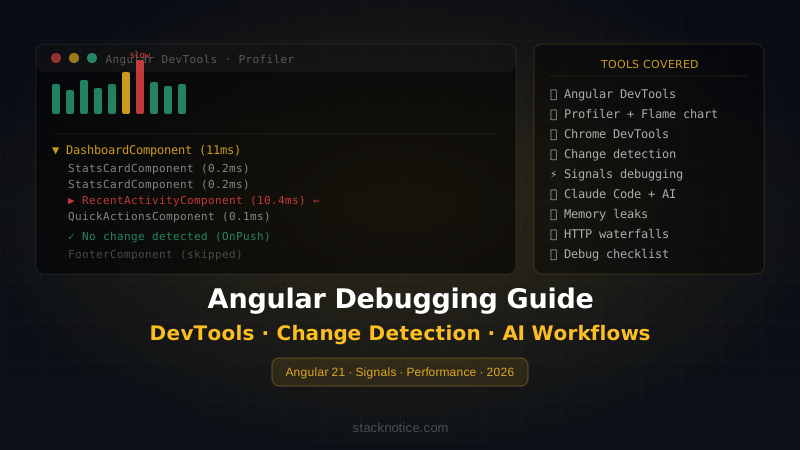
The Profiler is where you find performance problems. Click Profiler → Record → interact with your app → Stop.
You'll see a bar chart where each bar is one change detection cycle. The width = time taken.
Reading the flame chart:
- Wide bars = slow change detection cycles
- Click a bar → see which components were checked and how long each took
- Components in red are taking the most time
Common finding:
DashboardComponent (12ms)
├── StatsCardComponent (0.2ms)
├── StatsCardComponent (0.2ms)
├── StatsCardComponent (0.2ms)
└── RecentActivityComponent (11ms)  ← problem here
RecentActivityComponent is taking 11ms per change detection. That's the component to fix.
Debugging Change Detection
Change detection is the source of most Angular performance bugs. With Signals in Angular 21, it's simpler than Zone.js — but still possible to get wrong.
Symptom 1: Component Not Updating
The view doesn't reflect new data even though the data changed.
Diagnostic:
@Component({
  changeDetection: ChangeDetectionStrategy.OnPush,
  template: `{{ user?.name }}`,
})
export class ProfileComponent {
  @Input() user: User | undefined
}
If you mutate the object instead of replacing it, OnPush won't trigger:
// ❌ Mutation — OnPush won't detect this
this.user.name = 'New Name'

// ✅ New reference — OnPush triggers
this.user = { ...this.user, name: 'New Name' }
With Signals — this problem disappears:
@Component({
  changeDetection: ChangeDetectionStrategy.OnPush,
  template: `{{ user().name }}`,
})
export class ProfileComponent {
  user = input.required<User>()
  // Signals always trigger updates when the value changes
}
Symptom 2: Component Re-Renders Too Often
The Profiler shows your component updating on every user interaction, even when its data didn't change.
Find the cause with ngOnChanges:
export class ExpensiveComponent implements OnChanges {
  @Input() data: SomeData[]

  ngOnChanges(changes: SimpleChanges) {
    console.log('data changed:', changes['data'])
    console.log('previous:', changes['data']?.previousValue)
    console.log('current:', changes['data']?.currentValue)
    console.log('same reference?', changes['data']?.previousValue === changes['data']?.currentValue)
  }
}
If same reference? logs false on every interaction even when data didn't change, the parent is creating a new array reference on every render — a common bug when using computed values inline:
// ❌ In parent template — new array every render
<app-expensive [data]="items.filter(i => i.active)" />

// ✅ Use a signal or computed property
filteredItems = computed(() => this.items().filter(i => i.active))
// In template:
<app-expensive [data]="filteredItems()" />
Symptom 3: Signal Not Triggering View Update
You update a signal but the view doesn't react.
// ❌ Mutating the signal's value (array/object) without notifying it
const items = signal<Item[]>([])

items().push(newItem) // ← Angular doesn't know this happened

// ✅ Always replace, never mutate
items.update(current => [...current, newItem])
For objects:
// ❌
this.user().name = 'New Name'

// ✅
this.user.update(u => ({ ...u, name: 'New Name' }))
Debugging signals with effect():
import { effect } from '@angular/core'

// Add temporarily to component constructor
constructor() {
  effect(() => {
    console.log('Signal changed:', this.mySignal())
    // This runs whenever mySignal() changes
  })
}
effect() is a lightweight way to trace signal updates during debugging — remove it before committing.
Chrome DevTools for Angular
Angular DevTools shows component-level info. Chrome DevTools shows browser-level performance.
Performance Tab — Flame Chart
Open Chrome DevTools → Performance → Record → do the interaction → Stop.
Look for:
Long tasks (>50ms): Shown as red bars in the main thread. Angular change detection that takes too long will appear here.
Layout thrashing: Reading then immediately writing DOM properties forces the browser to recalculate layout synchronously. Appears as alternating purple (layout) and green (paint) blocks.
// ❌ Layout thrashing — reading scrollTop then writing width in a loop
for (const el of elements) {
  const height = el.scrollHeight  // read — forces layout
  el.style.width = height + 'px'  // write — invalidates layout
}

// ✅ Batch reads then writes
const heights = elements.map(el => el.scrollHeight)     // read
elements.forEach((el, i) => el.style.width = heights[i] + 'px') // write
Memory Tab — Heap Snapshots
Use this when your app slows down over time — classic memory leak symptom.
- Heap Snapshot → Take snapshot #1
- Do some interactions (navigate back and forth, open/close modals)
- Heap Snapshot → Take snapshot #2
- Select "Comparison" view → look for objects that increased
Common Angular memory leaks:
// ❌ Subscription never unsubscribed
export class DataComponent implements OnInit {
  ngOnInit() {
    this.dataService.updates$.subscribe(data => {
      this.data = data
    })
    // Subscription lives forever — even after component is destroyed
  }
}

// ✅ Option 1: takeUntilDestroyed (Angular 16+)
import { takeUntilDestroyed } from '@angular/core/rxjs-interop'

export class DataComponent {
  private destroyRef = inject(DestroyRef)

  constructor() {
    this.dataService.updates$.pipe(
      takeUntilDestroyed(this.destroyRef)
    ).subscribe(data => {
      this.data = data
    })
  }
}

// ✅ Option 2: Use signals + toSignal (no subscription to manage)
data = toSignal(this.dataService.updates$)
Network Tab — Request Waterfalls
Angular apps with multiple HTTP requests can create waterfalls — requests that wait for previous requests to complete unnecessarily.
GET /api/user         → 200ms
GET /api/dashboard    → waits for user → 150ms
GET /api/activity     → waits for dashboard → 200ms
Total: 550ms sequential
Fix with parallel requests:
// ❌ Sequential
async loadDashboard() {
  this.user = await lastValueFrom(this.userService.get())
  this.dashboard = await lastValueFrom(this.dashboardService.get())
  this.activity = await lastValueFrom(this.activityService.get())
}

// ✅ Parallel
async loadDashboard() {
  const [user, dashboard, activity] = await Promise.all([
    lastValueFrom(this.userService.get()),
    lastValueFrom(this.dashboardService.get()),
    lastValueFrom(this.activityService.get()),
  ])
  this.user = user
  this.dashboard = dashboard
  this.activity = activity
}
Or with RxJS:
combineLatest([
  this.userService.get(),
  this.dashboardService.get(),
  this.activityService.get(),
]).subscribe(([user, dashboard, activity]) => {
  this.user = user
  this.dashboard = dashboard
  this.activity = activity
})
Common Angular Bugs and How to Find Them
ExpressionChangedAfterItHasBeenCheckedError
The most infamous Angular error. It means you're changing state during change detection.
ERROR: ExpressionChangedAfterItHasBeenCheckedError:
Expression has changed after it was checked.
Previous value: 'false'. Current value: 'true'.
Where it comes from:
// ❌ Setting state in ngAfterViewInit triggers second detection cycle
export class LayoutComponent implements AfterViewInit {
  hasContent = false

  ngAfterViewInit() {
    this.hasContent = true // ← throws ExpressionChangedAfterChecked
  }
}
Fix:
// ✅ Use signal — signals don't have this problem
export class LayoutComponent {
  hasContent = signal(false)

  // Or with a setter that triggers after detection
  private cdr = inject(ChangeDetectorRef)

  ngAfterViewInit() {
    setTimeout(() => {
      this.hasContent = true
      this.cdr.detectChanges()
    })
  }
}
NG0100: Circular Dependency in DI
ERROR: NG0100: Circular dependency detected: ServiceA -> ServiceB -> ServiceA
Use @Optional() or refactor to a shared third service:
// Before: A depends on B, B depends on A
// After: both depend on C
@Injectable({ providedIn: 'root' })
export class SharedService { ... }

@Injectable({ providedIn: 'root' })
export class ServiceA {
  constructor(private shared: SharedService) {}
}

@Injectable({ providedIn: 'root' })
export class ServiceB {
  constructor(private shared: SharedService) {}
}
Using Claude Code for Angular Debugging
AI coding tools have significantly changed the debugging workflow for Angular. Claude Code (and similar tools) are most useful in specific scenarios.
Debugging Change Detection Issues
Describe the symptom, paste the component:
Prompt: "This Angular component with OnPush is not updating when the parent
updates the 'items' array. Here's the component and parent code:
[paste code]
What's causing it and how do I fix it?"
Claude Code identifies whether it's a mutation vs replacement issue, missing ChangeDetectorRef.markForCheck(), or a signal usage problem — in seconds.
Analyzing Bundle Size
# Generate stats file
ng build --stats-json

# Ask Claude Code:
# "Analyze this webpack stats.json. Find the largest dependencies
# and suggest which ones I can lazy-load or replace."
Converting NgModules to Standalone
Prompt: "Convert this Angular NgModule to standalone components.
Keep all the same functionality.
[paste module code]"
This is one of the most time-consuming manual tasks in Angular migrations — Claude Code handles it correctly in most cases.
Writing Component Tests
Prompt: "Write Jest tests for this Angular component using Angular Testing Library.
Cover: renders correctly, handles empty state, emits event on button click.
[paste component code]"
The tests generated are accurate and follow Angular Testing Library patterns — faster than writing them from scratch.
Template Optimization
Prompt: "Review this Angular template for performance issues.
Look for: function calls in templates, missing trackBy,
unnecessary ngIf/ngFor combinations, missing OnPush.
[paste template]"
Quick Debugging Checklist
When something doesn't work in Angular, go through this list:
Component not updating:
- Using
OnPush? Are you mutating objects instead of replacing? - Using signals? Are you setting with
.set()/.update()instead of mutating? - Using
asyncpipe in template? Is the Observable actually emitting?
Performance is slow:
- Open Angular DevTools Profiler — which component takes the most time?
- Are you passing new object references to
OnPushchildren on every parent render? - Are there function calls in templates (
*ngIf="expensiveFn()")? Move to computed signals. - Is
@fortrack set to a stable ID?
Memory leak / slowdown over time:
- All subscriptions using
takeUntilDestroyedorasyncpipe? - Event listeners removed in
ngOnDestroy? -
setInterval/setTimeoutcleared on destroy?
HTTP issues:
- Check Network tab — are requests sequential that could be parallel?
- Error interceptor catching 401/403 and redirecting?
- Are you unsubscribing from HTTP? (Angular's HttpClient auto-completes, so usually not needed)
The Debugging Workflow
- Reproduce reliably — find the exact steps. If you can't reproduce consistently, you can't fix it.
- Isolate the component — use Angular DevTools to find which component is involved.
- Check the profiler — is it a performance issue or a logic issue?
- Add
console.logstrategically — inngOnChanges,ngDoCheck, signaleffect(). - Use Claude Code — paste the relevant code and describe the symptom. For structural problems (DI, change detection, signal flow), AI tools are genuinely fast at diagnosis.
- Fix one thing at a time — change detection issues compound. Fix the root cause.
The Angular DevTools profiler + targeted console.log + Claude Code covers 95% of debugging scenarios you'll encounter in production Angular apps.