Every production API gets abused eventually. Sometimes it's scrapers, sometimes it's a runaway client, sometimes it's an actual attacker brute-forcing your auth. Without rate limiting, all of those scenarios end with either a massive bill or a compromised account.
The 5-line tutorial version uses an in-memory Map. That breaks immediately in serverless (each function instance has its own memory) and completely falls apart across multiple regions. This guide covers the real approach.
Why in-memory rate limiting doesn't work in serverless
const requests = new Map<string, number[]>()

export async function GET(req: Request) {
  const ip = req.headers.get('x-forwarded-for') ?? 'unknown'
  const now = Date.now()
  const windowMs = 60_000
  const limit = 10

  const timestamps = (requests.get(ip) ?? []).filter(t => now - t < windowMs)
  timestamps.push(now)
  requests.set(ip, timestamps)

  if (timestamps.length > limit) {
    return Response.json({ error: 'Too many requests' }, { status: 429 })
  }

  return Response.json({ ok: true })
}
This looks reasonable. It fails because:
- Serverless functions are stateless — every cold start is a fresh Map
- Multiple instances run concurrently — Instance A doesn't know about Instance B's Map
- Memory is not shared across regions — a user hitting Vercel's US and EU edge nodes would get 2× the limit
You need shared, persistent state. Redis is the right tool. Upstash specifically because it's serverless-native (HTTP API, no persistent connections required) and has a generous free tier.
Setup
npm install @upstash/redis @upstash/ratelimitCreate a Redis database at console.upstash.com. Copy the REST URL and token to your env:
UPSTASH_REDIS_REST_URL=https://YOUR-DB.upstash.io
UPSTASH_REDIS_REST_TOKEN=YOUR-TOKENimport { Redis } from '@upstash/redis'
export const redis = new Redis({
url: process.env.UPSTASH_REDIS_REST_URL!,
token: process.env.UPSTASH_REDIS_REST_TOKEN!,
})The three algorithms — which one to use
The @upstash/ratelimit package ships three algorithms. Understanding the tradeoff matters:
Fixed window problem: if your limit is 10 requests/minute, a user can make 10 at 12:59:59 and 10 more at 13:00:00 — 20 requests in 2 seconds with no violation.
Sliding window solves this by looking at the last N seconds continuously. Use this for most cases.
Token bucket is best when you want to allow occasional bursts (e.g., a user can fire 20 requests at once if they've been idle for a while).
Basic rate limiter
import { Ratelimit } from '@upstash/ratelimit'
import { redis } from './redis'

// General API: 20 requests per 10 seconds (sliding window)
export const ratelimit = new Ratelimit({
  redis,
  limiter: Ratelimit.slidingWindow(20, '10 s'),
  analytics: true, // sends data to Upstash console
  prefix: 'rl:api',
})

// Auth endpoints: much stricter — 5 attempts per minute
export const authRatelimit = new Ratelimit({
  redis,
  limiter: Ratelimit.slidingWindow(5, '60 s'),
  analytics: true,
  prefix: 'rl:auth',
})

// AI/expensive endpoints: 10 per hour per user
export const aiRatelimit = new Ratelimit({
  redis,
  limiter: Ratelimit.slidingWindow(10, '60 m'),
  analytics: true,
  prefix: 'rl:ai',
})
Rate limiting in API Route Handlers
import { auth } from '@clerk/nextjs/server'
import { aiRatelimit } from '@/lib/ratelimit'
import { NextRequest } from 'next/server'

export async function POST(req: NextRequest) {
  const { userId } = await auth()

  if (!userId) {
    return Response.json({ error: 'Unauthorized' }, { status: 401 })
  }

  // Rate limit by userId — each user gets their own bucket
  const { success, limit, reset, remaining } = await aiRatelimit.limit(userId)

  if (!success) {
    const resetDate = new Date(reset)
    return Response.json(
      {
        error: 'Rate limit exceeded',
        message: `You've used all ${limit} AI requests for this hour. Resets at ${resetDate.toISOString()}.`,
        retryAfter: Math.ceil((reset - Date.now()) / 1000),
      },
      {
        status: 429,
        headers: {
          'X-RateLimit-Limit': String(limit),
          'X-RateLimit-Remaining': String(remaining),
          'X-RateLimit-Reset': String(reset),
          'Retry-After': String(Math.ceil((reset - Date.now()) / 1000)),
        },
      }
    )
  }

  // Proceed with the expensive operation
  const body = await req.json()
  const result = await generateWithAI(body.prompt)

  return Response.json({ result })
}Return X-RateLimit-Limit, X-RateLimit-Remaining, X-RateLimit-Reset, and Retry-After in every response — not just 429s. Good API clients use these to back off proactively. It's also what every major API (OpenAI, GitHub, Stripe) does.
Rate limiting in Edge Middleware
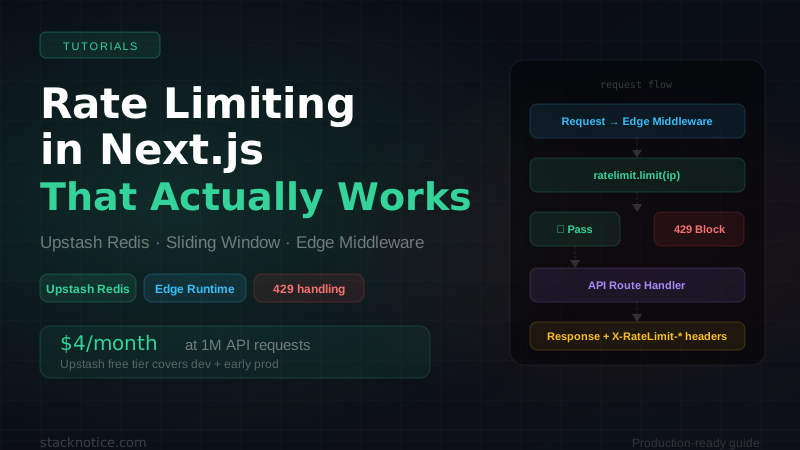
For high-traffic APIs, you want to reject abusive requests before they hit your serverless functions at all. Middleware runs at the edge — closest to the user, before any compute.
import { NextRequest, NextResponse } from 'next/server'
import { Ratelimit } from '@upstash/ratelimit'
import { Redis } from '@upstash/redis'

// Initialize outside the handler — reused across warm invocations
const ratelimit = new Ratelimit({
  redis: new Redis({
    url: process.env.UPSTASH_REDIS_REST_URL!,
    token: process.env.UPSTASH_REDIS_REST_TOKEN!,
  }),
  limiter: Ratelimit.slidingWindow(30, '10 s'),
  prefix: 'rl:edge',
})

export async function middleware(req: NextRequest) {
  // Only rate limit API routes
  if (!req.nextUrl.pathname.startsWith('/api/')) {
    return NextResponse.next()
  }

  // Get the real IP — Vercel sets this header
  const ip =
    req.headers.get('x-real-ip') ??
    req.headers.get('x-forwarded-for')?.split(',')[0]?.trim() ??
    '127.0.0.1'

  const { success, limit, reset, remaining } = await ratelimit.limit(ip)

  const res = success ? NextResponse.next() : NextResponse.json(
    { error: 'Too many requests' },
    { status: 429 }
  )

  // Always set headers
  res.headers.set('X-RateLimit-Limit', String(limit))
  res.headers.set('X-RateLimit-Remaining', String(remaining))
  res.headers.set('X-RateLimit-Reset', String(reset))

  return res
}

export const config = {
  matcher: ['/api/:path*'],
}No Node.js APIs available in middleware. The @upstash/redis package uses the Fetch API internally, so it works fine. Don't import anything that uses fs, net, or crypto from Node.js in middleware.
Auth endpoint hardening
Login and signup endpoints are the highest-value targets for attackers. They need aggressive rate limiting and additional protection.
import { authRatelimit } from '@/lib/ratelimit'
import { NextRequest } from 'next/server'

function getIdentifier(req: NextRequest, email?: string): string {
  const ip =
    req.headers.get('x-real-ip') ??
    req.headers.get('x-forwarded-for')?.split(',')[0]?.trim() ??
    'unknown'

  // Rate limit per IP + email combination when email is known
  // This prevents one IP from trying many emails AND one email from many IPs
  if (email) {
    return `${ip}:${email.toLowerCase()}`
  }
  return ip
}

export async function POST(req: NextRequest) {
  const body = await req.json()
  const { email, password } = body

  // Check rate limit before doing anything
  const identifier = getIdentifier(req, email)
  const { success, reset } = await authRatelimit.limit(identifier)

  if (!success) {
    // Don't tell them exactly why — just rate limit
    return Response.json(
      { error: 'Too many attempts. Please try again later.' },
      {
        status: 429,
        headers: {
          'Retry-After': String(Math.ceil((reset - Date.now()) / 1000)),
        },
      }
    )
  }

  // Validate credentials...
  const user = await validateCredentials(email, password)

  if (!user) {
    // Return the SAME error regardless of whether the email exists
    // (prevents email enumeration)
    return Response.json(
      { error: 'Invalid email or password' },
      { status: 401 }
    )
  }

  // Issue session...
}If you return "email not found" vs "wrong password" as separate errors, attackers can enumerate which emails have accounts. Always return the same generic error: "Invalid email or password". This is not just best practice — it's required by OWASP.
Per-user vs per-IP rate limiting
The identifier you pass to .limit() is everything. Think carefully about it:
import { NextRequest } from 'next/server'

// For public endpoints — rate limit by IP
export function getIpIdentifier(req: NextRequest): string {
  return (
    req.headers.get('x-real-ip') ??
    req.headers.get('x-forwarded-for')?.split(',')[0]?.trim() ??
    'unknown'
  )
}

// For authenticated endpoints — rate limit by user ID
// More fair: users behind the same NAT/VPN don't share a limit
export function getUserIdentifier(userId: string): string {
  return `user:${userId}`
}

// For free plan limits — combine user + time window key
export function getPlanIdentifier(userId: string, resource: string): string {
  return `plan:${userId}:${resource}`
}

// For endpoints that should never be public
// Rate limit by both IP and API key to prevent key sharing
export function getApiKeyIdentifier(
  req: NextRequest,
  apiKey: string
): string {
  const ip = getIpIdentifier(req)
  return `api:${apiKey}:${ip}`
}
Enforcing plan limits
Rate limiting isn't just for abuse prevention — it's also how you enforce pricing tiers. Your free plan users get 100 AI requests/month, pro users get unlimited.
import { Ratelimit } from '@upstash/ratelimit'
import { redis } from './redis'

export const planLimits = {
  free: new Ratelimit({
    redis,
    limiter: Ratelimit.slidingWindow(100, '30 d'), // 100 per month
    prefix: 'rl:plan:free',
  }),
  pro: null, // unlimited
  enterprise: null, // unlimited
}import { getAuthUser } from '@/lib/auth'
import { planLimits } from '@/lib/ratelimit'
export async function POST(req: Request) {
const user = await getAuthUser()
const limiter = planLimits[user.plan as keyof typeof planLimits]
if (limiter) {
const { success, remaining } = await limiter.limit(user.id)
if (!success) {
return Response.json(
{
error: 'Monthly AI limit reached',
message: 'Upgrade to Pro for unlimited AI requests.',
remaining: 0,
upgradeUrl: '/pricing',
},
{ status: 429 }
)
}
}
// Process the request...
}Utility: reusable rate limit wrapper
Instead of copy-pasting the rate limit check into every route, build a wrapper:
import { NextRequest, NextResponse } from 'next/server'
import { Ratelimit } from '@upstash/ratelimit'

type Handler = (req: NextRequest, ...args: any[]) => Promise<Response>

export function withRatelimit(
  handler: Handler,
  limiter: Ratelimit,
  getIdentifier: (req: NextRequest) => string
) {
  return async (req: NextRequest, ...args: any[]): Promise<Response> => {
    const identifier = getIdentifier(req)
    const { success, limit, reset, remaining } = await limiter.limit(identifier)

    if (!success) {
      return NextResponse.json(
        { error: 'Too many requests' },
        {
          status: 429,
          headers: {
            'X-RateLimit-Limit': String(limit),
            'X-RateLimit-Remaining': '0',
            'X-RateLimit-Reset': String(reset),
            'Retry-After': String(Math.ceil((reset - Date.now()) / 1000)),
          },
        }
      )
    }

    const res = await handler(req, ...args)

    // Inject headers into successful response too
    const newHeaders = new Headers(res.headers)
    newHeaders.set('X-RateLimit-Limit', String(limit))
    newHeaders.set('X-RateLimit-Remaining', String(remaining))
    newHeaders.set('X-RateLimit-Reset', String(reset))

    return new Response(res.body, {
      status: res.status,
      headers: newHeaders,
    })
  }
}import { withRatelimit } from '@/lib/with-ratelimit'
import { ratelimit } from '@/lib/ratelimit'
import { getIpIdentifier } from '@/lib/ratelimit-helpers'
import { NextRequest } from 'next/server'
async function handler(req: NextRequest) {
// Your actual logic — no rate limit code here
const data = await fetchData()
return Response.json(data)
}
export const GET = withRatelimit(handler, ratelimit, getIpIdentifier)Costs and free tier
Upstash free tier (2026):
- 10,000 commands/day — enough for a project with a few hundred users
- 256MB storage — plenty for rate limit counters (each counter is a few bytes)
- Global replication on paid plans
Sliding window uses 2 Redis commands per request. At 10,000 commands/day that's 5,000 rate-limited requests — enough for development and early production.
Pay-as-you-go starts at $0.2 per 100k commands. At 1 million API requests/month (two commands each = 2M commands), you're looking at $4/month.
Enable analytics in your Ratelimit instance during development. The Upstash console shows you real-time request patterns, which helps you tune your limits before going live.
Testing rate limits locally
# Test rate limit with curl — fire 6 requests at the same endpoint
for i in {1..6}; do
  curl -s -o /dev/null -w "%{http_code}\n" http://localhost:3000/api/data
done
# Expected: 200 200 200 200 200 429
For more realistic testing, use the Upstash CLI to inspect the Redis keys:
npx upstash-cli@latest keys "rl:*"
# Shows all active rate limit keys and their TTLs
For a complete picture of how rate limiting fits into a production Next.js SaaS — alongside auth, background jobs, and database setup — see the SaaS tech stack guide, background jobs with Inngest and Trigger.dev, and the Inngest complete guide.
If you're building auth alongside this, the Clerk production guide covers rate limiting specifically for auth endpoints in the context of a full auth setup.