Every developer knows .env files. Most developers use them in production. Most developers are doing it wrong.
.env files work fine for local development. In production, they're a security liability: no rotation, no audit trail, no access control, and a single git add . accident from leaking your database credentials to GitHub.
This guide covers how professional teams actually manage secrets in production — from the simplest setup that's already safer than a .env file, to the full enterprise approach with rotation and audit logging.
What's Wrong With .env in Production
Let's be specific about the risks:
1. Accidental commits
# This happens more than you think
git add .
git commit -m "fix: update config"
git push  # 🔥 .env just went to GitHub
Even if you delete the file in the next commit, it's in the git history. If it's a public repo, it's been scraped by secret-scanning bots within minutes.
2. No rotation mechanism
When a secret leaks — and eventually one will — how do you rotate it? With .env files: update the file, redeploy. Every environment. Manually. Under pressure. During an incident.
3. No audit trail
Who added this database password? When? Who has access to it right now? With .env files: no idea.
4. Flat access control
Every developer who can SSH into the server or pull from the repo can read every secret. There's no way to say "frontend devs can access the Stripe publishable key but not the database root password."
5. Environment drift
Production .env diverges from staging. Staging diverges from local. Three months later, you have no idea what environment has what version of which secret.
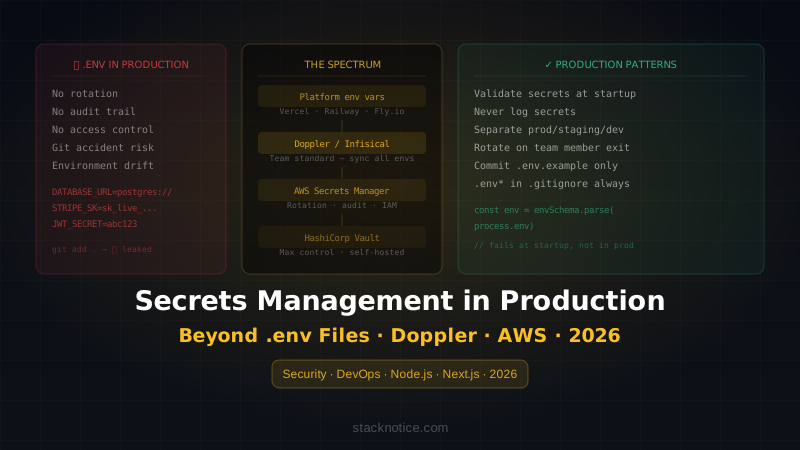
The Spectrum: From Simple to Serious
Different projects need different levels of rigor. Here's the spectrum:
.env in production          ← stop doing this
   ↓
Platform env vars           ← minimum viable for any serious project
   ↓
Doppler / Infisical         ← team standard, sync across environments
   ↓
AWS Secrets Manager         ← enterprise, full rotation + audit
   ↓
HashiCorp Vault             ← maximum control, self-hosted
Most projects land between platform env vars and Doppler. Let's cover each.
Level 1: Platform Environment Variables
The simplest upgrade from .env. Every major deployment platform has built-in env var management — and it's already safer than a file in your repo.
Vercel
# CLI: add a secret to production
vercel env add DATABASE_URL production

# Or via dashboard: Project → Settings → Environment Variables
Vercel env vars are:
- Encrypted at rest
- Never exposed in build logs
- Scoped to environment (production / preview / development)
- Accessible to team members based on project access
This alone eliminates the accidental commit risk. Use this if you're deploying to Vercel and don't need anything more sophisticated.
// In your Next.js app — same as before, nothing changes in the code
const db = new Client({
  connectionString: process.env.DATABASE_URL,
})
Railway, Render, Fly.io
All have similar built-in env var systems. The UI differs but the concept is identical: set secrets in the platform dashboard, they're injected into your container at runtime.
# Railway CLI
railway variables set DATABASE_URL="postgresql://..."

# Fly.io
fly secrets set DATABASE_URL="postgresql://..."
When to use platform env vars: solo projects, small teams, simple deployments where you don't need to sync secrets across multiple services or platforms.
Level 2: Doppler — The Team Standard
Doppler is what most professional dev teams settle on. It's a secrets manager that sits in front of your deployment platform — you manage all secrets in Doppler, and Doppler syncs them to Vercel, Railway, AWS, or wherever you deploy.
Why Doppler over platform env vars:
- Single source of truth across all environments and platforms
- Version history — you can see every change and who made it
- Access control — developers can have read access to staging but not production
- Automatic sync to your deployment platform
- Free tier for small teams (up to 5 users)
Setup for Next.js
# Install Doppler CLI
npm install -g @dopplerhq/cli

# Login and connect your project
doppler login
doppler setup
This creates a .doppler.yaml in your project:
setup:
  project: my-saas
  config: dev
Now instead of .env, you run local dev with:
doppler run -- npm run dev
# Doppler injects all secrets as env vars before starting the dev server
Your .env.local becomes empty or deleted. All secrets live in Doppler.
Syncing to Vercel
# Install the Doppler Vercel integration
doppler integrations vercel

# Or via the Doppler dashboard → Integrations → Vercel
Now when you change a secret in Doppler, it automatically pushes to Vercel. Change DATABASE_URL in Doppler → it updates in Vercel production, preview, and development automatically.
Access control in Doppler
Production config  → only lead devs + CI/CD
Staging config     → all developers (read), lead devs (write)
Development config → all developers (read + write)
A new developer onboards: give them Doppler access to staging and dev, they have everything they need immediately. No sending passwords over Slack.
Level 3: AWS Secrets Manager
When you're on AWS and need the full enterprise feature set: automatic rotation, fine-grained IAM access control, CloudTrail audit logging, cross-region replication.
Storing a secret
aws secretsmanager create-secret \
  --name "myapp/production/database" \
  --secret-string '{"url":"postgresql://...","password":"..."}'
Reading in your application
import { SecretsManagerClient, GetSecretValueCommand } from '@aws-sdk/client-secrets-manager'

const client = new SecretsManagerClient({ region: 'us-east-1' })

async function getDatabaseUrl(): Promise<string> {
  const response = await client.send(
    new GetSecretValueCommand({ SecretId: 'myapp/production/database' })
  )
  const secret = JSON.parse(response.SecretString!)
  return secret.url
}
Cache this at startup — don't call Secrets Manager on every request:
// startup.ts
let cachedSecrets: Record<string, string> | null = null

export async function getSecrets() {
  if (cachedSecrets) return cachedSecrets
  cachedSecrets = await loadFromSecretsManager()
  return cachedSecrets
}
Automatic rotation
The real power of Secrets Manager is automatic rotation — it can rotate your database password on a schedule without downtime:
aws secretsmanager rotate-secret \
  --secret-id "myapp/production/database" \
  --rotation-rules AutomaticallyAfterDays=30
AWS handles generating the new password, updating the database, and updating the secret — all without you doing anything. This is standard practice at companies that take security seriously.
IAM access control
{
  "Version": "2012-10-17",
  "Statement": [
    {
      "Effect": "Allow",
      "Action": ["secretsmanager:GetSecretValue"],
      "Resource": "arn:aws:secretsmanager:us-east-1:123456789:secret:myapp/production/*"
    }
  ]
}
Attach this policy to your EC2 instance role or Lambda execution role. The application gets access through IAM — no credentials in the code or config files.
Practical Patterns for Any Setup
Regardless of which secrets manager you use, these patterns apply.
Pattern 1: Validate secrets at startup
Don't let your app start with missing secrets. Fail loudly at startup rather than cryptically at runtime:
// lib/config.ts
const requiredEnvVars = [
  'DATABASE_URL',
  'STRIPE_SECRET_KEY',
  'JWT_SECRET',
  'NEXTAUTH_SECRET',
] as const

type EnvVar = (typeof requiredEnvVars)[number]

function validateEnv(): Record<EnvVar, string> {
  const missing: string[] = []

  for (const key of requiredEnvVars) {
    if (!process.env[key]) {
      missing.push(key)
    }
  }

  if (missing.length > 0) {
    throw new Error(
      `Missing required environment variables:\n${missing.map(k => `  - ${k}`).join('\n')}`
    )
  }

  return Object.fromEntries(
    requiredEnvVars.map(key => [key, process.env[key]!])
  ) as Record<EnvVar, string>
}

export const config = validateEnv()
Use with Zod for full type safety:
import { z } from 'zod'

const envSchema = z.object({
  DATABASE_URL: z.string().url(),
  STRIPE_SECRET_KEY: z.string().startsWith('sk_'),
  JWT_SECRET: z.string().min(32),
  NODE_ENV: z.enum(['development', 'test', 'production']),
})

export const env = envSchema.parse(process.env)
This gives you type-safe environment variables throughout your codebase, with validation that runs at startup.
For a deeper guide on Zod validation patterns, see our Zod complete guide.
Pattern 2: Never log secrets
Easy mistake — logging the request object, which contains an Authorization header:
// ❌ Logs the entire request including auth headers
console.log('Incoming request:', req)

// ✅ Log only what you need
console.log('Incoming request:', {
  method: req.method,
  url: req.url,
  userId: req.user?.id,
})
Set up your logger to scrub sensitive fields:
import pino from 'pino'

const logger = pino({
  redact: {
    paths: ['req.headers.authorization', 'body.password', 'body.token'],
    censor: '[REDACTED]',
  },
})
Pattern 3: Separate secrets by environment
Never share secrets between production and staging. Different Stripe accounts, different database instances, different API keys.
The naming convention:
myapp/production/stripe    → live Stripe keys
myapp/staging/stripe       → test Stripe keys
myapp/development/stripe   → test Stripe keys (can share with staging)
This prevents the classic mistake of accidentally running a test against the production Stripe account.
Pattern 4: Rotate after team member departure
Every time a developer with production access leaves the team, rotate all secrets they had access to. This is non-negotiable.
With Doppler: revoke their access in the dashboard → rotate affected secrets → Doppler syncs automatically.
Without a secrets manager: manual rotation of every secret in every environment. This is painful — which is exactly why having a secrets manager pays for itself.
The .env File You Should Keep
There's still a legitimate use for .env files — just not in production.
Keep a .env.example file in your repo (committed) with all the variables your app needs, but with placeholder values:
# .env.example — commit this
DATABASE_URL=postgresql://localhost:5432/myapp
STRIPE_SECRET_KEY=sk_test_...
JWT_SECRET=your-secret-here-minimum-32-chars
NEXTAUTH_SECRET=generate-with-openssl-rand-base64-32
REDIS_URL=redis://localhost:6379
This serves as documentation: new developers know exactly what variables to set up without searching through the codebase.
And add .env* to .gitignore to make sure actual secrets never get committed:
# .gitignore
.env
.env.local
.env.*.local
# Do NOT ignore .env.example
The Minimum Viable Setup for a Production App
If you're launching soon and need the simplest reasonable setup:
- Delete your
.envfrom the server if it's there - Move all secrets to your platform (Vercel, Railway, Fly.io — wherever you deploy)
- Add
.env*to.gitignoreand verify it's not tracked - Add startup validation to catch missing variables immediately
- Keep a
.env.examplefor documentation
That's it. You're already in a significantly better position than most production apps.
When you have a team and multiple environments, add Doppler. When you're on AWS at scale, add Secrets Manager with rotation.
Quick Reference: When to Use What
| Situation | Recommendation |
|---|---|
| Solo project, one environment | Platform env vars (Vercel/Railway) |
| Small team, multiple environments | Doppler (free tier) |
| Multiple platforms (Vercel + Lambda + etc.) | Doppler with platform integrations |
| AWS-native infrastructure | AWS Secrets Manager |
| Enterprise, compliance requirements | AWS Secrets Manager + CloudTrail |
| Self-hosted, maximum control | HashiCorp Vault |
The transition from platform env vars to Doppler takes about 2 hours. The transition from Doppler to AWS Secrets Manager takes a day. Neither migration is painful — and both are much less painful than recovering from a leaked production database password.
Related guides on production-ready setups:
- The Senior Dev's Production Checklist — everything to verify before going live
- Zod complete guide — type-safe environment variable validation
- Docker Next.js production guide — containerizing your app securely