After years of being Angular's invisible backbone, Zone.js is no longer included by default in Angular 21. This is not a subtle change — it's the most significant architectural shift in Angular since the framework was rewritten in 2016. If you write Angular, this affects everything from how components re-render to how third-party libraries behave.
The good news: Angular has been building toward this moment since version 16. Signals, the new reactivity primitive, are now stable, mature, and the recommended way to drive change detection. The result is a leaner framework, faster apps, and code that's easier to reason about.
This guide covers every Angular 21 change that matters — with real before/after code, a migration checklist, and an honest look at what can break.
What Is Zone.js and Why Angular Dropped It
Zone.js is a library that monkey-patches browser APIs — setTimeout, Promise, fetch, addEventListener, and dozens more — to intercept asynchronous operations. Angular used these patches to know when something might have changed in your app, then triggered change detection across the entire component tree.
The approach worked, but it had real costs:
- Bundle size: Zone.js adds ~35 KB to every Angular app
- Performance: change detection could run hundreds of times per second, even when nothing changed
- Debugging difficulty: stack traces were polluted with Zone.js frames, making errors hard to trace
- Third-party friction: libraries not designed for Zone.js patching behaved unpredictably
- Async/await incompatibility: native
async/awaitdoesn't integrate cleanly with Zone.js, requiring workarounds
Angular's solution was to design a new reactivity system — Signals — that provides fine-grained, explicit tracking of state changes. When a signal changes, Angular knows exactly which components depend on it. No global interception needed.
Starting in Angular 21, zone.js is no longer listed as a dependency in the default application setup. The provideZoneChangeDetection() call is removed from the bootstrapping code. New projects start zoneless by default.
Angular Signals — The New Reactivity Model
Signals are reactive primitives: values that notify consumers when they change. Angular 21 ships three core primitives.
signal() — writable state
import { signal } from '@angular/core';

const count = signal(0);

// Read the value
console.log(count()); // 0

// Update the value
count.set(1);
count.update(v => v + 1);

// Mutate (for objects/arrays)
const items = signal<string[]>([]);
items.mutate(list => list.push('new item'));
computed() — derived state
import { signal, computed } from '@angular/core';

const price = signal(100);
const quantity = signal(3);
const total = computed(() => price() * quantity());

console.log(total()); // 300
price.set(120);
console.log(total()); // 360 — automatically recalculated
computed() is lazy and memoized. It only recalculates when one of its dependencies changes, and only when something reads it.
effect() — side effects
import { signal, effect } from '@angular/core';

const theme = signal<'light' | 'dark'>('light');

effect(() => {
  document.body.classList.toggle('dark', theme() === 'dark');
});

theme.set('dark'); // effect runs automatically
Effects run inside a component's injection context. They track signal reads and re-run whenever any tracked signal changes.
Using signals in a component
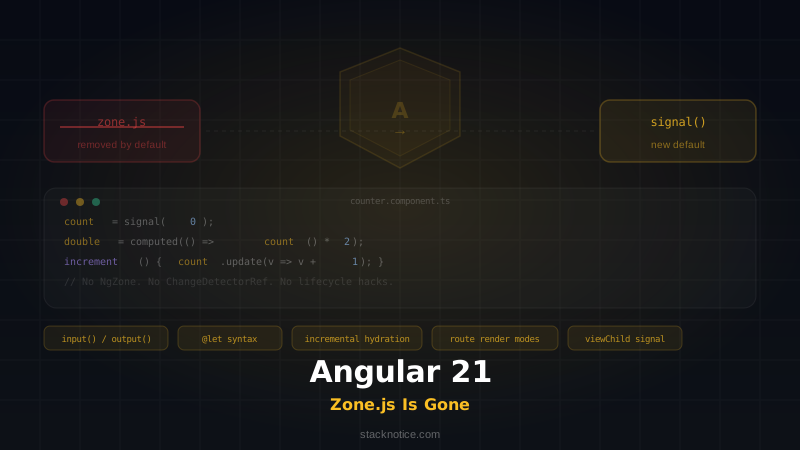
Here's a complete counter component using the new model — no NgZone, no ChangeDetectorRef, no lifecycle hacks:
import { Component, signal, computed } from '@angular/core';

@Component({
  selector: 'app-counter',
  standalone: true,
  template: `
    <p>Count: {{ count() }}</p>
    <p>Double: {{ double() }}</p>
    <button (click)="increment()">+1</button>
    <button (click)="reset()">Reset</button>
  `
})
export class CounterComponent {
  count = signal(0);
  double = computed(() => this.count() * 2);

  increment() {
    this.count.update(v => v + 1);
  }

  reset() {
    this.count.set(0);
  }
}
Angular 21 renders exactly what changed, exactly when it changed. The template reads count() — a signal — so Angular knows to re-render only this component when count updates. Nothing more.
New Signal-Based Component APIs
Angular 21 standardizes signal-based APIs for component inputs, outputs, and queries. These replace the old @Input(), @Output(), @ViewChild(), and @ContentChild() decorators for new code.
input() — signal inputs
import { Component, input, computed } from '@angular/core';

@Component({
  selector: 'app-product-card',
  standalone: true,
  template: `
    <h2>{{ product().name }}</h2>
    <p>{{ formattedPrice() }}</p>
  `
})
export class ProductCardComponent {
  // Required input
  product = input.required<{ name: string; price: number }>();

  // Optional input with default
  currency = input('USD');

  // Derived from input
  formattedPrice = computed(() =>
    new Intl.NumberFormat('en-US', {
      style: 'currency',
      currency: this.currency()
    }).format(this.product().price)
  );
}
Signal inputs are read-only from inside the component. They're always signals, so you can compose them with computed() directly without extra boilerplate.
Before (Zone.js era):
@Component({ ... })
export class ProductCardComponent implements OnChanges {
  @Input({ required: true }) product!: { name: string; price: number };
  @Input() currency = 'USD';

  formattedPrice = '';

  ngOnChanges() {
    this.formattedPrice = new Intl.NumberFormat('en-US', {
      style: 'currency',
      currency: this.currency
    }).format(this.product.price);
  }
}
The ngOnChanges lifecycle hook is gone. The derived state is always in sync automatically.
output() — signal outputs
import { Component, output } from '@angular/core';

@Component({
  selector: 'app-search',
  standalone: true,
  template: `<input (input)="onInput($event)" placeholder="Search..." />`
})
export class SearchComponent {
  search = output<string>();

  onInput(event: Event) {
    const value = (event.target as HTMLInputElement).value;
    this.search.emit(value);
  }
}
output() works exactly like @Output() search = new EventEmitter<string>(), but it's consistent with the signal-based API style and integrates cleanly with the new change detection model.
viewChild() and contentChild() — signal queries
import { Component, viewChild, ElementRef, afterViewInit, effect } from '@angular/core';

@Component({
  selector: 'app-canvas',
  standalone: true,
  template: `<canvas #myCanvas></canvas>`
})
export class CanvasComponent {
  canvas = viewChild.required<ElementRef<HTMLCanvasElement>>('myCanvas');

  constructor() {
    effect(() => {
      const ctx = this.canvas().nativeElement.getContext('2d');
      // Draw something — re-runs if canvas reference changes
    });
  }
}
viewChild() returns a signal that resolves after view initialization. Using it inside effect() automatically re-runs the effect when the queried element changes.
@let Template Syntax — Local Template Variables
Angular 21 stabilizes @let, a template syntax for declaring local variables inside templates. This eliminates the need for awkward *ngIf="x as y" patterns.
Before:
<ng-container *ngIf="getUserProfile() as profile">
  <h1>{{ profile.name }}</h1>
  <p>{{ profile.email }}</p>
</ng-container>
After:
@let profile = getUserProfile();
<h1>{{ profile.name }}</h1>
<p>{{ profile.email }}</p>
@let is scoped to the template block it's defined in. It can reference signals, component methods, or any template expression:
@let total = cart().items.reduce((sum, item) => sum + item.price, 0);
@let isExpensive = total > 100;

<p [class.highlight]="isExpensive">Total: {{ total | currency }}</p>
This is a quality-of-life improvement that makes templates significantly more readable.
Zoneless Change Detection — How to Enable It
In Angular 21, new apps are zoneless by default. But if you're on an older project, you need to explicitly opt in.
For new apps
Angular CLI generates zoneless apps by default:
ng new my-app
# No Zone.js in the generated app
For existing apps — enable zoneless
Replace provideZoneChangeDetection() with provideExperimentalZonelessChangeDetection() (now stable in v21, kept the name for backward compat):
// main.ts — Before
import { bootstrapApplication } from '@angular/platform-browser';
import { AppComponent } from './app/app.component';

bootstrapApplication(AppComponent, {
  providers: [
    provideZoneChangeDetection({ eventCoalescing: true }),
    // ...
  ]
});
// main.ts — After
import { bootstrapApplication } from '@angular/platform-browser';
import { provideExperimentalZonelessChangeDetection } from '@angular/core';
import { AppComponent } from './app/app.component';
bootstrapApplication(AppComponent, {
providers: [
provideExperimentalZonelessChangeDetection(),
// ...
]
});Remove zone.js from polyfills in angular.json:
// angular.json — Before
"polyfills": ["zone.js"]

// angular.json — After
"polyfills": []
Remove the zone.js import from polyfills.ts if you have one:
// Delete this line:
import 'zone.js';
Uninstall the package:
npm uninstall zone.jsMigration Guide: Step by Step
Migrating an existing Angular app to be zoneless is a process, not a one-shot change. Here's the recommended path.
Step 1 — Upgrade to Angular 21
ng update @angular/core@21 @angular/cli@21Run the automatic migrations Angular ships with the update. These handle many deprecation warnings automatically.
Step 2 — Run the Angular schematic
Angular 21 ships a migration schematic for signal conversion:
ng generate @angular/core:signalsThis converts @Input() to input(), @Output() to output(), and @ViewChild() to viewChild() where it can do so safely. Review the diff carefully — it won't convert everything.
Step 3 — Identify change detection dependencies
Search your codebase for anything that relies on Zone.js indirectly:
# Find NgZone usage
grep -r "NgZone" src/
grep -r "ngZone" src/
grep -r "zone.run" src/
grep -r "runOutsideAngular" src/
grep -r "ChangeDetectorRef" src/
grep -r "markForCheck" src/
grep -r "detectChanges" src/
Each of these is a place where the old change detection model was being used explicitly. Most can be removed when you switch to signals.
Step 4 — Convert components to use OnPush first
Before going fully zoneless, set all components to ChangeDetectionStrategy.OnPush. This is a safe intermediate step that reduces change detection runs while keeping Zone.js:
@Component({
  changeDetection: ChangeDetectionStrategy.OnPush,
  // ...
})
Step 5 — Migrate state to signals
Replace class properties and Observables with signals where practical. Start with leaf components (no children) and work upward.
Before:
@Component({
  changeDetection: ChangeDetectionStrategy.OnPush,
  template: `<p>{{ count }}</p><button (click)="increment()">+</button>`
})
export class CounterComponent {
  count = 0;

  constructor(private cdr: ChangeDetectorRef) {}

  increment() {
    this.count++;
    this.cdr.markForCheck();
  }
}
After:
@Component({
  template: `<p>{{ count() }}</p><button (click)="increment()">+</button>`
})
export class CounterComponent {
  count = signal(0);

  increment() {
    this.count.update(v => v + 1);
  }
}
Step 6 — Enable zoneless mode
Once the majority of your components use signals for state, enable zoneless (see previous section). Test thoroughly.
Step 7 — Handle remaining async code
Any code that uses raw setTimeout, setInterval, or Promise chains and expects Angular to pick up changes must be updated. Wrap those changes in signal updates:
// Before — Zone.js detected this automatically
setTimeout(() => {
  this.data = fetchedResult;
}, 1000);

// After — explicitly update a signal
setTimeout(() => {
  this.data.set(fetchedResult);
}, 1000);
Better yet, use Angular's rxjs-interop to bridge RxJS streams to signals:
import { toSignal } from '@angular/core/rxjs-interop';
import { HttpClient } from '@angular/common/http';

@Component({ ... })
export class DataComponent {
  private http = inject(HttpClient);

  data = toSignal(
    this.http.get<User[]>('/api/users'),
    { initialValue: [] }
  );
}
toSignal() converts an Observable into a signal and handles subscription cleanup automatically.
What Breaks: Libraries to Watch Out For
Zone.js removal has real compatibility implications. Libraries that rely on Zone.js patching to integrate with Angular may behave incorrectly or not at all in a zoneless app.
Libraries that may have issues
Angular Material — Fully updated for zoneless. Use version 21+.
NgRx — NgRx 18+ ships signalStore() and is zoneless-compatible. Older NgRx versions used markForCheck() internally — upgrade to NgRx 18+.
RxJS-based state libraries — Any library that dispatches state changes via Observables without explicitly notifying Angular (via markForCheck or a signal update) will break silently. The UI just won't update.
Third-party UI component libraries — Check the changelog. Libraries built before Angular 17 may use ChangeDetectorRef.detectChanges() internally. In a zoneless app, this still works — detectChanges() is not Zone.js-dependent.
Legacy async pipes with Zone.js reliance — Angular's built-in async pipe has been updated for zoneless. Custom pipes using ChangeDetectorRef need review.
Testing with fakeAsync and tick() — These helpers are Zone.js-based. Zoneless tests should use Angular's TestBed with signal-based state and avoid fakeAsync for async control. Use flushMicrotasks() where needed, or migrate to async/await-based tests.
How to check a library
- Look for Zone.js in the library's
peerDependencies— a red flag - Search the library source for
NgZone,zone.run, orrunOutsideAngular - Check GitHub issues for "zoneless" — most popular libraries have tracked this
New Rendering Features in Angular 21
Beyond the reactivity changes, Angular 21 ships two major rendering improvements.
Incremental Hydration (stable)
Incremental hydration, introduced experimentally in Angular 19, is now fully stable. It lets you defer hydration of specific parts of the page until they're needed — by user interaction, viewport entry, or manual trigger.
// app.config.ts
import { provideClientHydration, withIncrementalHydration } from '@angular/platform-browser';

export const appConfig: ApplicationConfig = {
  providers: [
    provideClientHydration(withIncrementalHydration())
  ]
};
<!-- Hydrate only when the user scrolls to this section -->
@defer (hydrate on viewport) {
<app-comments [articleId]="articleId()" />
}This is huge for performance: server-rendered HTML arrives fast, critical parts hydrate immediately, and the rest of the page activates on demand.
Route-Level Render Mode
Angular 21 lets you specify the rendering strategy per route — server-side rendering, client-side rendering, or prerendering — in one configuration file:
// app.routes.server.ts
import { RenderMode, ServerRoute } from '@angular/ssr';

export const serverRoutes: ServerRoute[] = [
  {
    path: '',
    renderMode: RenderMode.Prerender
  },
  {
    path: 'dashboard',
    renderMode: RenderMode.Client
  },
  {
    path: 'blog/:slug',
    renderMode: RenderMode.Prerender,
    getPrerenderParams: async () => {
      const posts = await fetchBlogPosts();
      return posts.map(post => ({ slug: post.slug }));
    }
  },
  {
    path: '**',
    renderMode: RenderMode.Server
  }
];
This gives Angular the same granular rendering control that Next.js has offered for years — without needing a separate file per page. For a comparison of how this pattern works in the React ecosystem, see the Next.js server vs. client components guide.
TypeScript Compatibility
Angular 21 requires TypeScript 5.7 or higher. If you're running TypeScript 6.0 (which ships strict mode by default), Angular 21 is fully compatible — in fact, the signal APIs are designed to take full advantage of strict type inference.
Signal inputs in particular benefit from TypeScript's improved generic inference. The required input.required<T>() API surfaces type errors at compile time if a parent component passes the wrong type — no more runtime surprises.
For a full breakdown of what TypeScript 6.0 changes and what needs fixing, see the TypeScript 6.0 breaking changes migration guide.
The Angular team has also been tracking the TypeScript rewrite in Go — the faster TypeScript compiler will directly benefit Angular's build times, since Angular's template compilation pipeline is tightly coupled to the TypeScript compiler API.
Angular vs. React: Both Frameworks Are Moving the Same Direction
It's worth noting that Angular's move to compiler-driven reactivity mirrors what React is doing with the React Compiler. Both frameworks are shifting from runtime patching (Zone.js / manual memoization) to compile-time analysis that eliminates unnecessary re-renders.
The React Compiler analyzes component code to automatically insert memoization — making useMemo and useCallback largely unnecessary. Angular Signals do something structurally similar: fine-grained dependency tracking means only the components that actually depend on changed state re-render.
For context on the React side of this, see React Compiler: Is useMemo Dead?
The convergence is real — both ecosystems are betting on the compiler to do what developers previously had to manage manually.
Frequently Asked Questions
Do I have to migrate to signals immediately?
No. Existing @Input(), @Output(), and @ViewChild() decorators still work in Angular 21. The migration is recommended but not forced. Angular maintains backward compatibility, and you can mix signal-based and decorator-based APIs in the same project.
Can I use Zone.js in Angular 21 if I need it?
Yes. Zone.js is still available as a package. You can re-add it manually and use provideZoneChangeDetection() in your app config. Some enterprise projects will choose this path during a longer migration window.
What happens to async pipe?
The async pipe still works in Angular 21. In a zoneless app, it triggers change detection through Angular's internal notification system rather than Zone.js. No changes needed for most uses.
Are signals compatible with RxJS?
Yes. Angular ships toSignal() and toObservable() in @angular/core/rxjs-interop to bridge between the two. You can gradually adopt signals without abandoning your existing Observable-based services.
Is effect() a replacement for ngOnChanges?
Largely yes. effect() re-runs whenever any signal it reads changes, which covers the common case. For fine-grained control (only respond to specific input changes), prefer computed() or use the input() signal directly in your template.
Does this change how Angular testing works?
Yes, somewhat. TestBed supports zoneless testing with provideExperimentalZonelessChangeDetection() in the providers array. fakeAsync and tick() won't work in fully zoneless tests — use fixture.detectChanges() and async/await instead.
Conclusion
Angular 21 is the version that delivers on the promise Angular has been building toward since version 16. Zone.js removal is not just a cleanup task — it's the architectural foundation for a faster, more predictable framework.
The migration path is real work. Depending on the size and age of your codebase, converting components to signals, auditing third-party libraries, and enabling zoneless mode can take days or weeks. But the result is code that's easier to read, easier to test, and runs faster in the browser.
Start with ng update, run the signals schematic, and begin converting leaf components. The framework gives you all the time you need — the old APIs still work — but the new model is clearly where Angular is going.
The era of monkey-patching setTimeout to detect that a user clicked a button is officially over.