Feature flags are one of those things junior developers add to the backlog and senior engineers add to the project setup. The difference is experience — specifically, the experience of having pushed a critical bug to 100% of users when it could have gone to 1%.
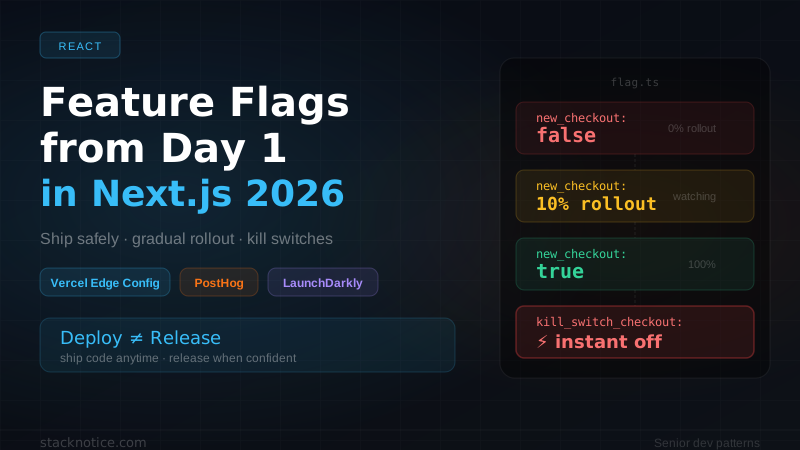
Flags decouple deployment from release. You ship the code whenever it's ready, you release it when you're confident. That's the entire value proposition, and it changes how your team operates at a fundamental level.
This guide covers three real options for Next.js in 2026, when to use each, and the patterns that actually matter in production.
What feature flags actually solve
Before the tool comparison: let's be concrete about why this matters.
Without flags, a deployment is all-or-nothing. You push, 100% of users get the new code. If it breaks, you push a revert, wait for the new deploy, and pray the damage is limited.
With flags, a deployment is separate from a release. You push, 0% of users get the new behavior (it's behind a flag). You enable for 1% of users. Watch your error rates, latency, and conversion. Enable for 10%. Then 50%. Then everyone. At any point, flip the flag off — no redeploy required.
This also enables:
- Kill switches — disable a broken feature in seconds without a deploy
- A/B testing — show different variants to different users, measure what wins
- Beta programs — enable for specific users or plans before general release
- Ops toggles — disable expensive features under load (e.g., AI generation during a spike)
Option 1: Vercel Edge Config — free, sub-millisecond, built-in
If you're on Vercel, Edge Config is the simplest starting point. It's a globally-replicated key-value store designed for configuration reads at the edge. Reads are sub-millisecond because the data is co-located with your edge functions globally.
Cost: free up to 150 reads/minute. Paid plans from $0.0015 per read beyond that.
npm install @vercel/edge-configimport { get } from '@vercel/edge-config'
// Type-safe flag reader
export async function getFlag(key: string, defaultValue = false): Promise<boolean> {
try {
const value = await get<boolean>(key)
return value ?? defaultValue
} catch {
// Edge Config unavailable — fail open (return default)
return defaultValue
}
}
// Typed flag definitions — single source of truth
export const FLAGS = {
NEW_ONBOARDING: 'new_onboarding_flow',
AI_CHAT: 'ai_chat_enabled',
BILLING_V2: 'billing_v2',
DARK_MODE: 'dark_mode_beta',
} as constEDGE_CONFIG=https://edge-config.vercel.com/ecfg_xxx?token=yyyUsing flags in Server Components
import { getFlag, FLAGS } from '@/lib/flags'

export default async function DashboardPage() {
  // Reads from the nearest edge node — ~0ms latency
  const showNewOnboarding = await getFlag(FLAGS.NEW_ONBOARDING)

  return (
    <div>
      {showNewOnboarding ? <NewOnboardingFlow /> : <LegacyOnboardingFlow />}
    </div>
  )
}
Using flags in Middleware (true edge evaluation)
import { NextRequest, NextResponse } from 'next/server'
import { get } from '@vercel/edge-config'

export async function middleware(req: NextRequest) {
  // Beta feature redirect — evaluated at the edge, before any compute
  const billingV2Enabled = await get<boolean>('billing_v2')

  if (billingV2Enabled && req.nextUrl.pathname === '/billing') {
    return NextResponse.rewrite(new URL('/billing-v2', req.url))
  }

  return NextResponse.next()
}
Updating flags without a deploy
Use the Vercel dashboard, CLI, or API:
# Via CLI
vercel edge-config patch ecfg_xxx \
  --items '[{"operation":"upsert","key":"new_onboarding_flow","value":true}]'

# Via API (works in scripts, Slack bots, admin panels)
curl -X PATCH \
  "https://api.vercel.com/v1/edge-config/ecfg_xxx/items" \
  -H "Authorization: Bearer $VERCEL_TOKEN" \
  -d '{"items":[{"operation":"upsert","key":"new_onboarding_flow","value":false}]}'
Edge Config limitations: it stores static values — there's no built-in concept of "show this flag to 10% of users" or "show this flag to users on the Pro plan". For that, you need PostHog or LaunchDarkly.
Option 2: PostHog — open source, flags + analytics + session replay
PostHog is the default for product-focused teams that want feature flags, A/B testing, analytics, session replay, and user behavior all in one place. It's open source (MIT), self-hostable, and has a generous free cloud tier.
Free tier: 1M events/month, unlimited flags.
npm install posthog-js posthog-nodeimport PostHog from 'posthog-node'
// Server-side client — one instance per app
export const posthog = new PostHog(process.env.POSTHOG_API_KEY!, {
host: process.env.POSTHOG_HOST ?? 'https://eu.i.posthog.com', // use EU host for GDPR
flushAt: 1, // flush immediately in serverless
flushInterval: 0,
})Evaluating flags per user on the server
This is where PostHog shines over Edge Config — flags can be targeted by user properties.
import { getAuthUser } from '@/lib/auth'
import { posthog } from '@/lib/posthog'

export default async function DashboardPage() {
  const user = await getAuthUser()

  // Evaluate flag for this specific user
  const showAiChat = await posthog.isFeatureEnabled(
    'ai_chat_enabled',
    user.id,
    {
      personProperties: {
        plan: user.plan,
        email: user.email,
        createdAt: user.createdAt.toISOString(),
      },
    }
  )

  // Always flush in serverless — requests are stateless
  await posthog.shutdown()

  return (
    <div>
      {showAiChat && <AiChatWidget />}
    </div>
  )
}
Gradual rollout — ship to 10% first
In the PostHog dashboard, create a flag with a percentage rollout:
// Check a flag with percentage rollout (done in PostHog dashboard)
// Here you just call isFeatureEnabled — PostHog handles the % logic
const isInBeta = await posthog.isFeatureEnabled('new_checkout', user.id)

// Get a multivariate flag (A/B test)
const checkoutVariant = await posthog.getFeatureFlag('checkout_test', user.id)
// Returns: 'control' | 'variant_a' | 'variant_b'

// Check flag AND capture an event atomically
await posthog.capture({
  distinctId: user.id,
  event: 'checkout_started',
  properties: {
    $feature_flag: 'checkout_test',
    $feature_flag_response: checkoutVariant,
  },
})
Client-side flags with hydration from server
Avoid a flash of wrong content by bootstrapping client-side PostHog with server-evaluated flags:
import { PostHogProvider } from './providers'
import { getAuthUser } from '@/lib/auth'
import { posthog } from '@/lib/posthog'

export default async function RootLayout({ children }: { children: React.ReactNode }) {
  let bootstrappedFlags: Record<string, boolean | string> = {}

  try {
    const user = await getAuthUser()

    // Evaluate all flags server-side and pass to client
    const flags = await posthog.getAllFlags(user.id)
    bootstrappedFlags = flags ?? {}
  } catch {
    // Not authenticated — no flags needed
  }

  return (
    <html>
      <body>
        <PostHogProvider bootstrapData={{ featureFlags: bootstrappedFlags }}>
          {children}
        </PostHogProvider>
      </body>
    </html>
  )
}'use client'
import posthog from 'posthog-js'
import { PostHogProvider as PHProvider } from 'posthog-js/react'
import { useEffect } from 'react'
export function PostHogProvider({
children,
bootstrapData,
}: {
children: React.ReactNode
bootstrapData: Record<string, unknown>
}) {
useEffect(() => {
posthog.init(process.env.NEXT_PUBLIC_POSTHOG_KEY!, {
api_host: process.env.NEXT_PUBLIC_POSTHOG_HOST ?? 'https://eu.i.posthog.com',
bootstrap: bootstrapData, // flags pre-loaded from server — no flicker
capture_pageview: false, // handled by router events
})
}, [])
return <PHProvider client={posthog}>{children}</PHProvider>
}Flag-based plan gating
export async function canAccessFeature(
  userId: string,
  feature: 'ai_generation' | 'analytics' | 'team_members',
  userPlan: string
): Promise<boolean> {
  // Hard gate — plan doesn't have access, no flag evaluation needed
  const planRequirements: Record<string, string[]> = {
    ai_generation: ['pro', 'enterprise'],
    analytics: ['pro', 'enterprise'],
    team_members: ['enterprise'],
  }

  if (!planRequirements[feature].includes(userPlan)) {
    return false
  }

  // Soft gate — plan has access, but flag may override (e.g., during rollout)
  return posthog.isFeatureEnabled(feature, userId)
}
Option 3: LaunchDarkly — enterprise-grade targeting
LaunchDarkly is what you use when your company has complex requirements: compliance, audit logs, targeting rules with dozens of conditions, multi-variate experiments, or a dedicated DevOps team. It's significantly more expensive but also significantly more capable.
npm install @launchdarkly/node-server-sdkimport * as ld from '@launchdarkly/node-server-sdk'
let client: ld.LDClient | null = null
export async function getLDClient(): Promise<ld.LDClient> {
if (client) return client
client = ld.init(process.env.LAUNCHDARKLY_SDK_KEY!)
await client.waitForInitialization({ timeout: 5 })
return client
}
export async function evaluateFlag(
flagKey: string,
user: { id: string; email: string; plan: string },
defaultValue: boolean = false
): Promise<boolean> {
const ldClient = await getLDClient()
const context: ld.LDContext = {
kind: 'user',
key: user.id,
email: user.email,
custom: { plan: user.plan },
}
return ldClient.variation(flagKey, context, defaultValue)
}When to choose LaunchDarkly:
- Your team needs a full audit log of every flag change (who changed it, when, what was the previous value)
- You need targeting rules like "users in Germany with Pro plan who signed up before 2025-01-01"
- Your compliance team requires it
- You have dedicated infrastructure engineers who own the flag system
For most early-stage SaaS: PostHog gives you 80% of the value at 5% of the cost.
The patterns that actually matter
Kill switch — your most important flag
Every risky feature needs a kill switch before it ships. Not after.
export async function isFeatureKillSwitched(feature: string): Promise<boolean> {
  // Convention: a flag named "kill_switch_<feature>" that defaults to false
  // When true, the feature is disabled regardless of other flags
  const isKilled = await getFlag(`kill_switch_${feature}`, false)
  return isKilled
}

// Usage in any Server Component or API route
export async function POST(req: Request) {
  if (await isFeatureKillSwitched('ai_generation')) {
    return Response.json(
      { error: 'AI generation is temporarily disabled. We\'re working on it.' },
      { status: 503 }
    )
  }
  // ... proceed
}
The kill switch is the flag you flip at 2 AM when the on-call alert fires. Make it dead simple — a single boolean in Edge Config or PostHog that any engineer can flip from their phone.
Ops toggles under load
Disable expensive features when your system is under stress:
export async function POST(req: Request) {
  const [isEnabled, isOverloaded] = await Promise.all([
    getFlag('ai_generation_enabled', true),
    getFlag('system_overloaded', false), // ops team sets this during incidents
  ])

  if (!isEnabled || isOverloaded) {
    return Response.json(
      { error: 'Generation unavailable — please try again in a few minutes.' },
      { status: 503 }
    )
  }

  // expensive operation
}
A/B testing with proper measurement
import { getAuthUser } from '@/lib/auth'
import { posthog } from '@/lib/posthog'

export default async function PricingPage() {
  let variant: string | boolean | undefined = 'control'

  try {
    const user = await getAuthUser()
    variant = await posthog.getFeatureFlag('pricing_page_test', user.id)
    await posthog.capture({
      distinctId: user.id,
      event: 'pricing_page_viewed',
      properties: { variant },
    })
    await posthog.shutdown()
  } catch {
    // Unauthenticated user — use control
  }

  return variant === 'variant_b' ? <PricingV2 /> : <PricingV1 />
}A/B testing without a specific hypothesis is just noise. Before creating a test, write down: "We believe that [change] will [impact metric] for [user segment] because [reason]. We'll know we're right when [metric] changes by [X]." If you can't complete that sentence, you're not ready to run the test.
Comparison summary
The right starting point
For most SaaS products in 2026:
For your first 3-5 flags — kill switches, ops toggles, simple beta features. Zero setup, zero cost, sub-millisecond reads. Add it to your project before you ship anything.
The moment you want "show this flag to users on the Pro plan" or "roll out to 10% of users" — add PostHog. It also gives you analytics and session replay for free, which you'll need anyway.
If a customer's procurement process requires SOC 2 feature flag compliance, or your team has a dedicated DevOps function managing releases — then evaluate LaunchDarkly. Not before.
The mistake most teams make is skipping flags entirely until after their first bad deployment. Add them from day 1. The overhead is an hour of setup. The payoff is every future deployment being safe by default.
If you're building out your SaaS stack systematically, this guide is part of a series. Check out the auth in production guide for Clerk webhook sync and RBAC patterns, and the database migrations guide for zero-downtime schema changes — the other two things that break production silently.