Starting a new Angular project in 2026 means making a lot of decisions upfront. Signals or NgRx? Angular Material or PrimeNG? Jest or the default Karma? Nx monorepo or standard CLI?
This guide covers the exact stack a senior Angular developer uses, with the reasoning behind every choice. Not a tutorial — a decision framework you can apply immediately.
Why Angular in 2026
Before the stack: Angular's position has shifted significantly. Angular 21 removed Zone.js as a requirement, made standalone components the default, and made Signals production-stable. The result is a framework that's genuinely competitive on performance with React and Vue — without the ecosystem fragmentation.
Key facts for 2026:
- Signals replace Zone.js-based change detection — reactive primitives, zero magic
- Standalone components are the default — no more NgModule boilerplate
- esbuild is the default build tool — build times dropped 70%+ vs webpack
- SSR with hydration is production-stable — Angular Universal merged into the core CLI
If you're evaluating Angular vs React for a new project: Angular wins on team scalability, strict TypeScript integration, and opinionated structure. React wins on ecosystem size and flexibility. For enterprise teams of 5+, Angular is frequently the better long-term choice.
For more on what changed in Angular 21, see our Angular 21 complete guide.
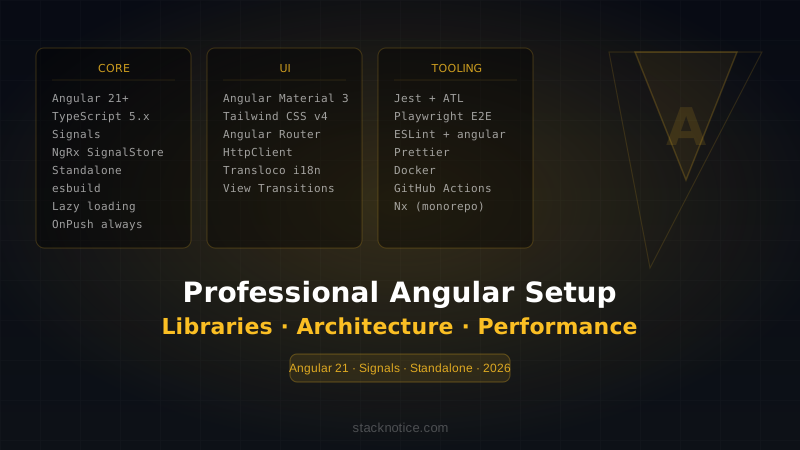
The Full Stack
Angular 21+           — Framework
TypeScript 5.x        — Language (strict mode, always)
Angular Signals       — State management (local/shared)
NgRx SignalStore      — State management (complex/global)
Angular Material 3    — UI components
Tailwind CSS v4       — Utility styling
Angular Router        — Routing (standalone)
Angular HttpClient    — HTTP (interceptors for auth/errors)
Transloco             — i18n
Jest + Testing Library — Unit and component testing
Playwright            — E2E testing
ESLint + angular-eslint — Linting
Prettier              — Formatting
Nx                    — Monorepo (optional, for larger projects)
Docker                — Containerization
GitHub Actions        — CI/CD
Project Scaffolding
# Create new project
ng new my-app \
  --standalone \
  --routing \
  --style=scss \
  --strict

cd my-app

# Add Angular Material
ng add @angular/material

# Add Tailwind
npm install -D tailwindcss postcss autoprefixer
npx tailwindcss init

# Add ESLint
ng add @angular-eslint/schematics

# Add Jest (replace Karma)
npm install -D jest jest-preset-angular @types/jest
npm uninstall karma karma-chrome-launcher karma-coverage karma-jasmine karma-jasmine-html-reporter

# Add Transloco for i18n
ng add @jsverse/transloco

# Add NgRx SignalStore (only if you need complex state)
npm install @ngrx/signals
Folder Structure
The single most important architectural decision. Feature-based structure, not type-based.
src/
├── app/
│   ├── core/                    # Singleton services, guards, interceptors
│   │   ├── auth/
│   │   │   ├── auth.guard.ts
│   │   │   ├── auth.interceptor.ts
│   │   │   └── auth.service.ts
│   │   ├── api/
│   │   │   └── api.service.ts
│   │   └── core.providers.ts
│   │
│   ├── shared/                  # Reusable components, pipes, directives
│   │   ├── components/
│   │   │   ├── button/
│   │   │   └── data-table/
│   │   ├── pipes/
│   │   └── directives/
│   │
│   ├── features/                # Feature modules — each self-contained
│   │   ├── dashboard/
│   │   │   ├── components/
│   │   │   ├── services/
│   │   │   ├── store/           # Feature-level state
│   │   │   ├── dashboard.routes.ts
│   │   │   └── dashboard.component.ts
│   │   ├── users/
│   │   └── settings/
│   │
│   ├── app.component.ts
│   ├── app.config.ts            # Application providers
│   └── app.routes.ts
│
├── environments/
│   ├── environment.ts
│   └── environment.prod.ts
└── styles/
    └── global.scss
Why feature-based?
- Each feature can be lazy-loaded as a unit
- Teams can own features without touching each other's code
- Easier to extract features if you ever split into a monorepo
App Configuration (Standalone)
// app/app.config.ts
import { ApplicationConfig, provideZoneChangeDetection } from '@angular/core'
import { provideRouter, withComponentInputBinding, withViewTransitions } from '@angular/router'
import { provideHttpClient, withInterceptors } from '@angular/common/http'
import { provideAnimationsAsync } from '@angular/platform-browser/animations/async'
import { routes } from './app.routes'
import { authInterceptor } from './core/auth/auth.interceptor'
import { errorInterceptor } from './core/api/error.interceptor'

export const appConfig: ApplicationConfig = {
  providers: [
    provideRouter(
      routes,
      withComponentInputBinding(),   // Route params as @Input()
      withViewTransitions(),         // Native view transitions API
    ),
    provideHttpClient(
      withInterceptors([authInterceptor, errorInterceptor]),
    ),
    provideAnimationsAsync(),
    // provideZoneChangeDetection() — omit if using fully zoneless
  ],
}
State Management: Signals First
The decision tree:
Is the state local to one component?
→ YES: component signal — signal(), computed(), effect()
→ NO: Is it shared between 2-3 sibling components?
  → YES: service with signals
  → NO: Is it complex (pagination, optimistic updates, undo)?
    → YES: NgRx SignalStore
    → NO: service with signals
Local State with Signals
// feature/counter/counter.component.ts
import { Component, signal, computed } from '@angular/core'

@Component({
  standalone: true,
  template: `
    <p>Count: {{ count() }}</p>
    <p>Double: {{ double() }}</p>
    <button (click)="increment()">+</button>
  `,
})
export class CounterComponent {
  count = signal(0)
  double = computed(() => this.count() * 2)

  increment() {
    this.count.update(n => n + 1)
  }
}
Shared State: Service with Signals
// core/auth/auth.service.ts
import { Injectable, signal, computed } from '@angular/core'
import { HttpClient } from '@angular/common/http'
import { tap } from 'rxjs/operators'

@Injectable({ providedIn: 'root' })
export class AuthService {
  private _user = signal<User | null>(null)

  readonly user = this._user.asReadonly()
  readonly isAuthenticated = computed(() => this._user() !== null)
  readonly isAdmin = computed(() => this._user()?.role === 'admin')

  constructor(private http: HttpClient) {}

  login(credentials: LoginDto) {
    return this.http.post<AuthResponse>('/api/auth/login', credentials).pipe(
      tap(({ user, token }) => {
        localStorage.setItem('token', token)
        this._user.set(user)
      })
    )
  }

  logout() {
    localStorage.removeItem('token')
    this._user.set(null)
  }
}
Complex State: NgRx SignalStore
// features/products/store/products.store.ts
import { signalStore, withState, withMethods, withComputed, patchState } from '@ngrx/signals'
import { inject, computed } from '@angular/core'
import { ProductsService } from '../services/products.service'
import { rxMethod } from '@ngrx/signals/rxjs-interop'
import { pipe, switchMap, tap } from 'rxjs'

type ProductsState = {
  products: Product[]
  selectedId: string | null
  loading: boolean
  error: string | null
  filter: string
}

const initialState: ProductsState = {
  products: [],
  selectedId: null,
  loading: false,
  error: null,
  filter: '',
}

export const ProductsStore = signalStore(
  { providedIn: 'root' },
  withState(initialState),
  withComputed(({ products, selectedId, filter }) => ({
    selectedProduct: computed(() =>
      products().find(p => p.id === selectedId()) ?? null
    ),
    filteredProducts: computed(() =>
      products().filter(p =>
        p.name.toLowerCase().includes(filter().toLowerCase())
      )
    ),
    totalCount: computed(() => products().length),
  })),
  withMethods((store, service = inject(ProductsService)) => ({
    loadProducts: rxMethod<void>(
      pipe(
        tap(() => patchState(store, { loading: true, error: null })),
        switchMap(() => service.getAll()),
        tap({
          next: (products) => patchState(store, { products, loading: false }),
          error: (err) => patchState(store, { error: err.message, loading: false }),
        })
      )
    ),
    selectProduct(id: string) {
      patchState(store, { selectedId: id })
    },
    setFilter(filter: string) {
      patchState(store, { filter })
    },
  }))
)
HTTP Layer with Interceptors
// core/auth/auth.interceptor.ts
import { HttpInterceptorFn } from '@angular/common/http'
import { inject } from '@angular/core'
import { AuthService } from './auth.service'

export const authInterceptor: HttpInterceptorFn = (req, next) => {
  const token = localStorage.getItem('token')

  if (!token) return next(req)

  return next(req.clone({
    setHeaders: { Authorization: `Bearer ${token}` }
  }))
}
// core/api/error.interceptor.ts
import { HttpInterceptorFn, HttpErrorResponse } from '@angular/common/http'
import { inject } from '@angular/core'
import { Router } from '@angular/router'
import { catchError, throwError } from 'rxjs'
export const errorInterceptor: HttpInterceptorFn = (req, next) => {
const router = inject(Router)
return next(req).pipe(
catchError((error: HttpErrorResponse) => {
if (error.status === 401) {
localStorage.removeItem('token')
router.navigate(['/login'])
}
if (error.status === 403) {
router.navigate(['/forbidden'])
}
return throwError(() => error)
})
)
}UI: Angular Material 3 + Tailwind
Use Angular Material for complex interactive components (tables, dialogs, date pickers, forms) and Tailwind for layout and custom styling.
// shared/components/data-table/data-table.component.ts
import { Component, input } from '@angular/core'
import { MatTableModule } from '@angular/material/table'
import { MatPaginatorModule } from '@angular/material/paginator'
import { MatSortModule } from '@angular/material/sort'

@Component({
  standalone: true,
  imports: [MatTableModule, MatPaginatorModule, MatSortModule],
  template: `
    <div class="rounded-xl border border-white/10 overflow-hidden">
      <mat-table [dataSource]="data()">
        <ng-content />
      </mat-table>
      <mat-paginator [pageSizeOptions]="[10, 25, 50]" />
    </div>
  `,
})
export class DataTableComponent<T> {
  data = input.required<T[]>()
}
Tailwind config for Angular:
// tailwind.config.js
export default {
  content: ['./src/**/*.{html,ts}'],
  theme: {
    extend: {
      colors: {
        primary: 'var(--mat-primary)',   // Use Material theme tokens
      }
    }
  }
}
Routing with Lazy Loading
Every feature should be lazy-loaded. With Angular 21 standalone, this is one line:
// app/app.routes.ts
import { Routes } from '@angular/router'
import { authGuard } from './core/auth/auth.guard'

export const routes: Routes = [
  {
    path: '',
    redirectTo: 'dashboard',
    pathMatch: 'full',
  },
  {
    path: 'login',
    loadComponent: () => import('./features/auth/login/login.component')
      .then(m => m.LoginComponent),
  },
  {
    path: 'dashboard',
    canActivate: [authGuard],
    loadChildren: () => import('./features/dashboard/dashboard.routes')
      .then(m => m.DASHBOARD_ROUTES),
  },
  {
    path: 'products',
    canActivate: [authGuard],
    loadChildren: () => import('./features/products/products.routes')
      .then(m => m.PRODUCTS_ROUTES),
  },
]
// core/auth/auth.guard.ts
import { inject } from '@angular/core'
import { CanActivateFn, Router } from '@angular/router'
import { AuthService } from './auth.service'
export const authGuard: CanActivateFn = () => {
const auth = inject(AuthService)
const router = inject(Router)
if (auth.isAuthenticated()) return true
return router.createUrlTree(['/login'])
}Testing Setup: Jest + Angular Testing Library
Remove Karma, use Jest — it's 3x faster and has a better developer experience:
// jest.config.js
module.exports = {
  preset: 'jest-preset-angular',
  setupFilesAfterFramework: ['<rootDir>/setup-jest.ts'],
  testPathPattern: '.*\\.spec\\.ts$',
  transform: {
    '^.+\\.(ts|js|html)$': ['jest-preset-angular', {
      tsconfig: '<rootDir>/tsconfig.spec.json',
    }],
  },
  collectCoverageFrom: ['src/**/*.ts', '!src/**/*.spec.ts'],
}
// Example component test
import { render, screen } from '@testing-library/angular'
import { userEvent } from '@testing-library/user-event'
import { ProductCardComponent } from './product-card.component'
describe('ProductCardComponent', () => {
it('emits addToCart event when button clicked', async () => {
const product = { id: '1', name: 'Widget', price: 29.99 }
const { fixture } = await render(ProductCardComponent, {
inputs: { product },
})
const addSpy = jest.spyOn(fixture.componentInstance.addToCart, 'emit')
await userEvent.click(screen.getByRole('button', { name: /add to cart/i }))
expect(addSpy).toHaveBeenCalledWith(product.id)
})
})Performance Patterns
OnPush Change Detection
Every component should use OnPush — the Angular team recommends it as the default:
@Component({
  standalone: true,
  changeDetection: ChangeDetectionStrategy.OnPush,
  template: `...`,
})
export class ProductListComponent {
  // With Signals, OnPush works automatically
  // The view only updates when signals change
  products = inject(ProductsStore).filteredProducts
}
trackBy for Lists
<!-- Without trackBy: entire list re-renders on any change -->
@for (product of products(); track product.id) {
  <app-product-card [product]="product" />
}
Angular 17+ @for with track is the modern syntax — replaces *ngFor + trackBy.
Preloading Strategy
import { PreloadAllModules } from '@angular/router'

provideRouter(
  routes,
  withPreloading(PreloadAllModules), // Preload lazy routes after initial load
)
For large apps, use a custom QuicklinkStrategy from ngx-quicklink — preloads routes the user is likely to visit based on visible links.
ESLint Configuration
// .eslintrc.json
{
  "root": true,
  "ignorePatterns": ["projects/**/*"],
  "overrides": [
    {
      "files": ["*.ts"],
      "extends": [
        "eslint:recommended",
        "plugin:@typescript-eslint/recommended",
        "plugin:@angular-eslint/recommended",
        "plugin:@angular-eslint/template/process-inline-templates"
      ],
      "rules": {
        "@angular-eslint/directive-selector": ["error", { "type": "attribute", "prefix": "app", "style": "camelCase" }],
        "@angular-eslint/component-selector": ["error", { "type": "element", "prefix": "app", "style": "kebab-case" }],
        "@typescript-eslint/no-explicit-any": "error",
        "@typescript-eslint/explicit-function-return-type": "warn"
      }
    },
    {
      "files": ["*.html"],
      "extends": ["plugin:@angular-eslint/template/recommended"],
      "rules": {}
    }
  ]
}
Environment Setup
// environments/environment.ts
export const environment = {
  production: false,
  apiUrl: 'http://localhost:3000/api',
  appName: 'MyApp',
}

// environments/environment.prod.ts
export const environment = {
  production: true,
  apiUrl: 'https://api.myapp.com',
  appName: 'MyApp',
}
// Usage in services
import { environment } from '../../../environments/environment'
@Injectable({ providedIn: 'root' })
export class ApiService {
private readonly baseUrl = environment.apiUrl
}Docker for Production
# Dockerfile
FROM node:22-alpine AS builder
WORKDIR /app
COPY package*.json ./
RUN npm ci
COPY . .
RUN npm run build -- --configuration production

FROM nginx:alpine AS runner
COPY --from=builder /app/dist/my-app/browser /usr/share/nginx/html
COPY nginx.conf /etc/nginx/nginx.conf
EXPOSE 80
# nginx.conf — critical for Angular SPA routing
server {
listen 80;
root /usr/share/nginx/html;
index index.html;
location / {
try_files $uri $uri/ /index.html; # Always serve index.html for SPA routes
}
gzip on;
gzip_types text/css application/javascript application/json;
}CI/CD with GitHub Actions
# .github/workflows/ci.yml
name: CI

on:
  push:
    branches: [main]
  pull_request:
    branches: [main]

jobs:
  test:
    runs-on: ubuntu-latest
    steps:
      - uses: actions/checkout@v4
      - uses: actions/setup-node@v4
        with:
          node-version: 22
          cache: 'npm'
      - run: npm ci
      - run: npm run lint
      - run: npm run test -- --coverage --watchAll=false
      - run: npm run build -- --configuration production

  docker:
    needs: test
    if: github.ref == 'refs/heads/main'
    runs-on: ubuntu-latest
    steps:
      - uses: actions/checkout@v4
      - name: Build and push
        uses: docker/build-push-action@v5
        with:
          push: true
          tags: myapp:latest
What to Avoid
Don't use NgModules for new code. Standalone is the Angular 2026 standard. NgModules still work but they're legacy.
Don't mix Zone.js and zoneless. Pick one. If you're starting fresh, go zoneless — it's the future direction.
Don't overuse NgRx. A service with signals handles 80% of state management needs. NgRx SignalStore only for genuinely complex state with side effects.
Don't skip OnPush. The performance difference is real. Make it a team standard enforced by ESLint.
Don't use any. Enable "noImplicitAny": true and "strict": true in tsconfig. TypeScript's value disappears without it.
Summary: When to Choose What
| Need | Choice | Why |
|---|---|---|
| Local component state | signal() | Zero overhead, automatic |
| Shared service state | Service + signals | Simple, no boilerplate |
| Complex global state | NgRx SignalStore | DevTools, time-travel debug |
| Simple UI components | Tailwind | Speed, no abstraction |
| Complex UI components | Angular Material 3 | Accessibility, consistency |
| Unit tests | Jest + ATL | Speed, modern API |
| E2E tests | Playwright | Multi-browser, reliable |
| Large team / monorepo | Nx | Task caching, affected commands |
This stack is production-proven, aligned with Angular's roadmap, and scales from a solo project to a team of 20+ without architectural rewrites.
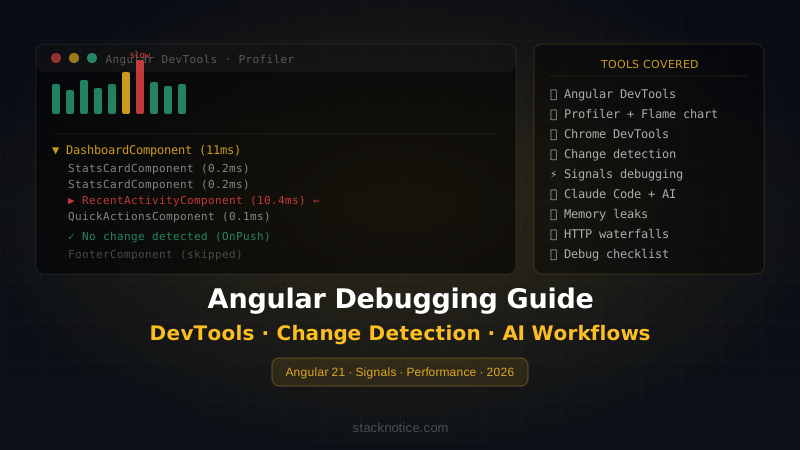
For debugging and optimizing this stack, see the companion guide: Angular Debugging: DevTools, Change Detection & AI Workflows.