Database migrations are the part of SaaS development that experienced engineers are most careful about — and that beginners destroy production with. A DROP COLUMN that takes 2 seconds in development can lock a production table for 4 minutes, bringing down your entire app with it.
This is article #3 in the Build a SaaS from $0 to Real Product series. We're using Drizzle ORM with PostgreSQL (Neon), as established in the stack decisions guide.
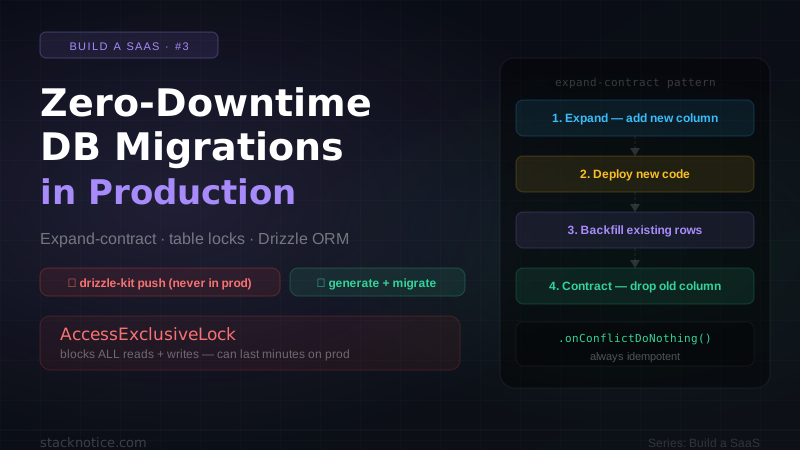
drizzle-kit push applies schema changes directly without creating migration files. It's fine for local development. In production, it skips the auditable migration history and can apply destructive changes without any review step. Always use drizzle-kit generate + drizzle-kit migrate in production.
Why zero-downtime migrations are hard
The core problem: your database and your application code deploy independently. During a deployment, two versions of your code run simultaneously — the old version (handling existing requests) and the new version (handling new requests). Your migration runs somewhere in between.
If your migration breaks backward compatibility with the old code, you have an outage window between "migration applied" and "old code retired". On Vercel with serverless functions, that window can be 30 seconds to several minutes depending on cold starts and in-flight requests.
The solution is making every migration backward compatible — so old code and new code can both run against the migrated schema simultaneously.
The production migration workflow
# After changing your schema.ts:
npx drizzle-kit generate

# Review the generated SQL before committing
cat drizzle/migrations/0042_add_subscription_tier.sql# Never push directly — run migrations as part of your deploy pipeline
npx drizzle-kit migrateimport type { Config } from 'drizzle-kit'
export default {
schema: './lib/db/schema.ts',
out: './drizzle/migrations',
dialect: 'postgresql',
dbCredentials: {
url: process.env.DATABASE_URL!,
},
// Prevents accidental data loss — forces you to explicitly allow destructive ops
strict: true,
verbose: true,
} satisfies ConfigSafe vs dangerous operations
Not all schema changes are equal. Before applying anything to production, know which category your change falls into.
Always safe ✅
-- Add a nullable column (no lock)
ALTER TABLE users ADD COLUMN stripe_customer_id TEXT;

-- Add a new table
CREATE TABLE subscriptions (...);

-- Add an index CONCURRENTLY (non-blocking)
CREATE INDEX CONCURRENTLY idx_users_email ON users(email);

-- Add a foreign key with NOT VALID (deferred check)
ALTER TABLE posts ADD CONSTRAINT fk_user
  FOREIGN KEY (user_id) REFERENCES users(id)
  NOT VALID;
-- Then validate separately (non-blocking on reads):
ALTER TABLE posts VALIDATE CONSTRAINT fk_user;

-- Extend a VARCHAR (widening is safe)
ALTER TABLE users ALTER COLUMN name TYPE VARCHAR(512);
Dangerous — requires the expand-contract pattern ⚠️
-- Drops immediately destroy data, no rollback
ALTER TABLE users DROP COLUMN legacy_field;

-- Renames break any code still using the old name
ALTER TABLE users RENAME COLUMN username TO display_name;

-- Adding NOT NULL on an existing column with data
-- acquires AccessExclusiveLock — blocks ALL reads and writes
ALTER TABLE users ALTER COLUMN email SET NOT NULL;

-- Narrowing a VARCHAR locks the table
ALTER TABLE users ALTER COLUMN name TYPE VARCHAR(50);

-- Changing a column type that requires rewrite
ALTER TABLE users ALTER COLUMN age TYPE BIGINT;Operations that acquire AccessExclusiveLock block every read and write on that table until the operation completes. On a table with millions of rows, ALTER TABLE ... SET NOT NULL without proper preparation can take minutes. On a busy production table, this means a full outage. Always use the expand-contract pattern for these operations.
The expand-contract pattern
This is the single most important concept in zero-downtime migrations. Every dangerous schema change becomes a sequence of safe steps deployed separately.
The pattern has three phases:
- Expand — add the new structure alongside the old
- Migrate — backfill data, update application code
- Contract — remove the old structure
Example: renaming a column
You want to rename username to display_name. If you do it in one migration, the old code (running during deployment) breaks immediately.
Phase 1 — Expand: add the new column, keep the old
ALTER TABLE users ADD COLUMN display_name TEXT;

-- Copy existing data
UPDATE users SET display_name = username WHERE display_name IS NULL;

-- Create a trigger to keep them in sync during the transition
CREATE OR REPLACE FUNCTION sync_display_name()
RETURNS TRIGGER AS $$
BEGIN
  IF TG_OP = 'INSERT' OR NEW.username IS DISTINCT FROM OLD.username THEN
    NEW.display_name = NEW.username;
  END IF;
  IF TG_OP = 'INSERT' OR NEW.display_name IS DISTINCT FROM OLD.display_name THEN
    NEW.username = NEW.display_name;
  END IF;
  RETURN NEW;
END;
$$ LANGUAGE plpgsql;

CREATE TRIGGER sync_names
BEFORE INSERT OR UPDATE ON users
FOR EACH ROW EXECUTE FUNCTION sync_display_name();
Now deploy your app to use display_name instead of username. Old instances still use username (the trigger keeps them in sync). New instances use display_name.
Phase 2 — Verify and wait
Wait until all old instances are retired (typically after 1-2 deploys). Verify no code still references username.
grep -r "username" --include="*.ts" --include="*.tsx" src/ lib/ app/
# Should return zero results (or only in the migration files themselves)
Phase 3 — Contract: remove the old column
DROP TRIGGER sync_names ON users;
DROP FUNCTION sync_display_name();
ALTER TABLE users DROP COLUMN username;
This is now safe to apply — no running code references username.
Example: adding a NOT NULL column
You want to add a plan column that's required. You can't add NOT NULL directly to a table with existing rows.
Phase 1 — Expand: add as nullable
ALTER TABLE users ADD COLUMN plan TEXT;
-- No NOT NULL constraint yet — existing rows get NULL
Phase 2 — Backfill in the application
Deploy code that:
- Writes
planfor all new users - Has a background job to backfill existing users
// Run this as a one-time job, not in the migration
export async function backfillUserPlans() {
  const batchSize = 500

  let offset = 0
  while (true) {
    const batch = await db
      .select({ id: users.id })
      .from(users)
      .where(isNull(users.plan))
      .limit(batchSize)
      .offset(offset)

    if (batch.length === 0) break

    await db
      .update(users)
      .set({ plan: 'free' })
      .where(inArray(users.id, batch.map(u => u.id)))

    offset += batchSize
    console.log(`Backfilled ${offset} users`)

    // Avoid overloading the DB — rate limit the backfill
    await new Promise(r => setTimeout(r, 50))
  }
}
Phase 3 — Contract: add the NOT NULL constraint
Only after confirming zero NULL rows:
-- Verify first (run this manually before the migration)
-- SELECT COUNT(*) FROM users WHERE plan IS NULL;
-- Should return 0

-- Set default for future rows
ALTER TABLE users ALTER COLUMN plan SET DEFAULT 'free';

-- Add NOT NULL — safe now because zero NULLs exist
-- PostgreSQL is smart enough to skip the full table scan if it can verify via constraint
ALTER TABLE users ALTER COLUMN plan SET NOT NULL;When adding a foreign key to a large table, use ADD CONSTRAINT ... NOT VALID first. This adds the constraint without validating existing rows (fast, minimal lock). Then run VALIDATE CONSTRAINT separately — it takes a ShareUpdateExclusiveLock which allows reads and writes to continue.
Indexes without downtime
Creating indexes on large tables can block writes for minutes. Always use CONCURRENTLY:
-- ❌ Blocks writes while building the index
CREATE INDEX idx_posts_user ON posts(user_id);

-- ✅ Non-blocking — builds index alongside normal operations
CREATE INDEX CONCURRENTLY idx_posts_user ON posts(user_id);
Drizzle generates the non-concurrent version by default in migration files. Override it:
import { index, pgTable, text, timestamp } from 'drizzle-orm/pg-core'

export const posts = pgTable('posts', {
  id: text('id').primaryKey(),
  userId: text('user_id').notNull(),
  createdAt: timestamp('created_at').defaultNow().notNull(),
}, (table) => ({
  // Drizzle generates CREATE INDEX — you manually add CONCURRENTLY in the migration file
  userIdIdx: index('idx_posts_user_id').on(table.userId),
}))-- Drizzle generates this:
-- CREATE INDEX "idx_posts_user_id" ON "posts" ("user_id");
-- Change it to this before applying:
CREATE INDEX CONCURRENTLY "idx_posts_user_id" ON "posts" ("user_id");CREATE INDEX CONCURRENTLY fails if it's inside a transaction block. Drizzle wraps migrations in transactions by default. For concurrent index creation, split it into a separate migration file that runs outside a transaction, or use the disableTransactionsDDL option.
To disable transactions for a specific migration in Drizzle:
-- drizzle-kit: { "disableTransactionsDDL": true }
CREATE INDEX CONCURRENTLY "idx_posts_user_id" ON "posts" ("user_id");
Handling large table updates
Updating millions of rows in a single transaction is dangerous — it holds locks for the entire duration and bloats the transaction log. Always batch large updates:
import { db } from '../lib/db'
import { users } from '../lib/db/schema'
import { isNull, lte, and } from 'drizzle-orm'

async function backfillInBatches() {
  const BATCH_SIZE = 1000
  const DELAY_MS = 100 // give DB breathing room between batches

  let processed = 0

  while (true) {
    // Process in ID order — predictable, restartable
    const result = await db
      .update(users)
      .set({ plan: 'free', updatedAt: new Date() })
      .where(
        and(
          isNull(users.plan),
          lte(users.id, /* last processed ID */ 'zzz')
        )
      )
      .limit(BATCH_SIZE)
      .returning({ id: users.id })

    if (result.length === 0) break

    processed += result.length
    console.log(`✅ Processed ${processed} rows`)

    await new Promise(r => setTimeout(r, DELAY_MS))
  }

  console.log(`🎉 Backfill complete — ${processed} rows updated`)
}

backfillInBatches().catch(console.error)
Integrating migrations into your CI/CD pipeline
name: Deploy

on:
  push:
    branches: [main]

jobs:
  deploy:
    runs-on: ubuntu-latest
    steps:
      - uses: actions/checkout@v4

      - name: Setup Node.js
        uses: actions/setup-node@v4
        with:
          node-version: '20'

      - name: Install dependencies
        run: npm ci

      - name: Run database migrations
        run: npx drizzle-kit migrate
        env:
          DATABASE_URL: ${{ secrets.DATABASE_URL }}
        # Migrations run BEFORE the new code deploys to Vercel
        # This is why all migrations must be backward-compatible
        # with the currently-running version

      - name: Deploy to Vercel
        uses: amondnet/vercel-action@v25
        with:
          vercel-token: ${{ secrets.VERCEL_TOKEN }}
          vercel-org-id: ${{ secrets.ORG_ID }}
          vercel-project-id: ${{ secrets.PROJECT_ID }}
          vercel-args: '--prod'
The sequence is critical: migrate first, then deploy code. This means:
- New schema + old code = must work ✅ (backward compatible migration)
- New schema + new code = works ✅ (the normal state)
Never deploy code and migrate simultaneously.
Rollback strategy
Drizzle doesn't have built-in rollback for applied migrations. The pragmatic production approach:
For data changes: always soft-delete, never hard-delete. Keep deleted_at columns. Data recovery is possible.
For schema changes: write a "down migration" file alongside every "up migration":
import { drizzle } from 'drizzle-orm/neon-http'
import { migrate } from 'drizzle-orm/neon-http/migrator'
import { neon } from '@neondatabase/serverless'

const sql = neon(process.env.DATABASE_URL!)
const db = drizzle(sql)

async function runMigrations() {
  console.log('Running migrations...')

  await migrate(db, {
    migrationsFolder: './drizzle/migrations',
  })

  console.log('Migrations complete')
}

runMigrations().catch((err) => {
  console.error('Migration failed:', err)
  process.exit(1)
})
For genuine rollbacks, the approach is always forward rollback — write a new migration that undoes the change, rather than trying to reverse-apply the previous one. This preserves the migration history and is far safer.
Monitoring migrations in production
Before and after every production migration, check these metrics:
SELECT
  pid,
  now() - query_start AS duration,
  state,
  wait_event_type,
  wait_event,
  left(query, 100) AS query_preview
FROM pg_stat_activity
WHERE state != 'idle'
  AND query_start < now() - interval '10 seconds'
ORDER BY duration DESC;SELECT
locktype,
relation::regclass AS table,
mode,
granted,
pid
FROM pg_locks
WHERE NOT granted
ORDER BY table;On Neon, you can watch these in the Neon console's query insights tab in real time.
For truly risky migrations — dropping a heavily-used column, restructuring a core table — schedule a maintenance window at low-traffic hours. Show a maintenance page, run the migration, verify, then restore traffic. The expand-contract pattern eliminates this for most changes, but sometimes a window is the right call.
Next in the series: Stripe webhooks — building idempotent subscription billing — the other migration nightmare: handling Stripe events in a way that survives retries, network failures, and duplicate deliveries.
If you're setting up your Drizzle schema from scratch, the Drizzle ORM complete guide covers the full setup with Next.js and Neon.