Every React codebase accumulates bad habits. Patterns that seemed fine in a tutorial turn into real performance problems in production. Most developers know about memoization — but they apply it wrong, or not at all, or in the wrong places.
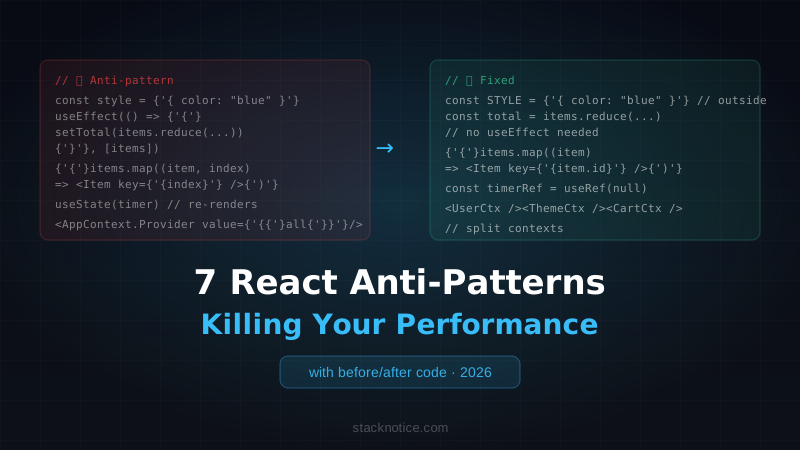
This guide covers 7 anti-patterns that show up consistently in real codebases, with the exact code change that fixes each one. No abstract advice — just before and after.
The Cost of Getting This Wrong
A 100ms delay in a UI interaction costs around 1% of engagement. At 300ms, users notice. These aren't theoretical problems: bad React patterns cause jank on scroll, sluggish forms, and unnecessary network waterfalls. The browser has limited time to render each frame. Your React tree is not free.
Anti-Pattern 1: Creating Objects and Functions Inside Render
The most common mistake that silently kills memoization.
The problem:
// ❌ Every render creates a new object reference
function UserCard({ userId }: { userId: string }) {
  const style = { color: 'blue', fontWeight: 'bold' }

  return <ExpensiveChild config={{ userId, theme: 'dark' }} style={style} />
}
Every time UserCard renders, style and config are new object references. Even if the values are identical, === returns false. If ExpensiveChild is wrapped in React.memo, it still re-renders — because the props reference changed.
The fix:
// ✅ Move constants outside the component
const STYLE = { color: 'blue', fontWeight: 'bold' }

function UserCard({ userId }: { userId: string }) {
  const config = useMemo(() => ({ userId, theme: 'dark' }), [userId])

  return <ExpensiveChild config={config} style={STYLE} />
}
Rules:
- Constants that never change → move outside the component entirely
- Objects derived from props →
useMemowith the right dependencies - Functions passed as callbacks →
useCallback
The same applies to inline arrow functions in JSX:
// ❌ New function reference on every render
<Button onClick={() => handleClick(item.id)} />

// ✅ Stable reference
const handleItemClick = useCallback(() => handleClick(item.id), [item.id, handleClick])
<Button onClick={handleItemClick} />
Anti-Pattern 2: Using Index as Key in Lists
This one causes subtle, maddening bugs — not just performance issues.
The problem:
// ❌ Index-as-key breaks state and animations on reorder/delete
{items.map((item, index) => (
  <TodoItem key={index} item={item} />
))}
React uses keys to match elements between renders. When you use index, deleting the first item makes React think the second item became the first, the third became the second, etc. Any component state (checked boxes, input values, focus state) shifts to the wrong item. Animations glitch. Performance suffers because React reconciles the wrong elements.
The fix:
// ✅ Use a stable, unique ID from your data
{items.map((item) => (
  <TodoItem key={item.id} item={item} />
))}
If your data doesn't have IDs, generate them when creating the items — not during render:
import { nanoid } from 'nanoid'

function addItem(text: string) {
  return {
    id: nanoid(), // Generated once, stable forever
    text,
    completed: false,
  }
}
Index as key is only acceptable for truly static lists that never change order, add items, or remove items. In practice, this is rare.
Anti-Pattern 3: useEffect for Everything
The most overused hook in React. Most useEffect calls in real codebases should be something else.
Problem 1: Derived state
// ❌ Syncing state with useEffect
function OrderSummary({ items }: { items: CartItem[] }) {
  const [total, setTotal] = useState(0)

  useEffect(() => {
    setTotal(items.reduce((sum, item) => sum + item.price * item.qty, 0))
  }, [items])

  return <div>Total: ${total}</div>
}
This causes two renders per items change: one for the items update, one for the total update. It's also just more code.
// ✅ Derived value — calculate during render
function OrderSummary({ items }: { items: CartItem[] }) {
  const total = items.reduce((sum, item) => sum + item.price * item.qty, 0)

  return <div>Total: ${total}</div>
}
If the calculation is expensive, use useMemo:
const total = useMemo(
  () => items.reduce((sum, item) => sum + item.price * item.qty, 0),
  [items]
)
Problem 2: Event-triggered work
// ❌ useEffect triggered by a flag
function PaymentForm() {
  const [submitted, setSubmitted] = useState(false)

  useEffect(() => {
    if (submitted) {
      processPayment()
      setSubmitted(false)
    }
  }, [submitted])

  return <button onClick={() => setSubmitted(true)}>Pay</button>
}
// ✅ Just call it in the event handler
function PaymentForm() {
const handleSubmit = async () => {
await processPayment()
}
return <button onClick={handleSubmit}>Pay</button>
}The React team's rule: if you're setting state from an effect, question whether the effect is necessary. Most of the time, it isn't. See the official docs: You Might Not Need an Effect.
Problem 3: Data fetching in useEffect
// ❌ Waterfall fetching with useEffect
function Profile({ userId }: { userId: string }) {
  const [user, setUser] = useState(null)

  useEffect(() => {
    fetchUser(userId).then(setUser)
  }, [userId])

  if (!user) return <Spinner />
  return <div>{user.name}</div>
}
This creates fetch waterfalls (component renders → effect fires → fetch starts → component renders again), has no loading/error state, no caching, and no deduplication. Use TanStack Query or the use() hook in React 19:
// ✅ TanStack Query — caching, deduplication, background refresh
function Profile({ userId }: { userId: string }) {
  const { data: user, isLoading } = useQuery({
    queryKey: ['user', userId],
    queryFn: () => fetchUser(userId),
  })

  if (isLoading) return <Spinner />
  return <div>{user.name}</div>
}
Anti-Pattern 4: Missing Suspense Boundaries
Suspense isn't just for lazy loading components. In React 18/19, it's the primitive for async UI.
The problem:
// ❌ No suspense boundary — entire page blocks or shows a spinner
function Dashboard() {
  return (
    <div>
      <Header />
      <StatsPanel />     {/* Slow — fetches analytics */}
      <RecentActivity /> {/* Also slow — different fetch */}
      <QuickActions />   {/* Fast — static */}
    </div>
  )
}
Without Suspense, either everything renders when the slowest piece is ready, or you write custom loading state for each component.
The fix:
// ✅ Independent Suspense boundaries — each section loads independently
function Dashboard() {
  return (
    <div>
      <Header />
      <Suspense fallback={<StatsSkeleton />}>
        <StatsPanel />
      </Suspense>
      <Suspense fallback={<ActivitySkeleton />}>
        <RecentActivity />
      </Suspense>
      <QuickActions />
    </div>
  )
}
Now StatsPanel and RecentActivity load in parallel. QuickActions renders immediately. Users see a skeleton and then real content instead of a blank page.
In Next.js App Router, this works natively with loading.tsx files and async Server Components. The data fetch happens on the server — no client-side waterfall at all:
// app/dashboard/page.tsx
export default function DashboardPage() {
  return (
    <div>
      <Header />
      <Suspense fallback={<StatsSkeleton />}>
        <StatsPanel /> {/* async Server Component */}
      </Suspense>
    </div>
  )
}

// app/dashboard/StatsPanel.tsx
async function StatsPanel() {
  const stats = await fetchStats() // Runs on the server
  return <div>{stats.value}</div>
}
For more on this pattern, see the Next.js App Router complete guide.
Anti-Pattern 5: Context That Re-Renders the Entire Tree
React Context is a sharp tool. Misuse it and your entire app re-renders on every state change.
The problem:
// ❌ One context with everything — any change re-renders all consumers
const AppContext = createContext<AppState | null>(null)

function AppProvider({ children }: { children: ReactNode }) {
  const [user, setUser] = useState<User | null>(null)
  const [theme, setTheme] = useState<'light' | 'dark'>('dark')
  const [cart, setCart] = useState<CartItem[]>([])
  const [notifications, setNotifications] = useState<Notification[]>([])

  return (
    <AppContext.Provider value={{ user, setUser, theme, setTheme, cart, setCart, notifications, setNotifications }}>
      {children}
    </AppContext.Provider>
  )
}
Every time notifications updates (which could be every few seconds), every component that consumes AppContext re-renders — including the Header that only cares about user, and the ThemeToggle that only cares about theme.
The fix — split by update frequency:
// ✅ Separate contexts for separate concerns
const UserContext = createContext<UserContextType | null>(null)
const ThemeContext = createContext<ThemeContextType | null>(null)
const CartContext = createContext<CartContextType | null>(null)
const NotificationContext = createContext<NotificationContextType | null>(null)

// Each context only re-renders its own consumers
Alternatively, split into read and write contexts. This is the pattern Daishi Kato (creator of Jotai, Zustand) recommends:
// ✅ Read context (stable object) + Write context (stable dispatch)
const CounterValueContext = createContext(0)
const CounterDispatchContext = createContext<Dispatch<Action> | null>(null)

function CounterProvider({ children }: { children: ReactNode }) {
  const [count, dispatch] = useReducer(reducer, 0)

  return (
    <CounterDispatchContext.Provider value={dispatch}>
      <CounterValueContext.Provider value={count}>
        {children}
      </CounterValueContext.Provider>
    </CounterDispatchContext.Provider>
  )
}
Now components that only dispatch actions won't re-render when the count changes, because dispatch is stable.
For complex state across many components, consider Zustand — it avoids the context re-render problem entirely with selector-based subscriptions.
Anti-Pattern 6: useState for Non-Reactive Values
Not every value needs to trigger a re-render. Using useState when you don't need reactivity creates unnecessary renders.
Problem 1: Mutable values that don't affect render
// ❌ Storing a timer ref in state — causes re-render when it changes
function AutoSave({ value }: { value: string }) {
  const [timer, setTimer] = useState<ReturnType<typeof setTimeout> | null>(null)

  const scheduleAutoSave = () => {
    if (timer) clearTimeout(timer)
    const newTimer = setTimeout(() => saveValue(value), 1000)
    setTimer(newTimer) // This triggers a re-render!
  }

  return <input value={value} onChange={scheduleAutoSave} />
}
// ✅ useRef — mutable, no re-render
function AutoSave({ value }: { value: string }) {
const timerRef = useRef<ReturnType<typeof setTimeout> | null>(null)
const scheduleAutoSave = () => {
if (timerRef.current) clearTimeout(timerRef.current)
timerRef.current = setTimeout(() => saveValue(value), 1000)
// No re-render triggered
}
return <input value={value} onChange={scheduleAutoSave} />
}Use useRef for: DOM refs, timer IDs, previous values, any mutable value the component reads but doesn't need to react to.
Problem 2: Previous value tracking
// ❌ State to track previous value — extra re-render
function Component({ value }: { value: number }) {
  const [prevValue, setPrevValue] = useState(value)

  useEffect(() => {
    setPrevValue(value)
  }, [value])
}

// ✅ Ref — no re-render
function Component({ value }: { value: number }) {
  const prevValueRef = useRef(value)

  useEffect(() => {
    prevValueRef.current = value
  })

  const prevValue = prevValueRef.current
}
Anti-Pattern 7: Optimizing Without Measuring
This is the meta anti-pattern: using useMemo, useCallback, and React.memo everywhere "just in case" — without knowing if they actually help.
The problem:
// ❌ Wrapping everything in useMemo "to be safe"
function Component({ items, user, config }: Props) {
  const filteredItems = useMemo(() => items.filter(i => i.active), [items])
  const userName = useMemo(() => user.firstName + ' ' + user.lastName, [user])
  const isAdmin = useMemo(() => user.role === 'admin', [user])
  const handleClick = useCallback(() => doSomething(), [])
  const handleChange = useCallback((e) => setValue(e.target.value), [])

  // ...
}
useMemo and useCallback have a cost: the closure, the dependency comparison, the cache storage. For cheap operations (string concatenation, boolean checks), this cost exceeds the benefit.
What to actually do:
-
Measure first. Use React DevTools Profiler to see which components re-render and why. A component that renders in 0.5ms doesn't need optimization.
-
Memoize at component boundaries.
React.memoon expensive components is higher-value thanuseMemoinside a cheap one. -
Rule of thumb for useMemo: Use it when the computation takes >1ms or creates a new object/array reference that would break a downstream
React.memo.
// ✅ Measure with Profiler, then optimize specifically
const expensiveData = useMemo(() => {
  // This one genuinely takes 10ms — verified in Profiler
  return processLargeDataset(rawData)
}, [rawData])

// ✅ Let React Compiler handle the rest (if you're on React 19+)
// The compiler will add memoization where it's actually needed
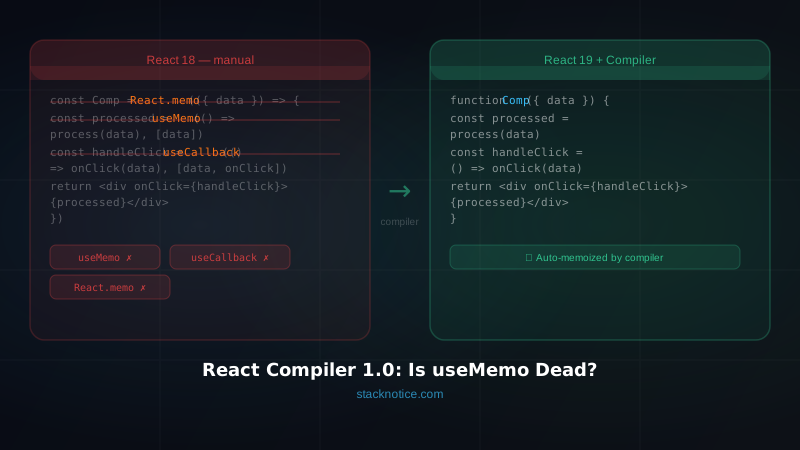
If you're on React 19 with the React Compiler, you can remove most manual memoization entirely — the compiler is better at knowing what to memoize than developers are.
Quick Reference: Which Hook to Use
| Situation | Use |
|---|---|
| Value computed from props/state | Derived state (no hook) or useMemo |
| DOM reference | useRef |
| Previous value | useRef |
| Timer ID / subscription | useRef |
| Value that triggers re-render | useState |
| Stable callback for child | useCallback |
| Expensive computation | useMemo |
| Shared state without re-render issue | useContext (split by frequency) |
| Complex shared state | Zustand / Jotai |
The Bigger Pattern
Most of these anti-patterns share a root cause: using more React machinery than needed.
- Derived state doesn't need
useState+useEffect - Non-reactive values don't need
useState— they needuseRef - Inline functions don't need
useCallbackif the child isn't memoized - Context doesn't need splitting if nothing is expensive
The goal isn't to use all the hooks — it's to use the minimum needed to make your component work correctly. Start simple. Measure. Optimize where the data tells you to.
What to Do Next
- Open React DevTools → Profiler → record an interaction in your app
- Find the 3 slowest components
- Apply the relevant fix from this guide
- Re-measure and confirm the improvement
The React 19 features like the React Compiler, Server Actions, and the use() hook eliminate entire categories of these problems at the framework level. If you're still on React 18, most of these still apply.
For Next.js specifically, using Server Components correctly eliminates client-side fetch waterfalls entirely — which is the highest-value optimization available today.