React 19 has been in production for over a year. The React Compiler hit 1.0 stable in late 2025. If you've been on Next.js 15 since it dropped, you've been running all of this without necessarily knowing which part does what.
This isn't another release-day summary. It's the working picture of React 19 in 2026 — the APIs you actually reach for, the patterns that replaced the old boilerplate, and the things that still trip developers up.
The Two Things That Changed React Development Most
Before the API list: React 19 and the React Compiler solve different problems and are easy to conflate.
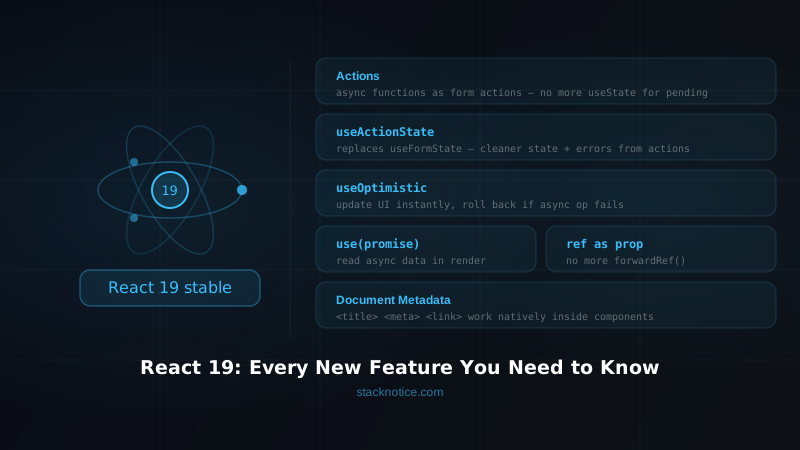
React 19 changed the APIs — new hooks for async state (useActionState, useOptimistic), use(), ref as a prop, Server Actions stable, document metadata from components.
The React Compiler changed how you write components — it automatically memoizes components, values, and callbacks. useMemo, useCallback, and React.memo are mostly unnecessary now. The compiler handles it.
Together they cut a significant amount of ceremony from typical React code. Separately, each solves a distinct category of problem.
useActionState — The Form Pattern You've Been Waiting For
This is the one that changes daily code most visibly. Pre-React 19, every async form submission required the same boilerplate:
// Pre-React 19 — you wrote this for every form
function SignupForm() {
  const [isPending, setIsPending] = useState(false)
  const [error, setError] = useState<string | null>(null)
  const [success, setSuccess] = useState(false)

  async function handleSubmit(e: React.FormEvent) {
    e.preventDefault()
    setIsPending(true)
    setError(null)
    try {
      await createAccount(new FormData(e.currentTarget as HTMLFormElement))
      setSuccess(true)
    } catch (err) {
      setError((err as Error).message)
    } finally {
      setIsPending(false)
    }
  }

  return (
    <form onSubmit={handleSubmit}>
      {/* ... */}
      <button disabled={isPending}>{isPending ? 'Creating...' : 'Create account'}</button>
      {error && <p className="text-red-500">{error}</p>}
    </form>
  )
}
Three useState calls, a try/catch, a finally block, e.preventDefault(). Multiply that by every form in your app.
React 19 collapses this with useActionState:
import { useActionState } from 'react'

type FormResult =
  | { status: 'idle' }
  | { status: 'success'; userId: string }
  | { status: 'error'; message: string }

async function createAccountAction(
  prev: FormResult,
  formData: FormData
): Promise<FormResult> {
  const email = formData.get('email') as string
  const password = formData.get('password') as string

  if (!email || !password) {
    return { status: 'error', message: 'Email and password are required.' }
  }

  try {
    const user = await createAccount({ email, password })
    return { status: 'success', userId: user.id }
  } catch (err) {
    return { status: 'error', message: (err as Error).message }
  }
}

function SignupForm() {
  const [result, submitAction, isPending] = useActionState(
    createAccountAction,
    { status: 'idle' }
  )

  return (
    <form action={submitAction}>
      <input name="email" type="email" required />
      <input name="password" type="password" required minLength={8} />
      <button disabled={isPending}>
        {isPending ? 'Creating...' : 'Create account'}
      </button>
      {result.status === 'error' && (
        <p className="text-red-500">{result.message}</p>
      )}
      {result.status === 'success' && (
        <p className="text-green-500">Account created!</p>
      )}
    </form>
  )
}
useActionState returns [state, dispatchFn, isPending]. The function receives the previous state and the FormData — which means you can accumulate state across multiple submissions if you need to. The isPending boolean and the transition are managed by React automatically.
The action function lives outside the component — it's a plain async function with typed input and output. Testable, reusable, no closure over state.
With Server Actions in Next.js
When the action has 'use server', the same pattern runs the function on the server and streams the result back:
// app/contact/actions.ts
'use server'

import { db } from '@/lib/db'
import { z } from 'zod'
import { revalidatePath } from 'next/cache'

const schema = z.object({
  email: z.string().email(),
  message: z.string().min(10).max(2000),
})

type ActionResult = { success: boolean; error?: string }

export async function submitContactAction(
  prev: ActionResult,
  formData: FormData
): Promise<ActionResult> {
  const parsed = schema.safeParse({
    email: formData.get('email'),
    message: formData.get('message'),
  })

  if (!parsed.success) {
    return { success: false, error: parsed.error.errors[0].message }
  }

  await db.contactSubmission.create({ data: parsed.data })
  revalidatePath('/contact')
  return { success: true }
}
// app/contact/page.tsx
'use client'
import { useActionState } from 'react'
import { submitContactAction } from './actions'
export default function ContactPage() {
const [result, action, isPending] = useActionState(submitContactAction, {
success: false,
})
return (
<form action={action} className="space-y-4">
<input name="email" type="email" className="w-full border rounded p-2" />
<textarea name="message" rows={5} className="w-full border rounded p-2" />
<button
type="submit"
disabled={isPending}
className="px-4 py-2 bg-blue-600 text-white rounded disabled:opacity-50"
>
{isPending ? 'Sending...' : 'Send message'}
</button>
{result.error && <p className="text-red-500">{result.error}</p>}
{result.success && <p className="text-green-600">Message sent!</p>}
</form>
)
}No separate API route. No fetch. The form submits to a server function that writes to the database and invalidates cache — all in one operation.
useFormStatus — Pending State Anywhere in the Tree
When your submit button lives in a shared component and you don't want to prop-drill isPending:
import { useFormStatus } from 'react-dom'

function SubmitButton({ label = 'Submit' }: { label?: string }) {
  const { pending } = useFormStatus()

  return (
    <button
      type="submit"
      disabled={pending}
      className="px-4 py-2 bg-blue-600 text-white rounded disabled:opacity-50 flex items-center gap-2"
    >
      {pending && <span className="animate-spin h-4 w-4 border-2 border-white border-t-transparent rounded-full" />}
      {pending ? 'Working...' : label}
    </button>
  )
}
useFormStatus reads from the nearest parent <form> context — no props needed. Works in any component nested inside the form, no matter how deep.
useOptimistic — Instant Feedback Without the Complexity
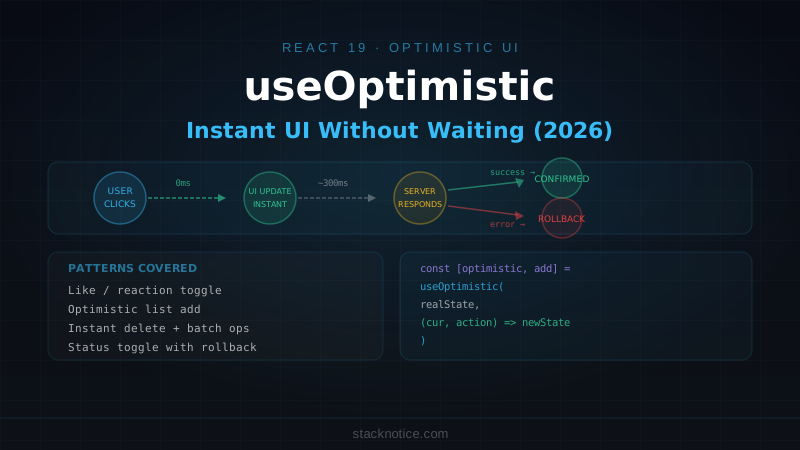
Before React 19, optimistic UI meant manually maintaining a separate "pending" list, rolling it back on errors, and keeping it synchronized with server state. Error-prone enough that most teams skipped it.
useOptimistic makes it a pattern you can actually ship:
import { useOptimistic, useState, useTransition } from 'react'

interface Comment {
  id: string
  text: string
  authorId: string
  pending?: boolean
}

function CommentThread({
  postId,
  initialComments,
  currentUserId,
}: {
  postId: string
  initialComments: Comment[]
  currentUserId: string
}) {
  const [comments, setComments] = useState(initialComments)
  const [isPending, startTransition] = useTransition()
  const [optimisticComments, addOptimisticComment] = useOptimistic(
    comments,
    (current: Comment[], newComment: Comment) => [...current, newComment]
  )

  async function handleSubmit(formData: FormData) {
    const text = formData.get('text') as string
    if (!text.trim()) return

    const tempId = `temp-${Date.now()}`
    const optimistic: Comment = {
      id: tempId,
      text,
      authorId: currentUserId,
      pending: true,
    }

    startTransition(async () => {
      addOptimisticComment(optimistic)

      try {
        const saved = await addComment({ postId, text })
        setComments((prev) => [...prev, saved])
      } catch {
        // Optimistic state reverts automatically when the transition completes
        // and setComments is never called with the optimistic data
      }
    })
  }

  return (
    <div>
      <ul className="space-y-2 mb-4">
        {optimisticComments.map((c) => (
          <li key={c.id} className={c.pending ? 'opacity-60' : ''}>
            {c.text}
            {c.pending && <span className="text-xs text-gray-400 ml-2">posting...</span>}
          </li>
        ))}
      </ul>
      <form action={handleSubmit} className="flex gap-2">
        <input name="text" className="flex-1 border rounded px-3 py-1" />
        <SubmitButton label="Post" />
      </form>
    </div>
  )
}
The optimistic update appears instantly. If the network call succeeds, setComments replaces it with the real data. If it fails, the transition completes without a setComments call, and the optimistic state reverts. You don't write rollback logic.
Right use cases: likes, follows, bookmarks, comment posting, toggles — interactions where success is the overwhelmingly likely outcome and a 200–500ms delay feels sluggish.
Wrong use cases: payments, destructive actions, anything where showing incorrect state has real consequences.
The use() Hook — Promises in Render
use() is the odd one in the React 19 API list. Unlike every other hook, it can be called conditionally and inside loops — it breaks the Rules of Hooks in a very specific and intentional way.
It takes a Promise or a Context object and either returns the value or suspends the component until it's available.
import { use, Suspense } from 'react'
import { type Session } from '@/lib/auth'

// Promise created outside the component so it's stable across renders
const sessionPromise = fetchCurrentSession()

function UserGreeting() {
  const session = use(sessionPromise) // suspends until resolved

  if (!session) return <span>Sign in</span>
  return <span>Welcome, {session.user.name}</span>
}

function Header() {
  return (
    <header>
      <Suspense fallback={<span>Loading...</span>}>
        <UserGreeting />
      </Suspense>
    </header>
  )
}
The component genuinely suspends — no useEffect, no empty initial state, no double render. The Suspense boundary shows the fallback until the promise resolves.
use() with Context works conditionally, which was previously impossible with useContext:
function ConditionallyThemedButton({
  useTheme = true,
  children,
}: {
  useTheme?: boolean
  children: React.ReactNode
}) {
  if (useTheme) {
    const theme = use(ThemeContext) // valid — conditional use() is allowed
    return (
      <button style={{ background: theme.primary, color: theme.text }}>
        {children}
      </button>
    )
  }

  return <button>{children}</button>
}If you create the promise inside the component body, it recreates on every render and the component never resolves. Create it at the module level or in a parent component and pass it as a prop.
ref as a Prop — forwardRef Is Gone
forwardRef was one of those APIs that worked but felt like a workaround. Wrapping your entire component in a higher-order function just to pass a ref through was verbose and confusing for new team members.
React 19 makes ref a regular prop:
// Before React 19
import { forwardRef } from 'react'

const TextInput = forwardRef<HTMLInputElement, { label: string; placeholder?: string }>(
  function TextInput({ label, placeholder }, ref) {
    return (
      <div>
        <label className="block text-sm font-medium mb-1">{label}</label>
        <input ref={ref} placeholder={placeholder} className="border rounded px-3 py-2" />
      </div>
    )
  }
)
// React 19 — ref is just a prop
interface TextInputProps {
label: string
placeholder?: string
ref?: React.Ref<HTMLInputElement>
}
function TextInput({ label, placeholder, ref }: TextInputProps) {
return (
<div>
<label className="block text-sm font-medium mb-1">{label}</label>
<input ref={ref} placeholder={placeholder} className="border rounded px-3 py-2" />
</div>
)
}
// Usage is identical
function SearchBar() {
const inputRef = useRef<HTMLInputElement>(null)
return (
<form onSubmit={() => inputRef.current?.blur()}>
<TextInput label="Search" placeholder="Type to search..." ref={inputRef} />
</form>
)
}forwardRef still works — no breaking change. But it's considered legacy and new components should use ref as a prop directly.
Ref Cleanup Functions
Ref callbacks can now return cleanup functions, matching the useEffect pattern:
function AutoResizeTextarea() {
  return (
    <textarea
      ref={(node) => {
        if (!node) return

        const observer = new ResizeObserver(() => {
          node.style.height = 'auto'
          node.style.height = `${node.scrollHeight}px`
        })
        observer.observe(node)

        // Cleanup runs when the element unmounts
        return () => observer.disconnect()
      }}
      className="w-full border rounded p-2"
    />
  )
}
Previously, return values from ref callbacks were ignored and you'd have to store the observer in a useRef to disconnect it on unmount. Now it's handled inline.
Document Metadata from Components
React 19 supports <title>, <meta>, and <link> tags rendered anywhere in your component tree. React hoists them to <head> and deduplicates automatically.
interface Article {
  title: string
  description: string
  slug: string
  publishedAt: string
}

function ArticlePage({ article }: { article: Article }) {
  return (
    <main>
      <title>{article.title} — Your Site</title>
      <meta name="description" content={article.description} />
      <meta property="og:title" content={article.title} />
      <meta property="og:description" content={article.description} />
      <link
        rel="canonical"
        href={`https://yoursite.com/articles/${article.slug}`}
      />

      <article>
        <h1>{article.title}</h1>
        {/* content */}
      </article>
    </main>
  )
}
No react-helmet, no next/head. React handles deduplication — if multiple components render <title>, the deepest one in the tree wins.
If you're on Next.js: the metadata export and generateMetadata function are still the recommended pattern. They integrate with Next.js static generation and handle more edge cases. React's native metadata is more useful for SPAs, React Router setups, and non-Next.js apps.
The React Compiler — The Other Half of the Story
The React Compiler reached 1.0 stable in late 2025. It sits between React 19's API changes and your component code: it analyzes your components at build time and inserts the memoization that developers used to write manually.
The practical impact: useMemo, useCallback, and React.memo are mostly unnecessary for performance optimization now. The compiler figures out what to memoize and when.
// Before Compiler
const expensiveList = useMemo(
  () => items.filter(isActive).sort(byDate),
  [items]
)

const handleChange = useCallback((id: string) => {
  setSelected(id)
}, [setSelected])

// With Compiler — write this instead
const expensiveList = items.filter(isActive).sort(byDate)

function handleChange(id: string) {
  setSelected(id)
}
// The compiler inserts the memoization automatically
This doesn't mean useMemo is deleted — there are still cases where you need explicit control over when something recomputes. But the default changed: you write plain code and the compiler optimizes it. You reach for useMemo when you need to override the compiler's decision, not as a performance default.
Enable it in your Next.js project:
// next.config.mjs
const nextConfig = {
  experimental: {
    reactCompiler: true,
  },
}
For the full breakdown, see the React Compiler guide.
Breaking Changes Worth Knowing
These are removed in React 19 — not deprecated, removed:
ReactDOM.render — use createRoot:
// Removed
ReactDOM.render(<App />, document.getElementById('root'))

// Correct
import { createRoot } from 'react-dom/client'
createRoot(document.getElementById('root')!).render(<App />)
String refs — use useRef:
// Removed — this was a React 0.x pattern
ref="myInput"

// Correct
const myInput = useRef<HTMLInputElement>(null)
<input ref={myInput} />
Legacy Context API — contextTypes, childContextTypes, getChildContext are removed. Use createContext + useContext.
propTypes runtime validation — the runtime check is removed from the React package. TypeScript is the correct replacement, and you're using TypeScript.
Run the official codemod to handle most of this automatically:
npx codemod react/19/migration-recipeMigration: Next.js Users Are Already There
If you're on Next.js 15, you're already running stable React 19. The App Router has been built on React Server Components since Next.js 13 — stable React 19 is the official version of what you've been using.
For non-Next.js projects:
npm install react@latest react-dom@latest
npm install --save-dev @types/react@latest @types/react-dom@latest
Run the codemod, fix what it flags, and check your third-party component libraries — most major ones (shadcn/ui, Radix, etc.) have been React 19 compatible since early 2025.
What the Day-to-Day Looks Like in 2026
The combination of React 19 + Compiler + Next.js 15 App Router changes which patterns you reach for most:
Forms: useActionState + Server Actions. No useState for form state, no separate API routes for simple mutations.
Optimistic UI: useOptimistic for toggles and list mutations. No custom rollback logic.
Memoization: The compiler handles it. useMemo/useCallback only when you need explicit control.
Data in components: Server Components for async data. use() for client-side promise unwrapping with Suspense.
Refs: Plain prop, no forwardRef. Cleanup from ref callbacks instead of useEffect.
The volume of ceremony code dropped significantly. The patterns that used to require 50 lines now require 20. That's the real change from React 19 in production — not any single API, but the cumulative reduction in boilerplate across every component you write.
Related: React Compiler — Is useMemo Dead? · Server Actions complete guide · React anti-patterns that hurt performance