The App Router has been stable since Next.js 13.4, is the default in Next.js 14 and 15, and it's still confusing the hell out of people. Not because it's bad — it's genuinely powerful — but because it requires a different mental model than the Pages Router.
This guide covers every file convention, every routing pattern, the right mental model for Server vs Client Components, and the common mistakes that trip people up. By the end, the App Router will make sense.
The Core Mental Model
Everything in the App Router starts with understanding the component tree and where it runs:
layout.tsx (Server Component — runs on server)
  loading.tsx (Server Component — Suspense boundary)
    error.tsx (Client Component — error boundary)
      page.tsx (Server Component by default)
        'use client' components (Client Components)
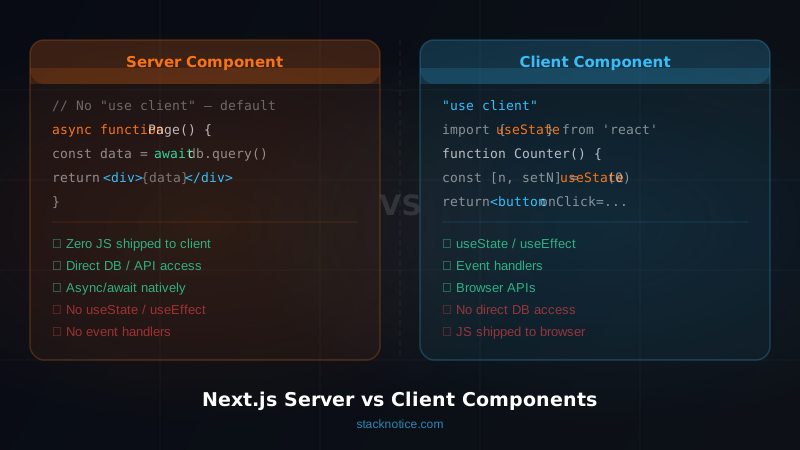
The key insight: Server Components are the default. They render on the server, have direct access to databases and APIs, and send only HTML + minimal JS to the browser. When you need interactivity, you opt into Client Components with 'use client'.
This is the opposite of the Pages Router, where everything was client-first and you called APIs explicitly.
File Conventions
The App Router uses special filenames to create routing behavior:
| File | Purpose |
|---|---|
page.tsx | The route's UI — makes the URL accessible |
layout.tsx | Wraps pages, persists across navigation |
loading.tsx | Automatic Suspense boundary while data loads |
error.tsx | Error boundary for the segment |
not-found.tsx | 404 UI for the segment |
template.tsx | Like layout but remounts on navigation |
route.ts | API route (no UI) |
default.tsx | Fallback for parallel routes |
These files must be in the app/ directory. You can nest them in any folder.
Layouts
Layouts wrap their children and persist across navigations — they don't re-render when you navigate between pages that share the same layout.
// app/layout.tsx — root layout (required)
import type { Metadata } from 'next'

export const metadata: Metadata = {
  title: { template: '%s | StackNotice', default: 'StackNotice' },
  description: 'Full-stack React guides',
}

export default function RootLayout({
  children,
}: {
  children: React.ReactNode
}) {
  return (
    <html lang="en">
      <body>
        <nav>/* persistent nav */</nav>
        {children}
        <footer>/* persistent footer */</footer>
      </body>
    </html>
  )
}
Nested layouts:
// app/dashboard/layout.tsx
export default function DashboardLayout({
  children,
}: {
  children: React.ReactNode
}) {
  return (
    <div className="flex">
      <aside>/* dashboard sidebar */</aside>
      <main className="flex-1">{children}</main>
    </div>
  )
}
Any page under /dashboard/* gets this sidebar. The root layout wraps it all. Layouts compose automatically.
When to Use template.tsx Instead
template.tsx works like layout.tsx but remounts on every navigation. Use it when you need to run effects on route change:
// app/dashboard/template.tsx
'use client'

import { useEffect } from 'react'
import { trackPageView } from '@/lib/analytics'

export default function DashboardTemplate({
  children,
}: {
  children: React.ReactNode
}) {
  useEffect(() => {
    trackPageView()
  }, [])

  return <>{children}</>
}
If layout.tsx works, prefer it — it's more performant. Use template.tsx only when you need lifecycle behavior on navigation.
Loading UI
loading.tsx automatically wraps your page.tsx in a Suspense boundary. While the page fetches data, the loading UI shows:
// app/dashboard/loading.tsx
export default function DashboardLoading() {
  return (
    <div className="space-y-4">
      <div className="h-8 w-48 animate-pulse rounded bg-gray-200" />
      <div className="h-4 w-full animate-pulse rounded bg-gray-200" />
      <div className="h-4 w-3/4 animate-pulse rounded bg-gray-200" />
    </div>
  )
}
// app/dashboard/page.tsx
export default async function DashboardPage() {
// This fetch is what triggers loading.tsx while it resolves
const data = await fetchDashboardData()
return <Dashboard data={data} />
}The loading UI appears instantly, before the data resolves. No useEffect, no manual loading state.
Granular Loading with Suspense
For granular control within a page, use <Suspense> directly:
// app/dashboard/page.tsx
import { Suspense } from 'react'
import { MetricsSkeleton } from '@/components/skeletons'

export default function DashboardPage() {
  return (
    <div>
      <h1>Dashboard</h1>
      {/* Fast data loads instantly */}
      <Suspense fallback={<MetricsSkeleton />}>
        <SlowMetrics />
      </Suspense>
      {/* Very slow data has its own boundary */}
      <Suspense fallback={<p>Loading chart...</p>}>
        <RevenueChart />
      </Suspense>
    </div>
  )
}

// These are Server Components that fetch independently
async function SlowMetrics() {
  const metrics = await fetchMetrics() // takes ~300ms
  return <MetricsGrid data={metrics} />
}

async function RevenueChart() {
  const data = await fetchRevenueData() // takes ~800ms
  return <Chart data={data} />
}
Both SlowMetrics and RevenueChart fetch in parallel. Each shows its own skeleton independently as it resolves. This is streaming — the page sends HTML incrementally as each piece resolves.
Error Boundaries
error.tsx catches errors thrown in the segment's page.tsx or child Server Components. It must be a Client Component because it uses React error boundary APIs:
// app/dashboard/error.tsx
'use client'

import { useEffect } from 'react'

export default function DashboardError({
  error,
  reset,
}: {
  error: Error & { digest?: string }
  reset: () => void
}) {
  useEffect(() => {
    // Log to error reporting service
    console.error(error)
  }, [error])

  return (
    <div className="flex flex-col items-center gap-4 p-8">
      <h2 className="text-xl font-bold">Something went wrong</h2>
      <p className="text-gray-500">{error.message}</p>
      <button
        onClick={reset}
        className="rounded bg-blue-500 px-4 py-2 text-white"
      >
        Try again
      </button>
    </div>
  )
}
reset() re-renders the segment — useful for transient errors like network failures.
For errors in the root layout, create app/global-error.tsx (it must include <html> and <body>).
Route Groups — (parentheses)
Route groups let you organize files without affecting the URL. Wrap a folder name in parentheses:
app/
  (marketing)/
    page.tsx        → /
    about/page.tsx  → /about
    layout.tsx      → marketing layout (no auth)
  (app)/
    dashboard/
      page.tsx      → /dashboard
    settings/
      page.tsx      → /settings
    layout.tsx      → app layout (with auth check)
Both groups share the same URL namespace, but they can have different layouts. This is the cleanest way to have a public marketing layout and an authenticated app layout without URL segments.
// app/(app)/layout.tsx
import { redirect } from 'next/navigation'
import { auth } from '@/lib/auth'

export default async function AppLayout({
  children,
}: {
  children: React.ReactNode
}) {
  const session = await auth()

  if (!session) {
    redirect('/login')
  }

  return (
    <div>
      <AppNavbar user={session.user} />
      {children}
    </div>
  )
}
Every route under (app)/ is automatically protected. No middleware needed for this use case.
Dynamic Routes
app/
  blog/
    [slug]/
      page.tsx      → /blog/any-slug
    [...slug]/
      page.tsx      → /blog/a/b/c (catch-all)
    [[...slug]]/
      page.tsx      → /blog and /blog/a/b/c (optional catch-all)
// app/blog/[slug]/page.tsx
import { notFound } from 'next/navigation'

type Props = {
  params: Promise<{ slug: string }>
}

export default async function BlogPost({ params }: Props) {
  const { slug } = await params  // params is now async in Next.js 15

  const post = await getPost(slug)

  if (!post) {
    notFound()  // triggers not-found.tsx
  }

  return <Article post={post} />
}

// Generate static pages at build time
export async function generateStaticParams() {
  const posts = await getAllPosts()
  return posts.map(post => ({ slug: post.slug }))
}
Note: in Next.js 15, params and searchParams are now Promises — you must await them.
Parallel Routes — @folder
Parallel routes render multiple pages in the same layout simultaneously. Each parallel slot is a folder prefixed with @:
app/
  layout.tsx
  page.tsx
  @modal/
    login/
      page.tsx    → rendered alongside main content
    default.tsx   → shown when no modal is active
  @sidebar/
    page.tsx
    default.tsx
// app/layout.tsx
export default function Layout({
  children,
  modal,
  sidebar,
}: {
  children: React.ReactNode
  modal: React.ReactNode
  sidebar: React.ReactNode
}) {
  return (
    <div>
      {sidebar}
      <main>{children}</main>
      {modal}
    </div>
  )
}
default.tsx in each slot renders when the slot has no active match — essential to prevent layout crashes when navigating.
Intercepting Routes — (.) syntax
Intercepting routes let you display a route's content inside the current page (like a modal) while keeping the full page accessible via direct URL.
app/
  photos/
    [id]/
      page.tsx          → /photos/1 (full page)
  @modal/
    (.)photos/[id]/
      page.tsx          → /photos/1 when navigated client-side (modal)
    default.tsx
// app/@modal/(.)photos/[id]/page.tsx
import { Modal } from '@/components/modal'
import { PhotoView } from '@/components/photo-view'

export default async function PhotoModal({
  params,
}: {
  params: Promise<{ id: string }>
}) {
  const { id } = await params
  const photo = await getPhoto(id)

  return (
    <Modal>
      <PhotoView photo={photo} />
    </Modal>
  )
}
The intercepting route conventions:
(.)— intercept segment at the same level(..)— intercept segment one level up(..)(..)— two levels up(...)— intercept from the rootapp/
Metadata API
Static metadata:
// app/blog/[slug]/page.tsx
import type { Metadata } from 'next'

export const metadata: Metadata = {
  title: 'My Post',
  description: 'Post description',
}
Dynamic metadata (for pages that need fetched data):
export async function generateMetadata({
  params,
}: {
  params: Promise<{ slug: string }>
}): Promise<Metadata> {
  const { slug } = await params
  const post = await getPost(slug)

  return {
    title: post.title,
    description: post.excerpt,
    openGraph: {
      title: post.title,
      description: post.excerpt,
      images: [{ url: post.coverImage }],
    },
    twitter: {
      card: 'summary_large_image',
    },
  }
}
Next.js deduplicates the data fetch — if generateMetadata and the page component both call getPost(slug), it's fetched once.
Data Fetching in Server Components
Server Components can fetch data directly — no useEffect, no API route:
// app/dashboard/page.tsx
import { db } from '@/lib/db'
import { auth } from '@/lib/auth'

export default async function DashboardPage() {
  const session = await auth()

  // Direct DB access in the component
  const posts = await db.post.findMany({
    where: { authorId: session.user.id },
    orderBy: { createdAt: 'desc' },
    take: 10,
  })

  return <PostList posts={posts} />
}
For caching control:
// Cache for 60 seconds, then revalidate
const data = await fetch('https://api.example.com/data', {
  next: { revalidate: 60 }
})

// Never cache (always fresh)
const data = await fetch('https://api.example.com/data', {
  cache: 'no-store'
})

// Cache indefinitely (static)
const data = await fetch('https://api.example.com/data', {
  cache: 'force-cache'
})
Server vs Client Components: Decision Rules
Use a Server Component when:
- Fetching data
- Accessing environment variables or secrets
- The component has no interactivity
- You want to reduce client bundle size
Use a Client Component when:
- Using
useState,useReducer,useEffect - Using browser APIs (
window,localStorage,document) - Using event handlers (
onClick,onChange) - Using third-party libraries that use browser APIs
// Server Component — data fetching, no client needed
async function UserProfile({ userId }: { userId: string }) {
  const user = await getUser(userId)
  return (
    <div>
      <h1>{user.name}</h1>
      {/* Pass data down to a Client Component */}
      <FollowButton userId={userId} initialFollowing={user.isFollowing} />
    </div>
  )
}

// Client Component — interactivity only
'use client'
function FollowButton({ userId, initialFollowing }: { userId: string; initialFollowing: boolean }) {
  const [following, setFollowing] = useState(initialFollowing)

  async function toggle() {
    setFollowing(!following)
    await toggleFollow(userId)
  }

  return (
    <button onClick={toggle}>
      {following ? 'Unfollow' : 'Follow'}
    </button>
  )
}
The pattern: Server Components fetch, Client Components handle interactivity. Pass data from server to client via props.
Common Mistakes
Mistake 1: Wrapping everything in 'use client'
The most common anti-pattern. When you add 'use client' to a component, all its imports also become client-side — you lose the Server Component benefits and bundle-size savings.
Instead, push 'use client' down to the leaf components that actually need it.
Mistake 2: Not awaiting params in Next.js 15
// ❌ Next.js 14 style — breaks in 15
export default function Page({ params }: { params: { slug: string } }) {
  const { slug } = params  // wrong — params is a Promise in Next.js 15
}

// ✅ Next.js 15 style
export default async function Page({ params }: { params: Promise<{ slug: string }> }) {
  const { slug } = await params  // correct
}
Mistake 3: Forgetting default.tsx for parallel routes
Without default.tsx in a parallel route slot, navigating to a route that doesn't match the slot causes a 404. Always add a default.tsx to every @slot folder.
Mistake 4: Fetching in Client Components when Server Components would work
// ❌ Old habits — fetching in a client component
'use client'
function Posts() {
  const [posts, setPosts] = useState([])
  useEffect(() => {
    fetch('/api/posts').then(r => r.json()).then(setPosts)
  }, [])
  return <PostList posts={posts} />
}

// ✅ Server Component — simpler, faster, no loading state
async function Posts() {
  const posts = await db.post.findMany()
  return <PostList posts={posts} />
}
Related Patterns
The App Router pairs cleanly with React Server Actions for mutations — no API routes needed for most CRUD operations. For authentication that works with the App Router's layout-based protection, see the Next.js auth guide. For full-stack patterns combining all these concepts, check out the Next.js full-stack tutorial.