The single most common mistake developers make when migrating to the Next.js 14 App Router is stamping "use client" on everything the moment they hit an error. Within a week their app is functionally identical to a Create React App project — all the bundle bloat, zero of the server rendering benefits.
Server Components are the biggest shift in React's architecture in years. They're also deeply misunderstood. This guide cuts through the confusion with concrete rules, real patterns, and the composition technique that unlocks the full performance upside. For the latest changes in the Next.js 16 release, see what's new in Next.js 16.
What Are Server Components?
Server Components are the default in the Next.js 14 App Router. Every file you create inside app/ is a Server Component unless you opt out.
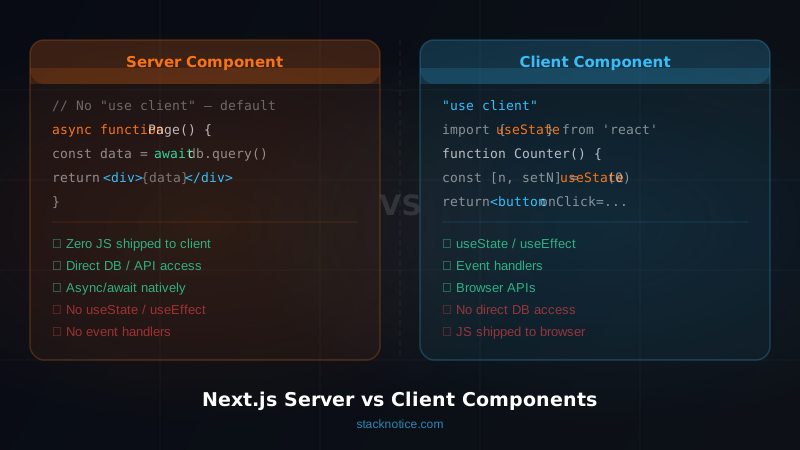
They run exclusively on the server — during the request, or at build time for static pages. The key properties:
- Zero JavaScript shipped to the browser — the component renders to HTML on the server, that's it
- Direct access to server resources — databases, file system, environment secrets, internal APIs
- Async by default — you can
awaitanything at the top level of the component - No browser APIs — no
window, nodocument, no event listeners
// app/blog/page.tsx — this is a Server Component by default
import { db } from '@/lib/db'

export default async function BlogPage() {
  // Direct database query — no API route needed, no useEffect, no loading state
  const posts = await db.post.findMany({
    orderBy: { createdAt: 'desc' },
    take: 10,
  })

  return (
    <main>
      <h1>Latest Posts</h1>
      <ul>
        {posts.map((post) => (
          <li key={post.id}>{post.title}</li>
        ))}
      </ul>
    </main>
  )
}
No useState. No useEffect. No fetch('/api/posts'). The data is fetched on the server before the HTML is sent to the browser. The client receives rendered markup, not a blank div waiting for JavaScript to hydrate it.
This is what makes Server Components powerful — and it's exactly what you throw away when you reflexively add "use client".
What Are Client Components?
Client Components are what React developers have always worked with — components that run in the browser and can use the full React feature set.
You opt in with the "use client" directive at the top of the file:
'use client'

import { useState } from 'react'

export function Counter() {
  const [count, setCount] = useState(0)

  return (
    <button onClick={() => setCount((c) => c + 1)}>
      Count: {count}
    </button>
  )
}
Client Components support — note that with React 19's new APIs, hooks like useActionState and useOptimistic also belong here:
- React hooks —
useState,useEffect,useReducer,useContext,useRef,useTransition - Event handlers —
onClick,onChange,onSubmit, everything DOM-related - Browser APIs —
window,localStorage,navigator,IntersectionObserver - Third-party libraries that rely on browser state or DOM manipulation
The cost: their code ships to the browser. Every Client Component adds to your JavaScript bundle. And the entire component subtree below a "use client" boundary — unless you pass server-rendered children — also runs on the client.
The Mental Model: A Decision Tree
Stop asking "should this be a Server or Client Component?" and start asking a single question: does this component need to interact with the user or the browser?
Does the component need...
  ├── onClick, onChange, onSubmit?          → Client Component
  ├── useState, useReducer, useContext?     → Client Component
  ├── useEffect, useRef, useCallback?       → Client Component
  ├── Browser APIs (window, localStorage)? → Client Component
  ├── A third-party library with hooks?    → Client Component
  │
  └── None of the above?                   → Server Component
       ├── Fetching data?                  → async Server Component
       ├── Accessing env secrets?          → Server Component
       └── Pure rendering / layout?        → Server Component
If it's purely about rendering data, structure, or layout — it's a Server Component. If it reacts to users, it's a Client Component.
A good rule of thumb: push the "use client" boundary as far down the component tree as possible. The smaller the Client Component, the better.
Server Components in Practice
Async Data Fetching Directly in Components
One of the biggest wins with Server Components is eliminating entire layers of abstraction. No more API routes just to proxy your own database.
// app/dashboard/page.tsx
import { db } from '@/lib/db'
import { auth } from '@/lib/auth'
import { redirect } from 'next/navigation'

export default async function DashboardPage() {
  const session = await auth()

  if (!session) {
    redirect('/login')
  }

  // Query the database directly — credentials never leave the server
  const [user, recentOrders, stats] = await Promise.all([
    db.user.findUnique({ where: { id: session.userId } }),
    db.order.findMany({
      where: { userId: session.userId },
      orderBy: { createdAt: 'desc' },
      take: 5,
    }),
    db.order.aggregate({
      where: { userId: session.userId },
      _sum: { total: true },
      _count: true,
    }),
  ])

  return (
    <div>
      <h1>Welcome back, {user?.name}</h1>
      <p>Total orders: {stats._count}</p>
      <p>Total spent: ${stats._sum.total}</p>
      {/* Pass data as props to pure rendering components */}
      <RecentOrdersList orders={recentOrders} />
    </div>
  )
}
Notice Promise.all — these three queries run in parallel. Compare this to the traditional Client Component pattern where you'd fetch them sequentially in useEffect, each waiting for the previous to complete.
Accessing Environment Secrets Safely
// app/pricing/page.tsx
// Server Component — NEXT_PUBLIC_ prefix is NOT needed for secret keys

async function getStripePrices() {
  const stripe = new Stripe(process.env.STRIPE_SECRET_KEY!) // safe — server only
  return stripe.prices.list({ active: true })
}

export default async function PricingPage() {
  const { data: prices } = await getStripePrices()

  return <PricingTable prices={prices} />
}
The Stripe secret key never touches the browser. You don't need NEXT_PUBLIC_ prefix and you don't need to create an API route to protect it.
Server Components with Static Rendering
// app/blog/[slug]/page.tsx
import { getPostBySlug, getAllPosts } from '@/lib/blog'
import { notFound } from 'next/navigation'
import { MDXRemote } from 'next-mdx-remote/rsc'

// Generates static pages at build time
export async function generateStaticParams() {
  const posts = await getAllPosts()
  return posts.map((post) => ({ slug: post.slug }))
}

export default async function BlogPostPage({
  params,
}: {
  params: { slug: string }
}) {
  const post = await getPostBySlug(params.slug)

  if (!post) notFound()

  return (
    <article>
      <h1>{post.title}</h1>
      <MDXRemote source={post.content} />
    </article>
  )
}
This page is statically generated at build time. Zero server cost per request. Zero JavaScript for the article content. This is the performance ceiling you can hit — and you can't get there if the page is a Client Component.
Client Components in Practice
Client Components shine for anything interactive. Keep them small and targeted.
Form with Validation
'use client'

import { useState } from 'react'
import { useRouter } from 'next/navigation'

export function ContactForm() {
  const [status, setStatus] = useState<'idle' | 'loading' | 'success' | 'error'>('idle')
  const router = useRouter()

  async function handleSubmit(event: React.FormEvent<HTMLFormElement>) {
    event.preventDefault()
    setStatus('loading')

    const formData = new FormData(event.currentTarget)

    const res = await fetch('/api/contact', {
      method: 'POST',
      body: JSON.stringify({
        name: formData.get('name'),
        email: formData.get('email'),
        message: formData.get('message'),
      }),
      headers: { 'Content-Type': 'application/json' },
    })

    if (res.ok) {
      setStatus('success')
      router.push('/thank-you')
    } else {
      setStatus('error')
    }
  }

  return (
    <form onSubmit={handleSubmit}>
      <input name="name" required />
      <input name="email" type="email" required />
      <textarea name="message" required />
      <button type="submit" disabled={status === 'loading'}>
        {status === 'loading' ? 'Sending...' : 'Send Message'}
      </button>
      {status === 'error' && <p>Something went wrong. Try again.</p>}
    </form>
  )
}
Component Using Browser APIs
'use client'

import { useEffect, useState } from 'react'

export function ScrollProgress() {
  const [progress, setProgress] = useState(0)

  useEffect(() => {
    function handleScroll() {
      const scrollTop = window.scrollY
      const docHeight = document.documentElement.scrollHeight - window.innerHeight
      setProgress(docHeight > 0 ? (scrollTop / docHeight) * 100 : 0)
    }

    window.addEventListener('scroll', handleScroll, { passive: true })
    return () => window.removeEventListener('scroll', handleScroll)
  }, [])

  return (
    <div
      className="fixed top-0 left-0 h-1 bg-orange-500 z-50 transition-all"
      style={{ width: `${progress}%` }}
    />
  )
}
This uses window and an event listener — Server Component impossible. It's also a perfect example of a component that should be small and isolated so it doesn't drag the rest of the page into the client bundle.
The Composition Pattern
This is the pattern most developers miss, and it's the key to keeping your bundle small while still having interactivity.
The rule: Server Components can be passed as children to Client Components.
When you pass a Server Component as children, it renders on the server. The Client Component receives already-rendered HTML as its children prop. The children's code never ships to the browser.
The Wrong Way
// ❌ Wrong — this makes the entire layout a Client Component
// just because the sidebar needs a toggle

'use client'

import { useState } from 'react'
import { db } from '@/lib/db' // ERROR — can't use db in a Client Component

export default function Layout({ children }: { children: React.ReactNode }) {
  const [sidebarOpen, setSidebarOpen] = useState(false)

  // This won't even work — you can't await in a Client Component
  // const posts = await db.post.findMany()

  return (
    <div>
      <button onClick={() => setSidebarOpen(!sidebarOpen)}>Toggle</button>
      {sidebarOpen && <Sidebar />}
      {children}
    </div>
  )
}
The Right Way: Composition
// components/sidebar-wrapper.tsx
'use client'

import { useState } from 'react'

// This Client Component accepts children — those children can be Server Components
export function SidebarWrapper({ children }: { children: React.ReactNode }) {
  const [open, setOpen] = useState(true)

  return (
    <div className="flex">
      <button onClick={() => setOpen(!open)}>Toggle Sidebar</button>
      {open && <aside className="w-64">{children}</aside>}
    </div>
  )
}
// app/layout.tsx — Server Component (default)
import { SidebarWrapper } from '@/components/sidebar-wrapper'
import { db } from '@/lib/db'
export default async function Layout({ children }: { children: React.ReactNode }) {
// This runs on the server — db access is fine
const navItems = await db.category.findMany({ where: { active: true } })
return (
<SidebarWrapper>
{/* This is a Server Component rendered on the server,
passed as children to the Client Component */}
<nav>
{navItems.map((item) => (
<a key={item.id} href={`/category/${item.slug}`}>{item.name}</a>
))}
</nav>
</SidebarWrapper>
)
}The SidebarWrapper controls open/close state on the client. The nav items are fetched on the server and rendered as HTML. The database query code never reaches the browser. This is the composition pattern.
Common Mistakes and How to Fix Them
Mistake 1: Wrapping Everything in "use client"
// ❌ Before — entire page becomes a Client Component
'use client'

import { useEffect, useState } from 'react'

export default function ProductPage({ params }: { params: { id: string } }) {
  const [product, setProduct] = useState(null)

  useEffect(() => {
    fetch(`/api/products/${params.id}`)
      .then((r) => r.json())
      .then(setProduct)
  }, [params.id])

  if (!product) return <div>Loading...</div>

  return <div>{product.name}</div>
}
// ✅ After — async Server Component, no loading state needed
import { db } from '@/lib/db'
import { notFound } from 'next/navigation'
export default async function ProductPage({ params }: { params: { id: string } }) {
const product = await db.product.findUnique({ where: { id: params.id } })
if (!product) notFound()
return <div>{product.name}</div>
}Mistake 2: Importing Server-Only Code into Client Components
// ❌ Before — leaks server code to the browser, causes runtime errors
'use client'

import { db } from '@/lib/db' // Prisma, pg, etc. — breaks in the browser

export function UserCard({ userId }: { userId: string }) {
  // This will error — Node.js modules aren't available in the browser
  const user = db.user.findUnique({ where: { id: userId } })
  // ...
}
// ✅ After — fetch from an API route, or better: keep UserCard as a Server Component
// and only extract the interactive bits as Client Components
// app/users/[id]/page.tsx (Server Component)
import { db } from '@/lib/db'
import { FollowButton } from '@/components/follow-button' // Client Component
export default async function UserPage({ params }: { params: { id: string } }) {
const user = await db.user.findUnique({ where: { id: params.id } })
return (
<div>
<h1>{user?.name}</h1>
<FollowButton userId={params.id} /> {/* Only this is interactive */}
</div>
)
}Mistake 3: Context Providers Swallowing the Entire App
// ❌ Before — all children become Client Components
'use client'

export function Providers({ children }: { children: React.ReactNode }) {
  return (
    <ThemeProvider>
      <AuthProvider>
        <CartProvider>
          {children}
        </CartProvider>
      </AuthProvider>
    </ThemeProvider>
  )
}

// app/layout.tsx
import { Providers } from '@/components/providers'

export default function RootLayout({ children }: { children: React.ReactNode }) {
  return (
    <html>
      <body>
        <Providers>{children}</Providers> {/* children CAN still be Server Components */}
      </body>
    </html>
  )
}
This is actually fine — the children prop preserves the Server Component boundary. The subtlety is in what you put inside Providers directly (not via children). As long as page content is passed as children, it remains a Server Component.
Mistake 4: useEffect for Data That Should Be Server-Fetched
// ❌ Before — waterfall: page loads, JS executes, then fetch starts
'use client'

export function RecentPosts() {
  const [posts, setPosts] = useState([])

  useEffect(() => {
    fetch('/api/posts').then((r) => r.json()).then(setPosts)
  }, [])

  return <PostList posts={posts} />
}
// ✅ After — data is in the HTML from the first byte
// components/recent-posts.tsx (Server Component — no "use client")
import { db } from '@/lib/db'
export async function RecentPosts() {
const posts = await db.post.findMany({ take: 5, orderBy: { date: 'desc' } })
return <PostList posts={posts} />
}Mistake 5: Forgetting That "use client" Propagates Down
// ❌ Subtle mistake — HeavyChart is a Client Component
// because its parent file has "use client"
'use client'

import { HeavyChart } from '@/components/heavy-chart' // ships to bundle
import { DataTable } from '@/components/data-table'   // also ships to bundle

export function Dashboard() {
  const [filter, setFilter] = useState('week')
  // ...
}
// ✅ Better — isolate the interactive part
'use client'
// Only the filter controls need to be a Client Component
export function FilterControls({
value,
onChange,
}: {
value: string
onChange: (v: string) => void
}) {
return (
<select value={value} onChange={(e) => onChange(e.target.value)}>
<option value="week">This Week</option>
<option value="month">This Month</option>
</select>
)
}// app/dashboard/page.tsx (Server Component)
import { FilterControls } from '@/components/filter-controls'
import { HeavyChart } from '@/components/heavy-chart'
import { DataTable } from '@/components/data-table'
export default async function DashboardPage() {
const data = await fetchDashboardData()
return (
<div>
{/* FilterControls is Client, but HeavyChart and DataTable are Server */}
<HeavyChart data={data.chart} />
<DataTable rows={data.rows} />
</div>
)
}Performance Impact
The performance difference between a Server-heavy and Client-heavy architecture is measurable and significant.
Bundle Size
A Client Component ships its full dependency tree to the browser. A Server Component ships zero bytes.
Consider a page that displays a user's order history. In a Client Component approach:
- React Query or SWR (~13 KB)
- date-fns for formatting (~7 KB)
- A currency formatting library (~4 KB)
- The component code itself (~2 KB)
Total: ~26 KB just for one data-display component. As a Server Component, the browser receives zero bytes for any of this — the formatting runs on the server and the output is plain HTML strings.
At scale, this compounds. A typical dashboard built Client-Component-first ships 200–400 KB of JavaScript. The same dashboard built with Server Components as the default typically ships 40–80 KB.
Waterfall vs Parallel Fetching
The traditional Client Component data fetching pattern creates request waterfalls:
- Browser downloads HTML (blank page)
- Browser downloads and parses JavaScript bundle
- React hydrates the component tree
useEffectfires, starting the data fetch- Data arrives, component re-renders with content
The user sees blank content for steps 1–4. On a slow connection that's 2–4 seconds of nothing.
With Server Components and Promise.all, all data fetches run in parallel on the server before the first byte is sent to the browser:
// All three queries run simultaneously — total time = slowest query
const [user, orders, recommendations] = await Promise.all([
  db.user.findUnique({ where: { id: userId } }),
  db.order.findMany({ where: { userId } }),
  getRecommendations(userId),
])
For generateStaticParams pages, this work happens once at build time — the user just gets pre-rendered HTML with zero wait.
When to Use loading.tsx and Suspense
Even with Server Components, you can get streaming HTML with loading.tsx and React Suspense:
// app/dashboard/loading.tsx — shown instantly while the page data loads
export default function DashboardLoading() {
  return <DashboardSkeleton />
}
// app/dashboard/page.tsx
import { Suspense } from 'react'
import { RecentOrders } from '@/components/recent-orders'
import { StatsCard } from '@/components/stats-card'
export default function DashboardPage() {
return (
<div>
{/* StatsCard loads independently — doesn't block the rest */}
<Suspense fallback={<StatsSkeleton />}>
<StatsCard />
</Suspense>
{/* RecentOrders loads independently */}
<Suspense fallback={<OrdersSkeleton />}>
<RecentOrders />
</Suspense>
</div>
)
}Each Suspense boundary streams independently. The user sees content as it becomes available rather than waiting for the slowest query.
Quick Decision Table
| Need | Use |
|---|---|
| Fetch data from DB / API | Server Component |
| Access environment secrets | Server Component |
| Read filesystem / cache | Server Component |
| Pure layout / structure | Server Component |
useState / useReducer | Client Component |
useEffect / useRef | Client Component |
onClick / onChange | Client Component |
window / localStorage / browser APIs | Client Component |
| Third-party library with hooks | Client Component |
| Context Provider | Client Component (pass children from server) |
| Form submission handling | Server Action (preferred) or Client Component |
FAQ
Can Server Components use React context?
No. Server Components can't read from or provide React context — context is a browser-side concept tied to the component tree during hydration. If you need to share data across multiple Server Components in a tree, pass it as props or use a caching layer like unstable_cache or React.cache.
Can I use async/await in a Client Component?
Not at the top level of the component function itself. async component functions are only supported for Server Components. In Client Components, use useEffect + setState or a data-fetching library like SWR or React Query for async operations.
What happens when I import a Server Component into a Client Component file?
You can't — Next.js will throw a build error. Server-only APIs (like db access) can't run in the browser. You can, however, pass a Server Component as children to a Client Component — that's the composition pattern.
Does "use client" mean the component only renders in the browser?
No — this is a common misconception. Client Components still render on the server for the initial HTML (SSR). The "use client" directive means the component's JavaScript is shipped to the browser for hydration and interactivity. Server Components, by contrast, never ship JavaScript to the browser at all.
How do I share data between a Server Component and its Client Component children?
Pass data as props. Server Components can pass serializable data (strings, numbers, plain objects, arrays) to Client Components as props. You can't pass non-serializable values like functions, class instances, or Dates (serialize them first). For deeply nested sharing, consider passing data through the component tree or using URL state.
Conclusion
The App Router's Server Component model isn't just an optimization you can bolt on later — it's the architecture Next.js is designed around. The mental shift is straightforward once it clicks: default to Server Components, opt into Client Components only for interactivity and browser APIs, and use the composition pattern to keep Client boundaries small.
The developers shipping the fastest Next.js apps in 2026 aren't doing anything exotic — they're following three rules consistently. The React Compiler further reduces boilerplate by auto-memoizing components, complementing these patterns nicely:
- Start every component as a Server Component
- Add
"use client"only when the decision tree demands it - Pass server-rendered content as
childrento Client Components rather than converting parent components
Apply these rules and you'll ship measurably faster pages, smaller bundles, and simpler data fetching code — without a single useEffect for data you already have on the server.
If you want to go deeper, Next.js's official docs on the Data Fetching patterns are worth a read alongside this guide. And if React Server Actions are the next piece you want to understand — that's where form handling and mutations get their own upgrade.