For years, React performance optimization meant one thing: manual memoization. You wrapped expensive values in useMemo, stable callbacks in useCallback, and components in React.memo — and you hoped you got the dependency arrays right. Miss a dependency, get a stale value. Add a redundant one, defeat the optimization.
React Compiler 1.0 — stable since October 2025 — makes that entire pattern obsolete. It analyzes your components at build time and applies memoization automatically, with zero runtime overhead and no dependency arrays to maintain. The compiler ships built-in to Next.js 15 as an experimental flag (one line to enable), and works the same with Vite, Remix, and plain React.
Here's what changes, what you can delete, and what still needs manual work.
What React Compiler Actually Does
React Compiler is a build-time transform. It reads your component code, builds a dependency graph of every value and function, determines what can change between renders, and rewrites the output to include the correct memoization — equivalent to useMemo/useCallback/React.memo, but generated automatically and verified correct.
The key guarantee: the compiler only transforms components that follow the Rules of React. If a component mutates props, reads external mutable state without tracking it, or calls hooks conditionally — the compiler skips that component entirely. It does not attempt to fix broken code. Either it transforms correctly, or it leaves the component untouched.
This matters because it means enabling the compiler is safe by default. The worst outcome is a component that isn't optimized yet, not one that behaves incorrectly.
Before and After
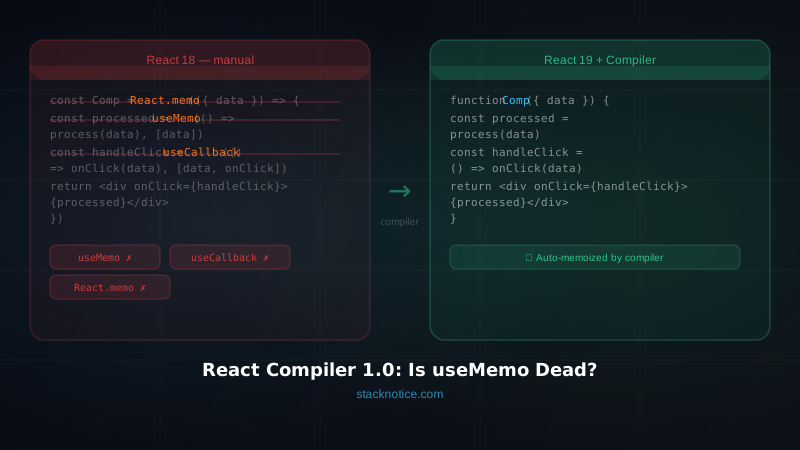
A standard React 18 component with manual memoization:
import React, { useMemo, useCallback, memo } from 'react'

type Item = { id: string; name: string; price: number }

const ItemList = memo(function ItemList({
  items,
  taxRate,
  onSelect,
}: {
  items: Item[]
  taxRate: number
  onSelect: (id: string) => void
}) {
  const withTax = useMemo(
    () => items.map((item) => ({ ...item, total: item.price * (1 + taxRate) })),
    [items, taxRate]
  )

  const handleSelect = useCallback(
    (id: string) => {
      onSelect(id)
    },
    [onSelect]
  )

  return (
    <ul>
      {withTax.map((item) => (
        <li key={item.id} onClick={() => handleSelect(item.id)}>
          {item.name} — ${item.total.toFixed(2)}
        </li>
      ))}
    </ul>
  )
})

export default ItemList
Three imports for optimization primitives. Two dependency arrays to keep synchronized. The memo() wrapper around the entire component. And if you forget any one of these, the optimization silently breaks.
The same component with React Compiler:
type Item = { id: string; name: string; price: number }

function ItemList({
  items,
  taxRate,
  onSelect,
}: {
  items: Item[]
  taxRate: number
  onSelect: (id: string) => void
}) {
  const withTax = items.map((item) => ({ ...item, total: item.price * (1 + taxRate) }))

  const handleSelect = (id: string) => {
    onSelect(id)
  }

  return (
    <ul>
      {withTax.map((item) => (
        <li key={item.id} onClick={() => handleSelect(item.id)}>
          {item.name} — ${item.total.toFixed(2)}
        </li>
      ))}
    </ul>
  )
}

export default ItemList
No imports. No wrappers. No dependency arrays. The compiler detects that withTax depends on items and taxRate, and that handleSelect depends on onSelect, and inserts the correct memoization at build time.
The rendered output is identical. The performance characteristics are identical. The code is significantly smaller.
How to Enable It
Next.js 15
Next.js 15 ships with built-in support — no extra package needed:
// next.config.mjs
const nextConfig = {
  experimental: {
    reactCompiler: true,
  },
}

export default nextConfig
That's the entire setup. Next.js enables the compiler for all components in your project on the next build.
To run in annotation mode first (compiler processes only components you explicitly opt in):
const nextConfig = {
  experimental: {
    reactCompiler: {
      compilationMode: 'annotation',
    },
  },
}
Then opt in individual components with the 'use memo' directive:
'use memo'  // compiler processes this file

export function MyComponent() {
  // ...
}
This is useful for gradual rollout on large existing projects — test the compiler on a subset of components before enabling it globally.
Vite
npm install --save-dev vite-plugin-react-compiler// vite.config.ts
import { defineConfig } from 'vite'
import react from '@vitejs/plugin-react'
import ReactCompiler from 'vite-plugin-react-compiler'
export default defineConfig({
plugins: [
ReactCompiler(),
react(),
],
})Babel (Remix, CRA, custom setups)
npm install --save-dev babel-plugin-react-compilerAdd it as the first plugin in your Babel config:
{
  "plugins": [
    "babel-plugin-react-compiler",
    ["@babel/plugin-transform-react-jsx", { "runtime": "automatic" }]
  ]
}
Verify It's Working
After enabling, open React DevTools. Components transformed by the compiler show a "Memo ✨" badge in the component tree.
Or run the healthcheck tool against your codebase:
npx react-compiler-healthcheckIt reports how many components are compiler-compatible versus how many have Rules of React violations that need fixing first.
What You Can Now Delete
With the compiler enabled, most manual memoization is redundant. Work through these systematically:
useMemo for computed values:
// Before — delete this
const sorted = useMemo(() => [...items].sort(compareFn), [items, compareFn])

// After — the compiler handles it
const sorted = [...items].sort(compareFn)
useCallback for stable function references:
// Before — delete this
const handleSubmit = useCallback(async (data: FormData) => {
  await submitForm(data)
  router.push('/success')
}, [submitForm, router])

// After — just write the function
const handleSubmit = async (data: FormData) => {
  await submitForm(data)
  router.push('/success')
}
React.memo component wrappers:
// Before — delete this
export default memo(ProductCard)

// After
export default ProductCard
Optimization imports:
// Before
import React, { useMemo, useCallback, memo } from 'react'

// After — in React 19 you don't need the React import at all
// (no import needed for basic components)
Do this incrementally. Removing one pattern at a time and running your tests is safer than deleting everything at once. The compiler handles the transition — leaving useMemo in place while you migrate is harmless.
What the Compiler Doesn't Handle
Async operations and data fetching. The compiler memoizes synchronous values. fetch(), database queries, and anything async still needs proper caching — TanStack Query, SWR, or React Server Components with cache().
External mutable state. If your component reads from a mutable global singleton or a ref that changes outside React's control, the compiler may skip it. These are the components you'll see flagged by react-compiler-healthcheck.
Rules of React violations. Mutating props, calling hooks conditionally, performing side effects during render — the compiler leaves these components alone. Fix the violations and the compiler picks them up automatically.
useRef for DOM access. Refs aren't a memoization primitive — they're a stable container for mutable values. The compiler doesn't change how they work.
Complex global state selectors. If you use Zustand or Redux Toolkit with complex derived selectors (like Reselect), those library-level optimizations may still apply. The compiler handles component-level memoization; it doesn't replace selector libraries for expensive cross-component derived state.
Web Workers for CPU-intensive work. If the first computation is expensive (parsing large datasets, running simulations), memoization prevents redundant recalculations but can't make the first run faster. Heavy CPU work belongs in a Worker regardless of the compiler.
React 19 Features Worth Knowing Alongside the Compiler
React Compiler 1.0 ships as part of the React 19 ecosystem. A few features that change component patterns significantly:
Activity component — hides/shows subtrees without unmounting. Preserves state and avoids remounting costs:
<Activity mode={tab === 'settings' ? 'visible' : 'hidden'}>
  <SettingsPanel />
</Activity>
The SettingsPanel stays mounted when hidden — no re-initialization cost when switching back.
Server Components — render on the server, ship zero client JavaScript, compose naturally with Client Components. For data-heavy views, moving to a Server Component eliminates client-side fetching, loading states, and much of the memoization that was protecting against expensive rerenders.
useActionState — replaces the pattern of useState + useTransition + error state for form mutations:
const [state, action, isPending] = useActionState(submitAction, initialState)Server Actions — async functions callable directly from Client Components, eliminating manual API route wiring for mutations.
The compiler pairs best with the new data patterns: keep components as Server Components where possible (no client state, no memoization needed), and let the compiler handle the interactive Client Component layer.
Migration Strategy for Existing Projects
The recommended path — don't try to do it all at once:
-
Enable in annotation mode — set
compilationMode: 'annotation'and add'use memo'to a few non-critical components. Watch for any behavior changes. -
Run the healthcheck —
npx react-compiler-healthcheckgives you a baseline. Fix Rules of React violations before switching to full mode. -
Enable globally — remove the
annotationmode config. The compiler processes everything it can safely transform. -
Delete manual memoization — work file by file. Run your test suite after each batch. Check React DevTools to confirm components show "Memo ✨".
-
Clean up imports — once the hooks are gone, clean up the import lines.
On a well-structured codebase, steps 1–3 take an afternoon. Steps 4–5 can be done over weeks as you touch each file for other reasons.
FAQ
Does it work with TypeScript? Yes. The compiler operates after TypeScript compilation — type checking is unaffected. You keep full type safety.
Does it work with React Native? Yes, via the Babel plugin (Metro bundler). Configure it the same way as the Babel option above.
What happens to my existing useMemo calls?
Nothing breaks. The compiler works alongside them. Existing calls are redundant but harmless — remove them at your own pace.
Is it production-ready? Yes. Meta has run it in production across Facebook and Instagram since the beta. The 1.0 release in October 2025 is the stable, non-experimental version.
Does it make every component faster?
It prevents unnecessary re-renders — the same guarantee useMemo/useCallback/React.memo provide, but applied automatically and correctly. Components that were already fast stay fast. Components where you had missed a memo() wrapper get fixed.
The practical result of enabling React Compiler is a codebase that's smaller, easier to read, and correctly optimized everywhere — not just in the components where someone remembered to add useMemo. For the full picture on React 19's other new patterns, see React 19: What's Actually New and What You Can Use Now. For Server Components and the data fetching patterns that work alongside the compiler, see Next.js Server vs Client Components.
Enable it with one config line. Run the healthcheck. Start deleting boilerplate.