Authentication is one of those things that sounds simple until you're debugging session tokens at 2am. Clerk takes the entire problem off your plate — hosted auth UI, session management, user storage, webhooks, and organizations — and plugs into Next.js with minimal setup.
This guide covers Clerk v6 with Next.js 15 App Router from zero to a production-ready auth system.
Why Clerk over Auth.js (NextAuth)
Both are valid choices, but they solve different problems:
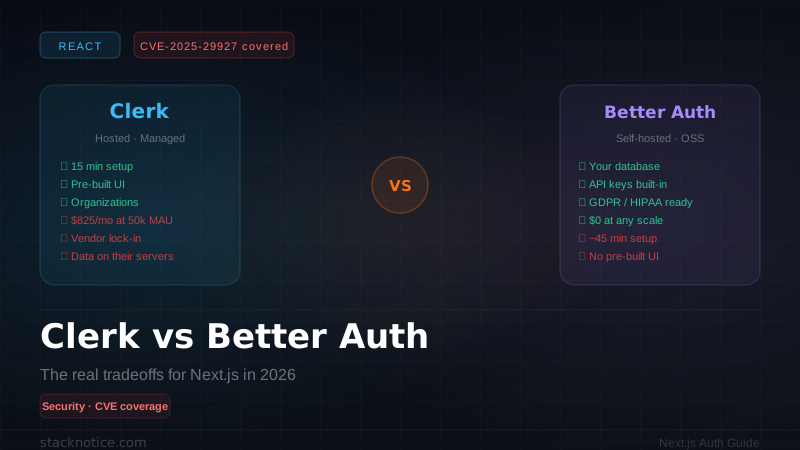
| Clerk | Auth.js | |
|---|---|---|
| Setup time | ~10 minutes | 1-2 hours |
| User storage | Hosted (Clerk manages) | Your database |
| Pre-built UI | Yes (customizable) | No (build your own) |
| Organizations/teams | Built-in | Manual |
| MFA, passkeys, social | Built-in | Manual |
| Webhooks | Built-in | Manual |
| Cost | Free tier (10k MAU) | Free (self-hosted) |
| Control | Less | Full |
Clerk is the right choice when you want auth done in an hour and don't need to own every byte of user data. Auth.js is right when you need full database control or a very custom auth flow. We covered NextAuth setup in our auth guide if you need that path.
Installation
npm install @clerk/nextjsCreate a free account at clerk.com, create an application, and copy your API keys. Add them to .env.local:
NEXT_PUBLIC_CLERK_PUBLISHABLE_KEY=pk_test_...
CLERK_SECRET_KEY=sk_test_...
Optionally set custom redirects:
NEXT_PUBLIC_CLERK_SIGN_IN_URL=/sign-in
NEXT_PUBLIC_CLERK_SIGN_UP_URL=/sign-up
NEXT_PUBLIC_CLERK_AFTER_SIGN_IN_URL=/dashboard
NEXT_PUBLIC_CLERK_AFTER_SIGN_UP_URL=/dashboard
ClerkProvider in the root layout
Wrap your entire app:
// app/layout.tsx
import { ClerkProvider } from '@clerk/nextjs'

export default function RootLayout({ children }: { children: React.ReactNode }) {
  return (
    <ClerkProvider>
      <html lang="en">
        <body>{children}</body>
      </html>
    </ClerkProvider>
  )
}
Middleware — protect routes
Create middleware.ts in the project root:
// middleware.ts
import { clerkMiddleware, createRouteMatcher } from '@clerk/nextjs/server'

const isPublicRoute = createRouteMatcher([
  '/',
  '/sign-in(.*)',
  '/sign-up(.*)',
  '/blog(.*)',
  '/api/webhooks(.*)',
])

export default clerkMiddleware(async (auth, req) => {
  if (!isPublicRoute(req)) {
    await auth.protect()  // redirects to sign-in if not authenticated
  }
})

export const config = {
  matcher: [
    '/((?!_next|[^?]*\\.(?:html?|css|js(?!on)|jpe?g|webp|png|gif|svg|ttf|woff2?|ico|csv|docx?|xlsx?|zip|webmanifest)).*)',
    '/(api|trpc)(.*)',
  ],
}
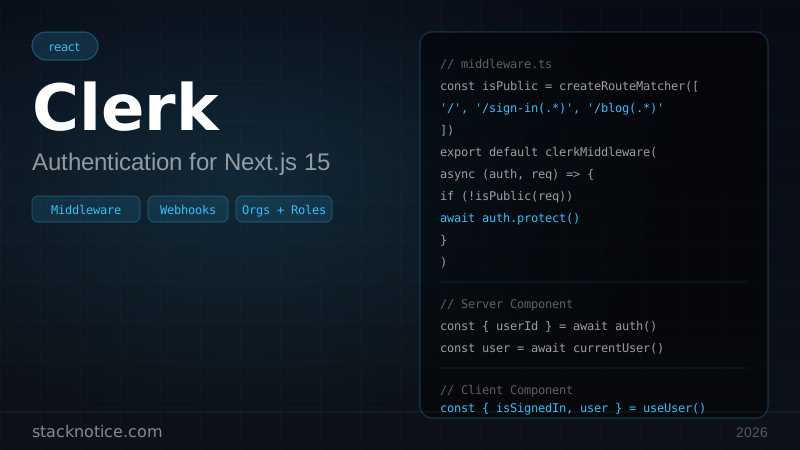
createRouteMatcher accepts glob patterns. auth.protect() redirects unauthenticated users to your sign-in URL automatically.
For more granular control:
export default clerkMiddleware(async (auth, req) => {
  // Protect only admin routes
  if (isAdminRoute(req)) {
    const { userId } = await auth()
    if (!userId) {
      return auth.redirectToSignIn()
    }
    // Check role
    const { sessionClaims } = await auth()
    if (sessionClaims?.metadata?.role !== 'admin') {
      return Response.redirect(new URL('/dashboard', req.url))
    }
  }

  if (!isPublicRoute(req)) {
    await auth.protect()
  }
})
Auth in Server Components
Use auth() for lightweight auth checks (userId, sessionId):
// app/dashboard/page.tsx
import { auth } from '@clerk/nextjs/server'
import { redirect } from 'next/navigation'

export default async function DashboardPage() {
  const { userId } = await auth()

  if (!userId) {
    redirect('/sign-in')
  }

  // Fetch user-specific data
  const posts = await db.posts.findMany({ where: { authorId: userId } })

  return <PostList posts={posts} />
}
Use currentUser() when you need the full user object:
import { currentUser } from '@clerk/nextjs/server'

export default async function ProfilePage() {
  const user = await currentUser()
  // user.firstName, user.emailAddresses, user.imageUrl, etc.

  return (
    <div>
      <img src={user?.imageUrl} alt="Avatar" />
      <h1>{user?.firstName} {user?.lastName}</h1>
      <p>{user?.emailAddresses[0].emailAddress}</p>
    </div>
  )
}
auth() is faster (reads from the session token). currentUser() makes a network call to Clerk's API. Use auth() unless you specifically need profile data.
Auth in Client Components
'use client'

import { useUser, useAuth, UserButton } from '@clerk/nextjs'

export function Navbar() {
  const { isLoaded, isSignedIn, user } = useUser()

  if (!isLoaded) return <div>Loading...</div>

  return (
    <nav>
      <a href="/">Home</a>
      {isSignedIn ? (
        <>
          <span>Hello, {user.firstName}</span>
          <UserButton afterSignOutUrl="/" />
        </>
      ) : (
        <a href="/sign-in">Sign in</a>
      )}
    </nav>
  )
}
useAuth() gives you userId, sessionId, and getToken() for raw JWT access:
'use client'

import { useAuth } from '@clerk/nextjs'

export function ApiCallExample() {
  const { userId, getToken } = useAuth()

  const callExternalApi = async () => {
    const token = await getToken()
    const res = await fetch('https://api.example.com/data', {
      headers: { Authorization: `Bearer ${token}` },
    })
    return res.json()
  }
}
Auth in API routes and Server Actions
// app/api/posts/route.ts
import { auth } from '@clerk/nextjs/server'
import { NextResponse } from 'next/server'

export async function POST(req: Request) {
  const { userId } = await auth()

  if (!userId) {
    return NextResponse.json({ error: 'Unauthorized' }, { status: 401 })
  }

  const body = await req.json()
  const post = await db.posts.create({ ...body, authorId: userId })
  return NextResponse.json(post)
}
In Server Actions:
// app/actions/posts.ts
'use server'

import { auth } from '@clerk/nextjs/server'

export async function createPost(data: PostInput) {
  const { userId } = await auth()
  if (!userId) throw new Error('Unauthorized')

  return db.posts.create({ ...data, authorId: userId })
}
Pre-built sign-in/sign-up pages
The fastest way — let Clerk render the UI:
// app/sign-in/[[...sign-in]]/page.tsx
import { SignIn } from '@clerk/nextjs'

export default function SignInPage() {
  return (
    <main className="flex min-h-screen items-center justify-center">
      <SignIn />
    </main>
  )
}
// app/sign-up/[[...sign-up]]/page.tsx
import { SignUp } from '@clerk/nextjs'
export default function SignUpPage() {
return (
<main className="flex min-h-screen items-center justify-center">
<SignUp />
</main>
)
}The [[...sign-in]] catch-all route handles all Clerk's internal flows (email verification, OAuth callbacks, etc.).
Customize appearance with the appearance prop:
<SignIn
  appearance={{
    elements: {
      rootBox: 'mx-auto',
      card: 'shadow-none border border-gray-200',
      headerTitle: 'text-2xl font-bold',
      formButtonPrimary: 'bg-blue-600 hover:bg-blue-700',
    },
  }}
/>
Syncing users to your database with webhooks
When users sign up or update their profile, you want to sync that data to your database. Clerk fires webhooks for these events.
Install svix for webhook signature verification:
npm install svix// app/api/webhooks/clerk/route.ts
import { Webhook } from 'svix'
import { headers } from 'next/headers'
import { WebhookEvent } from '@clerk/nextjs/server'
import { db } from '@/db'
export async function POST(req: Request) {
const WEBHOOK_SECRET = process.env.CLERK_WEBHOOK_SECRET
if (!WEBHOOK_SECRET) {
return new Response('Missing webhook secret', { status: 500 })
}
// Verify the webhook signature
const headerPayload = await headers()
const svix_id = headerPayload.get('svix-id')
const svix_timestamp = headerPayload.get('svix-timestamp')
const svix_signature = headerPayload.get('svix-signature')
if (!svix_id || !svix_timestamp || !svix_signature) {
return new Response('Missing svix headers', { status: 400 })
}
const payload = await req.json()
const body = JSON.stringify(payload)
const wh = new Webhook(WEBHOOK_SECRET)
let evt: WebhookEvent
try {
evt = wh.verify(body, {
'svix-id': svix_id,
'svix-timestamp': svix_timestamp,
'svix-signature': svix_signature,
}) as WebhookEvent
} catch {
return new Response('Invalid signature', { status: 400 })
}
// Handle the events
switch (evt.type) {
case 'user.created':
await db.users.create({
id: evt.data.id,
email: evt.data.email_addresses[0].email_address,
firstName: evt.data.first_name,
lastName: evt.data.last_name,
imageUrl: evt.data.image_url,
createdAt: new Date(evt.data.created_at),
})
break
case 'user.updated':
await db.users.update({
where: { id: evt.data.id },
data: {
email: evt.data.email_addresses[0].email_address,
firstName: evt.data.first_name,
lastName: evt.data.last_name,
imageUrl: evt.data.image_url,
},
})
break
case 'user.deleted':
if (evt.data.id) {
await db.users.delete({ where: { id: evt.data.id } })
}
break
}
return new Response(null, { status: 200 })
}Add the webhook in Clerk's dashboard pointing to https://yourdomain.com/api/webhooks/clerk, and add the signing secret to your environment as CLERK_WEBHOOK_SECRET.
Roles and permissions with metadata
Clerk stores custom data in publicMetadata (set server-side only) and unsafeMetadata (editable by client). Use publicMetadata for roles:
// Set a user's role (server-side only — use in a webhook or admin action)
import { clerkClient } from '@clerk/nextjs/server'

const client = await clerkClient()
await client.users.updateUserMetadata(userId, {
  publicMetadata: { role: 'admin' },
})
Read the role in middleware or Server Components:
// middleware.ts
const { sessionClaims } = await auth()
const role = sessionClaims?.metadata?.role as string | undefined

if (isAdminRoute(req) && role !== 'admin') {
  return Response.redirect(new URL('/dashboard', req.url))
}
Add metadata to the session token (so it's available without an extra API call). In Clerk's dashboard, go to Sessions → Customize session token and add:
{
  "metadata": "{{user.public_metadata}}"
}
Now sessionClaims?.metadata?.role is available in middleware with zero API calls.
Organizations and multi-tenancy
Clerk has first-class support for teams/workspaces:
// Show org switcher
import { OrganizationSwitcher } from '@clerk/nextjs'

export function AppHeader() {
  return (
    <header>
      <OrganizationSwitcher
        afterCreateOrganizationUrl="/dashboard"
        afterSelectOrganizationUrl="/dashboard"
      />
      <UserButton />
    </header>
  )
}
Check org membership in Server Components:
const { orgId, orgRole } = await auth()

if (!orgId) redirect('/select-org')
if (orgRole !== 'org:admin') redirect('/unauthorized')
This is particularly useful for building SaaS applications where each organization has its own data. You store orgId alongside your records and filter by it.
Testing authenticated routes locally
For local development, Clerk provides a test mode. You can also use @clerk/testing for end-to-end tests:
// In Playwright/Cypress tests
import { clerk } from '@clerk/testing/playwright'

test('dashboard loads for signed-in user', async ({ page }) => {
  await clerk.signIn({
    page,
    signInParams: {
      strategy: 'password',
      identifier: 'test@example.com',
      password: 'TestPassword123!',
    },
  })

  await page.goto('/dashboard')
  await expect(page.getByText('Welcome back')).toBeVisible()
})
Common mistakes
Mistake 1: Not adding /api/webhooks(.*) to public routes
Webhook endpoints must be public — Clerk can't authenticate itself to call them.
Mistake 2: Using currentUser() in middleware
Middleware runs on the Edge runtime. Use auth() only — currentUser() makes a Node.js API call.
Mistake 3: Reading userId from useUser() in Server Components
useUser() is a Client Component hook. In Server Components, always use auth() from @clerk/nextjs/server.
Mistake 4: Forgetting the catch-all route segments
Sign-in and sign-up pages must use [[...sign-in]] (double brackets with spread) — not [sign-in]. The double brackets make the route optional, which Clerk needs for its internal flows.
Next steps
Clerk handles the hard parts of authentication. Pair it with:
- React Hook Form + Zod for profile update forms
- Drizzle ORM to store user data synced from webhooks
- Next.js App Router for route-level protection patterns
Clerk's free tier covers 10,000 monthly active users — more than enough for most apps before you start worrying about cost.