Most Claude Max vs Pro comparisons focus on the wrong things: conversation limits, image generation, priority access. If you use Claude Code for actual development work, none of that is the real question.
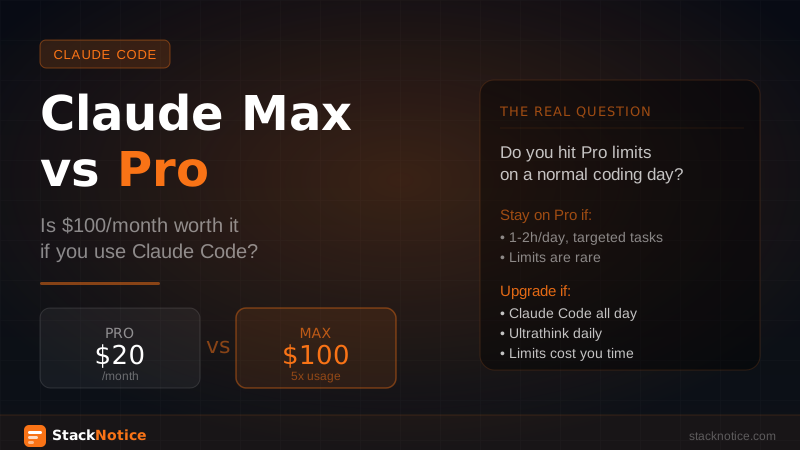
The real question is whether you hit Pro limits on a normal coding day — and if so, by how much. That calculation is different for every developer, and nobody has done it honestly for coding-heavy usage.
This is that article.
The plans, plainly
Claude Pro — $20/month Higher usage limits than the free tier, access to all current Claude models (Sonnet, Opus), and priority access during busy periods. For most developers who use Claude occasionally or for shorter sessions, Pro is the right default.
Claude Max — $100/month (5x) Five times the usage of Pro. Same models, same features. The multiplier applies to the underlying usage limits, not to any capability difference.
Claude Max — $200/month (20x) Twenty times Pro usage. Aimed at extremely heavy users or teams routing significant volume through one account.
No capability differences between the tiers. You get the same Sonnet, the same Opus, the same extended thinking. The only difference is how much you can use before hitting the wall.
How Claude Code actually burns tokens
This is where most comparisons miss the point. Claude Code is not a chat interface where you send short messages and get short replies. A typical Claude Code session involves:
- Reading files: Claude reads your codebase context. A medium Next.js project with 50-100 files means Claude processes hundreds of thousands of characters just to understand what it's working with.
- Multi-step reasoning: Claude doesn't just write the code once. It plans, writes, checks, refines. Each step is a round trip.
- Long outputs: A complete feature implementation might span 500-2000 lines of code across multiple files.
- Tool use: Every file read, every bash command, every edit adds to the context window.
A 2-hour focused Claude Code session on a real feature — adding auth, building an API endpoint, refactoring a module — can easily consume what would take days of casual chat usage. The token math is completely different.
The extended thinking multiplier
If you use extended thinking (ultrathink), your usage goes up significantly. When you run:
claude --extended-thinking "architect the payment flow for this SaaS"Claude spends a large amount of its context on reasoning before it responds. You get much better results on complex problems, but you're trading tokens for quality. On hard architectural decisions or tricky bugs, this is absolutely worth it. But it does mean you hit Pro limits faster.
Extended thinking on a complex problem can use 3-5x the tokens of a regular response for the same task. If you use ultrathink regularly, you're effectively getting 3-5x less headroom from your subscription tier.
When do you actually hit Pro limits?
Anthropic doesn't publish exact token counts per tier — the limits are usage-based and can vary. But the pattern is consistent enough that you can calibrate against your own behavior:
You'll stay comfortably within Pro if:
- You use Claude Code for 1-2 hours per day max
- Most sessions are targeted: "fix this bug", "write this function", "review this PR"
- You don't use extended thinking daily
- You work on smaller codebases or isolated files
You'll hit Pro limits regularly if:
- Claude Code is your primary coding environment (4+ hours/day)
- You work on large codebases where Claude needs to read many files for context
- You use extended thinking on complex problems several times a week
- You run multi-step agentic workflows with subagents
You'll hit Pro limits hard if:
- You use Claude Code all day, every day
- You run parallel Claude sessions simultaneously
- Extended thinking is your default mode, not your exception
- You're using Claude Code for a team and routing multiple devs through one account
The breakeven calculation
Here's the honest math. The question is not "is Max worth it in general" but "how many productive hours does Max give me back per month vs Pro?"
If you hit Pro limits twice a week and each time costs you 30-60 minutes of waiting or switching tools, that's 4-8 hours of disruption per month. At any reasonable hourly rate for a developer, $80 more per month (Pro → Max $100) pays for itself immediately.
If you hit limits once every two weeks and it's a minor inconvenience, Pro is fine.
The honest way to check: use Pro for 2-3 weeks and note every time you hit a limit. If it happens more than twice, run the math on your own time. You'll know immediately whether Max pays for itself.
Max $100 vs Max $200: when does 20x matter?
The $200 tier (20x vs Pro) is for very specific situations:
- You're a consultant or freelancer with multiple active client projects running simultaneously
- You're building and testing Claude-powered applications where you're consuming tokens through your own code
- You're doing large-scale code migrations or refactors (moving a 200k+ line codebase to TypeScript, for example)
- You run a small team and everyone codes through one Max account
For a solo developer who uses Claude Code heavily but normally, $100 is the right tier if you need to upgrade. The jump to $200 only makes sense when $100 still isn't enough — and you'll know quickly if that's you.
The API alternative
Worth mentioning because it changes the calculus for some developers. Claude Code can be configured to use your own Anthropic API key instead of your subscription credits:
export ANTHROPIC_API_KEY=sk-ant-...
claude
With API billing, you pay per token consumed. For claude-sonnet-4-5:
- Input tokens: $3 per million
- Output tokens: $15 per million
For a moderate user (1-2 hours of Claude Code per day), API billing might actually cost less than Max — or more. It depends entirely on your usage patterns and whether you're efficient with context.
The API approach makes sense if:
- Your usage is spiky (heavy some weeks, light others)
- You want exact cost visibility per session
- You're already paying for API access for other projects
The subscription approach makes sense if:
- Your usage is consistent and heavy
- You don't want to think about token costs mid-session
- Budget predictability matters
See the full API cost breakdown if you want to calculate your specific numbers.
By use case: Pro or Max?
Stay on Pro if:
- You use Claude Code for a few hours a week, not daily
- You mostly do targeted, specific tasks
- You haven't hit limits yet after a month of real usage
- You're exploring Claude Code and not fully committed yet
Upgrade to Max $100 if:
- Claude Code is your main coding environment
- You hit Pro limits at least twice a month
- You use extended thinking regularly
- Interruptions due to limits cost you real time
Consider Max $200 if:
- You're running multiple active projects simultaneously
- You've hit limits on Max $100
- You're a consultant or freelancer billing across several clients
Consider API billing if:
- Your usage is unpredictable (heavy sprints, then light weeks)
- You want per-session cost visibility
- You're building tools that also consume Claude API
What the data actually shows
The developers who get the most out of Max are the ones using Claude Code as a genuine pair programmer — not as a sophisticated autocomplete. When Claude is reading your whole codebase, reasoning about architecture, writing complete features, and running tests, the token consumption is fundamentally different from asking it to explain a function.
If your Claude Code usage looks like the dynamic workflows pattern — multi-step agentic tasks, parallel subagents, extended thinking on complex problems — Pro will limit you. Max $100 removes that constraint.
If your usage looks like "generate this function, fix this bug, explain this code," Pro is probably fine and you're spending $20/month correctly.
The honest verdict
Don't upgrade to Max because of FOMO or because you want "the best plan." Upgrade to Max if Claude Code is genuinely slowing you down because of limits.
Two weeks on Pro is enough to know. Track every interruption. If limits cost you more than an hour of productive work per month, Max $100 pays for itself in the first week. If limits are a rare minor inconvenience, save the $80.
The plan doesn't change what Claude can do. It only changes how much you can do before the wall hits.
Related: