Two developers use the same AI tool. One gets working code in 30 seconds. The other gets a broken mess and spends an hour fixing it.
The difference isn't the tool. It's the prompt.
Why most AI-generated code is bad
AI coding tools are pattern matchers with enormous context windows. Feed them a clear pattern and they complete it brilliantly. Feed them ambiguity and they invent assumptions — usually wrong ones.
The common mistakes:
- Too vague: "Add authentication to my app" — AI doesn't know your stack, your DB schema, or your conventions
- Too large: "Build me a SaaS dashboard" — AI invents architecture you didn't ask for and you spend an hour unraveling it
- No context: "Fix this bug" with no surrounding code — AI guesses at the system
- Asking for decisions: Using AI to make product or architecture choices instead of implementing ones you've already made
The fix isn't a different AI tool. It's a different way of writing prompts.
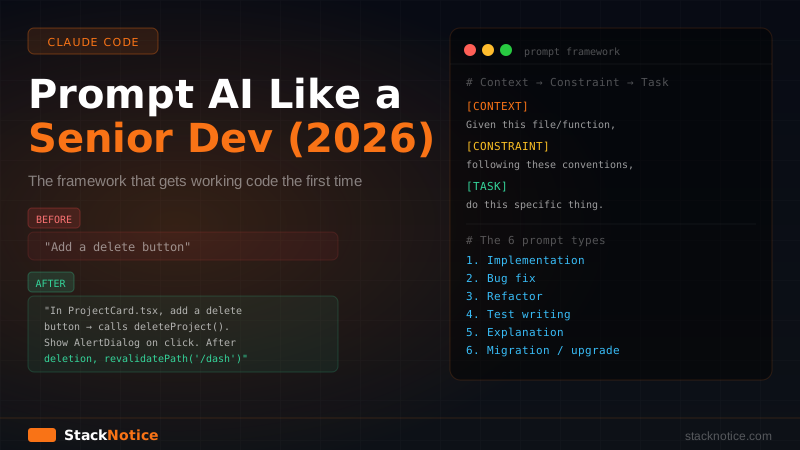
The framework: Context → Constraint → Task
Every effective coding prompt has three parts:
[CONTEXT] Given this [file/system/function],
[CONSTRAINT] following these [conventions/rules],
[TASK] do [specific, scoped thing].
Bad prompt:
"Add a delete button"
Good prompt:
"In
src/components/ProjectCard.tsx, add a delete button that calls thedeleteProjectServer Action fromsrc/actions/projects.ts. On click, show a confirmation dialog using the existingAlertDialogfrom shadcn/ui. After deletion, callrevalidatePath('/dashboard'). Follow the existing error handling pattern: catch errors and show a toast with sonner, don't throw."
Same request. The second one takes 40 extra seconds to write. The output is production-ready instead of a starting point that needs an hour of cleanup.
The 6 types of coding prompts
1. Implementation prompts
For building new features. The most common — and the easiest to get wrong.
Template:
Add [feature] to [file/component].
It should [behavior description].
Use [specific library/pattern] — not [what to avoid].
Follow the existing pattern in [example file or function].
The return/export should look like: [description].
Example:
Add pagination to `getUserProjects` in `src/lib/queries.ts`.
It should accept `{ page: number, limit: number }` and return
`{ data, total, hasMore }`.
Use Drizzle's `.offset()` and `.limit()` — not cursor-based pagination.
Follow the same select pattern as `getUserById`: select specific
columns, never `select *`.
Type the return with a `PaginatedResult<T>` generic.
2. Bug fix prompts
For debugging. The mistake is not giving enough context about expected vs actual behavior.
Template:
[function/component] in [file] is broken.
Expected: [what should happen]
Actual: [what is happening]
Error: [exact error message if any]
Relevant context: [the failing code + what it calls]
Example:
The `createProject` Server Action in `src/actions/projects.ts`
returns { error: "Unauthorized" } even when the user is logged in.

Expected: creates the project and returns { data: project }.
Actual: always hits the requireAuth() error branch.
Error: no error message, just the unauthorized return.

requireAuth() is in `src/lib/auth.ts` — I'm pasting it below.
The user is definitely authenticated (visible in Clerk dashboard).
This gives the AI the exact failure mode, the expected behavior, and points it at the right code. No guessing.
3. Refactor prompts
For improving existing code without breaking it. The critical constraint: specify what must not change.
Template:
Refactor [function/file] to [improvement goal].
Keep: [API, behavior, types that must stay identical]
Change: [what should change]
Don't: [specific things to avoid]
Example:
Refactor `UserTable.tsx` to extract the row actions into a
separate `UserTableActions` component.

Keep: the exact same props API on UserTable, same visual output,
same TypeScript types.
Change: move the action buttons and their handlers to
`UserTableActions.tsx`.
Don't: change how the parent passes data, don't add new dependencies.
4. Test writing prompts
For generating tests. Be explicit about the library, what to cover, and what to mock.
Template:
Write [unit/integration] tests for [function/component] in [file].
Testing library: [Vitest/Playwright/etc.]
Cover: [list of specific scenarios]
Mock: [external dependencies to mock and why]
Don't test: [implementation details to avoid]
Example:
Write Vitest unit tests for the `createProject` Server Action
in `src/actions/projects.ts`.

Cover:
- success case (user authorized, valid input)
- validation failure (name exceeds 50 chars)
- unauthorized user (requireAuth throws)
- database error (insert fails)

Mock: `src/lib/db.ts` (mock insert to return a fake project),
`src/lib/auth.ts` (mock requireAuth).
Don't test the actual database or actual auth — only the action's logic.
5. Explanation prompts
For understanding unfamiliar code. The mistake: asking for a general explanation.
Bad:
"Explain this code"
Good:
"Explain what this Drizzle query does. Specifically: what does
.$onConflictDoUpdatedo, and why istarget: [users.clerkId]needed? Give me a one-sentence summary of the overall effect on the database."
Focused questions get focused answers. "Explain this code" gets a wall of text that explains things you already know.
6. Migration and upgrade prompts
For updating code to a new API version.
Template:
Migrate [file] from [old API] to [new API].
Breaking changes to handle: [list specific breaking changes]
Don't change: [function signatures your app uses]
Reference: [paste the relevant migration docs]
Example:
Migrate `src/lib/auth.ts` from Clerk v4 to Clerk v5.
Breaking changes: `auth()` is now async, `clerkMiddleware` replaces
`withClerkMiddleware`, user object shape changed (name → firstName/lastName).
Don't change the signatures my app uses: requireAuth() and getAuthUser().

Here are the relevant Clerk v5 migration notes:
[paste the breaking changes section from the docs]
Context is the multiplier
The single biggest factor in output quality is context. AI tools can only use what you give them.
What to always include
- The exact file path (so Claude Code can read it directly)
- The specific function or component name — not the whole file
- One existing example of the pattern to follow
- The libraries in use — don't assume it knows your stack
- What "done" looks like (return type, visual output, behavior)
What not to include
- The entire codebase ("here's my whole project")
- Unrelated files ("here's everything in
/lib") - Requirements that span multiple systems at once
The best context is the minimum needed to be unambiguous. More context isn't better — it dilutes the signal.
With Claude Code, you don't need to paste code into the prompt. Just reference the file path: "in src/actions/projects.ts" is enough — Claude Code reads it automatically. Save the pasting for specific snippets you want to highlight.
CLAUDE.md: persistent context for free
The problem with writing good prompts is that you have to repeat your conventions every time: "use cuid2 for IDs, use Server Actions not API routes, return { data } or { error }..."
With Claude Code, you write them once:
# CLAUDE.md

## Stack
- Next.js 15 App Router, TypeScript strict mode
- Drizzle ORM + Neon (PostgreSQL)
- Clerk auth, Zod validation, shadcn/ui
- Biome for linting and formatting

## Conventions
- cuid2 for all IDs, never auto-increment integers
- Soft-delete users (deletedAt), never hard delete
- Server Actions for mutations, not API routes
- Import env from `@/lib/env`, never `process.env` directly
- `requireAuth()` at the top of every protected action
- Return `{ data }` or `{ error: string }`, never throw from actions
- Error messages lowercase, no periods

## File structure
- Server Actions: `src/actions/[feature].ts`
- DB queries: `src/lib/queries.ts`
- Shared types: `src/types/[domain].ts`
Claude Code reads this file at startup and applies these rules automatically to every prompt. You never have to say "use cuid2" again — it just does it.
Full CLAUDE.md guide with advanced patterns.
Task decomposition: the real senior dev skill
The single skill that separates developers who get great results from those who get frustrated: breaking tasks down to the right size.
Don't:
"Build me user authentication with sign-up, login, social auth, Google OAuth, password reset, email verification, session management, and account settings page."
Do:
- "Set up Clerk in Next.js 15 App Router" → done
- "Create
requireAuth()helper insrc/lib/auth.ts" → done - "Add Clerk middleware to protect
/dashboardroutes" → done - "Create account settings page at
(dashboard)/settings/page.tsx" → done
Each step is a 30-second prompt with a clear, verifiable output. The combined result is identical to the big request — but with zero hallucinated architecture, and you understand every line.
The rule: if a prompt would take more than 5 minutes for a human to fully spec out, it's two prompts.
With Claude Code subagents, you can run independent steps in parallel — decompose into tasks, assign each to a subagent, review the combined output.
What you should never ask AI
Some things AI coding tools genuinely should not decide:
Architecture decisions:
"Should I use microservices or a monolith?"
AI will give you a reasonable-sounding answer based on generic patterns. It doesn't know your team size, your traffic, your runway, or your hiring plans. Decide this yourself first, then ask AI to implement your decision.
Business logic:
"What should happen when a user cancels their subscription?"
This is a product decision with revenue implications. AI will pick something plausible. That plausible choice might be wrong for your users. Define it yourself, then implement it.
Tech stack selection:
"What database should I use?"
Read the SaaS stack decisions guide instead. Stack choices compound over months — make them based on your actual constraints, not AI's best guess at what sounds reasonable.
Security auditing:
"Is this code secure?"
AI can write secure code when you ask for it. It will not spontaneously catch every vulnerability in existing code. Use dedicated security tooling for audits.
Anything you won't read:
If you're going to copy AI output without reading it, stop. You're shipping code you don't understand. When it breaks — and it will — you won't know where to look.
Before / after: real examples
Feature implementation
Before (30 seconds to write, 45 minutes to fix):
"Add search to the projects list"
After (90 seconds to write, works first time):
"Add search to
src/app/(dashboard)/projects/page.tsx. It should use a URL search param (?q=) so search state persists on refresh. Filter the results fromgetUserProjectswherenamecontains the query (case-insensitive). Use a debounced input — debounce 300ms usinguseDebouncefromsrc/hooks/useDebounce.ts. Don't add any new dependencies."
Bug fix
Before:
"My form isn't submitting"
After:
"The
CreateProjectForminsrc/components/CreateProjectForm.tsxdoesn't call the Server Action when submitted. React Hook Form'shandleSubmitis wired up but the action (createProjectfromsrc/actions/projects.ts) never fires — confirmed with console.log at the top of the action. No browser errors. Pasting both files below."
Refactor
Before:
"Clean up this file"
After:
"The
src/lib/db.tsfile has three inline helper functions (withRetry,paginate,softDelete) that are now used in 6+ places. Extract them tosrc/lib/db-helpers.tsand update all imports. Don't change the function signatures or behavior — only the location."
The meta-skill
The best way to get better at prompting is to notice when you get a bad result and ask why.
- Output too vague → your task wasn't specific enough
- AI invented architecture → your task was too large, split it
- AI used the wrong pattern → context was missing, add the relevant file or example
- AI made a product decision → you asked for a decision instead of implementation
- Code doesn't match your stack → your conventions aren't in
CLAUDE.md
Every bad output is feedback on the prompt. Fix the prompt, not just the output — so the next prompt is better too.
The developers getting 10x from AI tools aren't using different tools or paying for a higher tier. They're spending 60 extra seconds writing a better prompt. That's the entire edge — and it compounds every single day.
For the full Claude Code workflow including hooks, automated pipelines, and multi-agent task execution, see the Claude Code subagents guide.