Every tutorial about Claude Code is written for one person. One dev, one terminal, one codebase. That's not how most software gets built.
When your entire team starts using Claude Code, new problems surface that no individual workflow article covers. Two developers ask Claude to add error handling to the same module and get incompatible implementations. One developer's CLAUDE.md says "use Zod for all validation," another's says nothing about it, so their Claude uses a different approach. The junior developer's Claude is making architectural decisions that contradict the decisions the senior dev made in a different session last week.
This is AI drift — the silent divergence of a codebase when multiple AI sessions operate without shared context. This guide covers how to prevent it, and how to structure Claude Code as a team tool rather than a collection of individual tools that happen to work on the same repository.
The Core Problem: Claude Code's Context is Per-Session
Claude Code doesn't have a shared memory across developers. When your colleague opens a new session, their Claude knows nothing about:
- The architectural decisions you made last Tuesday
- The convention your team adopted last month
- The reason you chose approach A over approach B in that module
- The patterns that the team agreed to avoid
Without addressing this, every developer's Claude is operating from a different mental model of the codebase. The code compiles, the tests pass, but the architecture fragments quietly over weeks.
The fix is making the shared context explicit — in files that every Claude session reads automatically.
The CLAUDE.md Hierarchy for Teams
Claude Code reads CLAUDE.md files from multiple locations, in order of specificity:
~/.claude/CLAUDE.md           ← Personal (each dev's preferences)
/project/CLAUDE.md            ← Project root (team-wide conventions) ← THE KEY ONE
/project/src/CLAUDE.md        ← Subdirectory overrides
/project/src/api/CLAUDE.md    ← Module-specific rules
For teams, the project-level CLAUDE.md is your single source of truth. It should be version-controlled and treated with the same care as your eslint.config.ts — because it effectively is your AI's configuration.
What Goes in the Team CLAUDE.md
# Project: [Name] — AI Conventions

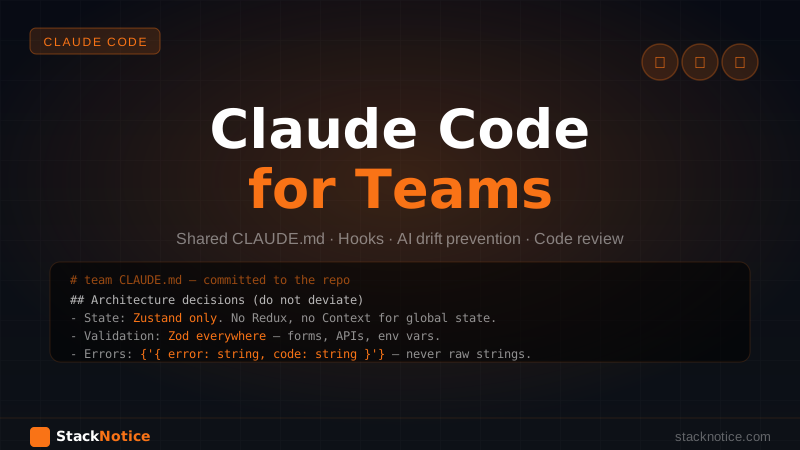
## Architecture decisions (do not deviate without team discussion)
- State management: Zustand only. No Redux, no Context for global state.
- Data fetching: TanStack Query for client-side, Next.js fetch with revalidate for RSC.
- Validation: Zod everywhere — form inputs, API responses, environment variables.
- Database: Drizzle ORM with Neon. Never write raw SQL outside of Drizzle.
- Auth: Clerk. Do not implement custom auth logic.

## Naming conventions
- Files: kebab-case. Components: PascalCase. Utilities: camelCase.
- Server Actions: verb + noun pattern (createTask, updateUser, deletePost).
- Database tables: snake_case. TypeScript types: PascalCase.

## Patterns we use
- Always use `z.inferOutput<typeof schema>` for response types — never define separately.
- All API routes validate with the shared `validateRequest` middleware in `src/lib/auth.ts`.
- Errors bubble up as structured objects `{ error: string, code: string }` — never throw raw strings.

## Patterns we explicitly avoid
- No `any` types, not even temporary ones.
- No `console.log` in production code — use the structured logger in `src/lib/logger.ts`.
- No inline styles — Tailwind classes only.
- No direct database access in route handlers — always go through the service layer.

## Before creating a new file, check
- Does a similar utility already exist in `src/lib/`?
- Does this belong in a shared component or is it page-specific?
- If adding a new dependency, confirm with the team first.

## Testing requirements
- Unit tests for all utility functions in `src/lib/`.
- Integration tests for all API routes.
- No PR merges without passing CI.
This isn't a style guide for humans to read — it's instructions that every Claude session on this project will follow automatically. The difference from a README is that Claude Code actually enforces it in real time.
For a deeper dive on structuring CLAUDE.md at every level of the hierarchy, see the CLAUDE.md ultimate guide.
Module-Level CLAUDE.md for Complex Domains
For parts of the codebase with specific complexity, add a CLAUDE.md in that directory:
# src/payments/CLAUDE.md

## CRITICAL — Read before touching any file in this directory

This module handles Stripe webhooks and subscription state. Mistakes here cause billing failures.

## Invariants that must ALWAYS hold
- Every webhook handler MUST verify the Stripe signature before processing.
- idempotency_key is REQUIRED on every Stripe API call.
- Subscription state in the DB is the source of truth — never derive it from Stripe directly.

## The only place subscription status is updated
`src/payments/handlers/subscription.ts` — if you're updating subscription status elsewhere,
stop and ask why.

## Testing
Every handler in this directory must have a test that covers the signature verification
failure case. No exceptions.
Localized CLAUDE.md files prevent Claude from making "helpful" changes in sensitive areas without the right context. The more critical the module, the more explicit the instructions should be.
Shared Hooks for Team Consistency
Claude Code hooks run as shell commands at specific points in the session lifecycle. For teams, the most valuable hook is one that enforces conventions at the tool-use level rather than asking Claude to remember them.
Add these to .claude/settings.json at the project level (committed to the repo):
{
  "hooks": {
    "PostToolUse": [
      {
        "matcher": "Write|Edit",
        "hooks": [
          {
            "type": "command",
            "command": "npx tsc --noEmit 2>&1 | head -20"
          }
        ]
      }
    ],
    "PreToolUse": [
      {
        "matcher": "Bash",
        "hooks": [
          {
            "type": "command",
            "command": "echo 'Bash command incoming — confirm it does not affect production'"
          }
        ]
      }
    ]
  }
}
The TypeScript check hook means every file edit is immediately validated. Claude sees the type errors in the same response and corrects them without you having to say anything. Across a team, this guarantees no one can merge code that breaks the type system — even if they're using Claude to generate it.
For the full hooks setup including PostToolUse patterns and git auto-commit hooks, see the Claude Code hooks guide.
The Code Review Workflow
The most underused Claude Code pattern in team settings is using it for review, not generation. Most developers only use Claude Code to write code. Teams that also use it to review code catch a different class of bugs — not syntax errors, but logic errors, missing edge cases, and security gaps.
Reviewing a PR Before Merge
# From the PR branch
git diff main...HEAD > /tmp/pr-diff.txt
claude "Review this diff as a senior engineer. Look for:
1. Logic errors and edge cases not handled
2. Security vulnerabilities (injection, auth bypass, IDOR)
3. Missing error handling in the happy path
4. Database queries that will be slow at scale
5. Anything that violates our conventions in CLAUDE.md

Output: a list of BLOCKING issues and a separate list of SUGGESTIONS.
Be specific — cite the file and line number.

$(cat /tmp/pr-diff.txt)"
This takes 30-60 seconds and catches issues that code review by tired developers misses. Make it part of your PR template or CI pipeline.
The Two-Claude Pattern
For complex features, assign two separate Claude Code sessions: one writes, one reviews.
# Terminal 1 — Writer Claude
claude "Implement the subscription upgrade flow according to the spec in docs/upgrade-flow.md.
Write tests as you go. When done, output a summary of what you built and any decisions you made."

# Terminal 2 — Reviewer Claude (after Writer is done)
claude "A colleague just implemented the subscription upgrade flow. Here's their code:
$(git diff main...HEAD)

Review it for correctness, security, and adherence to our CLAUDE.md conventions.
Be critical. Your job is to find problems, not to approve."
The Reviewer Claude has no attachment to the Writer Claude's decisions. It reviews objectively, the same way a human reviewer who didn't write the code would. In practice, this catches 2-3 real issues per feature that the Writer Claude missed because it was too close to the implementation.
Preventing Context Drift Across Long-Running Projects
Over months, the codebase evolves and CLAUDE.md can fall behind. A pattern that helps: add a section that Claude is allowed to update itself.
## Known refactors in progress (Claude may update this section)
- [ ] Migrating from React Context to Zustand — 60% done (src/store/)
- [ ] Moving validation to Zod schemas — 80% done (remaining: src/components/forms/)
- [ ] Removing deprecated API routes — 40% done

## Recent decisions (last updated: check git blame)
- 2026-06-10: Switched email provider from Sendgrid to Resend
- 2026-06-05: Adopted Zod for all environment variables
- 2026-05-28: Agreed to use Drizzle transactions for all multi-table writes
Tell Claude Code at the end of significant sessions: "Update the CLAUDE.md with what we decided today." Over time, CLAUDE.md becomes a living architecture decision record (ADR) that every new session — and every new team member — inherits automatically.
Onboarding New Developers
A well-maintained project CLAUDE.md dramatically accelerates onboarding. A new developer who clones the repo and opens Claude Code immediately gets:
- All the conventions explained
- The architecture decisions and their reasoning
- The patterns to follow and the anti-patterns to avoid
- The sensitive modules that require extra care
What used to take weeks of tribal knowledge transfer happens in the first session. The new developer can ask Claude questions like "why do we do X this way?" and Claude can answer based on the CLAUDE.md context — assuming the team wrote it there.
A good onboarding prompt for a new dev's first day
Read the CLAUDE.md files in this project. Then:
1. Summarize the architecture in 200 words
2. List the 5 most important conventions I need to know
3. Identify 2-3 areas of the codebase that need the most care
4. Tell me what I should read before touching the payments module
Claude's answer to this becomes their onboarding document — generated fresh from the actual current state of the project, not a wiki that was last updated 8 months ago.
Using Subagents for Parallel Team Tasks
When your team has a large task that can be parallelized — say, migrating a set of endpoints to a new pattern — Claude Code subagents let you split that work across parallel sessions.
// Claude Code orchestrates parallel migration of 12 endpoints
const endpoints = [
  'src/api/users',
  'src/api/posts',
  'src/api/comments',
  // ... 9 more
]

// Each subagent handles one endpoint, reads the CLAUDE.md, applies the migration
// The orchestrating session validates and commits when all pass
This is faster than sequential editing and safer than parallel human editing because each subagent operates with the same CLAUDE.md context — the same conventions, the same patterns, the same restrictions. No drift.
See the Claude Code subagents guide for the full orchestration patterns.
What Not to Put in CLAUDE.md
The team CLAUDE.md should contain decisions, not preferences. The distinction matters:
Decisions (team-wide, go in project CLAUDE.md):
- Which ORM to use
- Error handling patterns
- File naming conventions
- Which modules are off-limits without review
Preferences (personal, go in personal ~/.claude/CLAUDE.md):
- How verbose you want explanations
- Whether you prefer shorter or longer function names
- Your preferred coding style within the conventions
- Response format preferences
When everything goes into the team CLAUDE.md, it becomes cluttered and Claude starts following conflicting instructions. Keep the team file focused on architecture and conventions. Keep personal preferences in your personal CLAUDE.md.
Practical Checklist for Teams Adopting Claude Code
- Project CLAUDE.md committed to the repo with architecture decisions
- Module-level CLAUDE.md in payments, auth, and other critical paths
- Shared
.claude/settings.jsonwith TypeScript check hook committed - PR review workflow documented and shared with the team
- Personal preferences in each dev's
~/.claude/CLAUDE.md, not the project file - CLAUDE.md updated when architectural decisions change
- At least one team session per sprint reviewing what Claude got right and wrong
Related Guides
The foundation for everything in this article:
- Getting started with Claude Code — individual setup before team setup
- CLAUDE.md ultimate guide — the full hierarchy and every option available
- Claude Code hooks guide — automating enforcement of team conventions
- Claude Code subagents — parallel tasks and orchestration patterns
- Claude Code TDD workflow — writing tests first as a team discipline
The shift from "everyone uses Claude Code individually" to "the team uses Claude Code together" is about making the implicit explicit. The conventions that live in your team's head — the ones that get transmitted in PR comments and Slack threads and pair programming sessions — need to live in CLAUDE.md instead. Once they do, every developer's AI session starts from the same baseline. That's when Claude Code stops being a personal productivity tool and becomes a team multiplier.