There's a split happening in development teams right now.
On one side: developers who use AI tools and ship faster, debug quicker, and write better tests than they did a year ago. On the other: developers who use AI tools and can't explain the code they're committing, lose track of their own architecture, and struggle when the AI gives them something subtly wrong.
Same tools. Completely different outcomes.
The difference isn't the tool — it's the discipline around using it. This is what senior developers figured out before everyone else, and what this article is actually about.
The Problem Nobody Talks About
Junior developers using AI as a search engine with autocomplete is fine. The problem is when the workflow becomes:
have a requirement → paste it into Claude → copy the output → commit
This produces code that works — until it doesn't. And when it doesn't, the developer has no mental model of what the code is doing, no intuition for where to look, and no ability to debug it without going back to the AI.
That's not development. That's typing.
Senior developers use AI differently. They use it to move faster on things they already understand, not to bypass understanding. The distinction sounds obvious but it changes everything about the workflow.
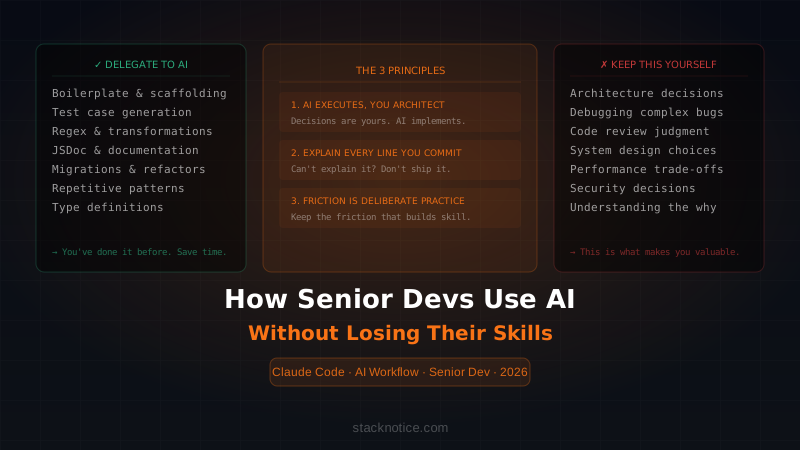
The Framework: 3 Principles
Before talking about specific workflows, here are the three principles that everything else comes from.
Principle 1: AI executes, you architect
Decisions about structure, data flow, system design, and trade-offs are yours. The AI implements what you've already decided.
If you find yourself asking "how should I structure this?" to the AI and then building whatever it says — you've handed over the architect role. That's when you start losing the skill that makes senior developers valuable.
Right: "I've decided to use a repository pattern with a service layer. Generate the boilerplate for a UserRepository in TypeScript that follows this interface: [interface]"
Wrong: "How should I design my user management system?"
Principle 2: You must be able to explain every line you commit
This isn't a rule about AI — it's a rule about software ownership. If you can't explain it, you can't debug it, extend it, or review it in someone else's PR.
When AI generates something you don't fully understand, that's a signal to stop and read it — not ship it. The AI just became a teacher, not a coder.
Principle 3: Friction is deliberate practice
There's a category of tasks where doing it yourself, even if slower, makes you better. Removing all friction from development means removing all learning. Senior developers know which friction to keep.
What to Always Delegate to AI
These are tasks where AI saves real time without costing you any skill:
Boilerplate and scaffolding
// You know what you need. You just don't want to type it.
// Prompt: "Generate a Next.js API route for user profile updates.
// It should: validate with Zod, use Prisma, return typed errors,
// handle 401 if no session. Here's my User schema: [schema]"
You could write this yourself. You've done it 50 times. Delegating it is not laziness — it's resource allocation.
Test cases from existing code
// Prompt: "Write Jest tests for this function.
// Cover: happy path, empty array input, null values, async error.
// Use this test setup: [setup file]"
// [paste the function]
You still review the tests. You still catch when the AI misunderstands the expected behavior. But you don't start from a blank file.
Regex and string transformations
// "Write a regex that matches email addresses but not
// those from disposable domains like mailinator.com or temp-mail.org.
// Return it as a named capture group with TypeScript types."
Nobody enjoys writing regex from scratch. This is what AI was made for.
Documentation and JSDoc
/**
 * Prompt: "Write JSDoc for this function.
 * Include @param, @returns, @throws, and a usage example."
 */
function processPayment(amount: number, currency: Currency, userId: string): Promise<PaymentResult>
Migrations and repetitive transformations
Converting a REST API to tRPC. Migrating from class components to hooks. Adding types to a JavaScript codebase. These are pattern-matching tasks — exactly what LLMs are good at.
Prompt: "Convert these 5 Angular NgModule components to standalone.
Keep all imports and dependencies. Here are the components: [code]"
What to Never Delegate
These are tasks where letting the AI take the wheel costs you real capability over time.
Debugging complex issues
When something is genuinely broken and you don't know why, your first move should not be to paste the error into Claude. That's the instinct to resist.
The debugging process — reading the stack trace, forming a hypothesis, checking your assumptions, isolating the problem — is where you build the mental model of your system. If you skip it, you're renting intelligence instead of building it.
The right use of AI in debugging: After you've already done the investigation and formed a hypothesis, AI is excellent at confirming your reasoning, suggesting edge cases you might have missed, or explaining a framework behavior you don't understand.
Wrong: "My component isn't updating. Here's the code, fix it."

Right: "I think the issue is that I'm mutating the signal's array
instead of replacing it with .update(). Here's the component.
Does this match what I'm seeing in the behavior, and am I missing
any other cases where this pattern would cause the same bug?"
For a deeper dive into this approach, our Angular debugging guide covers how to use AI as a diagnostic tool without bypassing the investigation.
Architecture and system design decisions
When a senior developer reviews a PR and says "this doesn't belong here" — that judgment comes from understanding the system's boundaries, the team's patterns, and the long-term cost of a shortcut. AI doesn't have that context and can't build it from a prompt.
Use AI to explore options once you understand the trade-offs. Don't use it to decide.
Code review
The point of code review is to understand what a change does and whether it's correct. If you're using AI to review PRs without reading the diff yourself, you're missing the point entirely. The AI might catch syntax issues — but it won't catch "this change is technically correct but breaks the implicit contract between these two services."
Performance optimization judgment
AI can profile code and suggest optimizations. But deciding which optimizations are worth the complexity cost requires understanding the actual usage patterns, the team's ability to maintain the change, and the system's bottlenecks. That's engineering judgment — and it atrophies if you outsource it.
A Real Workflow: Building a Feature From Scratch
Here's how a senior developer actually builds a new feature with AI assistance. This is a real pattern, not a demo.
Scenario: Add a notification system to a Next.js SaaS app.
Step 1: Design without AI (15-20 min)
Before opening any AI tool, sketch the design:
Questions to answer first:
- Where does the notification state live? (Zustand? Server state? DB?)
- What triggers notifications? (webhooks, cron, user actions?)
- Real-time or polling? (WebSocket? SSE? Just refresh?)
- How long do notifications persist?
- What's the read/unread state model?
Write out the data model yourself:
interface Notification {
  id: string
  userId: string
  type: 'payment' | 'comment' | 'system'
  title: string
  body: string
  read: boolean
  createdAt: Date
  metadata?: Record<string, unknown>
}
You made the decisions. Now you use AI to implement them.
Step 2: Generate the boilerplate
Prompt: "Generate a Drizzle ORM schema for this Notification interface.
Add indexes on userId and createdAt. Include a migration.
[paste the interface]"
Prompt: "Generate a NotificationService class with these methods:
- getUnread(userId): Promise<Notification[]>
- markAsRead(id, userId): Promise<void>
- markAllRead(userId): Promise<void>
- create(data): Promise<Notification>
Use Drizzle with this schema: [schema]
Handle errors with typed results, not exceptions."
Review the output. Understand each method. Push back if something doesn't match your mental model.
Step 3: Write the component structure yourself
// Write the component skeleton manually — you decide the props and state shape
export function NotificationBell({ userId }: { userId: string }) {
  // What state do I need here?
  // How does this connect to the server?
  // What's the loading state?
  // What happens on error?
}
Then fill in the implementation with AI assistance once the structure is clear.
Step 4: Generate tests from the implementation
Prompt: "Write Vitest tests for this NotificationService.
Mock the Drizzle client. Cover: returns only unread notifications,
markAsRead fails silently if notification belongs to different user,
create validates required fields.
[paste the service]"
Run the tests. Read each one. Fix the ones that don't make sense.
Step 5: Review everything before committing
The final check is always manual. Can you explain each function? Would you be comfortable being asked about this in a code review? If no — read it again before pushing.
Prompting Patterns That Make You Better
The way you prompt AI affects whether you're learning or just consuming output.
Pattern 1: Explain before generating
"Before writing the code, explain in 2-3 sentences what approach
you'll use and why. Then generate it."
This forces the AI to surface its reasoning — which you can then evaluate. If the reasoning is wrong, you catch it before the code exists.
Pattern 2: Ask for the trade-offs
"Give me two implementations of this:
one optimized for readability, one for performance.
Explain the trade-off."
You choose which one fits your situation. The decision is yours.
Pattern 3: Challenge the output
"What are the failure modes of this implementation?
What would break it in production that a unit test wouldn't catch?"
This is how senior developers use AI for code review — as a red-teaming tool, not a rubber stamp.
Pattern 4: Ask it to teach
"Why does TypeScript infer this type as 'never' here?
Explain the mechanism, not just the fix."
When you don't understand something, make the AI explain it. Don't just apply the fix and move on.
For more on getting better outputs from AI tools, our guide on effective Claude Code prompts covers the prompt patterns that consistently work on real codebases.
Staying Sharp: Deliberate Practice Alongside AI
Using AI heavily creates a real risk: you get faster at the surface but your depth stagnates. Here's how to prevent it.
Keep one weekly challenge without AI
Pick one algorithmic problem or small feature per week and build it without AI assistance. Not because AI is cheating — because the difficulty is what builds the skill. Advent of Code, Exercism, or just a feature in your side project with a self-imposed constraint.
Read the generated code actively
When you delegate something to AI and get an answer back, read it the way you'd read a solution to a problem you worked on. What did the AI do that you wouldn't have? What did it do worse? What pattern did it use that you should internalize?
Own the debugging
When something breaks, make the rule: 30 minutes of your own investigation before going to AI. This isn't martyrdom — it's the practice that keeps your diagnostic instincts sharp.
Review AI-generated PRs as if you wrote them
When AI generates something and you're about to commit it, review your own PR. Run through it as if someone else wrote it and you need to understand it before approving. This is the quality gate that prevents shipping code you can't explain.
The Red Flags: Signs You're Using AI Wrong
- You can't reproduce the bug that the AI "fixed" — because you didn't understand what caused it
- You're asking "how should I build this?" before you've thought about it yourself
- Your commit messages say "as suggested by AI" or similar
- You feel anxious when the AI is unavailable and you have to build something
- You're copying AI output without reading it because "it usually works"
- The architecture of your project has drifted and you're not sure how
Any of these is a signal to reset the workflow, not the tool.
The Actual Advantage
The developers getting the most from AI tools aren't the ones who use it most — they're the ones who use it most precisely.
They've mapped their own skills clearly enough to know what's worth their time and what's just friction. They've set boundaries that protect their craft while still shipping faster than they did two years ago.
That's the advantage: not replacing the developer, but making a skilled developer's time go further.
The skill is still what matters. AI just changes where you spend it.
Want to go deeper on the AI workflow?
- Claude Code context management — how to work with large codebases without losing the AI's focus
- Debugging with AI assistance — when and how to bring AI into the debugging process
- Claude Code tips that actually matter — the patterns that make a real difference day to day