If you've used Claude Code recently, you've probably seen the words "ultrathink" and "ultracode" thrown around. Most guides treat them as the same thing — they aren't, and confusing them leads to wasted tokens and underwhelming results.
This guide explains what every effort level actually does, the real difference between ultrathink and ultracode, when to use each, and what you'll actually pay in token cost.
The effort system: what it is
Every Claude Code request carries an effort level — a signal that tells the model how much compute to use when generating a response. This isn't just about speed. Higher effort means Claude engages more extended thinking (visible reasoning), explores more alternatives internally, and produces better output on complex tasks.
The effort levels available in Claude Code (as of mid-2026):
| Level | Extended Thinking | Use Case |
|---|---|---|
low | None | Quick lookups, simple edits |
medium | Minimal | Default — balanced for most tasks |
high | Moderate | Complex logic, architectural questions |
xhigh | Full | Hard problems, multi-step reasoning |
max | Full + parallel | Maximum compute, exploratory tasks |
Model support note:
xhighis only available on Opus 4.7 and Opus 4.8. Sonnet 4.6 and Opus 4.6 supportlow,medium,high, andmax— but notxhigh.
At medium (the default), Claude gives you fast, good answers. At xhigh, Claude spends significantly more time reasoning before responding, showing its work in a thinking block and producing measurably better output on hard tasks.
Ultrathink: per-turn extended thinking
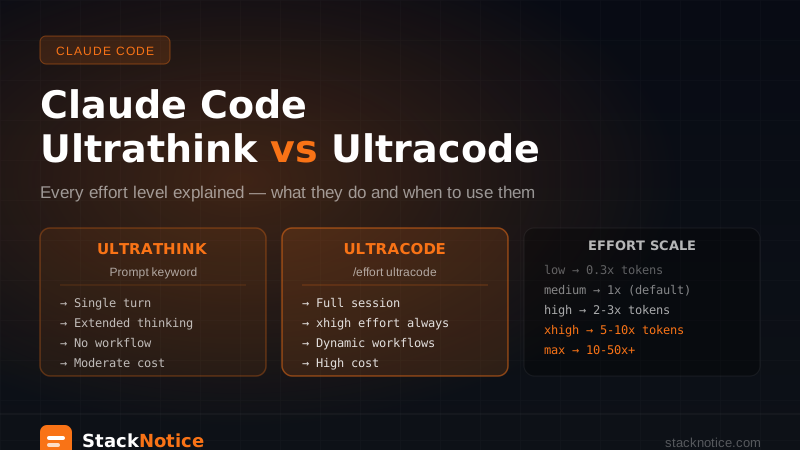
Ultrathink is a prompt keyword, not a mode.
When you include the word "ultrathink" anywhere in your prompt, Claude Code treats it as a signal to engage extended thinking on that specific response. It doesn't change your session's effort setting, it doesn't persist to your next message, and it doesn't trigger workflow orchestration.
It's a one-time nudge.
# Before: standard response
"Refactor this auth module to handle refresh token rotation"

# After: extended thinking on this turn only
"ultrathink refactor this auth module to handle refresh token rotation"
The difference in practice: with ultrathink, Claude will output a visible thinking block where it reasons through the problem before writing any code. That reasoning catches edge cases it would otherwise miss — race conditions, token expiry timing, concurrent refresh scenarios.
When ultrathink is worth it
Use it when the problem has hidden complexity that isn't obvious from the surface:
- Debugging a race condition or timing issue
- Architectural decisions with long-term consequences
- Understanding why a complex piece of code behaves unexpectedly
- Designing a schema that has to support multiple future use cases
- Writing logic that's easy to get subtly wrong (auth, money, concurrency)
When ultrathink is overkill
Don't bother for:
- Adding a new API endpoint with a standard pattern
- Explaining what a function does
- Generating boilerplate
- Simple refactors with clear intent
The token overhead isn't worth it when the task doesn't have meaningful hidden complexity.
Ultracode: session-wide xhigh effort + dynamic workflows
Ultracode is a session setting, not a prompt keyword.
Enabling ultracode with /effort ultracode does two things for every subsequent request in that session:
- Pins effort to
xhigh— every request uses extended thinking, not just the one you asked about - Enables automatic dynamic workflow orchestration — for substantive tasks, Claude will write an orchestration plan and spin up parallel subagents rather than handling everything in a single context window
This is the key distinction: ultrathink activates extended thinking on one turn. Ultracode activates extended thinking on every turn and enables Claude to break large tasks into parallel agent workflows automatically.
How to enable ultracode
# In Claude Code session
/effort ultracode

# Or toggle it in Claude Code settings → Effort Level
What ultracode actually does to a workflow
Without ultracode, a request like "audit all API endpoints for missing auth checks" runs as a single agent task. Claude works through the codebase sequentially in one context window.
With ultracode enabled, the same request triggers:
- An orchestrator that analyzes the scope of the task
- A written orchestration plan (you can review it before it executes)
- Parallel subagents assigned to specific directories or files
- Cross-validation of results before returning
- A consolidated report
The output quality difference for large tasks is significant. The token cost difference is also significant.
When to use ultracode
If the task touches more than 20–30 files, needs cross-file consistency checking, or would take you 30+ minutes manually, ultracode is probably the right call.
Good fits:
- Security audit across the entire API layer
- Migrating all class components to functional components
- Finding all instances of a problematic pattern across a codebase
- Generating test coverage for a large module
Bad fits:
- Writing a single feature or component
- Fixing a specific bug you've already located
- Asking Claude to explain something
- Any task that fits comfortably in a single context window
The stop rule
Before running a large ultracode task, apply this: run a small pilot slice first. Ask Claude to audit one directory before the whole codebase. Review the output, approve the approach, then scale up. This saves tokens and prevents you from discovering the orchestration went sideways after 2 million tokens.
Effort level comparison: token cost
Higher effort = more tokens consumed. Rough multipliers relative to medium:
| Effort | Token multiplier | Typical use |
|---|---|---|
low | ~0.3x | Simple lookups |
medium | 1x (baseline) | Daily development |
high | 2–3x | Complex single tasks |
xhigh / ultrathink | 5–10x | Hard problems |
| ultracode (full session) | 10–50x+ | Codebase-wide operations |
The multipliers vary significantly depending on the task. A simple ultrathink request adds maybe 3x overhead. A full ultracode security audit across a 50k-line codebase can run 500k–2M tokens.
Practical guidance: if you're on a Claude Max plan with a generous monthly token budget, ultrathink is essentially free to use liberally. Ultracode for a large codebase operation should be scoped carefully — see the Claude Code cost optimization guide for practical token budgets per plan.
The comparison that matters
| Ultrathink | Ultracode | |
|---|---|---|
| What it is | Prompt keyword | /effort session command |
| Scope | Single turn | Entire session |
| Extended thinking | Yes, that turn | Yes, every turn |
| Dynamic workflows | No | Yes, auto-triggered |
| Token cost | Moderate per use | High for large sessions |
| Best for | Hard single-turn problems | Codebase-wide operations |
| How to activate | Type "ultrathink" in prompt | /effort ultracode |
| How to deactivate | N/A (per-turn) | /effort high or /effort medium |
Practical workflow
Here's how to think about which to reach for:
Task needed
    │
    ▼
Single response or exploration?
    │
 ┌──┴──┐
YES    NO (codebase-wide)
 │      │
 ▼      ▼
Is it   Use ultracode
complex?
 │
 ┌─┴──┐
YES   NO
 │     │
 ▼     ▼
Use   Standard
ultra- medium effort
think
In practice, this means:
- Default development:
mediumeffort (no keyword, no command) - Debugging a hard bug or designing something architectural: add
ultrathinkto that one prompt - Security audit, large migration, codebase-wide analysis:
/effort ultracode→ pilot run → full run
Real prompts
Ultrathink prompts
ultrathink: this code sometimes fails under concurrent load but only in production.
Here's the function: [paste]. What are all the ways this could fail?

ultrathink: design a multi-tenant RLS strategy for this Drizzle schema where
users can belong to multiple organizations with different roles per org.

ultrathink: explain why this database query is slow and what the correct
index strategy should be for these access patterns.
Ultracode requests (after /effort ultracode)
Create a workflow to find every place in this Next.js codebase where a
Server Action is called without proper input validation. For each finding:
file, line, the action name, what validation is missing, and the fix.

Create a workflow to migrate all Prisma queries in /src to Drizzle ORM.
Preserve all query semantics, add types where missing, run tests after each file.

Audit all API routes in /app/api for OWASP Top 10 issues. Group by severity.
Common mistakes
Mistake 1: Using ultracode for a single-file task
Ultracode's overhead is justified by the parallelism. If you're working on one file, that overhead is pure waste. Use ultrathink instead.
Mistake 2: Not scoping the pilot run
Running ultracode on a 200k-line codebase without a pilot run is how you spend 3M tokens on output that went in the wrong direction. Always scope first.
Mistake 3: Assuming ultrathink = ultracode
The naming is confusing. They're fundamentally different: one is a per-turn hint, the other is a session-wide operational mode.
Mistake 4: Forgetting to turn off ultracode
After finishing a large task, run /effort medium to restore the default. Otherwise every simple follow-up question runs at maximum effort.
Summary
- Ultrathink — add it to any prompt to trigger extended thinking on that turn. Per-request, no setup, moderate token overhead.
- Ultracode —
/effort ultracodeto pin the session to xhigh effort and enable automatic dynamic workflow orchestration. For codebase-wide tasks with meaningful parallelism benefits. - Default effort (medium) — right for 80% of daily Claude Code use.
The mental model: ultrathink is a scalpel (precision on one hard problem), ultracode is an excavator (when you need to dig through the whole codebase at once).
Related: Claude Code Dynamic Workflows — how the orchestration layer behind ultracode actually works · Claude Code Subagents — running tasks in parallel · Context Management in Claude Code — keeping your session focused · Refactoring with Claude Code — when to use ultrathink during complex refactors · Onboarding Claude Code to an existing codebase — using ultrathink for architecture analysis