Most developers use Claude Code like a single assistant: ask a question, get an answer, move on. That works. But there's a layer most people never reach — subagents — and once you do, your workflow changes permanently. If you're just getting started, see the Claude Code getting started guide first.
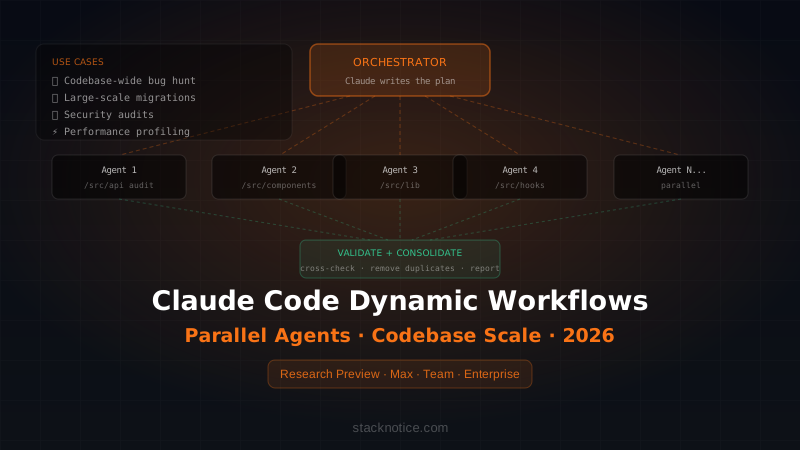
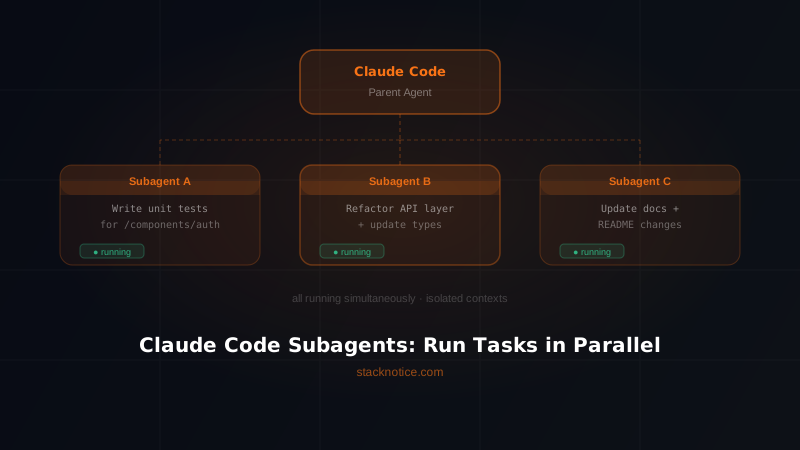
Subagents let Claude Code spin up independent AI processes that work in parallel on different parts of your codebase. While one agent writes tests, another refactors the API layer, and a third updates the documentation. No waiting. No context switching. Just results.
This guide covers how subagents work, when to use them, and real examples you can run today.
What Are Claude Code Subagents?
A subagent is a separate Claude Code process spawned by the main agent to handle a specific, scoped task. The parent agent delegates work — "go fix the auth module" — and the subagent executes it autonomously, using its own context window and tool access.
The key difference from regular Claude Code usage:
| Regular Claude Code | With Subagents | |
|---|---|---|
| Tasks | Sequential, one at a time | Parallel, multiple simultaneous |
| Context | Single shared window | Isolated per subagent |
| Speed | Linear | Multiplied by number of agents |
| Best for | Exploratory work | Known, decomposable tasks |
Subagents are not a gimmick. They're how you get Claude Code to handle large codebases without hitting context limits or losing track of what it was doing.
How Subagents Work Under the Hood
When Claude Code spawns a subagent, it uses the Agent tool internally. Each subagent gets:
- Its own isolated context window
- Access to the same tools (Read, Edit, Bash, Grep, Glob, etc.)
- A specific prompt defining its task scope
- The ability to spawn its own sub-subagents if needed
The parent agent waits for results (foreground) or continues working while the subagent runs (background). Results come back as a single message — the subagent's findings or confirmation of completed work.
Here's what that looks like from Claude Code's perspective when you ask it to tackle a large task:
Parent agent
├── Subagent A: "Analyze all API endpoints and document them"
├── Subagent B: "Find all usages of the deprecated auth module"
└── Subagent C: "Run the test suite and report failures"
All three run simultaneously. The parent collects results and proceeds.
When to Use Subagents
Not every task needs a subagent. Use them when:
1. You have clearly separable subtasks Refactoring a monolith? The auth module, the payment module, and the notification module are independent. Three subagents, three simultaneous refactors.
2. You need to search a large codebase Searching across 500 files for all usages of a deprecated pattern is a job for a subagent. It won't pollute your main context with thousands of lines of grep output.
3. You want isolated experiments "Try implementing this feature two different ways and report which is cleaner." Two subagents, two implementations, you pick.
4. You need parallel verification Run tests, check types, and lint — all at once — before you review the output.
Real-World Examples
Example 1: Parallel Codebase Audit
You just inherited a messy codebase. Instead of asking Claude to audit it linearly (which eats your context window fast), you delegate:
"I need a full audit of this project. Please spawn subagents to:
1. Find all console.log statements left in production code
2. Identify all TODO and FIXME comments with their file locations
3. Find any hardcoded API keys or secrets
4. List all dependencies that have major version updates available

Run these in parallel and give me a consolidated report."
Claude Code spawns four subagents simultaneously. Each searches the codebase for its specific concern. You get a clean report in a fraction of the time.
Example 2: Full-Stack Feature Implementation
Adding a new notifications feature to a Next.js app with a PostgreSQL backend:
"Implement a notifications system. Please use subagents to handle this in parallel:
- Subagent 1: Create the Notification model and database migration
- Subagent 2: Build the /api/notifications REST endpoints
- Subagent 3: Create the NotificationBell React component
- Subagent 4: Write tests for all of the above

Start all four in parallel. Report back when done."
Each subagent works in its own domain. No collision, no confusion. You review four clean diffs instead of one tangled mess.
Example 3: Multi-File Refactor
Renaming a core concept throughout a codebase — say, changing User to Member across 80+ files:
"Rename all references of 'User' to 'Member' across the codebase.
Use subagents to split the work by directory:
- /app routes
- /components
- /lib utilities
- /api endpoints
- /tests

Run them in parallel. After all complete, run the test suite to verify nothing broke."
Without subagents, this is a 30-minute sequential operation with high chance of context overflow. With subagents, it's done in minutes.
Example 4: Competitive Code Analysis
You found a GitHub repo that does something interesting and want Claude to learn from it:
"Analyze this open source project. Spawn subagents to:
1. Understand the overall architecture (read README, package.json, main entry points)
2. Analyze how they handle authentication
3. Study their state management approach
4. Review their test structure

Combine the findings into a summary with takeaways I can apply to my project."
Each subagent digs into its domain without burning your main context on unrelated files.
How to Trigger Subagent Behavior
You don't need special syntax. Claude Code decides to use subagents when the task clearly benefits from parallelism. But you can guide it explicitly:
Explicit delegation:
"Use subagents to handle this in parallel..."
"Spawn separate agents for each of these tasks..."
"Run these simultaneously using subagents..."
Implicit hints:
"Do all of these at the same time..."
"Handle each module independently..."
"Check all of these in parallel..."
Claude Code is smart enough to recognize when parallel execution makes sense. The more your prompt separates concerns, the more likely it spawns subagents automatically.
Background vs Foreground Subagents
By default, subagents run in the foreground — the parent waits for each to finish before proceeding. For truly independent tasks, Claude Code can run subagents in the background:
- Foreground: parent waits, good when results are needed before next step
- Background: parent continues, notified when subagent completes
Example where background makes sense:
"Start a background subagent to run the full test suite.
While that runs, let's work on the new feature together.
Alert me when the tests finish."
You keep working. When tests finish, Claude Code lets you know. No interruption.
Subagents and Context Window Management
This is where subagents become essential for large projects. Each subagent gets its own isolated context. This means:
- The parent agent stays clean — it only sees summaries, not raw file contents
- Subagents can read and process large files without polluting shared context
- You can work on a 200k+ line codebase without running into limits
The parent delegates, receives a concise result, and moves on. Think of it like having a team where each developer reports progress in stand-up — not by reading you every line of code they wrote.
Worktree Isolation for Safe Parallel Work
For high-stakes operations where you don't want subagents stepping on each other's edits, Claude Code supports worktree isolation. Each subagent runs in its own git worktree — a separate copy of the repo at a given commit.
This is especially useful when:
- Two subagents might edit the same file
- You want to test different approaches without conflict
- You need a rollback option per subagent
The worktree is automatically cleaned up if the subagent makes no changes. If it does make changes, the branch is returned for you to review and merge.
Practical Tips for Working with Subagents
Be specific about task boundaries. Vague prompts produce vague subagents. "Fix the codebase" won't help. "Fix all TypeScript errors in /components/auth/" will.
Give subagents clear success criteria. Instead of "look at the API", say "list all endpoints that don't have error handling for 401 responses."
Use them for verification, not just creation. After Claude writes code, spawn a subagent to review it. Fresh context, no bias from the creation process.
Combine subagents with hooks. If you use Claude Code hooks (PostToolUse, Stop), those hooks fire per agent. You can have each subagent auto-run formatters and linters on its own output.
Trust the summary, not the raw output. Subagent results are summaries by design. If you need raw output (like actual test results), tell the subagent to include specific data in its report.
What Subagents Can and Can't Do
Can do:
- Read, write, and edit any file the parent can access
- Run Bash commands including tests, builds, and scripts
- Search the codebase with Grep and Glob
- Fetch web content and documentation
- Spawn their own subagents (nested delegation)
Can't do:
- Share state with sibling subagents in real time (they're isolated)
- Access the parent's conversation history
- Persist memory beyond their execution (results come back as text)
When Not to Use Subagents
Subagents add overhead. Don't use them when:
- The task is small and sequential — asking a subagent to "check this one file" is overkill
- Tasks depend tightly on each other — if step 2 needs step 1's output, run them sequentially
- You need a fluid back-and-forth — subagents don't talk back mid-task, they return results when done
The rule of thumb: if you'd give it to a junior dev with a specific brief and expect them to work independently for 30+ minutes, it's a good subagent candidate.
The Bigger Picture: Claude Code as an Orchestrator
Subagents reframe how you think about Claude Code. It's not just an assistant that answers questions — it's an orchestrator that can direct a team of AI agents toward a shared goal.
The developers who get the most out of Claude Code are the ones who think in systems:
- Break large tasks into independent scopes
- Delegate each scope to a focused agent
- Review consolidated results, not raw execution
That's the shift. From "AI assistant" to "AI engineering team."
Quick Reference
| Use Case | Subagent Prompt Pattern |
|---|---|
| Parallel audit | "Spawn subagents to check X, Y, Z simultaneously" |
| Feature implementation | "Use subagents: one for backend, one for frontend, one for tests" |
| Large refactor | "Split the work by directory and run in parallel" |
| Background task | "Start a background subagent to run tests while we work" |
| Code review | "Spawn a fresh subagent to review what you just wrote" |
Subagents are available now in Claude Code with no extra configuration. The next time you have a task you'd break into steps on a whiteboard, break it into subagents instead.
Want to go deeper on Claude Code? Check out Claude Code Hooks and 25 Tips to 10x Your Productivity.