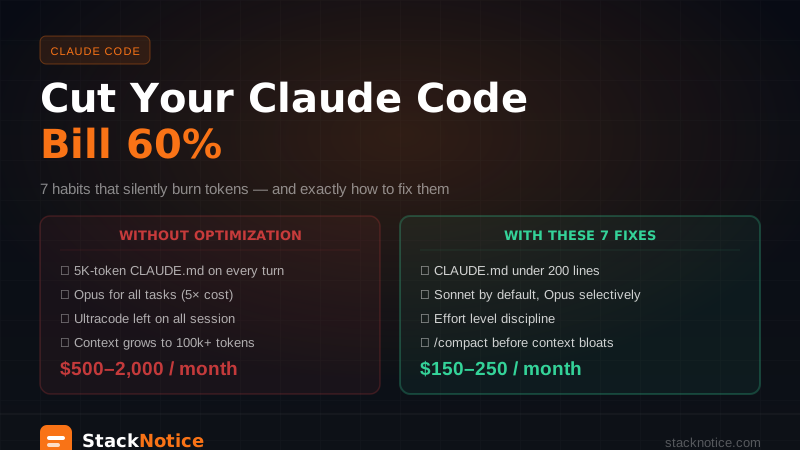
Claude Code users regularly report $500–2,000/month in API costs. The $20 Pro plan hits rate limits mid-session. The $100 Max plan runs out faster than expected. Something feels off.
It's not the pricing — it's the habits. There are 7 specific behaviors that silently burn tokens on every request, and fixing them doesn't slow you down at all. Teams that fix them report 40–85% reductions without writing less code or asking fewer questions.
Here's exactly what wastes tokens and what to do about it.
First: how Claude Code actually charges you
Understanding the cost structure prevents surprises.
Subscription plans (as of 2026):
| Plan | Price | Usage |
|---|---|---|
| Pro | $20/month | 5× rate limits of Free |
| Max 5× | $100/month | 5× more than Pro |
| Max 20× | $200/month | 20× more than Pro |
| Team Standard | $25/seat/month | Pro equivalent |
| Team Premium | $125/seat/month | Max equivalent |
API mode costs per token, directly:
- Sonnet 4.5: ~$3/M input, ~$15/M output
- Opus 4: ~$15/M input, ~$75/M output
The subscription plans are a good deal for moderate usage. The API mode is where costs explode if you have bad habits, and where optimization matters most.
The real insight: input tokens are cheap, output tokens are expensive, but context is what kills you. Claude Code sends your entire conversation context on every turn. A 200-turn session with 5,000 tokens of context per turn = 1 million input tokens just in context overhead.
Habit 1: A bloated CLAUDE.md (the biggest silent killer)
Your CLAUDE.md file is injected into every single request. Every turn. All session long.
A CLAUDE.md with 5,000 tokens costs you 5,000 tokens per turn regardless of whether those instructions are relevant to what you're doing right now.
# Real math:
5,000 token CLAUDE.md × 100 turns per day × $3/M input = $1.50/day from CLAUDE.md alone
= $45/month from project instructions nobody reads
The fix: Keep CLAUDE.md under 200 lines (~2,500 tokens). Everything else either doesn't belong there or should be in a separate file Claude only reads when you reference it explicitly.
What belongs in CLAUDE.md:
- Critical rules Claude must always follow
- Project structure overview (brief)
- Stack choices and why
- What NOT to do
What doesn't belong:
- Long examples of patterns — link to a file instead
- History of decisions
- Documentation Claude doesn't need for coding tasks
- Full API references
Trim your CLAUDE.md right now and count the lines. If it's over 200, you're paying a recurring tax on every conversation.
Habit 2: Using Opus for everything
Claude Opus 4 costs 5× more than Sonnet 4.5. Most coding tasks don't need Opus.
Sonnet handles well:
- Writing new code from clear requirements
- Fixing bugs you can describe accurately
- Refactoring with clear patterns
- Tests, documentation, boilerplate
Opus adds real value for:
- Novel architectural decisions
- Debugging truly complex logic (concurrency, distributed systems)
- Deep code review of critical paths
- Tasks where you've tried Sonnet twice and it keeps missing something
The default for most developers should be Sonnet. Switch to Opus selectively for the specific sessions where the complexity warrants it.
# Check your current model in Claude Code
/model

# Switch to Sonnet if you're on Opus for routine work
# Settings → Model → claude-sonnet-4-5
Switching your default from Opus to Sonnet for 80% of sessions = 80% cost reduction on those sessions.
Habit 3: Setting /effort ultracode and leaving it on
/effort ultracode sets the session to xhigh — an 8× token multiplier. It also enables parallel subagents, which multiply cost again.
Most people set it at the start of a session and forget it. Then they use it to answer a question about a variable name. That question just cost 8× what it should have.
# Expensive: using ultracode for the whole session
/effort ultracode    # 8× multiplier on EVERYTHING

# Better: use effort levels contextually
/effort medium       # default for most work
/effort high         # for complex problems
/effort ultracode    # only for large, parallelizable tasks
The practical rule: Reset to /effort medium after any ultracode session. Only activate ultracode when you have a large, clearly defined task that will genuinely benefit from parallel subagents.
Related: Claude Code Ultrathink vs Ultracode — Every Effort Level Explained
Habit 4: Letting context grow until it hits limits
Claude Code's context window is large, but it's not free. Every turn sends your entire accumulated context. A session that grows to 100k tokens means every subsequent message pays for 100k tokens of input — even if you're asking something simple.
Signs your context is too large:
- Responses get slower over the session
- Claude starts forgetting earlier instructions
- The
/costcommand shows your per-turn cost climbing
What to do:
Use /compact when context feels heavy. Claude summarizes the conversation into a compressed version, keeping the key decisions and discarding the verbose back-and-forth.
# In Claude Code — check current context cost
/cost

# Compact when context gets heavy
/compact

# Or: start fresh for a new task
# Ctrl+C → new session → /init
Starting a new session for a new task isn't giving up — it's resetting the meter. Don't carry the context of "fixing that auth bug" into "now let's build the dashboard."
Related: Claude Code Context Management Guide 2026
Habit 5: Spinning up subagents for simple tasks
Subagents are powerful and expensive. Each subagent is essentially a separate Claude session — it has its own context, makes its own API calls, and costs independently.
Using 5 parallel subagents to handle tasks that one sequential agent could do in slightly more time = 5× the cost for the same output.
When subagents are worth it:
- Reading multiple large files simultaneously (genuinely parallel)
- Running independent checks (tests + lint + type check) in parallel
- Large codebase exploration where the files are truly independent
When they're not:
- Tasks that depend on each other sequentially
- Simple tasks where parallelism adds overhead without saving time
- Any time you activate them by default without thinking
The Claude Code subagents article covers when they make sense in detail: Claude Code Subagents — Parallel Tasks Guide
Habit 6: Not monitoring cost at all
You can't optimize what you don't measure.
# Check session cost
/cost

# This shows:
# - Tokens used in current session
# - Input vs output breakdown
# - Estimated cost for the session
Set a mental budget per session: "this refactor should cost under $2." When the /cost command shows you're at $1.80 doing the easy parts, you know to be more targeted with the hard parts.
For teams: Claude Code supports spend limits at the account level. Set a per-developer monthly limit and get notified when approaching it. This prevents the "$1,200 surprise at the end of the month" situation.
Habit 7: Writing vague prompts that require multiple correction turns
This one is counterintuitive: being lazy in your prompts is expensive.
A vague prompt → Claude produces something close but wrong → you explain what's wrong → Claude corrects → you explain again → 4 turns to do what 1 precise prompt would have done.
Each correction turn costs input + output tokens. A 4-turn correction loop on a complex task easily costs 3× what a single precise prompt would have.
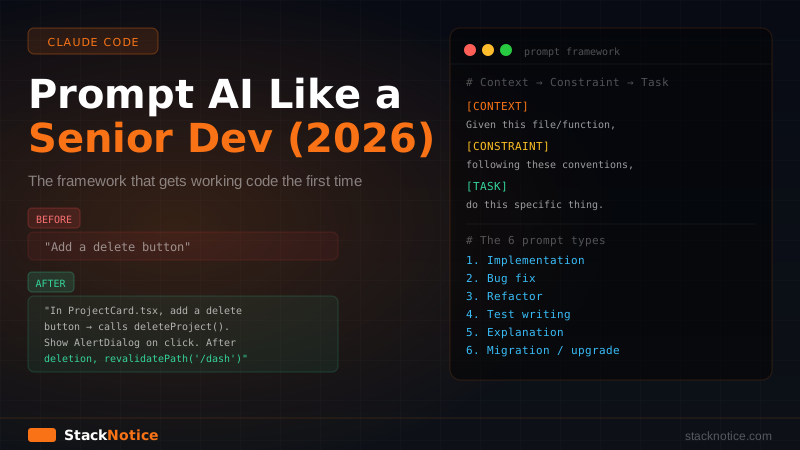
The fix: The Claude Code Prompting Guide covers this in depth, but the short version:
# Vague (expensive — requires corrections)
"Fix the auth bug"

# Precise (cheap — one turn)
"In app/api/auth/route.ts, the JWT verification fails when the token
contains an 'aud' claim. The error is 'invalid audience'. Fix this
by adding audience validation in the verifyToken function. The expected
audience is process.env.JWT_AUDIENCE."
More context upfront = fewer correction turns = lower cost.
The real cost breakdown by workflow type
Based on actual usage patterns:
| Workflow | Good habits | Bad habits |
|---|---|---|
| Feature development (4h session) | $3–8 | $15–40 |
| Bug investigation | $1–3 | $5–15 |
| Large refactor (6h, subagents) | $10–20 | $40–100 |
| Code review session | $0.50–2 | $3–8 |
The difference between good and bad habits is consistently 4–5×. Not 10% — 400%.
The optimization checklist
Run through this when starting a project or when your costs feel high:
CLAUDE.md audit:
- Under 200 lines total
- No long examples (link to files instead)
- Only rules Claude needs on every turn
Per-session habits:
- Default to Sonnet, switch to Opus selectively
- Start at
/effort medium, escalate only for hard problems - Run
/compactwhen context grows large - Use
/costto track spend during long sessions - Start new sessions for new tasks
Prompt quality:
- Include file paths and function names when relevant
- Describe the error message exactly, not "it's broken"
- State what you've already tried to avoid repeated approaches
Subagent discipline:
- Only use ultracode for tasks that are genuinely parallel
- Reset to medium after ultracode sessions
- Don't use subagents for tasks with sequential dependencies
Plan selection guide
If you're on the Pro plan ($20) and hitting rate limits daily → Max 5× ($100) is the right step up. Pro rate limits are tight for heavy users.
If you're on Max 5× ($100) and still hitting limits → look at your habits first before upgrading to Max 20×. Habits 1–7 above often fix the rate limit problem without needing to upgrade.
If you're using the API directly and costs are unpredictable → your per-session cost is driven entirely by context size and effort level. Habits 4, 5, and 6 have the highest impact here.
For teams: per-developer spend of $150–250/month is typical for heavy Claude Code users with good habits. Over $400/developer/month suggests habit issues worth investigating.
Quick wins you can do right now
- Trim your CLAUDE.md — delete anything over 200 lines
- Check your default model — switch from Opus to Sonnet if you're using Opus for everything
- Run
/costat the end of your next session — the number is informative - Start a new session for your next task instead of continuing from yesterday
These four take under 10 minutes and typically cut costs 30–50% immediately.
Related: Claude Code Ultrathink vs Ultracode Guide · Context Management in Claude Code · AI Coding Prompts for Senior Developers · Claude Code Subagents Guide