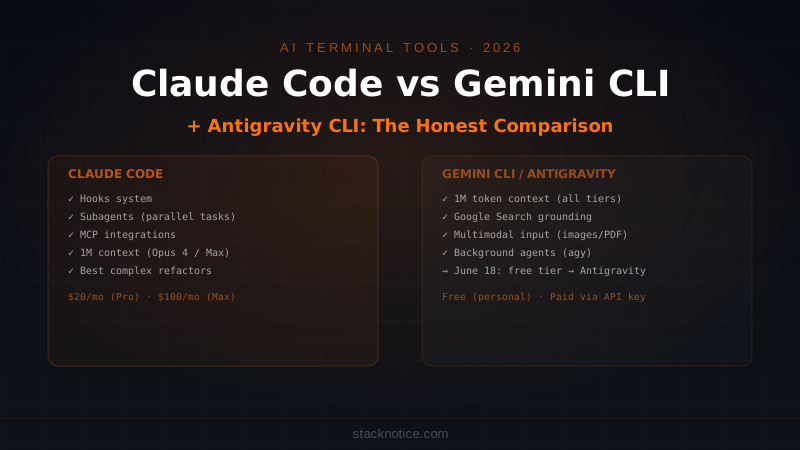
For most of 2025, the terminal AI coding tool comparison was simple: Claude Code vs Gemini CLI. Then June 18, 2026 happened. Google shut down Gemini CLI's free hosted tier for personal users and moved them to Antigravity CLI — a new closed-source tool with a different command (agy) and a more ambitious multi-agent architecture. This changed the comparison considerably.
This article covers where both tools stand today: what Claude Code offers, what Gemini CLI was (and still is, for paid API key users), what Antigravity CLI introduces, and — most practically — which one you should be running in your terminal.
What Each Tool Actually Is
Claude Code is Anthropic's terminal AI agent. It runs locally, reads your filesystem, executes shell commands with approval, understands your codebase through project context files, and iterates on tasks autonomously. It uses Claude models (Sonnet 4 by default, Opus 4 for maximum capability) and requires an Anthropic subscription or API key.
Gemini CLI was Google's open-source terminal AI agent, released at Google I/O 2025. Same basic model: runs in your terminal, edits files, runs shell commands, supports project memory. It used Gemini models with a free tier that was genuinely attractive — 60 requests per minute, 1,000 requests per day on a standard Google account. The open-source codebase still exists at github.com/google-gemini/gemini-cli and still works with a paid Gemini API key.
Antigravity CLI is Google's replacement for the free personal tier of Gemini CLI, announced at Google I/O 2026 and live since June 18. It's closed-source, written in Go, invoked with agy, and takes a multi-agent approach — it can spin up background agents to handle complex tasks without blocking your terminal. It shares its agent infrastructure with Antigravity 2.0 (Google's desktop app) and carries over the key Gemini CLI capabilities: hooks, subagents, extensions (now called Antigravity plugins), and Google Search grounding.
Setup and Authentication
Claude Code
npm install -g @anthropic-ai/claude-code
claude
First run opens browser auth if you have Claude.ai Pro or Max. Alternatively, set ANTHROPIC_API_KEY for direct API access.
Gemini CLI (API key mode — still works)
npm install -g @google/gemini-cli
export GEMINI_API_KEY=your_key_here
gemini
Antigravity CLI
# Install via Google's installer
curl -fsSL https://antigravity.google/install.sh | bash
# or
npm install -g @google/antigravity-cli
agy
Antigravity authenticates via Google account (OAuth) or Vertex AI credentials for enterprise.
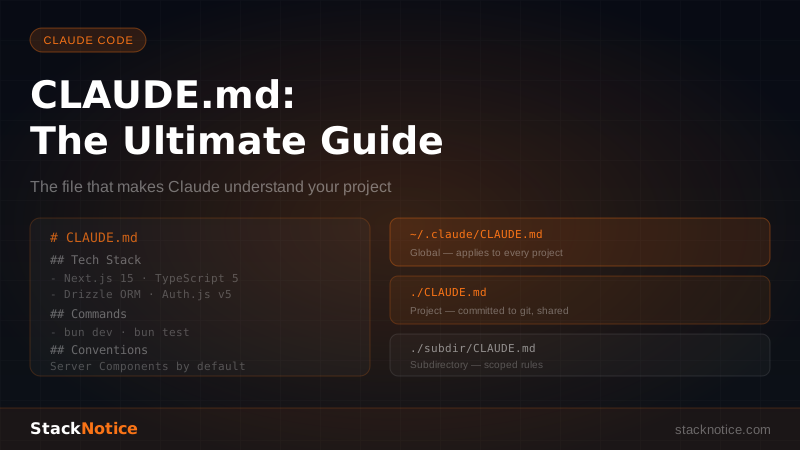
Project Memory: CLAUDE.md vs GEMINI.md
Both tools use a markdown file in the project root to give the AI persistent context about your codebase.
Claude Code uses CLAUDE.md:
# Project: Payment API

## Architecture
- Node.js + Fastify, PostgreSQL via Kysely
- Auth: Bearer JWT (RS256), keys in AWS Secrets Manager
- All money amounts in cents (integer), never floats

## Commands
- `npm run dev` — local dev with nodemon
- `npm test` — Vitest, runs against test DB
- `npm run migrate` — Kysely migrations

## Rules
- Never modify the `payments` table schema without a migration
- All external API calls go through `src/services/`, never inline in routes
Gemini CLI uses GEMINI.md with the same format. Antigravity CLI picks up GEMINI.md but also reads ANTIGRAVITY.md if present.
The project memory approach is nearly identical across all three tools. Where they diverge is what they do with that context during autonomous tasks.
Pricing in 2026
| Tool | Cost | What You Get |
|---|---|---|
| Claude Code (Pro) | $20/month | Sonnet 4, normal usage limits |
| Claude Code (Max) | $100/month | Opus 4 + Sonnet 4, higher limits, parallel tasks |
| Gemini CLI | Free* | 60 req/min, 1K req/day via Google account (ended June 18 for new users) |
| Gemini CLI | ~$7–20/month via API | Gemini 2.0 Flash or Pro with Google AI Studio key |
| Antigravity CLI | Free | Replaces Gemini CLI's free tier for personal Google accounts |
| Antigravity CLI | Included | In Google One AI Premium, Workspace plans |
The asterisk on "free" for Gemini CLI is the story of 2026. What was free is now Antigravity. Gemini CLI with an API key is essentially a paid tier. Antigravity is free for personal Google accounts but closed-source.
Context Window
Context window size affects what you can do in a single session — large context means you can paste entire codebases, run large analysis tasks without chunking, or maintain more conversation history.
| Model | Context |
|---|---|
| Claude Sonnet 4 | 200K tokens |
| Claude Opus 4 | 1M tokens (with Max subscription) |
| Gemini 2.0 Flash | 1M tokens |
| Gemini 2.0 Pro | 1M tokens |
| Antigravity (Gemini 3 Ultra) | 1M tokens |
Google's tooling has had 1M token context since Gemini 1.5. Claude's 1M context requires Opus 4 specifically, which needs a Max subscription. For day-to-day coding tasks — reading a component, fixing a bug, writing a test — 200K is more than enough. For tasks like "analyze this entire codebase of 300 files and tell me what's wrong with the auth layer," 1M genuinely matters.
Agentic Capabilities
Both tools can operate autonomously on multi-step tasks. The implementation details differ significantly.
Claude Code's Strengths
Hooks are Claude Code's standout feature for automation. You can run shell commands on any event — before/after a tool call, when Claude edits a file, on session start:
{
  "hooks": {
    "PostToolUse": [
      {
        "matcher": "Write|Edit",
        "hooks": [
          { "type": "command", "command": "npm run lint:fix" }
        ]
      }
    ]
  }
}
Every file Claude writes gets auto-linted. This is the kind of tight integration that makes Claude Code feel like a real development environment rather than a smart terminal.
Subagents let Claude Code spin up parallel Claude instances to handle independent subtasks simultaneously. A task that would take 15 sequential minutes can run in 5 minutes with three subagents working in parallel. This is built into Claude Code and requires no external orchestration. See Claude Code Subagents: Parallel Tasks Guide for the full breakdown.
MCP integration means Claude Code can connect to external tools — databases, APIs, web browsers — through the Model Context Protocol. You can give Claude Code read access to your production database, a browser for web scraping, or a Slack API for sending notifications, all through standardized MCP servers. See How to Add MCP Servers to Claude Code.
Antigravity CLI's Strengths
Background agents are Antigravity's equivalent of subagents, but they explicitly run without blocking your terminal. You can kick off a large refactor and continue working while it runs in the background:
agy task "Refactor all API routes to use the new error handling middleware" --background
agy status  # check what's running
Google Search grounding is a native capability that neither Claude Code nor Gemini CLI has as a first-class feature. When Antigravity needs to look something up — check if a library API changed, verify a best practice, look up an error message — it searches Google directly rather than relying solely on training data. For debugging unfamiliar libraries or tracking down obscure error messages, this is genuinely useful.
Multi-modal file understanding: Antigravity CLI inherits Gemini's native multimodal capabilities. You can pass it images, PDFs, or screenshots directly in the terminal and it processes them as first-class inputs — useful if you're working from design files or error screenshots.
Code Quality: Honest Assessment
Both tools write good code. The meaningful differences show up in specific scenarios:
Complex multi-file refactors: Claude Code tends to be more reliable for changes that span 10+ files with interdependencies. It's better at tracking what changed and why across a large operation, and less likely to introduce subtle inconsistencies between files.
Boilerplate generation: Roughly equivalent. Both can scaffold a full CRUD API, generate test suites, or wire up authentication flows. Speed is similar in practice.
Debugging reasoning: Claude Code's reasoning tends to be more thorough when working through an unfamiliar error — it explains the root cause, not just the fix. Antigravity/Gemini CLI tends to give you the fix faster but with less explanation of why.
Large codebase analysis: Google's 1M token context gives it an edge for tasks that require loading an entire large codebase at once. If you have a monorepo with hundreds of files and you want to ask "where does this data flow end up?" — having 1M context means you can fit more of it in a single prompt.
The CLAUDE.md Advantage
One underrated difference: Claude Code's CLAUDE.md system is deeply integrated into how Claude interprets every task. Claude reads it, follows the rules, and maintains consistency with your project conventions throughout long sessions.
Gemini CLI and Antigravity CLI respect GEMINI.md, but in practice Claude Code feels more reliable about actually following the constraints you've specified. If you tell Claude Code "always use snake_case for database columns," it enforces that. The Google tools are good at following instructions but occasionally drift on complex, multi-constraint contexts.
Custom Automation with Hooks
Claude Code's hooks system, covered in detail in the hooks guide, has no direct equivalent in Gemini CLI. Antigravity CLI's hooks work similarly:
# .antigravity/hooks.yaml
on_file_write:
  - run: "biome check --apply {file}"
on_session_end:
  - run: "git add -A && git commit -m 'wip: agent session'"
Both hooks systems give you automation at the tool level — something you can't do with most AI coding tools that only offer a chat interface.
When to Use Claude Code
Use Claude Code when:
- You're doing complex refactors across many files and need reliable results
- You want tight automation with hooks (lint, format, test on every write)
- You're already using Claude API in your application and want consistency
- You need subagents for parallel task execution
- You want the most thorough code reasoning and explanations
- Your team has standardized on CLAUDE.md as the project context format
When to Use Antigravity CLI (formerly Gemini CLI)
Use Antigravity CLI when:
- You have a very large codebase and need 1M context to analyze it meaningfully
- You want Google Search grounding for real-time documentation lookups
- You're already in the Google Cloud / Workspace ecosystem
- You want to pass images or PDFs to the AI directly in the terminal
- You need background agents for long-running tasks without blocking your terminal
- Cost is a priority — Antigravity's free tier for personal accounts is compelling
Quick Reference
# Claude Code
npm install -g @anthropic-ai/claude-code
claude                           # start session
claude --model claude-opus-4-5   # use Opus for complex tasks
claude "fix all TypeScript errors in src/"  # one-shot mode

# Gemini CLI (with API key)
npm install -g @google/gemini-cli
export GEMINI_API_KEY=your_key
gemini "explain what this codebase does"

# Antigravity CLI
npm install -g @google/antigravity-cli
agy                              # interactive session
agy "refactor auth module" --background  # non-blocking task
agy status                       # check running agents

# Project memory
CLAUDE.md        → Claude Code context
GEMINI.md        → Gemini CLI + Antigravity context
ANTIGRAVITY.md   → Antigravity-specific context (optional)
The Real Answer
In practice, many developers in 2026 use both: Claude Code as the primary tool for interactive development and serious refactoring work, and Antigravity CLI for specific tasks where 1M context or Google Search grounding makes a difference.
Claude Code's hooks system, subagents, and MCP ecosystem give it an edge for integration with your development workflow. Antigravity CLI's multimodal input and background agents give it an edge for research-heavy or long-running tasks.
If you're getting started today: Claude Code is the stronger starting point for daily coding. Add Antigravity CLI when you hit a specific scenario where it genuinely helps.