Every time you open a new Claude Code session, Claude starts from scratch. It doesn't know your tech stack, your conventions, your naming patterns, or which files to avoid. Without a CLAUDE.md file, you spend the first few minutes of every session re-explaining the same context.
CLAUDE.md solves this. It's a plain Markdown file that Claude reads automatically at the start of every session, giving it the context it needs to work in your project effectively from the first message.
What CLAUDE.md Is
CLAUDE.md is a Markdown file that Claude Code reads before doing anything else. It's project instructions, conventions, and context — written once and applied to every session.
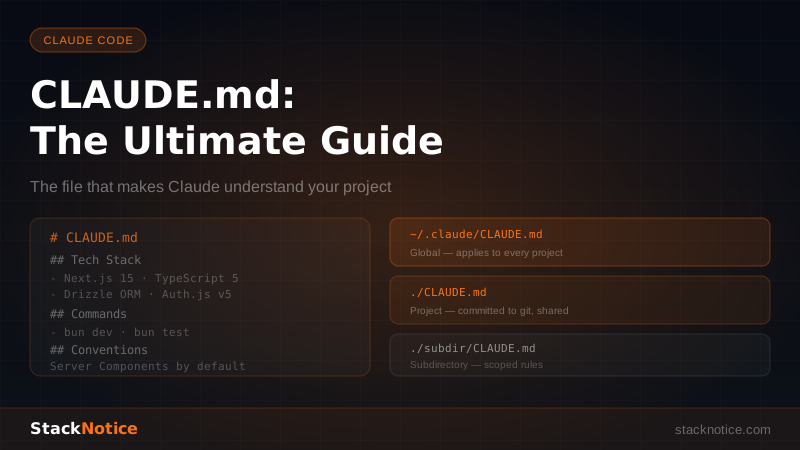
There are three levels:
| Level | Location | When it's read |
|---|---|---|
| Global | ~/.claude/CLAUDE.md | Every Claude Code session, everywhere |
| Project | [project-root]/CLAUDE.md | Any session in that project |
| Subdirectory | [subdir]/CLAUDE.md | Sessions in that directory or deeper |
All three are read and merged. The project CLAUDE.md overrides the global one where they conflict.
The project CLAUDE.md is typically committed to git — it's part of the codebase and benefits the whole team.
The Global CLAUDE.md
Your global CLAUDE.md sets baseline behavior across all projects. Keep it short — these rules apply everywhere:
# Global Claude Preferences

## Communication
- Be concise. Skip filler phrases like "Certainly!" and "Of course!"
- If you're uncertain about something, say so rather than guessing
- When I ask what's wrong with code, diagnose first, fix second
- Prefer real code over pseudocode

## Code Style
- Always use TypeScript. Never use `any` — use `unknown` and narrow
- Prefer `const` over `let`
- Async/await over `.then()` chains
- Early returns over deeply nested conditionals
- No `console.log` in production code

## Git
- Conventional commits: type(scope): message
- Never add Co-Authored-By trailers
- Never force push to main/master without asking

## Security
- Never log secrets, tokens, or passwords
- Never hardcode credentials — use environment variables
- Flag SQL injection, XSS, or IDOR risks when you see them
This global file is your "always apply" layer. Don't put project-specific things here.
The Project CLAUDE.md
The project CLAUDE.md is where the real value is. It should answer the questions Claude would otherwise ask you every session:
- What's the tech stack and which versions?
- How do I run the project?
- Where do things live?
- What conventions does this codebase follow?
- What should I avoid?
A Complete Real-World Example
Here's a production-ready CLAUDE.md for a Next.js 15 SaaS project:
# Project: MyApp

## What This Is
A B2B SaaS platform for managing team workflows. Multi-tenant, subscription-based.

## Tech Stack
- **Next.js 15.2** — App Router, Server Components by default
- **TypeScript 5.x** — strict mode, no `any`
- **Tailwind CSS v4** — utility-first, no custom CSS files
- **Drizzle ORM** — PostgreSQL via Neon serverless
- **Auth.js v5** — email + GitHub OAuth, database sessions
- **Stripe** — subscriptions, customer portal
- **shadcn/ui** — component library (components owned in components/ui/)
- **Bun** — package manager and runtime

## Development Commands
- `bun dev` — start dev server on localhost:3000
- `bun run db:generate` — generate Drizzle migration from schema changes
- `bun run db:migrate` — apply pending migrations
- `bun run db:studio` — open Drizzle Studio at localhost:4983
- `bun test` — run test suite
- `bun run build` — production build

## Project Structure
- `app/` — Next.js App Router pages and API routes
- `app/(auth)/` — login, signup, password reset (public)
- `app/(dashboard)/` — protected routes (require auth)
- `app/api/` — API routes and webhooks
- `components/ui/` — shadcn/ui components (editable, owned)
- `components/[feature]/` — feature-specific components
- `db/schema.ts` — ALL database table definitions
- `db/index.ts` — database connection
- `lib/[feature].ts` — database query functions
- `app/[feature]/actions.ts` — Server Actions
- `types/` — shared TypeScript types

## Conventions

### Components
- Server Components by default — add `'use client'` only when you need browser APIs, event handlers, or hooks
- Co-locate component, its types, and its tests in the same folder
- Use `cn()` from `lib/utils.ts` for conditional classNames — never string concatenation
- shadcn/ui components go in `components/ui/`, feature components in `components/[feature]/`

### Server Actions
- All Server Actions in `app/[feature]/actions.ts` with `'use server'` at the top
- Always check auth at the top of every action: `const session = await auth(); if (!session?.user) return { error: 'Unauthorized' }`
- Always validate input with Zod before touching the database
- Return `{ error: string }` or `{ success: true, data: ... }` — never throw from Server Actions
- Call `revalidatePath()` after mutations that affect the UI

### Database
- All queries go in `lib/[feature].ts` — never query the DB directly in components or actions
- Use Drizzle relational queries (`db.query.X.findMany`) over raw `.select()` when fetching with relations
- Always check ownership in update/delete queries: `and(eq(table.id, id), eq(table.userId, user.id))`
- Never expose `userId`, internal IDs, or pricing data to the client without sanitizing

### API Routes
- Public webhooks (Stripe, etc.) in `app/api/webhooks/[provider]/route.ts`
- Always verify webhook signatures — never skip this
- Return proper HTTP status codes

## Do NOT
- Don't use `useEffect` for data fetching — use Server Components or `server-only` functions
- Don't call `supabase.auth.getSession()` — we use Auth.js, use `auth()` from `lib/auth`
- Don't add inline styles — use Tailwind utilities
- Don't install new npm packages without confirming with me first
- Don't modify `db/migrations/` manually — always use `bun run db:generate`
- Don't commit `.env.local`

## Environment Variables
- `DATABASE_URL` — Neon PostgreSQL connection string
- `NEXTAUTH_SECRET` — Auth.js secret
- `STRIPE_SECRET_KEY` / `STRIPE_WEBHOOK_SECRET` — Stripe
- `ANTHROPIC_API_KEY` — Claude API (used in AI features)
- All env vars are typed in `env.ts` using the `t3-env` library

## Testing
- Unit tests with `bun test` (Bun's built-in Jest-compatible runner)
- Test files: `[name].test.ts` in the same directory as the file being tested
- Mock external APIs — never call real Stripe/Anthropic in tests
Custom Slash Commands
One of the most underused features: you can define custom slash commands in CLAUDE.md that Claude understands and executes when you type them.
## Custom Commands

### /new-page [name]
Create a new Next.js page at `app/(dashboard)/[name]/page.tsx`. Include:
- Default export as an async Server Component
- Proper TypeScript types for searchParams and params
- `export const metadata` with title and description
- A skeleton loading state in `loading.tsx`
- An error boundary in `error.tsx` with `'use client'`

### /new-action [feature]
Create a Server Actions file at `app/[feature]/actions.ts`:
- `'use server'` at the top
- Auth check: `const session = await auth(); if (!session?.user) return { error: 'Unauthorized' }`
- Zod schema for input validation
- Drizzle query in a try/catch
- Return `{ error }` or `{ success: true }`
- `revalidatePath()` call after mutations

### /new-component [name]
Create a component at `components/[name]/index.tsx`:
- TypeScript interface for props
- Named export + default export
- Use `cn()` for className merging
- No inline styles

### /check-security
Review the current file or recent changes for:
- SQL injection risks (parameterized queries?)
- Auth checks on all mutations
- Exposed sensitive data in API responses
- Missing input validation
- Hardcoded secrets or credentials

### /explain-architecture
Give a high-level explanation of how this project is structured, what each major directory contains, and the data flow from user request to database and back.
When you type /new-page settings in Claude Code, Claude executes that definition — creating the page, loading state, and error boundary correctly according to your project's conventions. This eliminates an entire category of "wait, how should I structure this?" questions.
CLAUDE.md for Different Project Types
Python / FastAPI
# Project: Backend API

## Stack
- Python 3.12 + FastAPI 0.111
- SQLAlchemy 2.x (async) + Alembic
- Pydantic v2 for validation
- pytest + httpx for testing

## Commands
- `uvicorn main:app --reload` — start dev server
- `alembic upgrade head` — apply migrations
- `alembic revision --autogenerate -m "description"` — generate migration
- `pytest -x -v` — run tests, stop at first failure

## Structure
- `routers/[feature].py` — FastAPI route handlers
- `schemas/[feature].py` — Pydantic request/response models
- `models/[feature].py` — SQLAlchemy ORM models
- `services/[feature].py` — business logic (keep out of routers)
- `tests/[feature]/` — tests mirror the main structure

## Conventions
- Use `async def` throughout — never blocking calls in async functions
- Dependency injection for DB sessions and auth: `db: AsyncSession = Depends(get_db)`
- Never return ORM models directly — always convert to Pydantic schemas
- HTTP status codes: 200 OK, 201 Created, 204 No Content, 400 Bad Request, 401 Unauthorized, 403 Forbidden, 404 Not Found
- Raise `HTTPException` for client errors, let FastAPI handle validation errors
React Native / Expo
# Project: Mobile App

## Stack
- Expo SDK 52 + React Native
- TypeScript strict
- Expo Router (file-based routing)
- Zustand for state management
- React Query for server state

## Commands
- `bun start` — start Expo dev server
- `bun run ios` / `bun run android` — run on simulator

## Conventions
- Screens in `app/` (Expo Router)
- Shared components in `components/`
- Never use inline styles — use StyleSheet.create() or NativeWind
- Handle both iOS and Android — test behavior on both platforms
- Use `Platform.OS` sparingly — prefer cross-platform components

## Do NOT
- Don't use web-only APIs (localStorage, fetch without polyfill)
- Don't block the JS thread — use InteractionManager for heavy work
What NOT to Put in CLAUDE.md
Secrets and credentials — CLAUDE.md is committed to git. Never put API keys, passwords, or tokens in it.
Overly long history or changelogs — Claude reads CLAUDE.md every session. If it's 2,000 lines long, you're burning context window on irrelevant history.
Things that change frequently — Put feature flags, current sprint goals, or temporary notes in a scratchpad file instead, not CLAUDE.md.
Contradictory instructions — "Use tabs for indentation" and "use 2-space indentation" in the same file causes Claude to pick one and be inconsistent. Review for conflicts.
Negative-only instructions — "Don't do X, Y, Z" without saying what to do instead. Give Claude the positive guidance too.
Tips for Writing Effective CLAUDE.md Files
Be specific about versions. "TypeScript" is less useful than "TypeScript 5.x strict mode." "React" is less useful than "React 19 with Server Components."
Include the commands Claude needs to run. Dev server, test runner, migration commands — Claude can run these and fix issues it finds without asking you.
Explain WHY, not just WHAT. "Don't use getSession() — always use getUser() because getSession() doesn't validate the JWT" is far more useful than just "don't use getSession()."
Iterate on it. Every time you catch Claude making the same mistake, add a rule. Every time you find yourself explaining the same thing twice, it belongs in CLAUDE.md.
Keep the global file small. The global CLAUDE.md is for true universals — communication preferences, git conventions. Project specifics go in the project file.
The CLAUDE.md file is the highest-leverage thing you can do to improve your Claude Code workflow. A well-written one turns a good AI assistant into one that feels like it's been working in your codebase for months.
For more on maximizing Claude Code, see the complete Claude Code tips guide, the hooks guide for automated workflows, and how to use subagents for parallel tasks.