A question that comes up constantly when developers discover Claude Code: "I already have Cursor — do I need Claude Code too? Aren't they basically the same thing?"
They're not the same thing. They solve overlapping problems using the same underlying model, but the architecture is different, the control model is different, the daily workflow is different, and they excel in completely different situations.
This comparison is based on using both tools seriously — Cursor for months before Claude Code existed, Claude Code since it launched. Not a feature checklist: a real assessment of where each wins.
The Surface-Level Answer
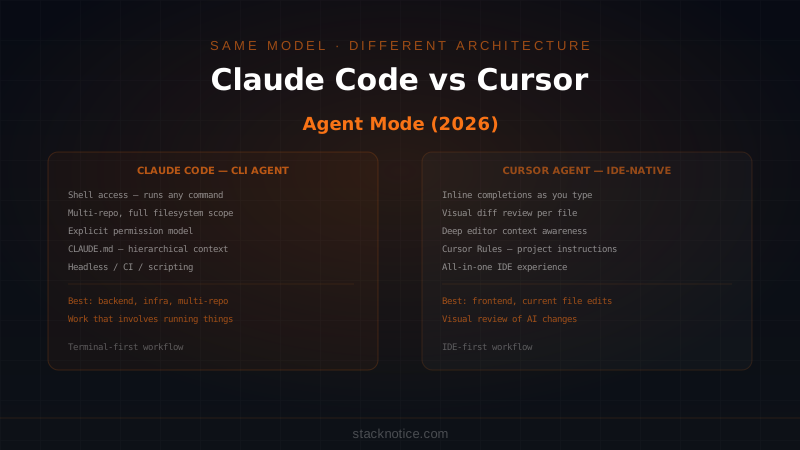
Cursor is an IDE. It wraps VS Code with AI capabilities built in: inline completions, a chat panel, an Agent Mode that can execute multi-step tasks, and deep integration with the editor you're already looking at.
Claude Code is a CLI agent. It lives in your terminal, has direct access to your filesystem and shell, can run commands, read files anywhere on your machine, and execute tasks without an IDE involved at all.
Both can use Claude Sonnet 4.6 or Opus 4.6 as the underlying model. The model is not the differentiator. The tool architecture is.
How Agent Mode Works in Each
Cursor Agent Mode
Cursor's Agent Mode runs inside the IDE. You describe a task in the chat panel, and Cursor's agent:
- Opens and reads files from your project
- Writes diffs you can review inline before accepting
- Can run terminal commands in a panel inside Cursor
- Applies changes file by file with a visual diff review step
The UX is optimized for visual review. Every change shows you exactly what's being modified, in context, in the same editor you work in. You approve or reject diffs one at a time.
The tradeoff: Cursor's agent operates within the IDE's model of your project. It knows what's open, what's in your workspace folder, and what VS Code's language server understands. Reaching outside that — to other repos, to system paths, to running arbitrary scripts — requires more setup.
Claude Code
Claude Code's agent runs in your terminal. You describe a task, and Claude Code:
- Reads files anywhere on your filesystem
- Runs shell commands directly (npm, pytest, git, docker, curl — anything)
- Edits files with your approval at each step
- Persists context about your project via CLAUDE.md
- Can orchestrate parallel subagents across multiple tasks simultaneously
The UX is optimized for task completion over visual review. You give a goal, Claude Code executes it, asks for permission at consequential steps, and delivers the result.
The tradeoff: There's no GUI. No inline diff view. You're working in a terminal, and the feedback loop is text-based. For developers who live in the terminal, this is natural. For developers who prefer visual tools, it's an adjustment.
The Permission Model Difference
This is the most important architectural difference and the one that changes daily workflow the most.
Cursor: implicit trust within the workspace
Cursor's agent can read and modify files in your open workspace by default. It will ask before running terminal commands, but within the file editing scope, it operates relatively freely. The assumption is that your workspace is your project and the agent should be able to work in it.
Claude Code: explicit, auditable permissions
Claude Code has a layered permission system. Before running any command or modifying any file outside of what you've explicitly allowed, it asks. You can configure what's always allowed (specific commands, specific paths) in your settings, and everything else prompts you.
This matters in two ways:
For safety: Claude Code will not silently run npm install or git push or modify a file outside your project directory without asking. You know exactly what it's doing.
For trust: When you're working in a sensitive codebase — production infrastructure, auth code, anything where a silent mistake has real consequences — the explicit permission model is not friction. It's the point.
# Claude Code shows what it's about to run and asks:
# > Run command: git push origin feature/auth-refactor ?
# [y/n/always/never]

# You can grant permanent permission for safe commands:
claude config add-allowed-command "npm test"
Cursor's model is faster for everyday coding. Claude Code's model is more appropriate when the stakes are higher or the scope is broader.
Context: Where Each Excels
Cursor: current file + open workspace
Cursor is exceptional at understanding what you're currently looking at. It knows your cursor position, the selected code, the current file, and the other files in your workspace. When you want help with the specific code you're editing right now, Cursor's context is immediate and relevant.
This makes Cursor outstanding for:
- Inline completions that understand the code around your cursor
- Explaining or refactoring the function you're looking at
- Quick fixes for the error in the current file
- Anything where visual context in the editor matters
Claude Code: your whole machine, your whole workflow
Claude Code's context can span your entire filesystem, multiple repositories, shell history, running processes, and anything accessible from the terminal. Combined with CLAUDE.md files that store permanent project context, it understands your project at a higher level than "what's in the workspace folder".
This makes Claude Code exceptional for:
- Tasks that span multiple repositories
- Anything that involves running commands as part of the work (tests, builds, migrations)
- Backend-heavy work where the "IDE" is less relevant than the terminal
- Automation and scripting
- CI/CD, Docker, infrastructure work
- Headless operation — running Claude Code in scripts or pipelines without a human watching
# Claude Code can run a full workflow:
# 1. Read the failing test output
# 2. Find the source of the failure
# 3. Fix the code
# 4. Run the tests again
# 5. Commit if they pass

# All from one instruction in the terminal, no IDE needed.
The CLAUDE.md vs Cursor Rules Comparison
Both tools have a mechanism for giving the AI persistent context about your project.
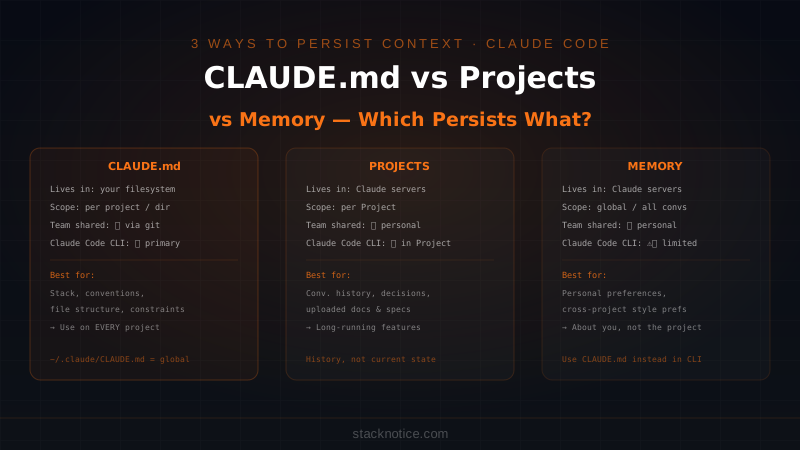
Cursor Rules (.cursor/rules): A set of instructions Cursor's AI follows when working in your project. You define coding standards, naming conventions, which libraries to prefer, what to avoid.
CLAUDE.md: A richer project document that can include architecture overview, technical decisions, constraints, and structured instructions. It's also hierarchical — a global CLAUDE.md in your home directory applies everywhere, project-level ones override it, subdirectory ones add context for specific parts of the codebase.
Both solve the same problem: making the AI understand your project conventions without re-explaining them every session. CLAUDE.md supports more structure and nesting, which matters in complex projects with multiple modules.
Which Scenarios Favor Each
Use Cursor when:
- You're primarily doing frontend work where visual context in the editor matters
- You want inline completions as you type alongside agent capabilities in the same tool
- You're reviewing AI changes visually and want to accept/reject diffs per file
- You're working in a single repository with a clear workspace
- Your workflow is IDE-centered and you prefer keeping everything in one window
- You're onboarding to a new codebase and want to explore it visually
Use Claude Code when:
- You're doing backend, infrastructure, or DevOps work where the terminal is the primary environment
- The task involves running commands as part of the work (tests, scripts, migrations, builds)
- You're working across multiple repositories simultaneously
- You want to automate repetitive development tasks via headless scripting
- You're doing a large refactor that spans many files and you want parallel subagents
- You're on CI or a remote server without a GUI
- The work is sensitive and you want the explicit permission model
Do You Need Both?
Yes, and many developers use them together without friction.
The workflow that makes sense: Cursor for in-editor work, Claude Code for everything outside the editor.
When you're writing a new feature, Cursor's inline completions and chat are fast and context-aware. When you need to run a database migration, write a deployment script, fix a failing test suite across three repos, or automate a repeated task — switch to Claude Code in the terminal.
They're not competitors for the same workflow. They address different parts of a developer's day. Cursor is better when you're in the code. Claude Code is better when you're running the code.
Cost and Subscription
Cursor: $20/month for Pro (access to premium models including Claude Sonnet). Opus access is metered separately.
Claude Code: Requires a Claude subscription. Included in Claude Max ($100/month), otherwise uses API credits. The cost optimization guide for Claude Code covers how to manage usage.
If you're on Claude Max, Claude Code's cost is part of that subscription. If you're also paying for Cursor Pro, you're paying for both — which is reasonable if you're using both for different things, but worth evaluating if your workflow leans clearly one way.
The Broader Comparison
If you want the full picture of where Claude Code sits among all AI coding tools — including GitHub Copilot, Windsurf, Gemini CLI, and others — the complete AI coding tool comparison covers all of them. The Cursor complete guide goes deeper on Cursor's specific features if you're evaluating it as your primary IDE.
The One-Line Summary
Cursor: AI built into your editor. Best when the work is the file you're looking at.
Claude Code: AI with shell access. Best when the work involves running things, spanning repos, or going beyond what an IDE can reach.
The question isn't which one is better. The question is which one matches the shape of the work you're doing right now. For most developers doing full-stack work, both have a clear role and don't conflict with each other — they just live in different parts of the workflow.