The most common frustration with Claude Code is re-explaining the same context at the start of every session. "We use Drizzle, not Prisma." "Don't use any in TypeScript." "The auth is in /src/lib/auth.ts." Saying this every time is a sign you haven't set up context persistence correctly.
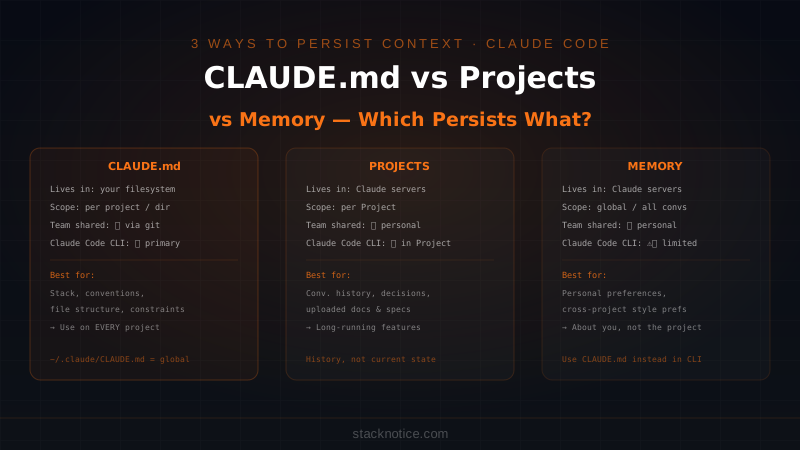
Claude has three mechanisms for remembering across sessions. They solve different problems, persist differently, and are appropriate in different situations. Using the wrong one means either re-explaining constantly or contaminating context you didn't want shared.
The Three Mechanisms at a Glance
| CLAUDE.md | Projects | Memory | |
|---|---|---|---|
| Scope | Per project / directory | Per Claude.ai Project | Global across all conversations |
| Who sets it | You (by writing a file) | You (by uploading to a Project) | Claude (when you ask it to remember) |
| Where it lives | Your filesystem | Claude's servers | Claude's servers |
| Shared with team | ✅ Yes (git) | ❌ No | ❌ No |
| Works in Claude Code CLI | ✅ Primary method | ✅ When using Projects | ⚠️ Limited |
| Works in Claude.ai web | ❌ No | ✅ Yes | ✅ Yes |
| Survives context window | ✅ Always (re-read each session) | ✅ Yes | ✅ Yes |
CLAUDE.md — The Primary Tool for Claude Code
CLAUDE.md is a Markdown file that Claude Code reads automatically at the start of every session. You write it once, it persists forever, it's under version control, and your whole team benefits from it.
Where CLAUDE.md files live
Claude Code uses a hierarchical system:
~/.claude/CLAUDE.md          # Global — applies to every project
~/projects/myapp/CLAUDE.md   # Project-level — applies to this project
~/projects/myapp/src/CLAUDE.md  # Subdirectory — additional context for src/
Claude reads all applicable files in order, with more specific files taking precedence. Global instructions apply everywhere; project instructions override them where needed.
What to put in CLAUDE.md
The most valuable content is things you'd have to re-explain every session:
# MyApp — Claude Context

## Stack
- Next.js 15 App Router, TypeScript strict mode
- Drizzle ORM with Neon Postgres (NOT Prisma)
- Clerk for authentication (NOT NextAuth)
- Tailwind CSS + shadcn/ui components
- Bun as package manager (NOT npm or yarn)

## Conventions
- All API routes go in /src/app/api/
- Server actions go in /src/actions/ with 'use server' directive
- Database queries go in /src/lib/db/ — never inline in components
- Use `z.infer<typeof schema>` for types derived from Zod schemas
- Never use `any`. Use `unknown` with type guards instead.

## Project Structure
- /src/app/ — Next.js routes and pages
- /src/components/ — Shared UI components
- /src/lib/ — Utilities and shared logic
- /src/actions/ — Server actions

## Key Files
- /src/lib/auth.ts — Clerk auth helpers and session logic
- /src/lib/db/schema.ts — Complete Drizzle schema
- /src/lib/db/index.ts — Database client (use this, don't create new ones)

## What to Avoid
- Don't install new packages without asking first
- Don't modify /src/lib/db/schema.ts without mentioning the migration
- Don't use fetch() directly — use the typed API client in /src/lib/api.ts
This file loads into every Claude Code session for this project. Claude knows your stack, conventions, and constraints without you saying anything.
Global CLAUDE.md — personal preferences across all projects
Your ~/.claude/CLAUDE.md applies everywhere:
# Global Preferences

## Code Style
- TypeScript strict mode always on
- Prefer explicit return types on public functions
- Use early returns over nested conditionals
- Async/await over .then() chains

## Communication
- Show the plan before implementing large changes
- Ask before installing packages I didn't mention
- When uncertain about requirements, ask — don't assume
These are your developer preferences, not project-specific. They persist across every project without any per-project setup.
The team advantage
CLAUDE.md files committed to git give every developer on the team the same starting context. When a new developer joins, they clone the repo and immediately have a Claude Code setup that knows the conventions. When you update a convention, update the CLAUDE.md and everyone's next session picks it up.
This is something neither Projects nor Memory can do — they're personal, not shared.
Claude Projects — Conversation History That Persists
Claude Projects (available in Claude.ai and accessible from Claude Code when you're inside a Project) maintain a persistent conversation history across sessions. You can also upload files — PDFs, code files, documentation — and Claude can reference them throughout the Project's lifetime.
What Projects actually persist
- Conversation history — previous exchanges within the Project are available as context
- Uploaded files — documents, specs, architecture diagrams you've added
- Project instructions — a persistent system prompt you define for the Project
When Projects add value for Claude Code users
Projects are useful when your work is inherently iterative across multiple sessions and you need the history of decisions, not just the current state of the codebase:
- Long-running features where previous decisions inform new ones
- Debugging sessions where you need to remember what you've already tried
- Architecture work where the reasoning behind choices matters
- Client work where you need to track requirements discussions
The difference from CLAUDE.md: CLAUDE.md tells Claude what your codebase is like right now. Projects tell Claude what you've discussed and decided over time.
The limitation
Projects are personal. Your Project history isn't shared with your team. If another developer joins the same work, they don't get your accumulated context — they start fresh.
Projects also don't know your local filesystem unless you're actively running Claude Code within that Project and the files are open or referenced.
Memory — Personal Facts Across All Conversations
Memory is the simplest mechanism: you ask Claude to remember something, and it does — across all your Claude conversations, regardless of project.
"Remember that I prefer tabs over spaces in all my projects."
"Remember that my main database is on Railway, not local."
"Remember that I'm working toward launching by September."
What Memory is good for
Personal preferences that don't belong in a project's CLAUDE.md because they're about you, not the project:
- Communication style preferences ("explain things concisely, no lengthy preambles")
- Cross-project personal conventions
- Biographical context Claude might find useful ("I'm a solo founder working in evenings")
- Work context that changes slowly ("I'm currently focused on the payments feature")
What Memory is bad for
Technical project context. Don't try to use Memory to replace CLAUDE.md. Memory is global, imprecise, and can accumulate contradictions. It's not indexed like a file — Claude reads it as background context, not as specific instructions.
If you put "use Drizzle not Prisma for the MyApp project" in Memory, Claude might apply that instruction to unrelated projects. CLAUDE.md keeps project context scoped to the right project.
Memory in Claude Code CLI
Memory operates primarily in the Claude.ai web interface. In the Claude Code CLI, your CLAUDE.md is the equivalent mechanism — more precise, version-controlled, and project-scoped. For CLI users, CLAUDE.md is the right tool for everything Memory tries to solve.
The Right Tool for Each Situation
Use CLAUDE.md when:
- You want context that applies every time you open Claude Code in this project
- The context is technical: stack, conventions, file structure, constraints
- You want your team to share the same context
- You're codifying decisions that came from planning sessions
Use Projects when:
- You're doing extended work that spans many sessions and the history matters
- You've uploaded reference documents Claude needs to consult
- You want to maintain a running record of decisions and reasoning
- You're working on something complex enough to benefit from conversation continuity
Use Memory when:
- It's a personal preference, not a project constraint
- The context applies across all your work, not one project
- You want Claude to know something about you as a developer
- You're in the Claude.ai web interface and CLAUDE.md isn't available
The Practical Setup for a New Project
When you start a new project, the first thing to do before writing any code:
# Create the project CLAUDE.md
touch CLAUDE.md
Then fill it with:
- Stack — every library and framework, with what you're NOT using that Claude might assume
- Conventions — naming, file organization, patterns you follow
- Key files — where the important pieces live
- Constraints — things Claude should ask about before doing
Commit it to git on day one. From that point forward, every session starts with full context — no re-explaining, no wrong assumptions about your stack, no "I'll use Prisma" when you're on Drizzle.
If you're working on a long-running feature, create a Claude Project for it in the web UI and do your planning there. The conversation history becomes your decision log.
If you have global personal preferences, add them to ~/.claude/CLAUDE.md. They apply everywhere without cluttering project-specific files.
See the full CLAUDE.md guide for more patterns on structuring context files for large codebases, and the context management guide for how to handle context limits within a session.
Why Most Developers Under-Use CLAUDE.md
The most common mistake is treating CLAUDE.md as documentation — writing it once when you set up the project and never updating it.
CLAUDE.md is a living document. Every time you make an architectural decision, add it. Every time Claude makes a wrong assumption about your stack, correct it in the file. Every time you establish a new convention, write it down.
The developers who get consistent, high-quality output from Claude Code are the ones who maintain a detailed CLAUDE.md. Not because Claude is smarter with it — because it's not making assumptions about your project. It knows.
The hierarchy — global personal preferences in ~/.claude/CLAUDE.md, project context in the project's CLAUDE.md, extended session history in Projects — gives you precise control over what Claude knows and when. It's worth the 30 minutes to set up properly on every project you care about.