Most Claude Code users discover Plan Mode by accident — they run a command with --plan or type /plan in a session and Claude starts writing a numbered list instead of code. The instinct is to dismiss it as an extra step and go back to direct execution.
That instinct is wrong for a specific class of tasks. Understanding when Plan Mode earns its place changes how you handle the hardest parts of a codebase.
What Plan Mode Actually Does
In normal Claude Code operation, you describe what you want and Claude starts writing code immediately. It reads relevant files, makes decisions, and executes — sometimes correctly, sometimes with an approach you'd have stopped if you'd seen it first.
Plan Mode inserts a step between your instruction and any code changes. Claude reads all relevant files and context, then produces a written plan: what it intends to do, in what order, with what tradeoffs. No files are modified. No commands are run. You get to read the plan and decide whether to proceed.
# Start a session in Plan Mode
claude --plan

# Or switch mid-session with the slash command
/plan

# Once you've reviewed the plan and want to execute:
/execute
The plan Claude produces is not vague. It will typically list:
- Which files it intends to modify
- What changes it plans to make to each
- Any new files it will create
- Commands it expects to run
- Potential risks or places where it's uncertain
You can redirect, correct, or approve before a single character of code is written.
The Problems Plan Mode Solves
Wasted implementation on the wrong approach
The most expensive failure mode in AI-assisted coding is when Claude picks an approach, implements it across a dozen files, and you realize at the end it was the wrong architecture for your constraints.
This happens more often on tasks that seem well-specified but have hidden dependencies. "Add email notifications when a user's subscription expires" sounds clear. But the correct implementation depends on whether you have a job queue, what email service you use, whether you have idempotency requirements, and how cancellations are handled. Claude will make assumptions. Without Plan Mode, you find out what assumptions it made after it's already written the code.
With Plan Mode, you read: "I plan to use a cron job that runs daily and sends via Resend. I'll add a notificationSentAt field to the subscriptions table." At that point you can say "we use BullMQ, not cron" before anything is touched.
Multi-file refactors with unclear scope
When a refactor touches many files, the first thing you need is a clear map of what changes. Not code — a map. Plan Mode produces exactly this before execution starts.
Planned changes for auth middleware refactor:

1. src/middleware.ts — Extract token validation to validateToken()
2. src/lib/auth.ts — Add validateToken() function, update types
3. src/app/api/auth/[...nextauth]/route.ts — Remove duplicated validation
4. src/app/api/webhooks/stripe/route.ts — Use shared validateToken()
5. src/__tests__/auth.test.ts — Update tests for new function signature

Risk: The Stripe webhook currently uses a different validation path
that might need special handling — I'll flag this in the implementation.
Reading this takes 30 seconds and tells you whether Claude's mental model of the codebase is correct before it starts touching files.
Tasks where requirements are genuinely unclear
Sometimes you know you need X but not exactly how X should work. Plan Mode externalizes Claude's assumptions so you can course-correct early. The back-and-forth happens in natural language before the code is written, not in code reviews after.
High-stakes changes in production code
Auth flows, payment processing, data migrations, security-sensitive paths — these are places where a wrong implementation has consequences beyond "revert the commit." Plan Mode gives you a formal review step that matches the stakes of the change.
When Plan Mode Gets in the Way
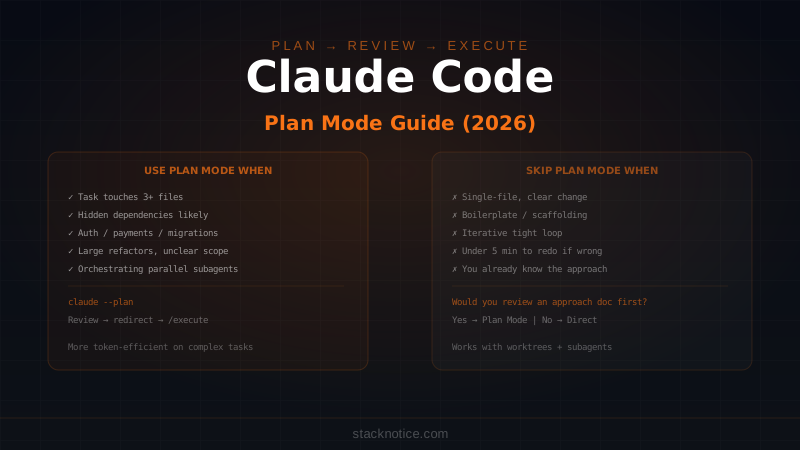
Plan Mode is overhead on tasks where you already know the approach, the scope is small, and the risk of a wrong implementation is low. Using it by reflex slows you down without a corresponding benefit.
Skip Plan Mode for:
- Well-defined single-file changes — "Add input validation to this function", "fix the typo in this error message", "add a loading spinner to this button"
- Boilerplate generation — scaffolding a new API route, creating a new component with known structure, writing tests for existing behavior
- Iterative refinement — you're in a tight feedback loop and correcting as you go
- Anything under 5 minutes to redo — if Claude gets it wrong and you need to revert, the cost of the mistake is lower than the cost of the planning step
The practical test: if you can describe what you want in one sentence and you'd recognize a correct implementation immediately, skip Plan Mode.
The Plan → Review → Execute Workflow
The most effective way to use Plan Mode is as a deliberate workflow step, not a reactive switch:
Step 1: Start with Plan Mode for complex tasks
claude --plan

# Describe the task with full context
"I need to add multi-tenancy to the API. Each user belongs to an
organization, all data should be filtered by org_id, and I want
Row-Level Security at the Postgres level. Current schema is in
/prisma/schema.prisma. Start by planning the approach."
Step 2: Read the plan critically
When Claude produces the plan, read it as you would a PR description:
- Does it understand the existing structure correctly?
- Are the files it plans to touch the right ones?
- Does the sequence make sense?
- Has it missed anything?
- Are its assumptions about your stack correct?
Step 3: Redirect before executing
If the plan is wrong, say so in plain language:
"The plan looks right but you're missing the webhook handlers in
/src/app/api/webhooks — those also query the database and need
the org_id filter. Add those to the plan."
Claude will revise the plan. You can iterate until it's correct.
Step 4: Execute with confidence
/executeNow Claude implements exactly what the plan describes. Because you've already validated the approach, interruptions during execution are rare — Claude isn't making strategy decisions while writing code, it's executing a plan you approved.
Plan Mode and Token Cost
A common concern: does Plan Mode cost more? The planning step does consume tokens. But the more relevant question is the total token cost across the full task.
Failed implementations cost tokens too — reading files, writing wrong code, running failing tests, attempting corrections. A single botched refactor that requires multiple correction attempts can easily cost 3-5x what a successful planned implementation costs.
For tasks over a certain complexity threshold, Plan Mode is almost always more token-efficient than direct execution. That threshold is roughly: any task that touches more than 3 files or has non-obvious dependencies.
The Claude Code cost optimization guide covers the full picture of managing token usage, including when to switch models for different task types.
Plan Mode With Subagents
Plan Mode becomes particularly valuable when you're orchestrating parallel subagents. Before spinning up multiple agents on different parts of a large task, a planning phase in the orchestrator ensures each subagent has a clear, non-overlapping scope.
# Orchestrator session with --plan
claude --plan

"We need to add a complete notification system: email via Resend,
in-app via a notifications table, and push via Expo. These three
channels are independent. Plan how to split this across parallel
subagents with no shared file conflicts."
The plan gives you a coordination map before any code is written. Once you approve it, you can spawn the subagents with confidence that their work won't collide.
Plan Mode vs Worktrees
Claude Code worktrees let you work on multiple branches simultaneously. Combined with Plan Mode, the workflow is:
- Plan Mode in main branch context → understand scope
- Create a worktree for the feature branch
- Execute in the worktree → main branch stays clean
This is the pattern for risky changes: plan in context of the real codebase, execute in isolation.
The Decision Framework
One question determines whether to use Plan Mode: "Would I want to review an approach document before this work starts?"
If the answer is yes in a human-to-human collaboration, the answer is yes with Claude too. Plan Mode is that approach document, produced in seconds, reviewable before a single change is made.
The developers who get the most out of Claude Code are the ones who treat it like a collaborator that needs a brief — not an executor that needs instructions. Plan Mode is how you write the brief.