The AI coding tools market just had its most turbulent quarter yet.
Windsurf — the scrappy Cursor alternative that quietly hit 1 million users — was acquired by Cognition (the makers of Devin) for $250 million in early 2026. Cursor, fresh off a reported $400 million valuation, expanded beyond VS Code and shipped JetBrains support in March. GitHub Copilot crossed 4.7 million paid subscribers and launched an autonomous agent that creates pull requests on its own. And Anthropic quietly pushed Claude's SWE-bench score past 80%.
If you picked your AI coding tool a year ago, the landscape looks completely different now. Tools that were niche experiments are production infrastructure. Features that were roadmap promises shipped. And the gap between "assistant" and "agent" collapsed faster than anyone predicted.
This is the comparison nobody's written yet: four tools, honest tradeoffs, no hype. Let's get into it.
The Quick Decision Guide
Before the deep dives, here's the honest shortcut:
| If you want... | Use this |
|---|---|
| Maximum coding autonomy, terminal power | Claude Code |
| Best GUI + inline editor experience | Cursor |
| Cursor-level features without the Cursor price | Windsurf |
| GitHub/Jira-native team workflow | GitHub Copilot |
| JetBrains + AI (IntelliJ, PyCharm, GoLand) | Cursor or Copilot |
| Side-by-side model comparison | Windsurf (Arena Mode) |
| Works in any editor without switching | Claude Code |
| Autonomous PR creation from issue tickets | GitHub Copilot |
Now let's break down why.
Claude Code: The Agentic Terminal-First Powerhouse
What It Is
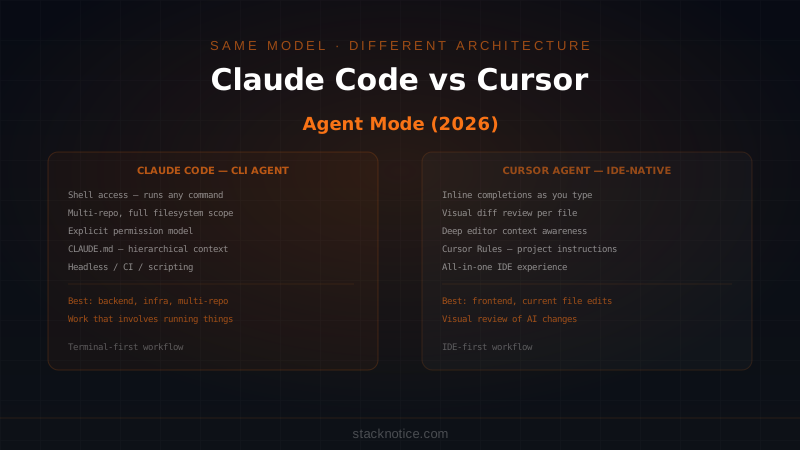
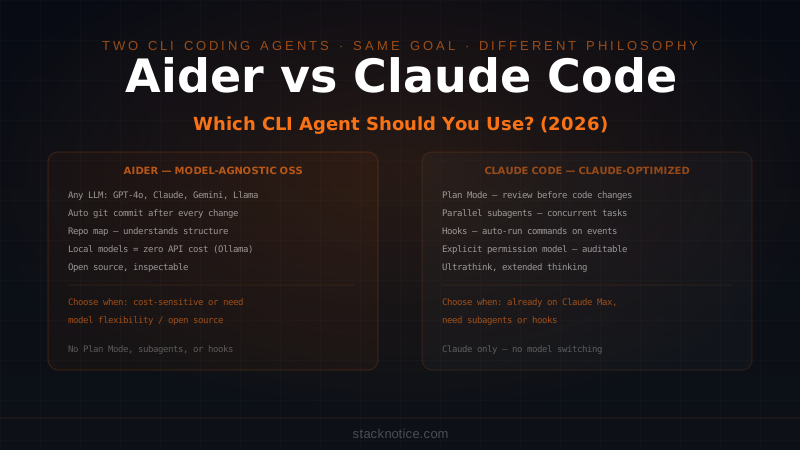
Claude Code is Anthropic's answer to a different question than everyone else is asking. While Cursor and Windsurf are betting on the IDE experience, Claude Code bets on the terminal. It's a CLI tool — you run it from your terminal, it reads your codebase, and it executes multi-step agentic tasks with minimal hand-holding. If you're new to it, the getting started guide covers the full setup.
The philosophical difference matters: Claude Code isn't trying to be your editor. It's trying to be your senior engineer who works in the terminal, can touch any file, run any command, and chain dozens of actions together without stopping to ask for permission at every step.
This approach has a measurable payoff. Claude Opus 4.6 scores 80.8% on SWE-bench — the industry benchmark for resolving real GitHub issues autonomously. Claude Sonnet 4.6 hits 79.6%. For context, scores above 50% were considered impressive a year ago. These are the highest verified autonomous coding benchmark scores from any production model.
Pricing
| Plan | Price | Notes |
|---|---|---|
| Claude.ai Pro | $20/month | Access to Claude models, limited Claude Code usage |
| Claude.ai Max | $100/month | Higher usage limits, priority Opus access |
| API (pay-as-you-go) | Per token | Sonnet ~$3/1M input, Opus ~$15/1M input |
| Teams / Enterprise | Custom | SSO, audit logs, centralized billing |
For heavy users, API-based usage can get expensive during long agentic sessions. But for teams where one engineer replaces two hours of boilerplate with a 5-minute Claude Code session, the math still works.
Best Features
1M token context window. Claude Code can read your entire codebase — not just the file you're in, not just recently opened files, your entire project — and reason about it coherently. For large monorepos or sweeping architectural changes, this changes what "refactoring" means.
Hooks system. Claude Code lets you define custom hooks that trigger automatically during its workflow: before file edits, after terminal commands, on session end. You can enforce linting, run tests, update logs, or block certain operations. It's programmable automation layered on top of AI automation.
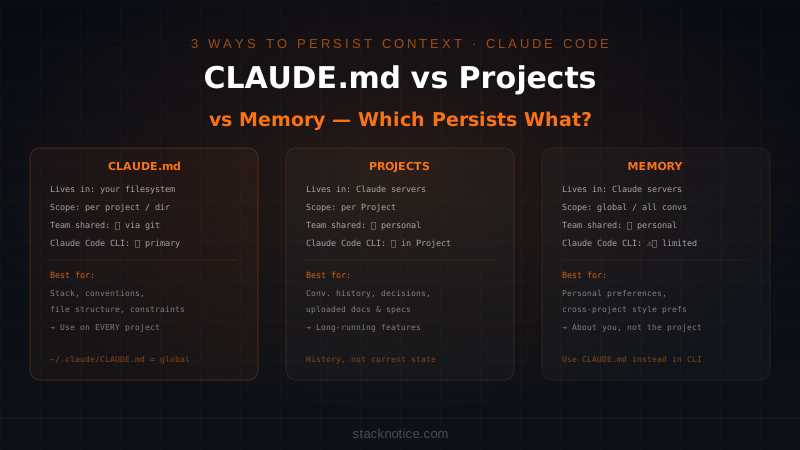
CLAUDE.md project instructions. Drop a CLAUDE.md file at your repo root and Claude Code reads it at the start of every session. Architecture rules, coding standards, forbidden patterns, naming conventions — it's a persistent system prompt for your codebase.
Slash commands. Custom /commands let you encode repeated workflows as single invocations: /review, /deploy, /test-all, /migrate. Whatever your team does repeatedly can become a prompt you type once and forget.
Works in any editor. Because Claude Code lives in the terminal, it integrates with VS Code, Neovim, Zed, Emacs, JetBrains, or nothing at all. You don't need to switch editors. You open your terminal alongside whatever you already use.
Multi-file, multi-step agentic execution. Tell it: "Refactor the authentication module to use JWTs, update all callers, and add tests." It will do that. Across multiple files. Without stopping after every edit to ask if you're satisfied.
Limitations
No GUI. If you rely on visual context — seeing diffs inline, clicking to accept or reject changes — Claude Code will feel alien. The terminal-first workflow has a real learning curve.
No inline autocomplete. Claude Code is not a type-ahead tool. It doesn't sit in your editor finishing your sentences. That's intentional, but it means you'll still want a separate solution for that if it's part of your flow.
Cost at scale. Heavy agentic sessions processing large files and chaining many sequential actions can consume significant tokens. Teams need to track this at scale.
Who It's For
Claude Code is for developers who already live in the terminal, want maximum agentic autonomy, and are building or maintaining complex codebases. It's particularly strong for backend engineers, full-stack engineers handling architecture changes, and teams embedding AI into CI/CD pipelines or automating repetitive dev tasks.
Real Workflow Example
You're migrating a Next.js codebase from Pages Router to App Router — 80+ files affected.
claude "Migrate the entire codebase from Next.js Pages Router to App Router.
Audit all files in /pages, create the equivalent /app structure, update
imports, and handle layout.tsx and loading.tsx where needed. Run next dev
after each batch to catch errors before moving on."
Claude Code reads the full /pages directory, creates a migration plan, works in batches, runs next dev after each batch, reads the error output, fixes issues, and iterates. You check back in 20 minutes. You're reviewing a working migration.
Cursor: The Best GUI AI Coding Experience
What It Is
Cursor is a VS Code fork that rebuilt the editor experience from the ground up with AI at the center — not bolted on as an afterthought. If you've used VS Code, Cursor feels immediately familiar, but everything is AI-aware: the file tree, the terminal, the diff view, the chat panel, the tab completion.
The company's trajectory has been exceptional. From a scrappy alternative to VS Code's Copilot integration, Cursor grew to a reported $400 million valuation on the strength of one thing: the best in-editor AI experience available. In March 2026, they expanded to JetBrains, opening the door to IntelliJ, PyCharm, WebStorm, and GoLand users who were previously locked out.
Pricing
| Plan | Price | What you get |
|---|---|---|
| Hobby | Free | 2,000 completions/month, 50 slow requests |
| Pro | $20/month | Unlimited completions, 500 fast requests/month |
| Business | $40/user/month | Admin controls, zero data retention, centralized billing |
The free tier is deliberately limited — don't judge Cursor on it. The Pro tier is the real product.
Best Features
Inline editing and Composer. Cursor's Cmd+K inline edit and Composer multi-file editing are genuinely best-in-class. Select code, describe what you want, see the change applied with a clean diff you can accept or reject. Composer extends this to multi-file changes with a visual workflow showing exactly what touches what.
Cloud agents and parallel subagents. Cursor now supports spinning up cloud-based agents that work on multiple tasks in parallel — one agent refactoring authentication while another writes tests for the new API endpoints. This is a significant capability step that brings Cursor closer to the fully agentic tier.
JetBrains support (March 2026). This unlocked a huge segment of developers — Java teams, Kotlin/Android shops, Python engineers on PyCharm — who were previously watching from the sidelines. The JetBrains experience is newer, but the direction is clear.
Model flexibility. Cursor lets you choose which model powers your experience. Claude 3.5 Sonnet, Claude 4, GPT-4o, Gemini — you're not locked to one provider's model. For simple completions, use a cheaper model. For complex Composer sessions, dial up.
Codebase indexing. Cursor indexes your project and uses semantic search to pull relevant files into context automatically. You don't have to manually reference files — it figures out what matters.
Limitations
You're switching editors. Unlike Copilot or Claude Code, which layer on top of your existing setup, Cursor asks you to make it your primary editor. For teams with standardized tooling or developers deeply invested in another environment, this is a real cost.
Privacy considerations. By default, Cursor sends code to its servers. Business tier includes zero data retention, but teams handling sensitive codebases need to evaluate this carefully before adoption.
Pro request ceiling. Heavy agent use hits the 500 fast requests/month ceiling on Pro. Teams doing serious agentic work should budget for Business tier.
JetBrains feature parity. The JetBrains integration is newer and may not match the VS Code experience at full depth yet. Watch for updates.
Who It's For
Cursor is for developers who want the most integrated, polished GUI experience and are willing to make their AI tool their editor. Excellent for frontend and full-stack developers who work visually, teams building React/Next.js apps, and now JetBrains shops that want a genuine alternative to Copilot.
Real Workflow Example
You're adding a new revenue chart widget to a dashboard. Open Composer (Cmd+Shift+I):
Add a revenue chart widget to the dashboard. It should:
- Pull from the /api/revenue endpoint
- Use Recharts with the existing chart library setup
- Match the existing Card component styling
- Include a date range selector (last 7d / 30d / 90d)
- Add a unit test for the data transformation logic
Cursor automatically pulls in Dashboard.tsx, Card.tsx, api/revenue.ts, and existing chart components. It generates a multi-file diff across 4 files. You review each change visually, accept or reject individually, run tests, and commit. Total time: 6 minutes.
Windsurf: The Serious Challenger
What It Is
Windsurf (built by Codeium) was already growing fast when the acquisition changed everything. In early 2026, Cognition — the team behind Devin — acquired Windsurf for $250 million. That's not just a business event; it's a signal about where the product is heading.
With 1 million+ users before the acquisition and Cognition's deep agentic AI expertise now behind it, Windsurf is positioned as the most capable Cursor alternative. Not a cheap knockoff — a genuine competitor with the backing of a team that built the most capable autonomous software engineering agent in the industry.
The February 2026 launch of Arena Mode is the feature that made developers pay attention: you can compare two AI models side-by-side on the same coding task and see which produces better output. It's a genuinely novel feature that reflects Windsurf's model-agnostic philosophy.
Pricing
| Plan | Price | Notes |
|---|---|---|
| Free | $0 | Most generous free tier in this comparison |
| Pro | $15/month | Expanded credits, faster model access |
| Teams | $35/user/month | Admin controls, usage analytics, priority support |
At $15/month Pro vs Cursor's $20/month, Windsurf has been winning cost-sensitive teams. Whether that pricing holds post-acquisition is an open question.
Best Features
Arena Mode. Compare Claude vs GPT-4o vs Gemini on the same prompt in a split-screen view. See which model's approach you actually prefer, and apply it — or take the best elements of both. This is the only feature of its kind available in any production AI coding tool right now.
Cascade agent. Windsurf's Cascade handles multi-file tasks with a chat-based interface that tracks what it did and why. The acquisition by Cognition is expected to significantly deepen Cascade's autonomous capabilities as Devin's research gets integrated.
Generous free tier. If you're evaluating tools or on a tight budget, Windsurf's free tier gives you a legitimate taste of the product. The other tools' free tiers feel deliberately hobbled by comparison.
Competitive pricing across the board. $15/month Pro, $35/user/month Teams — Windsurf is the most affordable option for teams right now.
Strong baseline autocomplete. Codeium built its reputation on fast, accurate type-ahead suggestions. That baseline quality carries through to Windsurf's inline completion engine.
Limitations
Post-acquisition uncertainty. The Cognition acquisition is recent. Product direction under new ownership isn't fully clear. Will Windsurf stay focused on the general-purpose IDE experience, or shift toward the fully autonomous Devin-style use cases? Teams building workflows around Windsurf are placing a bet on that uncertainty going well.
VS Code only. Unlike Cursor, Windsurf hasn't shipped JetBrains support as of April 2026. JetBrains developers looking for alternatives are limited to Cursor or Copilot.
Less mature ecosystem than Copilot. No Jira integration, no GitHub PR agent, smaller community documentation. The enterprise integration depth simply isn't there yet.
Arena Mode learning curve. Comparing model outputs side-by-side is powerful, but it requires you to have strong opinions about what "better code" looks like. Less experienced developers may find it more overwhelming than helpful.
Who It's For
Windsurf is for developers who want Cursor-level capabilities at lower cost, teams comfortable with some post-acquisition ambiguity in exchange for better pricing, and developers who want to use Arena Mode's model comparison as part of their workflow. The Cognition DNA means Windsurf's trajectory leans toward deeper autonomy — if that's the direction you want to bet on, this is the tool.
Real Workflow Example
You're about to rewrite authentication middleware — a critical path where bugs are costly. You use Arena Mode to run the same refactoring prompt through Claude 4 and GPT-4o simultaneously:
- Claude's output is more defensive with explicit error handling and audit logging
- GPT-4o's output is more concise and idiomatic
You pick Claude's error handling approach and GPT-4o's structure, manually merge the best of both, and apply it. Arena Mode just saved you from a blind choice between two meaningfully different implementations.
GitHub Copilot: The Enterprise Standard
What It Is
GitHub Copilot is the market leader — and by a wide margin. 4.7 million paid subscribers. 20 million total users. Approximately 42% market share of the AI coding tools space. Backed by Microsoft and OpenAI, with enterprise distribution that no independent tool can match.
The product has evolved dramatically from its origins as sophisticated autocomplete. The 2026 version includes a Copilot Coding Agent that creates pull requests autonomously, a Jira integration shipped in March 2026, and deep hooks into GitHub Actions, Issues, and the entire Microsoft/Azure ecosystem. This isn't an IDE plugin anymore. It's an autonomous software engineering system.
Pricing
| Plan | Price | What you get |
|---|---|---|
| Individual | $10/month | Completions, chat, basic agent features |
| Business | $19/user/month | Policy management, IP protection, team controls |
| Enterprise | $39/user/month | Copilot Coding Agent, Jira integration, fine-tuning, audit logs |
Copilot Individual at $10/month is the cheapest premium entry point in this comparison. The autonomous agent features live at the Enterprise tier — a meaningful price jump for smaller teams.
Best Features
Copilot Coding Agent (PR creation). Assign a GitHub Issue to Copilot. It reads the issue, researches the codebase, writes the implementation, runs CI, and opens a pull request. Then it responds to code review comments by making additional changes. For well-specified issues, this is genuinely remarkable automation.
Jira integration (March 2026). Connect Jira and your tickets become assignable to the AI agent. Copilot reads the acceptance criteria, creates the branch, implements the feature, and opens a PR. For teams where Jira is the source of truth, this closes the loop between project management and code delivery in a way no other tool matches.
Works in every editor. VS Code, JetBrains, Vim/Neovim, Visual Studio, Eclipse, Xcode — Copilot's extension covers the full landscape. You keep your editor. You keep your workflow.
20 million users means tooling momentum. The tutorials, the workarounds, the team policies, the community knowledge — there's more shared context around Copilot than any other tool by an order of magnitude. For enterprises that care about onboarding resources and support surface area, this matters.
Microsoft/Azure enterprise trust. Copilot's compliance posture, data handling agreements, and enterprise SLAs are known quantities for legal and security teams. This matters more than most developers realize until procurement gets involved.
Limitations
Agent features require Enterprise tier. At $39/user/month, the autonomous PR creation and Jira integration are locked behind the highest tier. Individual developers and small teams don't get the most compelling capabilities.
Autocomplete quality has been caught. Copilot built the category, but Cursor and Windsurf have caught up and in some cases surpassed its in-editor completion quality. The lead that originally defined Copilot has narrowed.
Model is not your choice. Unlike Cursor or Windsurf, you're using GitHub's curated model selection — primarily GPT-4o and GitHub's fine-tuned variants. You're not choosing Claude or Gemini.
SWE-bench trails the leaders. In autonomous coding benchmarks, Copilot's agent performance doesn't match Claude Code's model quality. For complex, multi-step autonomous tasks, Anthropic's models lead.
No CLI-first workflow. Copilot lives in your editor or GitHub's web interface. Developers who want to script AI into build pipelines or run agentic tasks from the terminal don't have a native path.
Who It's For
GitHub Copilot is for enterprise teams and anyone embedded in the Microsoft/GitHub ecosystem, organizations where procurement, compliance, and IT approval matter, and teams that want autonomous PR creation integrated directly with their issue tracker. It's also the right choice for individual developers who want the most affordable entry point and the broadest editor support.
Real Workflow Example
You're a tech lead. A well-specified GitHub issue arrives: "Add rate limiting to the /api/auth/login endpoint — max 5 failed login attempts per IP per 15 minutes, return 429 with a Retry-After header, log all rate limit events."
You assign the issue to the Copilot Coding Agent. An hour later you have a PR: rate limiting middleware added, unit tests written, endpoint updated, CHANGELOG.md updated. You leave two code review comments requesting better test coverage for edge cases. Copilot responds to the review comments and pushes additional commits. You merge.
You didn't write a line of code for this feature.
Full Feature Comparison Table
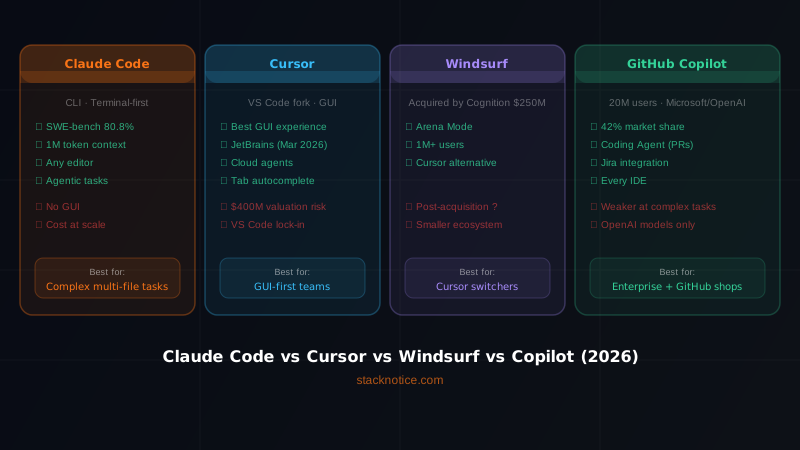
| Feature | Claude Code | Cursor | Windsurf | GitHub Copilot |
|---|---|---|---|---|
| Primary interface | Terminal / CLI | GUI (VS Code fork) | GUI (VS Code-based) | Editor plugin |
| Editor support | Any (terminal) | VS Code + JetBrains | VS Code only | VS Code, JetBrains, Vim, Visual Studio, more |
| Context window | 1M tokens | ~200K tokens | ~200K tokens | ~64K tokens |
| SWE-bench score | 80.8% (Opus 4.6) / 79.6% (Sonnet 4.6) | Varies by model | Varies by model | N/A |
| Autonomous agent | Yes (full agentic sessions) | Yes (Composer + cloud agents) | Yes (Cascade) | Yes (PR Coding Agent) |
| Parallel agents | No (sequential) | Yes | Partial | No |
| Model choice | Claude only | Multiple (Claude, GPT-4o, Gemini) | Multiple + Arena Mode | GitHub curated (GPT-4o, Claude Enterprise) |
| Inline autocomplete | No | Yes | Yes | Yes |
| GitHub integration | Via CLI | Moderate | Moderate | Native |
| Jira integration | No | No | No | Yes (March 2026, Enterprise) |
| PR creation | Via CLI | No | No | Yes (Coding Agent) |
| Custom instructions | CLAUDE.md | .cursorrules | Settings | Custom instructions |
| Hooks / scripting API | Yes | No | No | No |
| Arena Mode (model compare) | No | No | Yes | No |
| JetBrains support | N/A (terminal) | Yes (March 2026) | No | Yes |
| Free tier | No | Limited | Generous | Limited |
| Pricing (Pro/individual) | $20/month | $20/month | $15/month | $10/month |
| Team pricing | Custom | $40/user/month | $35/user/month | $19/user/month (Business) |
| Privacy (strict mode) | API terms (no training by default) | Business tier | Teams tier | Enterprise tier |
| Company backing | Anthropic | Independent (~$400M valuation) | Cognition ($250M acquisition) | Microsoft / OpenAI |
| Best for | Agentic autonomy, complex refactors | GUI experience, daily coding flow | Price + flexibility, model comparison | GitHub/enterprise teams |
Head-to-Head: The Real Scenarios
Scenario 1: Large codebase refactor
Claude Code wins. With 1M context and full agentic sessions, it handles sweeping architectural changes better than any other tool. Describe what you want at a high level, let it work, review the diff.
Cursor is competitive. Composer with cloud agents handles real-world codebases well. For monorepos that push context limits, Claude Code has the edge.
Windsurf keeps pace. Cascade handles multi-file tasks well. The gap will likely close post-acquisition as Cognition's research integrates.
Copilot is still maturing here. The PR agent is impressive for well-specified single features, but complex architectural refactors are where the other agents have pulled ahead.
Scenario 2: Inline autocomplete as you type
Copilot still leads. It built the category and the core completion quality remains excellent.
Cursor is excellent. Tab completion is second only to Copilot for most developers.
Windsurf is solid. Codeium's autocomplete baseline is strong.
Claude Code doesn't play. It's not an autocomplete tool. This is not a weakness — it's a design choice. But it means you still need another solution for this workflow.
Scenario 3: GitHub + Jira enterprise workflow
Copilot wins clearly. Native Jira integration, native GitHub, Microsoft enterprise compliance — this is Copilot's home turf. No one else is even in this race yet.
Scenario 4: JetBrains IDEs (IntelliJ, PyCharm, GoLand)
Copilot or Cursor. Copilot has had JetBrains support longer and is more mature there. Cursor shipped JetBrains support in March 2026 and is actively developing it.
Claude Code is editor-agnostic. If you're comfortable with the CLI alongside your IDE, it doesn't care what editor you use.
Windsurf is VS Code only as of April 2026. JetBrains users are out for now.
Scenario 5: Comparing model outputs before committing
Windsurf wins. Arena Mode is the only feature of its kind. If you regularly want to see how Claude handles a problem versus GPT-4o on the same prompt, no one else offers this.
FAQ
Is Claude Code worth it if I'm already paying for Cursor?
Yes — for different tasks. Cursor wins for daily in-editor flow, inline completions, and the visual diff experience. Claude Code wins for complex, agentic, multi-file tasks where model quality matters more than GUI convenience. Many senior developers use both: Cursor for the flow state of active development, Claude Code for the heavy lifting.
Will Windsurf's acquisition by Cognition hurt the product?
Too early to say definitively. Cognition has strong research credentials — Devin scored highly on SWE-bench and is one of the most capable autonomous engineering agents available. The upside is Devin-level autonomy integrated into a consumer-facing IDE. The risk is product direction shifting away from the everyday developer experience. Watch the next 2-3 product releases for a signal.
Can I use multiple tools at the same time?
Yes, and many developers do. Claude Code runs in your terminal. Cursor or Copilot runs in your editor. They don't conflict. A common setup: Cursor or Copilot for active development with inline completions, Claude Code for larger architectural tasks and automation sessions.
Which tool is best for beginners?
GitHub Copilot. The $10/month price is accessible, the VS Code integration is seamless, and the community resources are the largest in the space. Cursor is a close second. Claude Code has the steepest learning curve due to its CLI-first nature.
Is the SWE-bench score actually meaningful?
It's the best autonomous coding benchmark we have. SWE-bench tests whether a model can resolve real GitHub issues on open-source repositories without human guidance. A score of 80.8% means Claude Opus 4.6 resolves about 4 in 5 real engineering tasks autonomously. For practical use: yes, this translates to meaningfully better performance on complex, multi-step problems. But model quality is only part of the equation — your context window usage, tool architecture, and how well the tool understands your specific codebase matter too.
Which tool is best for a solo developer on a budget?
If you want affordable and broadly supported: GitHub Copilot at $10/month. If you want the best value for a GUI editor experience: Windsurf at $15/month. If you want maximum autonomy and you're comfortable in the terminal: Claude Code — the cost is higher but the productivity multiplier on complex tasks can justify it quickly.
Is Copilot's 42% market share safe?
Dominant but not guaranteed. Microsoft's enterprise distribution is a powerful moat, and 20 million users creates significant switching friction. But Cursor is growing rapidly and targeting VS Code developers — which is most of Copilot's base. The next 12-18 months will reveal whether Copilot's lead is a permanent structural advantage or a head start that the field is closing.
How do these tools handle private or sensitive code?
All four have stricter privacy options at higher tiers. Claude Code through the API does not use your code for training by default under Anthropic's API terms. Cursor Business, Windsurf Teams, and Copilot Enterprise all include zero data retention or stricter controls. Review each vendor's current data processing agreement before adopting for sensitive codebases — and don't rely on marketing language; read the actual terms.
The Bottom Line
There's no universal winner in 2026. The market has matured to the point where each tool is genuinely excellent within its niche — and genuinely weak outside it.
Choose Claude Code if you want the highest ceiling for autonomous, agentic coding. The 1M context window and SWE-bench leadership translate to real capability on large codebases and complex tasks. Accept the terminal-first tradeoff and the cost at scale.
Choose Cursor if you want the best integrated GUI experience and are willing to use it as your primary editor. The JetBrains expansion just opened the door for a huge new developer segment. The cloud agent features are maturing fast.
Choose Windsurf if you want Cursor-level capability at a lower price, or if Arena Mode's model comparison fits your workflow. The Cognition acquisition is a bet on the team that built Devin — that's not nothing. Know you're accepting some post-acquisition uncertainty.
Choose GitHub Copilot if you're embedded in GitHub and the Microsoft ecosystem, if your team needs Jira integration, if you need the broadest editor support without switching anything, or if "proven, widely supported, and everywhere" matters more than "best in class at one thing."
The trap to avoid: picking based on hype rather than workflow fit. These tools evolve fast — what one tool ships today, another ships next quarter. The differentiator that matters most is which one you'll actually use consistently, in the workflow you already have.
Want to go deeper on Claude Code specifically? Read our guide on Claude Code hooks and automation, or see how to add MCP servers to Claude Code to extend its capabilities even further.