If you've decided you want an AI coding agent that runs in your terminal, you're choosing between two serious tools: Aider and Claude Code. Both edit files, run commands, and work across your codebase autonomously. But the philosophy behind each is different, and that difference shows up in daily use.
This is not a feature checklist. It's an honest assessment of where each tool wins, based on using both in real projects.
The Essential Difference
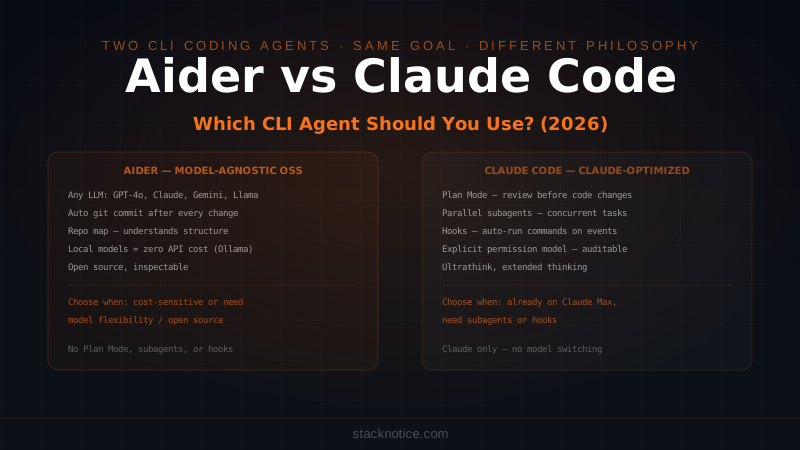
Aider is model-agnostic and open source. It works with GPT-4o, Claude, Gemini, Llama, and most models with an API. Its design reflects this flexibility: it focuses on doing one thing well — editing code with any capable LLM — and staying out of the way.
Claude Code is tightly integrated with Anthropic's Claude models. It's built to use Claude's specific capabilities: extended thinking, subagents, Plan Mode, the hooks system, and CLAUDE.md context files. The tradeoff is a richer feature set, but it only runs on Claude.
Neither is universally better. The right choice depends on what you value.
Model Flexibility
Aider: any model, your choice
# Aider with different models
aider --model gpt-4o          # OpenAI
aider --model claude-sonnet-4-6  # Anthropic
aider --model gemini/gemini-2.0-flash  # Google
aider --model ollama/llama3.2  # Local, free
Aider lets you mix models within a workflow. You can use a cheap, fast model for simple edits and a powerful model for architecture questions — all within the same tool. If Claude's pricing increases or a better model releases, you switch a flag.
For teams with cost constraints, Aider with a well-chosen model can be significantly cheaper than Claude Code with Opus. For developers who want to run locally with no API costs at all, Aider with Ollama works.
Claude Code: Claude only
# Claude Code model options
claude                              # Default (Sonnet 4.6)
claude --model claude-opus-4-6     # Opus
claude --model claude-haiku-4-5    # Haiku (faster, cheaper)
You can choose between Claude model tiers, but you're staying in the Claude ecosystem. If you're already paying for Claude Max, this is included. If you're not, you're paying Anthropic API rates.
The advantage: Claude Code is optimized specifically for Claude's strengths. Features like extended thinking (ultrathink), Plan Mode, and parallel subagents are built around how Claude reasons. These don't exist in Aider because they'd be model-specific.
Git Integration
Aider: automatic commits by default
Aider commits after every change, with AI-generated commit messages:
aider src/auth.ts

# After each edit, Aider auto-commits:
# "feat: add JWT validation for custom org_id claim"
# "fix: handle null case in token refresh"
This creates a clean git history of every AI change. You can git log to see exactly what Aider did and when. You can git revert any AI change instantly if it was wrong.
The automatic commit behavior is configurable — you can turn it off — but it's the default for a reason. It gives you a safety net that makes aggressive AI editing less risky.
Claude Code: explicit git control
Claude Code doesn't auto-commit. It makes file changes and then you control what gets committed:
claude

# Claude edits files during the session
# You review with git diff, then:
git add -p
git commit -m "feat: add JWT validation"
This gives you more control over what ends up in the commit. You can combine multiple Claude changes into one logical commit, or split a single Claude session's work across multiple commits with meaningful messages.
The tradeoff: you have to remember to commit. Aider's automatic commits are a safety net against losing track of what changed. Claude Code relies on your own git discipline.
Context and Codebase Understanding
Aider: repo map
Aider scans your repository and builds a "repo map" — a compressed representation of your codebase's structure, functions, classes, and their relationships. It uses this map to understand how files relate without reading every file in full.
# Aider shows which files it's using for context
aider --show-repo-map
This is effective for large codebases where you want Aider to understand the big picture without reading everything. The repo map is generated automatically and updated as files change.
Claude Code: explicit + CLAUDE.md
Claude Code reads files explicitly when you reference them or when they're clearly needed. You can also point it at specific files:
claude

"Read /src/lib/auth.ts and /src/middleware.ts, then fix the token
validation bug that's causing the 401 errors"
The alternative to Aider's repo map is CLAUDE.md: a file you write and maintain that gives Claude a high-level understanding of your codebase, where key files live, and what conventions to follow.
# Key Architecture
- Auth: /src/lib/auth.ts (Clerk JWT validation)
- DB: /src/lib/db/ (Drizzle ORM + Neon)
- API: /src/app/api/ (Next.js route handlers)
Aider's approach is automatic but approximate. Claude Code's approach requires maintenance but gives precise control over what context Claude has.
Permission Model
Aider: permissive by default
Aider edits files and runs commands with minimal confirmation prompts. It's designed to move fast. You can configure confirmation requirements, but the default is to trust you set up the right context.
This works well for experienced developers who know what they're asking for. It can feel unsafe for changes in sensitive areas.
Claude Code: explicit approval
Claude Code asks before running commands, before modifying files outside the explicitly allowed scope, and at consequential steps:
# Claude Code prompts before running:
# > Run command: git push origin feature/auth-refactor ?
# [y/n/always/never]
You can grant permanent permission for commands you trust:
claude config add-allowed-command "npm test"
claude config add-allowed-command "npx drizzle-kit push"
For production codebases or sensitive areas where a wrong command has real consequences, the explicit permission model is not friction — it's the point. The permissions guide covers the full configuration.
Features Unique to Each
Aider has
- Model agnosticism — run any LLM, including local
- Automatic git commits — every change tracked
- Voice mode — dictate code changes (experimental)
- Browser mode — GUI for viewing changes
- Open source — inspect and modify the tool itself
Claude Code has
- Plan Mode — review an approach before any code is written
- Parallel subagents — spawn multiple Claude instances on different parts of a task
- Hooks system — run shell commands automatically on events (pre-tool-use, post-save)
- CLAUDE.md hierarchy — global + project + subdirectory context files
- Extended thinking —
ultrathinkflag for problems that need deeper reasoning - Headless mode — non-interactive execution for CI/automation scripts
The Claude Code-specific features are meaningful. Plan Mode prevents expensive wrong implementations. Subagents let you parallelize work across a large codebase. Hooks let you automate git commits, linting, and testing on every file write. These have no equivalent in Aider.
Daily Workflow Comparison
A typical Aider session
aider src/api/users.ts src/lib/auth.ts

# Aider loads the files and you're in a chat
> Add rate limiting to the users endpoint using the existing Redis client

# Aider edits files, auto-commits
# "feat: add rate limiting to users endpoint"

> The test is failing — fix it

# Aider reads the test file, fixes, auto-commits
# "fix: update user rate limit test expectations"
Lightweight, fast, minimal friction. The auto-commit history gives you a clean record.
A typical Claude Code session
claude

"Add rate limiting to /src/app/api/users/route.ts using the Redis
client in /src/lib/redis.ts. The limit is 100 requests per minute
per user ID. Add a test in /src/__tests__/api/users.test.ts."

# Claude reads the relevant files
# Asks permission to run: npm test
# [y]
# Makes changes, runs tests, confirms they pass
More explicit, more controlled. You review what Claude intends before it runs anything.
Cost Comparison
This depends entirely on model choice.
| Setup | Approximate cost |
|---|---|
| Aider + GPT-4o | ~$0.01-0.05/task (varies) |
| Aider + Claude Sonnet 4.6 | Similar to Claude Code |
| Aider + local Llama (Ollama) | Free (your compute) |
| Claude Code + Sonnet | ~$0.02-0.08/task |
| Claude Code + Opus | 3-5x Sonnet cost |
| Claude Code on Claude Max | $100/month flat |
If cost is the primary constraint, Aider with a local model or a cheaper API model wins. If you're already on Claude Max, Claude Code adds no marginal cost per task.
Which One to Use
Choose Aider if:
- You want model flexibility — especially local models or non-Claude APIs
- Auto-commit git history is important to your workflow
- Cost is a primary constraint
- You prefer open source tools you can inspect and modify
- You need Aider's specific ecosystem integrations
Choose Claude Code if:
- You're already using Claude and on Claude Max or Pro
- You need Plan Mode, subagents, or hooks — features with no Aider equivalent
- You're working in a sensitive codebase where explicit permissions matter
- You're doing complex multi-step tasks that benefit from parallel subagents
- You want tight integration with Claude's reasoning capabilities (ultrathink, extended thinking)
Use both if:
- You want Aider for quick edits with a cheap/local model and Claude Code for complex reasoning tasks
- Your team uses different tools and you want to evaluate both
The two tools complement more than they compete. Aider is the lightweight, flexible, any-model option. Claude Code is the Claude-optimized, feature-rich option. Neither replaces the other entirely.
If you're new to Claude Code and want to understand the full setup, the getting started guide is the place to start. For the full comparison of Claude Code against all major AI coding tools including Cursor and Copilot, see the complete AI coding tools comparison.