If you're building a full-stack Next.js app with TypeScript, you've probably hit the same wall: your API returns data, but the client has no idea what shape it is. You either write types twice or cast everything to any and hope for the best.
tRPC eliminates that problem entirely. Your server types are your client types — automatically, with zero code generation.
This guide covers tRPC v11 with the Next.js App Router. By the end you'll have a fully typed, production-ready API layer.
What tRPC actually does
With a REST API, there's always a gap between what the server returns and what the client knows:
// Server
app.get('/posts/:id', async (req, res) => {
  const post = await db.posts.findById(req.params.id)
  res.json(post)
})

// Client — you're on your own
const post = await fetch(`/api/posts/${id}`).then(r => r.json()) as Post
//                                                                   ^ manual cast, unsafe
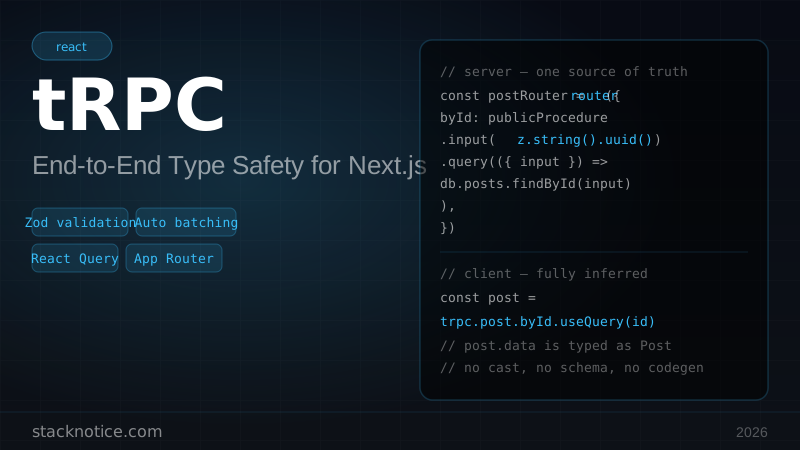
With tRPC, the router IS the type:
// Server — one source of truth
const postRouter = router({
  byId: publicProcedure
    .input(z.string().uuid())
    .query(({ input }) => db.posts.findById(input)),
})

// Client — fully inferred, no cast needed
const post = trpc.post.byId.useQuery(id)
// post.data is typed as Post | undefined — automatically
Your IDE shows autocomplete on every procedure call. Rename a procedure on the server and TypeScript immediately flags every broken call on the client.
Installation
npm install @trpc/server @trpc/client @trpc/react-query @tanstack/react-query zod superjsonsuperjson handles types that JSON doesn't support (Date, Map, Set, BigInt) transparently across the wire.
Project structure
src/
├── server/
│   ├── trpc.ts          # tRPC instance, procedures
│   ├── context.ts       # request context (db, session)
│   └── routers/
│       ├── _app.ts      # root router
│       ├── post.ts
│       └── user.ts
├── lib/
│   └── trpc.ts          # client-side tRPC
└── app/
    ├── api/trpc/[trpc]/route.ts   # API handler
    └── providers.tsx              # React providers
1. Create the tRPC instance
// src/server/trpc.ts
import { initTRPC, TRPCError } from '@trpc/server'
import superjson from 'superjson'
import { ZodError } from 'zod'
import type { Context } from './context'

const t = initTRPC.context<Context>().create({
  transformer: superjson,
  errorFormatter({ shape, error }) {
    return {
      ...shape,
      data: {
        ...shape.data,
        zodError:
          error.cause instanceof ZodError
            ? error.cause.flatten()
            : null,
      },
    }
  },
})

export const router = t.router
export const publicProcedure = t.procedure
export const createCallerFactory = t.createCallerFactory
The errorFormatter attaches Zod validation errors to the response so the client can display field-level error messages.
2. Context — database and session
The context runs on every request and provides shared resources to all procedures:
// src/server/context.ts
import { db } from '@/db'
import { auth } from '@/lib/auth'
import type { FetchCreateContextFnOptions } from '@trpc/server/adapters/fetch'

export async function createContext({ req }: FetchCreateContextFnOptions) {
  const session = await auth()
  return { db, session, req }
}

export type Context = Awaited<ReturnType<typeof createContext>>
3. Protected middleware
Create an isAuthed middleware that gates procedures behind authentication:
// src/server/trpc.ts — add after creating `t`
import { middleware } from './trpc'

const isAuthed = t.middleware(({ ctx, next }) => {
  if (!ctx.session?.user) {
    throw new TRPCError({ code: 'UNAUTHORIZED' })
  }
  return next({
    ctx: {
      ...ctx,
      session: ctx.session, // narrows type: session is non-null
    },
  })
})

export const protectedProcedure = t.procedure.use(isAuthed)
Now protectedProcedure gives you ctx.session.user as a non-nullable type inside the handler — no ! assertions needed.
4. Build your first router
// src/server/routers/post.ts
import { z } from 'zod'
import { router, publicProcedure, protectedProcedure } from '../trpc'
import { TRPCError } from '@trpc/server'

export const postRouter = router({
  list: publicProcedure
    .input(
      z.object({
        limit: z.number().int().min(1).max(100).default(20),
        cursor: z.string().uuid().optional(),
      })
    )
    .query(async ({ ctx, input }) => {
      const posts = await ctx.db.posts.findMany({
        take: input.limit + 1,
        cursor: input.cursor ? { id: input.cursor } : undefined,
        orderBy: { createdAt: 'desc' },
      })

      let nextCursor: string | undefined
      if (posts.length > input.limit) {
        const next = posts.pop()
        nextCursor = next?.id
      }

      return { posts, nextCursor }
    }),

  byId: publicProcedure
    .input(z.string().uuid())
    .query(async ({ ctx, input }) => {
      const post = await ctx.db.posts.findById(input)
      if (!post) throw new TRPCError({ code: 'NOT_FOUND' })
      return post
    }),

  create: protectedProcedure
    .input(
      z.object({
        title: z.string().min(1).max(200),
        body: z.string().min(10),
        published: z.boolean().default(false),
      })
    )
    .mutation(async ({ ctx, input }) => {
      return ctx.db.posts.create({
        ...input,
        authorId: ctx.session.user.id,
      })
    }),

  update: protectedProcedure
    .input(
      z.object({
        id: z.string().uuid(),
        title: z.string().min(1).max(200).optional(),
        body: z.string().min(10).optional(),
        published: z.boolean().optional(),
      })
    )
    .mutation(async ({ ctx, input }) => {
      const { id, ...data } = input
      const post = await ctx.db.posts.findById(id)
      if (!post) throw new TRPCError({ code: 'NOT_FOUND' })
      if (post.authorId !== ctx.session.user.id) {
        throw new TRPCError({ code: 'FORBIDDEN' })
      }
      return ctx.db.posts.update(id, data)
    }),

  delete: protectedProcedure
    .input(z.string().uuid())
    .mutation(async ({ ctx, input }) => {
      const post = await ctx.db.posts.findById(input)
      if (!post) throw new TRPCError({ code: 'NOT_FOUND' })
      if (post.authorId !== ctx.session.user.id) {
        throw new TRPCError({ code: 'FORBIDDEN' })
      }
      return ctx.db.posts.delete(input)
    }),
})
5. Compose the root router
// src/server/routers/_app.ts
import { router } from '../trpc'
import { postRouter } from './post'
import { userRouter } from './user'

export const appRouter = router({
  post: postRouter,
  user: userRouter,
})

export type AppRouter = typeof appRouter
AppRouter is the single type you export to the client. It carries the full shape of every procedure.
6. Next.js API route
// src/app/api/trpc/[trpc]/route.ts
import { fetchRequestHandler } from '@trpc/server/adapters/fetch'
import { appRouter } from '@/server/routers/_app'
import { createContext } from '@/server/context'

const handler = (req: Request) =>
  fetchRequestHandler({
    endpoint: '/api/trpc',
    req,
    router: appRouter,
    createContext,
    onError:
      process.env.NODE_ENV === 'development'
        ? ({ path, error }) =>
            console.error(`[tRPC] /${path ?? 'unknown'}:`, error)
        : undefined,
  })

export { handler as GET, handler as POST }
tRPC batches multiple queries into a single HTTP request by default, which is why both GET and POST are needed.
7. Client provider setup
// src/lib/trpc.ts
import { createTRPCReact } from '@trpc/react-query'
import type { AppRouter } from '@/server/routers/_app'

export const trpc = createTRPCReact<AppRouter>()
// src/app/providers.tsx
'use client'
import { QueryClient, QueryClientProvider } from '@tanstack/react-query'
import { httpBatchLink } from '@trpc/client'
import superjson from 'superjson'
import { useState } from 'react'
import { trpc } from '@/lib/trpc'
export function TRPCProvider({ children }: { children: React.ReactNode }) {
const [queryClient] = useState(
() =>
new QueryClient({
defaultOptions: {
queries: { staleTime: 30 * 1000 },
},
})
)
const [trpcClient] = useState(() =>
trpc.createClient({
links: [
httpBatchLink({
url: '/api/trpc',
transformer: superjson,
// attach auth headers if needed
headers() {
return {}
},
}),
],
})
)
return (
<trpc.Provider client={trpcClient} queryClient={queryClient}>
<QueryClientProvider client={queryClient}>
{children}
</QueryClientProvider>
</trpc.Provider>
)
}Add it to your root layout:
// src/app/layout.tsx
import { TRPCProvider } from './providers'

export default function RootLayout({ children }: { children: React.ReactNode }) {
  return (
    <html>
      <body>
        <TRPCProvider>{children}</TRPCProvider>
      </body>
    </html>
  )
}
8. Using tRPC in Client Components
'use client'

import { trpc } from '@/lib/trpc'

export function PostList() {
  const utils = trpc.useUtils()

  const { data, isPending, error } = trpc.post.list.useQuery({ limit: 20 })

  const deleteMutation = trpc.post.delete.useMutation({
    onSuccess: () => {
      // Invalidate and refetch after delete
      utils.post.list.invalidate()
    },
  })

  const createMutation = trpc.post.create.useMutation({
    onSuccess: (newPost) => {
      // Optimistic update — add to cache without refetch
      utils.post.list.setData({ limit: 20 }, (old) => {
        if (!old) return old
        return { ...old, posts: [newPost, ...old.posts] }
      })
    },
  })

  if (isPending) return <p>Loading...</p>
  if (error) return <p>Error: {error.message}</p>

  return (
    <div>
      <button
        onClick={() =>
          createMutation.mutate({ title: 'New Post', body: 'Content here' })
        }
        disabled={createMutation.isPending}
      >
        {createMutation.isPending ? 'Creating...' : 'New Post'}
      </button>

      {data.posts.map((post) => (
        <article key={post.id}>
          <h2>{post.title}</h2>
          <button
            onClick={() => deleteMutation.mutate(post.id)}
            disabled={deleteMutation.isPending}
          >
            Delete
          </button>
        </article>
      ))}
    </div>
  )
}
9. Calling tRPC from Server Components
For Next.js App Router Server Components, you call procedures directly without HTTP:
// src/server/caller.ts
import { createCallerFactory } from './trpc'
import { appRouter } from './routers/_app'
import { createContext } from './context'

const createCaller = createCallerFactory(appRouter)

export async function getServerCaller() {
  const ctx = await createContext({
    req: new Request('http://internal'),
  })
  return createCaller(ctx)
}
// src/app/posts/page.tsx
import { getServerCaller } from '@/server/caller'
export default async function PostsPage() {
const caller = await getServerCaller()
const { posts } = await caller.post.list({ limit: 10 })
return (
<main>
{posts.map((post) => (
<article key={post.id}>
<h2>{post.title}</h2>
</article>
))}
</main>
)
}This is ideal for Server Actions and initial page renders — no HTTP round-trip, direct database access with full type safety.
10. Error handling
tRPC errors map directly to HTTP status codes:
// Throwing errors inside procedures
throw new TRPCError({ code: 'NOT_FOUND' })       // 404
throw new TRPCError({ code: 'UNAUTHORIZED' })     // 401
throw new TRPCError({ code: 'FORBIDDEN' })        // 403
throw new TRPCError({ code: 'BAD_REQUEST' })      // 400
throw new TRPCError({ code: 'INTERNAL_SERVER_ERROR' }) // 500

// With custom message
throw new TRPCError({
  code: 'BAD_REQUEST',
  message: 'Email already in use',
})
Handling on the client:
import { TRPCClientError } from '@trpc/client'
import type { AppRouter } from '@/server/routers/_app'

const mutation = trpc.post.create.useMutation({
  onError(error) {
    if (error instanceof TRPCClientError) {
      // Zod field validation errors
      const fieldErrors = error.data?.zodError?.fieldErrors
      if (fieldErrors) {
        // { title: ['String must contain at least 1 character'] }
        setFormErrors(fieldErrors)
        return
      }

      // Auth errors
      if (error.data?.code === 'UNAUTHORIZED') {
        router.push('/login')
        return
      }

      // Generic
      toast.error(error.message)
    }
  },
})
11. Infinite queries (pagination)
// In your component
const { data, fetchNextPage, hasNextPage, isFetchingNextPage } =
  trpc.post.list.useInfiniteQuery(
    { limit: 20 },
    {
      getNextPageParam: (lastPage) => lastPage.nextCursor,
      initialCursor: undefined,
    }
  )

const allPosts = data?.pages.flatMap((page) => page.posts) ?? []
This pairs perfectly with our full-stack Next.js tutorial for building complete data-driven apps.
12. Performance: automatic batching
tRPC batches multiple parallel queries into a single HTTP request automatically. This:
const [user, posts, comments] = await Promise.all([
  trpc.user.me.query(),
  trpc.post.list.query({ limit: 10 }),
  trpc.comment.recent.query(),
])
Sends one HTTP request instead of three. The server processes all three procedures and responds with all data in one go. No configuration needed.
13. tRPC vs REST vs GraphQL
| tRPC | REST | GraphQL | |
|---|---|---|---|
| Type safety | Automatic | Manual | Code gen |
| External API | No | Yes | Yes |
| Non-TS clients | No | Yes | Yes |
| Learning curve | Low | Low | High |
| Schema/docs | No | OpenAPI | Schema |
| Batching | Auto | Manual | Yes |
| Best for | TS monorepos | Public APIs | Multi-client |
Use tRPC when you own both the frontend and backend in a TypeScript codebase — especially with Next.js. You can pair it with Drizzle ORM for end-to-end type safety from database schema to client component.
Use REST when you need a public API, OpenAPI docs, or non-TypeScript consumers.
Use GraphQL when multiple very different clients need different data shapes, or when you have an existing GraphQL infrastructure.
Common mistakes
Mistake 1: creating QueryClient outside useState
// Wrong — creates a new client on every render
const [trpcClient] = useState(() => trpc.createClient({ ... }))
const queryClient = new QueryClient() // ← not in useState

// Correct
const [queryClient] = useState(() => new QueryClient())
const [trpcClient] = useState(() => trpc.createClient({ ... }))
Mistake 2: not exporting AppRouter type
The client needs AppRouter to infer procedure types. Always export it from your root router file.
Mistake 3: using the HTTP client in Server Components
Don't call trpc.post.list.useQuery() in a Server Component — it won't work. Use createCallerFactory for server-side calls.
Mistake 4: forgetting superjson on both sides
If you add transformer: superjson on the server, you must add it on the client too, or Date objects will come back as strings.
Next steps
You now have a fully typed API layer with authentication, validation, and error handling. From here:
- Add Drizzle ORM for a fully typed database layer
- Use TanStack Query v5 features like optimistic updates and prefetching
- Deploy on Vercel — tRPC works with Edge Runtime via the fetch adapter