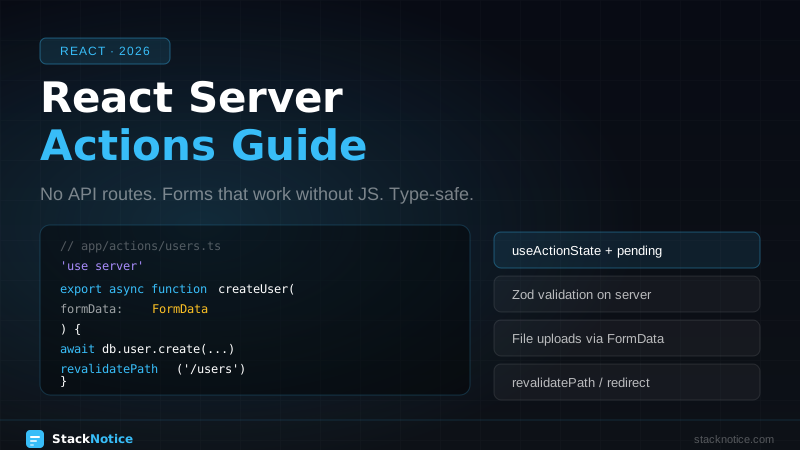
Server Actions are one of the biggest shifts in how React apps handle data mutations. Instead of writing a separate API route, validating input, handling CORS, and then calling it from the client, you write a single async function that runs on the server — and call it directly from your component.
This guide covers everything: the mental model, the syntax, real patterns with validation and error handling, file uploads, revalidation, and the cases where you should still use an API route.
The Mental Model
A Server Action is an async function marked with 'use server'. When a Client Component calls it, Next.js serializes the arguments, sends them to the server, runs the function, and returns the result — all over an encrypted HTTP request that Next.js manages for you.
Client Component calls serverAction(data)
     ↓
Next.js serializes args → POST /action-endpoint
     ↓
Server runs the function (DB access, auth, business logic)
     ↓
Returns serializable result → Client receives it
You get:
- No API route files to create, export, or maintain
- Type-safe function calls (TypeScript works end-to-end)
- Automatic CSRF protection — Next.js handles it
- Co-location — action lives next to the UI that uses it
Defining Server Actions
In a separate file (recommended for reuse)
// app/actions/users.ts
'use server'

import { db } from '@/lib/db'
import { revalidatePath } from 'next/cache'

export async function createUser(formData: FormData) {
  const name = formData.get('name') as string
  const email = formData.get('email') as string

  await db.user.create({ data: { name, email } })
  revalidatePath('/users')
}
Inline in a Server Component
// app/users/page.tsx
export default function UsersPage() {
  async function createUser(formData: FormData) {
    'use server'
    const name = formData.get('name') as string
    await db.user.create({ data: { name } })
    revalidatePath('/users')
  }

  return (
    <form action={createUser}>
      <input name="name" />
      <button type="submit">Add user</button>
    </form>
  )
}
The 'use server' directive inside the function body is the inline version. The file-level directive (at the top) marks every export in that file as a Server Action.
Using Server Actions with Forms
The simplest pattern: pass the action directly to <form action={...}>. This works even with JavaScript disabled.
// app/users/new/page.tsx
import { createUser } from '@/app/actions/users'

export default function NewUserPage() {
  return (
    <form action={createUser}>
      <input name="name" placeholder="Name" required />
      <input name="email" type="email" placeholder="Email" required />
      <button type="submit">Create</button>
    </form>
  )
}
useActionState — Pending, Errors, and State
useActionState (React 19, available in Next.js 15) gives you pending state and the ability to return state from your action back to the component. For a dedicated deep dive into all the new React 19 form hooks including useFormStatus and useOptimistic, see the React 19 form hooks guide.
The action with return value
// app/actions/users.ts
'use server'

import { z } from 'zod'
import { db } from '@/lib/db'
import { revalidatePath } from 'next/cache'

const schema = z.object({
  name: z.string().min(2, 'Name must be at least 2 characters'),
  email: z.string().email('Invalid email'),
})

type ActionState = {
  errors?: Record<string, string[]>
  success?: boolean
  message?: string
}

export async function createUser(
  prevState: ActionState,
  formData: FormData
): Promise<ActionState> {
  const raw = {
    name: formData.get('name'),
    email: formData.get('email'),
  }

  const result = schema.safeParse(raw)

  if (!result.success) {
    return {
      errors: result.error.flatten().fieldErrors,
    }
  }

  try {
    await db.user.create({ data: result.data })
    revalidatePath('/users')
    return { success: true, message: 'User created!' }
  } catch (error) {
    return { message: 'Database error. Please try again.' }
  }
}
The component with useActionState
// app/users/new/page.tsx (or a Client Component)
'use client'

import { useActionState } from 'react'
import { createUser } from '@/app/actions/users'

export function CreateUserForm() {
  const [state, action, isPending] = useActionState(createUser, {})

  return (
    <form action={action}>
      <div>
        <input name="name" placeholder="Name" disabled={isPending} />
        {state.errors?.name && (
          <p className="text-red-500">{state.errors.name[0]}</p>
        )}
      </div>
      <div>
        <input name="email" type="email" placeholder="Email" disabled={isPending} />
        {state.errors?.email && (
          <p className="text-red-500">{state.errors.email[0]}</p>
        )}
      </div>
      {state.message && (
        <p className={state.success ? 'text-green-500' : 'text-red-500'}>
          {state.message}
        </p>
      )}
      <button type="submit" disabled={isPending}>
        {isPending ? 'Creating...' : 'Create user'}
      </button>
    </form>
  )
}
useActionState signature:
const [state, formAction, isPending] = useActionState(
  action,        // your Server Action (prevState, formData) => state
  initialState,  // the initial state before first submission
  permalink?     // optional URL for progressive enhancement
)
useFormStatus — Submit Button Pending State
useFormStatus reads the status of the parent <form>. It's useful for extracting the submit button into its own component:
// components/submit-button.tsx
'use client'

import { useFormStatus } from 'react-dom'

export function SubmitButton({ children }: { children: React.ReactNode }) {
  const { pending } = useFormStatus()

  return (
    <button type="submit" disabled={pending}>
      {pending ? 'Saving...' : children}
    </button>
  )
}<form action={createUser}>
<input name="name" />
<SubmitButton>Create user</SubmitButton>
</form>useFormStatus must be used in a component that's inside the <form>, not in the component that renders the form.
Calling Server Actions from Event Handlers
Server Actions don't have to be used with <form>. You can call them programmatically with startTransition:
'use client'

import { useTransition } from 'react'
import { deleteUser } from '@/app/actions/users'

export function DeleteButton({ userId }: { userId: string }) {
  const [isPending, startTransition] = useTransition()

  return (
    <button
      onClick={() => startTransition(() => deleteUser(userId))}
      disabled={isPending}
    >
      {isPending ? 'Deleting...' : 'Delete'}
    </button>
  )
}
The Server Action:
// app/actions/users.ts
'use server'

export async function deleteUser(userId: string) {
  await db.user.delete({ where: { id: userId } })
  revalidatePath('/users')
}
Optimistic Updates with useOptimistic
For lists where you want instant UI feedback before the server responds:
'use client'

import { useOptimistic, useTransition } from 'react'
import { toggleTodo } from '@/app/actions/todos'

type Todo = { id: string; text: string; done: boolean }

export function TodoList({ todos }: { todos: Todo[] }) {
  const [optimisticTodos, setOptimistic] = useOptimistic(
    todos,
    (state, todoId: string) =>
      state.map(t => (t.id === todoId ? { ...t, done: !t.done } : t))
  )
  const [, startTransition] = useTransition()

  function handleToggle(todoId: string) {
    startTransition(async () => {
      setOptimistic(todoId)       // instant UI update
      await toggleTodo(todoId)    // actual server update
    })
  }

  return (
    <ul>
      {optimisticTodos.map(todo => (
        <li key={todo.id} onClick={() => handleToggle(todo.id)}>
          <span style={{ opacity: todo.done ? 0.5 : 1 }}>{todo.text}</span>
        </li>
      ))}
    </ul>
  )
}
File Uploads
Server Actions handle FormData natively, including files:
// app/actions/uploads.ts
'use server'

export async function uploadAvatar(formData: FormData) {
  const file = formData.get('avatar') as File

  if (!file || file.size === 0) {
    return { error: 'No file provided' }
  }

  if (file.size > 5 * 1024 * 1024) {
    return { error: 'File too large (max 5MB)' }
  }

  const allowedTypes = ['image/jpeg', 'image/png', 'image/webp']
  if (!allowedTypes.includes(file.type)) {
    return { error: 'Invalid file type' }
  }

  const bytes = await file.arrayBuffer()
  const buffer = Buffer.from(bytes)

  // Upload to your storage (S3, Supabase Storage, Cloudflare R2, etc.)
  const url = await uploadToStorage(buffer, file.name, file.type)

  await db.user.update({
    where: { id: getCurrentUserId() },
    data: { avatarUrl: url },
  })

  return { url }
}<form action={uploadAvatar} encType="multipart/form-data">
<input type="file" name="avatar" accept="image/*" />
<SubmitButton>Upload</SubmitButton>
</form>Revalidation
After a mutation, you need to tell Next.js to refresh the data. Two options:
revalidatePath — refresh a specific page
import { revalidatePath } from 'next/cache'

// Revalidate the entire /users segment
revalidatePath('/users')

// Revalidate a specific dynamic route
revalidatePath(`/users/${userId}`)

// Revalidate all pages (use sparingly)
revalidatePath('/', 'layout')
revalidateTag — refresh by cache tag
import { revalidateTag } from 'next/cache'

// In your action
revalidateTag('users')
revalidateTag(`user-${userId}`)
Tag your fetches:
const users = await fetch('/api/users', {
  next: { tags: ['users'] }
})
Or with Drizzle/Prisma, use unstable_cache:
import { unstable_cache } from 'next/cache'

const getUsers = unstable_cache(
  async () => db.user.findMany(),
  ['users'],
  { tags: ['users'] }
)
Redirects from Server Actions
import { redirect } from 'next/navigation'

export async function createPost(formData: FormData) {
  'use server'

  const post = await db.post.create({
    data: { title: formData.get('title') as string }
  })

  redirect(`/posts/${post.id}`)  // must be called outside try/catch
}
redirect throws internally — don't wrap it in try/catch or it won't work.
Authentication and Authorization in Server Actions
Always check auth before running mutations. Never trust that the client is who they say they are:
// app/actions/posts.ts
'use server'

import { auth } from '@/lib/auth'

export async function deletePost(postId: string) {
  const session = await auth()

  if (!session?.user) {
    throw new Error('Unauthorized')
  }

  // Verify ownership — don't just trust the postId
  const post = await db.post.findUnique({
    where: { id: postId },
    select: { authorId: true },
  })

  if (!post || post.authorId !== session.user.id) {
    throw new Error('Forbidden')
  }

  await db.post.delete({ where: { id: postId } })
  revalidatePath('/posts')
}
Cookies and Headers
import { cookies, headers } from 'next/headers'

export async function setPreference(theme: 'light' | 'dark') {
  'use server'

  const cookieStore = await cookies()
  cookieStore.set('theme', theme, {
    httpOnly: true,
    secure: true,
    sameSite: 'lax',
    maxAge: 60 * 60 * 24 * 365,
  })
}

export async function getUserAgent() {
  'use server'
  const headersList = await headers()
  return headersList.get('user-agent')
}
Passing Additional Data to Actions
When you need to pass data that isn't in the form (like an ID from a list), use .bind():
import { deleteUser } from '@/app/actions/users'

export function UserRow({ user }: { user: User }) {
  const deleteUserWithId = deleteUser.bind(null, user.id)

  return (
    <form action={deleteUserWithId}>
      <button type="submit">Delete {user.name}</button>
    </form>
  )
}
The action:
export async function deleteUser(userId: string, formData: FormData) {
  'use server'
  // userId is bound, formData comes from the form
  await db.user.delete({ where: { id: userId } })
}
When NOT to Use Server Actions
Server Actions are for mutations called from your own UI. Use a traditional API route when:
| Scenario | Use |
|---|---|
| Webhook from Stripe/GitHub | API route (POST /api/webhook) |
| OAuth callback | API route |
| Consumed by a mobile app | API route |
| GET requests | Not applicable (actions are POST) |
| Third-party service calling your endpoint | API route |
| Public API | API route |
Server Actions are not public endpoints — they're tied to your Next.js app's internal routing. Treat them as private function calls, not HTTP APIs.
Common Mistakes
Mistake 1: Forgetting 'use client' on components that use hooks
useActionState and useFormStatus are client-side hooks. Any component using them needs 'use client' at the top.
Mistake 2: Calling redirect() inside try/catch
// ❌ Wrong — redirect won't work
try {
  await db.post.create(...)
  redirect('/posts')  // this throws internally, gets caught
} catch (e) {
  return { error: 'something' }
}

// ✅ Correct
await db.post.create(...)
redirect('/posts')  // outside try/catch
Mistake 3: Not validating input on the server
The client sends data to the server — validate it there. Don't rely on HTML5 required or client-side validation alone.
Mistake 4: Heavy computation in Server Actions
Server Actions run on each request — they're not background jobs. For heavy work (image processing, sending emails, long DB queries), use a job queue and return immediately.
Comparison with API Routes
| Server Action | API Route | |
|---|---|---|
| Definition | Function with 'use server' | export async function POST() in route.ts |
| Calling from client | Direct import + call | fetch('/api/...') |
| Type safety | Automatic (shared types) | Manual or via tRPC/Zod |
| Form integration | Native (<form action>) | Requires JS always |
| Use for webhooks | No | Yes |
| Works without JS | Yes (forms) | No |
Related Patterns
If you're building a full stack app with Server Actions, pair them with Drizzle ORM for type-safe database access and Zustand for client-side state when you need UI state that doesn't need to be persisted. For authentication that integrates cleanly with Server Actions, see the Next.js auth guide.