Drizzle ORM has become the go-to choice for TypeScript developers building on Next.js. It's lightweight, SQL-first, generates zero boilerplate at runtime, and gives you the full power of TypeScript's type system on top of raw SQL. If you're still on Prisma and wondering whether the switch is worth it — this guide will answer that and show you the complete setup.
Why Drizzle Over Prisma
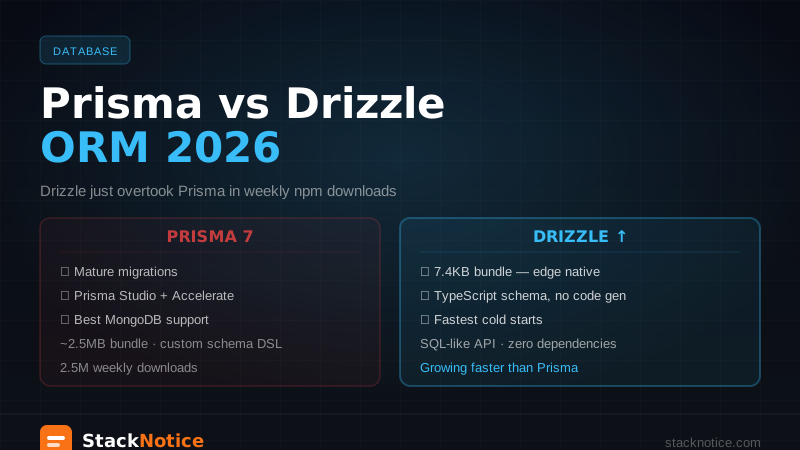
Both are excellent, but they make different trade-offs:
Drizzle advantages:
- SQL-first — queries look like SQL, which means no mental translation. If you know SQL, you know Drizzle.
- No runtime overhead — generates raw SQL at compile time, no ORM layer executing at runtime
- Lightweight — ~7.4kb gzipped. Prisma ships a query engine binary (~30MB)
- Edge compatible — works on Cloudflare Workers, Vercel Edge, and serverless without issues
- Drizzle Studio — built-in visual database browser
- Faster cold starts — critical for serverless and edge functions
Prisma advantages:
- More mature ecosystem, more StackOverflow answers
prisma db pushfor rapid prototyping- Better documentation for beginners
For new projects in 2026, Drizzle is the better default. For legacy Prisma projects with complex schemas, the migration effort may not be worth it unless you're hitting edge compatibility or cold start issues. See the Prisma vs Drizzle deep dive for a full side-by-side comparison with migration examples.
Setup
npm install drizzle-orm @neondatabase/serverless
npm install -D drizzle-kit
This guide uses Neon — serverless PostgreSQL that works well with Next.js and has a generous free tier. You can also use Supabase, Railway, or any Postgres instance.
# .env.local
DATABASE_URL=postgresql://user:password@host/dbname?sslmode=require
Database Connection
// db/index.ts
import { drizzle } from 'drizzle-orm/neon-http'
import { neon } from '@neondatabase/serverless'
import * as schema from './schema'

const sql = neon(process.env.DATABASE_URL!)
export const db = drizzle(sql, { schema })

export type Database = typeof db
For local development with a connection pool (better for long-running servers):
// db/index.ts (Node.js / local)
import { drizzle } from 'drizzle-orm/node-postgres'
import { Pool } from 'pg'
import * as schema from './schema'

const pool = new Pool({ connectionString: process.env.DATABASE_URL })
export const db = drizzle(pool, { schema })
Schema Definition
Schema is TypeScript — no separate .prisma files:
// db/schema.ts
import {
  pgTable,
  uuid,
  text,
  timestamp,
  boolean,
  integer,
  pgEnum,
} from 'drizzle-orm/pg-core'
import { relations } from 'drizzle-orm'

export const roleEnum = pgEnum('role', ['user', 'admin'])

export const users = pgTable('users', {
  id: uuid('id').defaultRandom().primaryKey(),
  email: text('email').notNull().unique(),
  name: text('name').notNull(),
  role: roleEnum('role').default('user').notNull(),
  createdAt: timestamp('created_at').defaultNow().notNull(),
  updatedAt: timestamp('updated_at').defaultNow().notNull(),
})

export const posts = pgTable('posts', {
  id: uuid('id').defaultRandom().primaryKey(),
  title: text('title').notNull(),
  slug: text('slug').notNull().unique(),
  content: text('content').notNull(),
  published: boolean('published').default(false).notNull(),
  viewCount: integer('view_count').default(0).notNull(),
  authorId: uuid('author_id')
    .notNull()
    .references(() => users.id, { onDelete: 'cascade' }),
  createdAt: timestamp('created_at').defaultNow().notNull(),
  updatedAt: timestamp('updated_at').defaultNow().notNull(),
})

export const comments = pgTable('comments', {
  id: uuid('id').defaultRandom().primaryKey(),
  content: text('content').notNull(),
  postId: uuid('post_id')
    .notNull()
    .references(() => posts.id, { onDelete: 'cascade' }),
  authorId: uuid('author_id')
    .notNull()
    .references(() => users.id, { onDelete: 'cascade' }),
  createdAt: timestamp('created_at').defaultNow().notNull(),
})
Relations
Relations tell Drizzle how tables connect, enabling the with syntax in queries:
// db/schema.ts (add after table definitions)
export const usersRelations = relations(users, ({ many }) => ({
  posts: many(posts),
  comments: many(comments),
}))

export const postsRelations = relations(posts, ({ one, many }) => ({
  author: one(users, {
    fields: [posts.authorId],
    references: [users.id],
  }),
  comments: many(comments),
}))

export const commentsRelations = relations(comments, ({ one }) => ({
  post: one(posts, {
    fields: [comments.postId],
    references: [posts.id],
  }),
  author: one(users, {
    fields: [comments.authorId],
    references: [users.id],
  }),
}))
Migrations with drizzle-kit
Configure the kit:
// drizzle.config.ts
import { defineConfig } from 'drizzle-kit'

export default defineConfig({
  schema: './db/schema.ts',
  out: './db/migrations',
  dialect: 'postgresql',
  dbCredentials: {
    url: process.env.DATABASE_URL!,
  },
})
Add scripts to package.json:
{
  "scripts": {
    "db:generate": "drizzle-kit generate",
    "db:migrate": "drizzle-kit migrate",
    "db:studio": "drizzle-kit studio",
    "db:push": "drizzle-kit push"
  }
}
Workflow:
# After changing schema.ts:
npm run db:generate   # creates SQL migration file in ./db/migrations
npm run db:migrate    # applies the migration to the database

# For quick prototyping (skips migration files):
npm run db:push

# Visual browser for your database:
npm run db:studio
db:push is like prisma db push — great for development. Always use db:generate + db:migrate in production to track schema changes.
Queries
Import helpers at the top of your files:
import { db } from '@/db'
import { posts, users, comments } from '@/db/schema'
import { eq, desc, and, or, like, count, sql } from 'drizzle-orm'
Select
// All published posts
const publishedPosts = await db
  .select()
  .from(posts)
  .where(eq(posts.published, true))
  .orderBy(desc(posts.createdAt))

// Specific columns
const postTitles = await db
  .select({ id: posts.id, title: posts.title })
  .from(posts)
  .where(eq(posts.published, true))

// With join
const postsWithAuthors = await db
  .select({
    id: posts.id,
    title: posts.title,
    authorName: users.name,
    authorEmail: users.email,
  })
  .from(posts)
  .leftJoin(users, eq(posts.authorId, users.id))
  .where(eq(posts.published, true))

// Count
const [{ total }] = await db
  .select({ total: count() })
  .from(posts)
  .where(eq(posts.published, true))
Relational Queries (the cleaner syntax)
// Get post with author and comments
const post = await db.query.posts.findFirst({
  where: eq(posts.slug, slug),
  with: {
    author: true,
    comments: {
      with: { author: true },
      orderBy: [desc(comments.createdAt)],
    },
  },
})

// Get all posts with author, only published
const allPosts = await db.query.posts.findMany({
  where: eq(posts.published, true),
  with: { author: { columns: { name: true, email: true } } },
  orderBy: [desc(posts.createdAt)],
  limit: 10,
  offset: 0,
})
Insert
// Single row
const [newPost] = await db
  .insert(posts)
  .values({
    title: 'My Post',
    slug: 'my-post',
    content: 'Content here',
    authorId: userId,
  })
  .returning()

// Multiple rows
const newComments = await db
  .insert(comments)
  .values([
    { content: 'First!', postId, authorId },
    { content: 'Great post', postId, authorId: otherUserId },
  ])
  .returning()

// Upsert (insert or update on conflict)
await db
  .insert(users)
  .values({ email, name })
  .onConflictDoUpdate({
    target: users.email,
    set: { name, updatedAt: new Date() },
  })
Update
// Update single field
await db
  .update(posts)
  .set({ published: true, updatedAt: new Date() })
  .where(eq(posts.id, postId))

// Increment a counter
await db
  .update(posts)
  .set({ viewCount: sql`${posts.viewCount} + 1` })
  .where(eq(posts.id, postId))

// Conditional update
await db
  .update(posts)
  .set({ published: false })
  .where(
    and(
      eq(posts.authorId, userId),
      eq(posts.published, true)
    )
  )
Delete
// Delete with condition
await db.delete(posts).where(eq(posts.id, postId))

// Delete and return deleted rows
const [deleted] = await db
  .delete(posts)
  .where(and(eq(posts.id, postId), eq(posts.authorId, userId)))
  .returning()
Transactions
const result = await db.transaction(async (tx) => {
  // Create user
  const [user] = await tx
    .insert(users)
    .values({ email, name })
    .returning()

  // Create their first post
  const [post] = await tx
    .insert(posts)
    .values({
      title: 'Welcome',
      slug: `welcome-${user.id}`,
      content: 'This is your first post.',
      authorId: user.id,
      published: true,
    })
    .returning()

  return { user, post }
})

// If any query inside throws, the whole transaction rolls back
With Next.js 15 Server Actions
// app/posts/actions.ts
'use server'

import { db } from '@/db'
import { posts } from '@/db/schema'
import { eq, and } from 'drizzle-orm'
import { revalidatePath } from 'next/cache'
import { redirect } from 'next/navigation'
import { auth } from '@/lib/auth' // your auth solution

export async function createPost(formData: FormData) {
  const session = await auth()
  if (!session?.user) return { error: 'Not authenticated' }

  const title = formData.get('title') as string
  const content = formData.get('content') as string

  if (!title || !content) return { error: 'Missing fields' }

  const slug = title
    .toLowerCase()
    .replace(/[^a-z0-9]+/g, '-')
    .replace(/(^-|-$)/g, '')

  const [post] = await db
    .insert(posts)
    .values({ title, slug, content, authorId: session.user.id })
    .returning()

  revalidatePath('/dashboard')
  redirect(`/posts/${post.slug}`)
}

export async function publishPost(postId: string) {
  const session = await auth()
  if (!session?.user) return { error: 'Not authenticated' }

  const [updated] = await db
    .update(posts)
    .set({ published: true, updatedAt: new Date() })
    .where(
      and(
        eq(posts.id, postId),
        eq(posts.authorId, session.user.id) // ensure ownership
      )
    )
    .returning()

  if (!updated) return { error: 'Post not found or unauthorized' }

  revalidatePath('/dashboard')
  revalidatePath(`/posts/${updated.slug}`)
  return { success: true }
}

export async function deletePost(postId: string) {
  const session = await auth()
  if (!session?.user) return { error: 'Not authenticated' }

  await db
    .delete(posts)
    .where(
      and(
        eq(posts.id, postId),
        eq(posts.authorId, session.user.id)
      )
    )

  revalidatePath('/dashboard')
}
Use in a Server Component:
// app/dashboard/page.tsx
import { db } from '@/db'
import { posts } from '@/db/schema'
import { eq, desc } from 'drizzle-orm'
import { auth } from '@/lib/auth'
import { publishPost, deletePost } from './actions'

export default async function DashboardPage() {
  const session = await auth()
  if (!session?.user) redirect('/login')

  const myPosts = await db
    .select()
    .from(posts)
    .where(eq(posts.authorId, session.user.id))
    .orderBy(desc(posts.createdAt))

  return (
    <div>
      {myPosts.map((post) => (
        <div key={post.id} className="border rounded p-4 mb-4">
          <h2 className="font-bold">{post.title}</h2>
          <span>{post.published ? 'Published' : 'Draft'}</span>
          <div className="flex gap-2 mt-2">
            {!post.published && (
              <form action={publishPost.bind(null, post.id)}>
                <button type="submit">Publish</button>
              </form>
            )}
            <form action={deletePost.bind(null, post.id)}>
              <button type="submit">Delete</button>
            </form>
          </div>
        </div>
      ))}
    </div>
  )
}
TypeScript Types
Drizzle infers types directly from your schema:
import type { InferSelectModel, InferInsertModel } from 'drizzle-orm'
import { posts, users } from '@/db/schema'

// Types from schema
type Post = InferSelectModel<typeof posts>
type PostInsert = InferInsertModel<typeof posts>
type User = InferSelectModel<typeof users>

// Custom type with relations
type PostWithAuthor = Post & {
  author: Pick<User, 'name' | 'email'>
}
No type generation step needed — the types are always in sync with your schema.
Seeding
// db/seed.ts
import { db } from './index'
import { users, posts } from './schema'

async function seed() {
  const [alice] = await db
    .insert(users)
    .values({ email: 'alice@example.com', name: 'Alice' })
    .returning()

  await db.insert(posts).values([
    {
      title: 'Getting Started with Drizzle',
      slug: 'getting-started-drizzle',
      content: 'Drizzle is a TypeScript ORM...',
      authorId: alice.id,
      published: true,
    },
    {
      title: 'Draft Post',
      slug: 'draft-post',
      content: 'Work in progress...',
      authorId: alice.id,
    },
  ])

  console.log('Seeded successfully')
  process.exit(0)
}

seed().catch(console.error)
npx tsx db/seed.tsFull Project Structure
db/
  index.ts          — connection + db instance
  schema.ts         — all table + relation definitions
  migrations/       — generated SQL migration files
drizzle.config.ts   — drizzle-kit config
app/
  posts/
    actions.ts      — server actions using db
    page.tsx        — server component with queries
If you're already using Supabase with Next.js 15, Drizzle layers on top perfectly — Drizzle handles queries with full TypeScript types, Supabase handles auth and realtime. For the full Next.js foundation, see the Next.js 15 TypeScript tutorial. If you're adding payments on top, the Stripe + Next.js 15 guide integrates cleanly with this data layer.