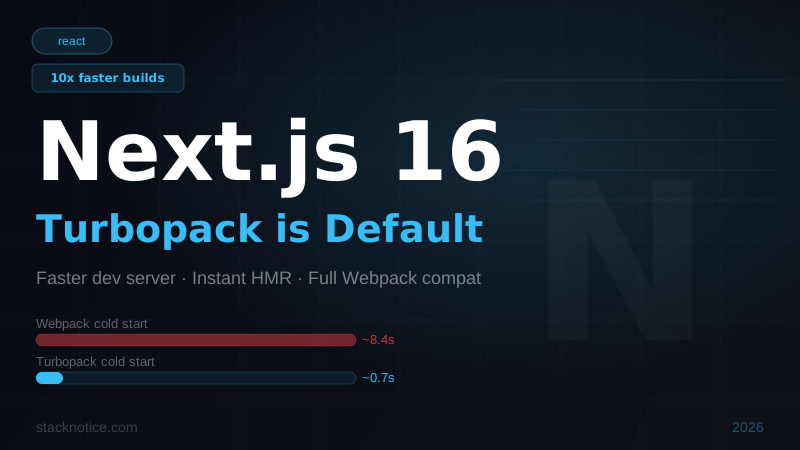
Next.js 16 is the release the community has been waiting for. After two years of gradual rollout, Turbopack is now the default bundler — no flags, no opt-ins, no experimental caveats. You create a new Next.js app today and you get Turbopack. Period.
The benchmark numbers are real: cold builds up to 10x faster than Webpack, HMR latency under 50ms in large codebases, and incremental rebuilds that feel instantaneous. This guide covers every change in Next.js 16, how to upgrade safely, and what might break on the way.
What Is Turbopack and Why Does It Matter
Turbopack is a Rust-based JavaScript bundler built by the Vercel team — the same team behind Next.js. It was announced at Next.js Conf 2022 and has been available behind an --turbo flag since Next.js 13.1. With Next.js 16, that flag is gone because Turbopack is now the default.
The core design difference from Webpack: incremental computation with fine-grained caching. Webpack rebuilds dependency graphs from scratch or from coarse-grained caches. Turbopack tracks exactly which functions and modules changed and only recomputes the affected parts. In a large app with 5,000 modules, a single file change might only re-evaluate 12 of them.
This is not a cosmetic speedup. It changes how development feels.
Performance Numbers: Turbopack vs Webpack
The Vercel team benchmarked both bundlers on a representative large Next.js application (thousands of modules). These are the published numbers from the Next.js 16 release post:
| Metric | Webpack | Turbopack | Speedup |
|---|---|---|---|
| Cold dev server start | ~8.4s | ~0.7s | ~12x |
| HMR (hot module replacement) | ~200ms avg | ~15ms avg | ~13x |
| Incremental build (single file) | ~1.1s | ~0.08s | ~14x |
| Production build (large app) | ~45s | ~18s | ~2.5x |
A few important notes on these numbers:
- The cold dev start improvement is the most dramatic because Turbopack uses lazy bundling — it only compiles the routes you actually navigate to, not the entire app upfront.
- HMR improvements are most visible in large codebases. On a 10-file app the difference is negligible. On a 500-file app it's profound.
- Production build speedup (~2.5x) is real but less dramatic because Turbopack still hands off to SWC for minification and tree-shaking at production build time.
What Changed in Next.js 16
Turbopack as Default Bundler
The headline change. When you run next dev in a Next.js 16 project, you are using Turbopack. There is no --turbo flag required.
# Next.js 15 — needed the flag
next dev --turbo

# Next.js 16 — just works
next dev
If you need to fall back to Webpack for any reason (a plugin that isn't Turbopack-compatible yet), you can:
next dev --no-turboOr in your next.config.js:
/** @type {import('next').NextConfig} */
const nextConfig = {
  webpack: (config) => {
    // custom webpack config here
    return config;
  },
};
The presence of a custom webpack() function in your config will trigger a fallback to Webpack automatically if the config is incompatible with Turbopack.
Improved Static Analysis for Server Components
Next.js 16 ships with improved static analysis for the React Server Components model. The compiler now better detects when you accidentally import server-only modules into client components — catching more errors at build time rather than at runtime.
// This will now throw a build-time error in Next.js 16
// if you try to import it in a 'use client' component
import { db } from '@/lib/database'; // server-only module
Streaming Metadata API
The generateMetadata function now supports streaming — you can await slow data sources without blocking the page render. The page HTML starts streaming to the client while metadata is being resolved in parallel.
// app/blog/[slug]/page.tsx
export async function generateMetadata({ params }: { params: { slug: string } }) {
  // This no longer blocks page streaming
  const post = await fetchPost(params.slug);

  return {
    title: post.title,
    description: post.excerpt,
    openGraph: {
      images: [post.coverImage],
    },
  };
}
after() API Now Stable
The after() API — introduced as experimental in Next.js 15 — is now stable. It lets you run code after the response has been sent to the user, without blocking Time to First Byte.
import { after } from 'next/server';

export async function GET(request: Request) {
  const data = await fetchData();

  // This runs after the response is sent
  after(async () => {
    await logAnalytics(request.url);
    await updateCache();
  });

  return Response.json(data);
}
This is the right pattern for analytics, cache warming, and any post-response side effects.
Improved instrumentation.js Hooks
The instrumentation.js file now supports more lifecycle hooks including onRequestError — a global error handler for all server-side errors with full request context.
// instrumentation.js
export async function onRequestError(err, request, context) {
  await reportErrorToSentry(err, {
    url: request.url,
    route: context.routerKind,
  });
}
Partial Prerendering (PPR) Improvements
PPR — the hybrid rendering model where static shells are served instantly and dynamic parts stream in — received significant stability improvements in v16. The configuration API is simplified:
// next.config.js
const nextConfig = {
  experimental: {
    ppr: true, // was 'incremental' in v15, now just true/false
  },
};
Individual routes opt in with:
// app/dashboard/page.tsx
export const experimental_ppr = true;

export default function DashboardPage() {
  return (
    <div>
      <StaticHeader /> {/* prerendered */}
      <Suspense fallback={<Skeleton />}>
        <DynamicFeed /> {/* streams in */}
      </Suspense>
    </div>
  );
}
How to Upgrade from Next.js 15 to 16
Step 1: Update the package
npm install next@16 react@19 react-dom@19
# or
pnpm add next@16 react@19 react-dom@19
# or
yarn add next@16 react@19 react-dom@19
Next.js 16 requires React 19. If you're still on React 18, the upgrade is a prerequisite.
Step 2: Update TypeScript types
npm install --save-dev @types/react@19 @types/react-dom@19Step 3: Run the codemod
The Next.js team provides a codemod that handles the most common migration patterns automatically:
npx @next/codemod@latest upgradeThis will:
- Update deprecated API usage
- Fix
paramsandsearchParamstyping (now Promises in some contexts — see breaking changes below) - Update import paths that changed
Step 4: Test your dev server
npm run devCheck the terminal output. If Turbopack encounters something it can't handle, it will log a warning. Pay attention to any [Turbopack] prefixed messages.
Step 5: Check your webpack config (if you have one)
If your next.config.js has a webpack() function, review it carefully. Some Webpack-specific plugins won't work with Turbopack. The most common ones to check:
webpack-bundle-analyzer— use the Turbopack equivalent or the built-in Next.js bundle analysis- Custom Babel transforms — Turbopack uses SWC, not Babel. Babel transforms are not supported in Turbopack mode.
raw-loader,file-loader,url-loader— these are replaced by native asset handling in Next.js 16
Breaking Changes to Watch Out For
params and searchParams Are Promises
This change was introduced in Next.js 15 but Next.js 16 strictly enforces it. Page props that were previously synchronous are now Promise-based:
// BEFORE (Next.js 14 and earlier)
export default function Page({ params }: { params: { slug: string } }) {
  return <h1>{params.slug}</h1>;
}

// AFTER (Next.js 15+, required in 16)
export default async function Page({ params }: { params: Promise<{ slug: string }> }) {
  const { slug } = await params;
  return <h1>{slug}</h1>;
}
The codemod handles this automatically, but if you have custom types wrapping the params shape, you'll need to update those manually.
Babel Loader No Longer Supported in Turbopack Mode
If you have a .babelrc or babel.config.js with custom plugins, those will be silently ignored when running with Turbopack. You must either:
- Find SWC equivalents for your Babel plugins (most major ones have them)
- Fall back to Webpack with
--no-turbo
The most commonly affected setups are:
- Styled Components — use the official SWC plugin:
@swc/plugin-styled-components - Emotion — use
@swc/plugin-emotion - Custom decorators — SWC supports TC39 decorators natively now
next/headers and next/cookies Are Now Async
// BEFORE
import { headers } from 'next/headers';
const headersList = headers();
const userAgent = headersList.get('user-agent');

// AFTER
import { headers } from 'next/headers';
const headersList = await headers();
const userAgent = headersList.get('user-agent');
Same applies to cookies():
// AFTER
import { cookies } from 'next/headers';
const cookieStore = await cookies();
const token = cookieStore.get('token');
Minimum Node.js Version: 18.18+
Next.js 16 drops support for Node.js 16 and requires 18.18 at minimum. Check your deployment environment.
node --version
# Should be v18.18.0 or higher
If you're on Vercel, you're fine — their runtime is already on Node 20. For self-hosted deployments, verify your Node version before upgrading.
next/image Remote Patterns Required
The domains config option for next/image is removed. You must use remotePatterns:
// REMOVED in Next.js 16
const nextConfig = {
  images: {
    domains: ['images.unsplash.com'], // throws error now
  },
};

// CORRECT
const nextConfig = {
  images: {
    remotePatterns: [
      {
        protocol: 'https',
        hostname: 'images.unsplash.com',
        pathname: '/**',
      },
    ],
  },
};
Real Code Examples: Before and After
Parallel data fetching with the new patterns
// app/dashboard/page.tsx — Next.js 16 patterns

import { Suspense } from 'react';
import { after } from 'next/server';

export default async function DashboardPage({
  params,
}: {
  params: Promise<{ userId: string }>;
}) {
  const { userId } = await params;

  // Parallel data fetching — both requests fire simultaneously
  const [user, statsPromise] = await Promise.all([
    fetchUser(userId),
    fetchStats(userId),
  ]);

  // Log after response, no blocking
  after(() => logDashboardView(userId));

  return (
    <div>
      <h1>Welcome, {user.name}</h1>
      <Suspense fallback={<StatsSkeleton />}>
        <Stats promise={statsPromise} />
      </Suspense>
    </div>
  );
}
Route handler with after()
// app/api/checkout/route.ts
import { after } from 'next/server';

export async function POST(request: Request) {
  const body = await request.json();
  const order = await createOrder(body);

  // Fire these after response — user doesn't wait
  after(async () => {
    await sendConfirmationEmail(order.userEmail, order.id);
    await updateInventory(order.items);
    await trackConversion(order.total);
  });

  return Response.json({ orderId: order.id, status: 'created' });
}
Should You Upgrade Now?
Yes, if:
- Your project uses the App Router (the default since Next.js 13)
- You don't rely on custom Babel transforms
- You're on Node.js 18.18+ in production
- You want dramatically faster local development
Wait, if:
- You have Webpack plugins with no SWC equivalent
- You're using Pages Router with heavy customization
- You're in the middle of a major feature release and can't risk regressions
The safe upgrade path for production apps is: create a branch, run the codemod, fix any TypeScript errors, test dev and build, then merge. The breaking changes are mechanical and the codemod catches most of them.
Summary
Next.js 16 is a significant release:
- Turbopack is default — no flags, up to 12x faster dev server cold start, ~13x faster HMR
after()API is stable — post-response tasks without blocking TTFB- Streaming metadata —
generateMetadatano longer blocks page streaming params/searchParamsmust be awaited (enforced, breaking)- Babel transforms are not supported in Turbopack mode
- Node.js 18.18+ required
next/imagedomains config removed, useremotePatterns
To make the most of the new App Router improvements, brush up on Server vs Client Components in Next.js and the new features in React 19 that ship alongside it.
For most App Router projects the upgrade is a npm install + codemod run. The development experience improvement alone makes it worth it — faster feedback loops mean faster shipping.
Full migration docs: nextjs.org/docs/app/guides/upgrading