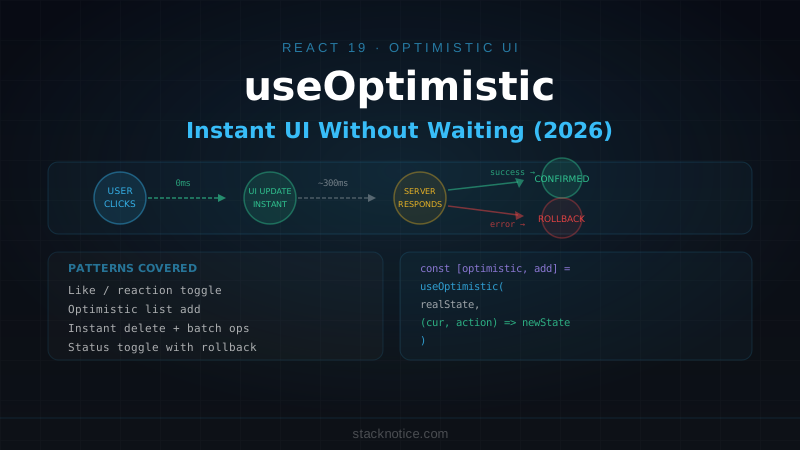
The problem with most web UIs is the gap between user action and visible feedback. A user clicks "like" and waits 200-400ms for the server to respond before the button changes. That delay reads as slowness even when the server is fast. The network round-trip is the ceiling.
Optimistic UI inverts this: assume the operation will succeed, update the UI immediately, then reconcile with the server response when it arrives. If the server fails, roll back. React 19's useOptimistic hook gives you this pattern with minimal boilerplate and automatic rollback built in.
The API
const [optimisticState, addOptimistic] = useOptimistic(
  state,          // the current "real" state — synced from server
  updateFn,       // (currentState, optimisticValue) => newOptimisticState
)optimisticState— during a pending transition, reflects the optimistic update. Once the transition completes (the server responds), it reverts tostateaddOptimistic(value)— triggers an optimistic update withvaluepassed toupdateFn
The key constraint: addOptimistic must be called inside a startTransition callback (or inside a Server Action call, which wraps automatically).
Pattern 1: Like Button
The canonical example — a button that toggles state immediately without waiting for the server:
'use client'

import { useOptimistic, useTransition } from 'react'
import { toggleLike } from '@/actions/likes'
import { Heart } from 'lucide-react'
import { cn } from '@/lib/utils'

type LikeState = {
  liked: boolean
  count: number
}

export function LikeButton({ postId, initialLiked, initialCount }: {
  postId: string
  initialLiked: boolean
  initialCount: number
}) {
  const [isPending, startTransition] = useTransition()
  const [optimisticState, addOptimistic] = useOptimistic<LikeState>(
    { liked: initialLiked, count: initialCount },
    (current, action: 'toggle') => ({
      liked: !current.liked,
      count: current.liked ? current.count - 1 : current.count + 1,
    })
  )

  function handleToggle() {
    startTransition(async () => {
      addOptimistic('toggle')  // updates UI immediately
      await toggleLike({ postId })  // syncs with server
    })
  }

  return (
    <button
      onClick={handleToggle}
      disabled={isPending}
      className="flex items-center gap-1.5 text-sm"
    >
      <Heart
        className={cn(
          'h-4 w-4 transition-colors',
          optimisticState.liked ? 'fill-red-500 text-red-500' : 'text-muted-foreground'
        )}
      />
      <span className={cn(optimisticState.liked ? 'text-red-500' : 'text-muted-foreground')}>
        {optimisticState.count}
      </span>
    </button>
  )
}
The user clicks, the heart fills instantly. If the server call fails, optimisticState reverts to initialLiked and initialCount. The server action:
// actions/likes.ts
'use server'

import { z } from 'zod'
import { auth } from '@/lib/auth'
import { db } from '@/lib/db'
import { likes } from '@/lib/db/schema'
import { and, eq } from 'drizzle-orm'

export async function toggleLike({ postId }: { postId: string }) {
  const session = await auth()
  if (!session) throw new Error('Unauthorized')

  const existing = await db.query.likes.findFirst({
    where: and(eq(likes.postId, postId), eq(likes.userId, session.user.id)),
  })

  if (existing) {
    await db.delete(likes).where(eq(likes.id, existing.id))
  } else {
    await db.insert(likes).values({ postId, userId: session.user.id })
  }
}
Pattern 2: Optimistic List Add
Adding an item to a list and showing it immediately, before the server confirms it was saved:
'use client'

import { useOptimistic, useTransition, useRef } from 'react'
import { addComment } from '@/actions/comments'

type Comment = {
  id: string
  text: string
  author: string
  createdAt: Date
  pending?: boolean  // marks optimistic items
}

export function CommentThread({ postId, initialComments, currentUser }: {
  postId: string
  initialComments: Comment[]
  currentUser: { name: string }
}) {
  const [isPending, startTransition] = useTransition()
  const formRef = useRef<HTMLFormElement>(null)

  const [optimisticComments, addOptimisticComment] = useOptimistic<
    Comment[],
    { text: string }
  >(
    initialComments,
    (current, newComment) => [
      ...current,
      {
        id: `optimistic-${Date.now()}`,  // temp ID
        text: newComment.text,
        author: currentUser.name,
        createdAt: new Date(),
        pending: true,
      },
    ]
  )

  function handleSubmit(formData: FormData) {
    const text = formData.get('text') as string
    if (!text.trim()) return

    startTransition(async () => {
      addOptimisticComment({ text })
      formRef.current?.reset()
      await addComment({ postId, text })
      // After this resolves, the real comment list from the server
      // replaces the optimistic version (via revalidatePath)
    })
  }

  return (
    <div className="space-y-4">
      <div className="space-y-3">
        {optimisticComments.map((comment) => (
          <div
            key={comment.id}
            className={cn(
              'rounded-lg border p-3',
              comment.pending && 'opacity-60'
            )}
          >
            <div className="flex items-center gap-2 text-sm">
              <span className="font-medium">{comment.author}</span>
              {comment.pending && (
                <span className="text-xs text-muted-foreground">Sending...</span>
              )}
            </div>
            <p className="mt-1 text-sm">{comment.text}</p>
          </div>
        ))}
      </div>

      <form ref={formRef} action={handleSubmit} className="flex gap-2">
        <Input name="text" placeholder="Add a comment..." className="flex-1" />
        <Button type="submit" disabled={isPending}>Post</Button>
      </form>
    </div>
  )
}
The comment appears instantly with opacity-60 and a "Sending..." label. Once the server responds and revalidatePath triggers a re-render, the real comment replaces the optimistic one.
Pattern 3: Optimistic Delete
Removing an item immediately from the list:
'use client'

import { useOptimistic, useTransition } from 'react'
import { deleteTodo } from '@/actions/todos'
import { Trash2 } from 'lucide-react'

export function TodoList({ initialTodos }: { initialTodos: Todo[] }) {
  const [isPending, startTransition] = useTransition()

  const [optimisticTodos, removeOptimistic] = useOptimistic<Todo[], string>(
    initialTodos,
    (current, idToRemove) => current.filter((todo) => todo.id !== idToRemove)
  )

  function handleDelete(id: string) {
    startTransition(async () => {
      removeOptimistic(id)        // remove from UI immediately
      await deleteTodo({ id })    // tell the server
    })
  }

  return (
    <ul className="space-y-2">
      {optimisticTodos.map((todo) => (
        <li key={todo.id} className="flex items-center justify-between rounded-lg border p-3">
          <span>{todo.title}</span>
          <Button
            variant="ghost"
            size="icon"
            onClick={() => handleDelete(todo.id)}
            disabled={isPending}
          >
            <Trash2 className="h-4 w-4 text-muted-foreground" />
          </Button>
        </li>
      ))}
    </ul>
  )
}
Pattern 4: Optimistic Toggle (Status)
Toggling a boolean field — todo completion, published state, feature flag:
'use client'

import { useOptimistic, useTransition } from 'react'
import { toggleTodo } from '@/actions/todos'

export function TodoItem({ todo }: { todo: Todo }) {
  const [isPending, startTransition] = useTransition()

  const [optimisticTodo, updateOptimistic] = useOptimistic<Todo, Partial<Todo>>(
    todo,
    (current, patch) => ({ ...current, ...patch })
  )

  function handleToggle(checked: boolean) {
    startTransition(async () => {
      updateOptimistic({ completed: checked })
      await toggleTodo({ id: todo.id, completed: checked })
    })
  }

  return (
    <div className="flex items-center gap-3">
      <Checkbox
        checked={optimisticTodo.completed}
        onCheckedChange={handleToggle}
        disabled={isPending}
      />
      <span className={cn(
        'text-sm transition-all',
        optimisticTodo.completed && 'line-through text-muted-foreground'
      )}>
        {optimisticTodo.title}
      </span>
    </div>
  )
}
The generic updateFn here accepts Partial<Todo> as the optimistic value, which makes it reusable for any field on the todo — not just completed.
Multiple Independent Optimistic Updates
When you have a list where each item manages its own optimistic state, the pattern above (one useOptimistic per item) is correct. Don't try to manage all items from a parent — that creates synchronization complexity.
The exception is batch operations (delete all selected, update all) where you need a single useOptimistic at the list level:
function BatchTodoList({ initialTodos }: { initialTodos: Todo[] }) {
  const [selected, setSelected] = useState<Set<string>>(new Set())
  const [isPending, startTransition] = useTransition()

  const [optimisticTodos, applyBatchUpdate] = useOptimistic<Todo[], 'delete-selected'>(
    initialTodos,
    (current, op) => {
      if (op === 'delete-selected') {
        return current.filter((t) => !selected.has(t.id))
      }
      return current
    }
  )

  function handleDeleteSelected() {
    const ids = [...selected]
    startTransition(async () => {
      applyBatchUpdate('delete-selected')
      setSelected(new Set())
      await deleteMultipleTodos({ ids })
    })
  }

  // ...
}
Error Handling and Rollback
useOptimistic rolls back automatically when the transition completes — if the server action throws, the state prop (real state) wins and the optimistic value disappears. But the user gets no feedback unless you handle the error explicitly:
function handleToggle(checked: boolean) {
  startTransition(async () => {
    updateOptimistic({ completed: checked })
    try {
      await toggleTodo({ id: todo.id, completed: checked })
    } catch {
      toast.error('Failed to update. Please try again.')
      // optimisticTodo already rolled back by React
    }
  })
}
For server actions that return structured errors (like those built with next-safe-action), check the result:
startTransition(async () => {
  addOptimisticComment({ text })
  const result = await addComment({ postId, text })

  if (result?.serverError) {
    toast.error(result.serverError)
    // optimistic state is rolled back automatically
  }
})
TypeScript Typing
The two generics on useOptimistic<State, Action>:
// Single-type state, single-type action
useOptimistic<Comment[], { text: string }>(...)

// State and a union of action types
useOptimistic<TodoList, 'toggle' | 'delete' | 'reorder'>(...)

// Generic patch pattern (most flexible)
useOptimistic<Todo, Partial<Todo>>(...)
The updateFn receives (currentState: State, action: Action) => State. If your update function returns the wrong shape, TypeScript tells you at the call site.
When Not to Use useOptimistic
Not every mutation is a good candidate:
Avoid for:
- Permanent deletes without an undo mechanism — showing something as deleted when it might not be is jarring if the server fails
- Financial transactions — never show a balance change before the server confirms
- Inventory or seat reservations — race conditions mean the server might reject even when you optimistically succeed
- Actions with side effects visible to other users (sending emails, posting to external systems)
Good for:
- Likes, reactions, votes
- Read status toggles
- Todo completion
- Comment submission (with pending indicator)
- Reordering within a user's own list
- Any "soft" toggle the user can immediately undo
Comparison with React Query Optimistic Updates
If you're using TanStack Query, it has its own onMutate rollback pattern:
// React Query approach
useMutation({
  mutationFn: toggleLike,
  onMutate: async (variables) => {
    await queryClient.cancelQueries({ queryKey: ['likes', postId] })
    const previous = queryClient.getQueryData(['likes', postId])
    queryClient.setQueryData(['likes', postId], (old) => ({
      ...old,
      liked: !old.liked,
    }))
    return { previous }
  },
  onError: (err, variables, context) => {
    queryClient.setQueryData(['likes', postId], context?.previous)
  },
})
The difference:
- useOptimistic is built into React, works natively with Server Actions, no extra library needed. Best for App Router + Server Actions workflows.
- React Query optimistic integrates with the query cache, which means the optimistic state persists across component remounts and is automatically invalidated on refetch. Better when your data is managed through a query cache rather than Server Actions +
revalidatePath.
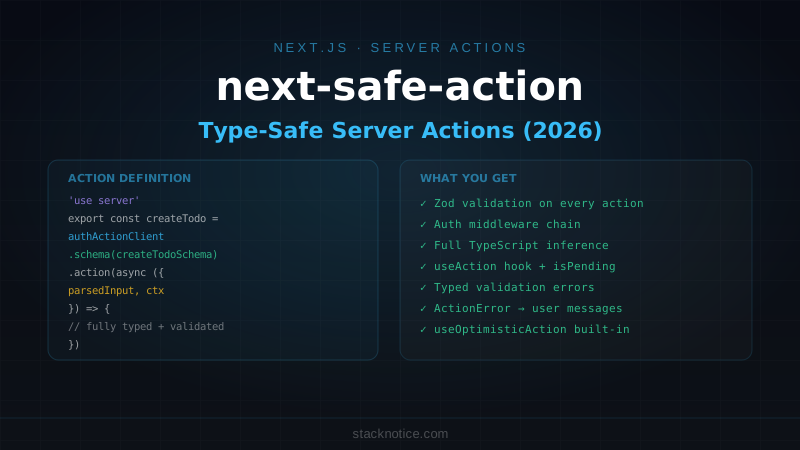
In practice: if you're using Server Actions, useOptimistic is the right choice. If you're using REST/GraphQL with React Query, the onMutate pattern fits better.
Quick Reference
// Import
import { useOptimistic, useTransition } from 'react'

// Hook signature
const [optimisticState, addOptimistic] = useOptimistic(
  realState,
  (currentState, action) => newState  // pure function, return updated state
)

// Always call addOptimistic inside startTransition
const [isPending, startTransition] = useTransition()
function handleAction() {
  startTransition(async () => {
    addOptimistic(actionValue)   // immediate UI update
    await serverAction(input)   // async server call
  })
}

// Patterns:
// List add   → [...current, newItem]
// List delete → current.filter(item => item.id !== id)
// Toggle     → { ...current, field: !current.field }
// Patch      → { ...current, ...partialUpdate }

// Rollback is automatic — if the transition fails,
// optimisticState reverts to the real state.
// Show error feedback manually with try/catch.
The mental model: useOptimistic is a view layer only. It doesn't touch the server, doesn't manage cache, doesn't retry. Its job is to show the user what you expect the world to look like while the real operation completes. Pair it with robust server action patterns for the actual mutations and useTransition for the concurrent execution model underneath it.