Raw Next.js Server Actions have a gap. You define a function marked 'use server', call it from a form or a button click, and somewhere between the client and the server you're trusting that the data arrived with the right shape. No guaranteed validation, no type-safe context, no structured error responses — just a function call that could receive anything.
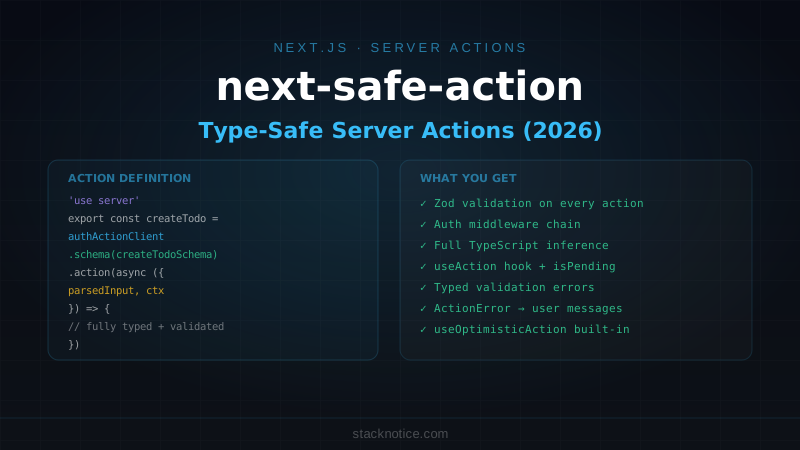
next-safe-action closes that gap. It wraps Server Actions with a schema layer (Zod or any Standard Schema compliant validator), a composable middleware chain, and React hooks that give you reactive status, typed results, and lifecycle callbacks. The v7 API, released in late 2025, made the middleware system composable in a way the earlier versions weren't.
This guide covers the full production setup: from the action client to auth guards to form integration to optimistic updates.
Installation
npm install next-safe-action zodWorks with Next.js 14+ App Router. Server Actions must be enabled (they are by default in Next.js 14+).
Creating the Action Client
The action client is where you configure shared behavior — error messages, middleware, logging. Create it once and import it everywhere:
// lib/safe-action.ts
import { createSafeActionClient } from 'next-safe-action'

export const actionClient = createSafeActionClient({
  // Customize the default server error message shown to clients
  handleServerError(error) {
    console.error('Server action error:', error)
    if (error instanceof ActionError) return error.message
    return 'Something went wrong. Please try again.'
  },
})
ActionError is next-safe-action's built-in class for surfacing user-facing errors from inside action handlers:
import { ActionError } from 'next-safe-action'

throw new ActionError('This email is already registered.')
// → client sees this message in result.serverError
Any other thrown error gets replaced by your handleServerError return value — so database errors, internal crashes, and stack traces never leak to the client.
Authenticated Action Client
The most common pattern: a second client that runs auth before any action executes:
// lib/safe-action.ts
import { createSafeActionClient } from 'next-safe-action'
import { auth } from '@/lib/auth'

export const actionClient = createSafeActionClient({
  handleServerError(error) {
    if (error instanceof ActionError) return error.message
    return 'Something went wrong.'
  },
})

export const authActionClient = createSafeActionClient({
  handleServerError(error) {
    if (error instanceof ActionError) return error.message
    return 'Something went wrong.'
  },
}).use(async ({ next }) => {
  const session = await auth()

  if (!session?.user?.id) {
    throw new ActionError('You must be signed in to perform this action.')
  }

  return next({
    ctx: {
      userId: session.user.id,
      user: session.user,
    },
  })
})
The .use() method adds middleware. Each middleware receives the accumulated context so far and returns it with additions via next({ ctx: {...} }). Actions that use authActionClient get ctx.userId and ctx.user fully typed — no casting required.
Defining Actions
Actions are defined in 'use server' files. Each action chains .schema() (input validation) onto .action() (the handler):
// actions/todos.ts
'use server'

import { z } from 'zod'
import { revalidatePath } from 'next/cache'
import { authActionClient } from '@/lib/safe-action'
import { db } from '@/lib/db'
import { todos } from '@/lib/db/schema'
import { eq, and } from 'drizzle-orm'
import { ActionError } from 'next-safe-action'

const createTodoSchema = z.object({
  title: z.string().min(1, 'Title is required').max(200),
  priority: z.enum(['low', 'medium', 'high']).default('medium'),
})

export const createTodo = authActionClient
  .schema(createTodoSchema)
  .action(async ({ parsedInput, ctx }) => {
    const [todo] = await db
      .insert(todos)
      .values({
        title: parsedInput.title,
        priority: parsedInput.priority,
        userId: ctx.userId,
        createdAt: new Date(),
      })
      .returning()

    revalidatePath('/todos')
    return { todo }
  })

const toggleTodoSchema = z.object({
  id: z.string().uuid(),
  completed: z.boolean(),
})

export const toggleTodo = authActionClient
  .schema(toggleTodoSchema)
  .action(async ({ parsedInput, ctx }) => {
    // Verify ownership before updating
    const existing = await db.query.todos.findFirst({
      where: and(
        eq(todos.id, parsedInput.id),
        eq(todos.userId, ctx.userId)
      ),
    })

    if (!existing) {
      throw new ActionError('Todo not found.')
    }

    const [updated] = await db
      .update(todos)
      .set({ completed: parsedInput.completed })
      .where(eq(todos.id, parsedInput.id))
      .returning()

    revalidatePath('/todos')
    return { todo: updated }
  })

const deleteTodoSchema = z.object({
  id: z.string().uuid(),
})

export const deleteTodo = authActionClient
  .schema(deleteTodoSchema)
  .action(async ({ parsedInput, ctx }) => {
    const deleted = await db
      .delete(todos)
      .where(
        and(
          eq(todos.id, parsedInput.id),
          eq(todos.userId, ctx.userId)
        )
      )
      .returning()

    if (!deleted.length) {
      throw new ActionError('Todo not found or already deleted.')
    }

    revalidatePath('/todos')
    return { deleted: true }
  })
The parsedInput object is fully typed from your Zod schema. The ctx object is typed from whatever your middleware chain produces. TypeScript catches mismatches at compile time.
The useAction Hook
On the client, useAction is the primary way to call your actions reactively:
'use client'

import { useAction } from 'next-safe-action/hooks'
import { createTodo } from '@/actions/todos'
import { toast } from 'sonner'

function CreateTodoButton() {
  const { execute, result, isPending, reset } = useAction(createTodo, {
    onSuccess: ({ data }) => {
      toast.success(`"${data?.todo.title}" added`)
      reset() // clears result state
    },
    onError: ({ error }) => {
      toast.error(error.serverError ?? 'Failed to create todo')
    },
  })

  return (
    <button
      onClick={() => execute({ title: 'New todo', priority: 'medium' })}
      disabled={isPending}
    >
      {isPending ? 'Adding...' : 'Add todo'}
    </button>
  )
}
useAction returns:
| Property | Type | Description |
|---|---|---|
execute | (input) => void | Triggers the action |
executeAsync | (input) => Promise<result> | Same, but awaitable |
result | ActionResult | Last result: data, validationErrors, serverError |
isPending | boolean | True while action is running |
status | 'idle' | 'executing' | 'hasSucceeded' | 'hasErrored' | Fine-grained status |
reset | () => void | Clears result state |
Handling Validation Errors
Zod validation errors are separated from server errors and available as result.validationErrors. Each field maps to an array of error messages:
'use client'

import { useAction } from 'next-safe-action/hooks'
import { createTodo } from '@/actions/todos'

function CreateTodoForm() {
  const { execute, result, isPending } = useAction(createTodo)

  return (
    <form
      onSubmit={(e) => {
        e.preventDefault()
        const formData = new FormData(e.currentTarget)
        execute({
          title: formData.get('title') as string,
          priority: formData.get('priority') as 'low' | 'medium' | 'high',
        })
      }}
    >
      <div>
        <input name="title" placeholder="Todo title" />
        {result.validationErrors?.title?._errors?.map((err) => (
          <p key={err} className="text-sm text-red-500">{err}</p>
        ))}
      </div>

      {result.serverError && (
        <p className="text-sm text-red-500">{result.serverError}</p>
      )}

      <button type="submit" disabled={isPending}>
        {isPending ? 'Creating...' : 'Create'}
      </button>
    </form>
  )
}
The separation matters: validation errors come from Zod and are field-specific. Server errors (ActionError) are global messages. You display them in different places.
Integration with React Hook Form
For complex forms, pair next-safe-action with React Hook Form and the Zod resolver:
'use client'

import { useForm } from 'react-hook-form'
import { zodResolver } from '@hookform/resolvers/zod'
import { useAction } from 'next-safe-action/hooks'
import { z } from 'zod'
import { createTodo } from '@/actions/todos'

const formSchema = z.object({
  title: z.string().min(1, 'Title is required').max(200),
  priority: z.enum(['low', 'medium', 'high']),
})

type FormValues = z.infer<typeof formSchema>

export function CreateTodoForm() {
  const form = useForm<FormValues>({
    resolver: zodResolver(formSchema),
    defaultValues: { title: '', priority: 'medium' },
  })

  const { execute, isPending, result } = useAction(createTodo, {
    onSuccess: () => {
      form.reset()
      toast.success('Todo created!')
    },
  })

  // Merge server-side validation errors back into the form
  useEffect(() => {
    if (result.validationErrors) {
      Object.entries(result.validationErrors).forEach(([field, errors]) => {
        if (errors?._errors?.length) {
          form.setError(field as keyof FormValues, {
            message: errors._errors[0],
          })
        }
      })
    }
  }, [result.validationErrors, form])

  return (
    <Form {...form}>
      <form onSubmit={form.handleSubmit(execute)}>
        <FormField
          control={form.control}
          name="title"
          render={({ field }) => (
            <FormItem>
              <FormLabel>Title</FormLabel>
              <FormControl>
                <Input placeholder="What needs to be done?" {...field} />
              </FormControl>
              <FormMessage />
            </FormItem>
          )}
        />
        <FormField
          control={form.control}
          name="priority"
          render={({ field }) => (
            <FormItem>
              <FormLabel>Priority</FormLabel>
              <Select onValueChange={field.onChange} defaultValue={field.value}>
                <FormControl>
                  <SelectTrigger><SelectValue /></SelectTrigger>
                </FormControl>
                <SelectContent>
                  <SelectItem value="low">Low</SelectItem>
                  <SelectItem value="medium">Medium</SelectItem>
                  <SelectItem value="high">High</SelectItem>
                </SelectContent>
              </Select>
              <FormMessage />
            </FormItem>
          )}
        />

        {result.serverError && (
          <p className="text-sm text-destructive">{result.serverError}</p>
        )}

        <Button type="submit" disabled={isPending || form.formState.isSubmitting}>
          {isPending ? 'Creating...' : 'Create Todo'}
        </Button>
      </form>
    </Form>
  )
}
RHF validates client-side via Zod before the action fires. If the server returns additional validation errors (e.g. uniqueness checks that only the DB can verify), those get merged back into the form state via setError.
Custom Server-Side Validation
Sometimes a constraint can only be checked server-side — email uniqueness, for example. Use returnValidationErrors to send those back in the same format as Zod errors:
import { returnValidationErrors } from 'next-safe-action'
import { createUserSchema } from './schemas'

export const createUser = authActionClient
  .schema(createUserSchema)
  .action(async ({ parsedInput }) => {
    const existing = await db.query.users.findFirst({
      where: eq(users.email, parsedInput.email),
    })

    if (existing) {
      // Returns a validation error in the same shape as Zod errors
      return returnValidationErrors(createUserSchema, {
        email: { _errors: ['This email is already registered.'] },
      })
    }

    const user = await db.insert(users).values(parsedInput).returning()
    return { user: user[0] }
  })
The client gets result.validationErrors.email._errors[0] — same path as a Zod schema error, so your form error display code doesn't need to change.
Composable Middleware
Middleware chains are composable — you can add logging, rate limiting, or feature flags on top of the base auth middleware:
// lib/safe-action.ts

// Rate-limited action client (builds on authActionClient)
export const rateLimitedActionClient = authActionClient
  .use(async ({ next, ctx }) => {
    const { success } = await ratelimit.limit(ctx.userId)

    if (!success) {
      throw new ActionError('Too many requests. Please wait a moment.')
    }

    return next({ ctx })
  })

// Audit-logged action client (for sensitive operations)
export const auditedActionClient = authActionClient
  .use(async ({ next, ctx, clientInput }) => {
    const result = await next({ ctx })

    await db.insert(auditLogs).values({
      userId: ctx.userId,
      action: 'sensitive_operation',
      input: JSON.stringify(clientInput),
      timestamp: new Date(),
    })

    return result
  })
Use whichever client matches the action's requirements: actionClient for public endpoints, authActionClient for anything requiring a session, rateLimitedActionClient for mutation-heavy operations.
useOptimisticAction
For actions where you want instant UI feedback before the server responds, use useOptimisticAction:
'use client'

import { useOptimisticAction } from 'next-safe-action/hooks'
import { toggleTodo } from '@/actions/todos'

function TodoItem({ todo }: { todo: Todo }) {
  const { execute, optimisticState } = useOptimisticAction(toggleTodo, {
    currentState: todo,
    updateFn: (state, input) => ({
      ...state,
      completed: input.completed,
    }),
  })

  return (
    <div className="flex items-center gap-3">
      <Checkbox
        checked={optimisticState.completed}
        onCheckedChange={(checked) =>
          execute({ id: todo.id, completed: !!checked })
        }
      />
      <span className={cn(optimisticState.completed && 'line-through text-muted-foreground')}>
        {todo.title}
      </span>
    </div>
  )
}
optimisticState reflects the update immediately. If the server fails, it reverts to the previous state automatically.
Quick Reference
// lib/safe-action.ts — setup
export const actionClient = createSafeActionClient({ handleServerError })
export const authActionClient = actionClient.use(async ({ next }) => {
  const session = await auth()
  if (!session) throw new ActionError('Unauthorized')
  return next({ ctx: { userId: session.user.id } })
})

// actions/example.ts — define
'use server'
export const myAction = authActionClient
  .schema(z.object({ name: z.string() }))
  .action(async ({ parsedInput, ctx }) => {
    // parsedInput.name — validated
    // ctx.userId — from middleware
    return { result: 'ok' }
  })

// component.tsx — use
const { execute, result, isPending } = useAction(myAction, {
  onSuccess: ({ data }) => console.log(data),
  onError: ({ error }) => console.error(error.serverError),
})

// Validation errors
result.validationErrors?.fieldName?._errors

// Server error (from ActionError)
result.serverError
The pattern that earns its keep in production: define one authActionClient that handles session checking, wrap any mutation-heavy route with rateLimitedActionClient, and use ActionError for every user-facing message. Your Server Actions become as safe as a typed API route, with a fraction of the boilerplate. Pairs naturally with React Hook Form + Zod for client-side validation and Server Actions patterns for the underlying mechanics.