Both useTransition and useDeferredValue exist because React 19 cares about which renders are urgent and which can wait. But they operate at different points in the update cycle, and confusing them leads to either no improvement or subtle bugs.
Here's the clearest way to think about it before getting into code:
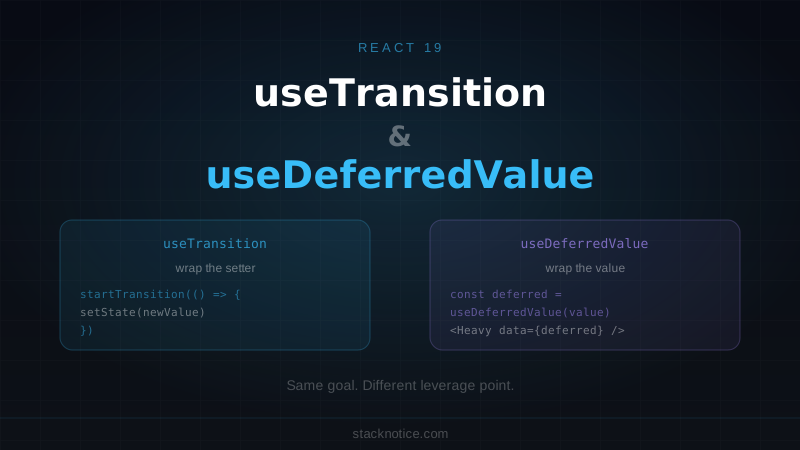
useTransition— you control when the state update happens. You wrap the setter.useDeferredValue— you control when the new value propagates. You wrap the value after it's set.
Same goal, different leverage point. This article shows exactly when each applies, with real patterns you can copy into your project.
What "Transition" Actually Means
Before React's concurrent features, every state update triggered a render immediately and synchronously. Click a button, set state, render — all in the same frame. If the render was expensive, the UI froze.
React's concurrent mode introduced the concept of priority. Not every update needs to happen at the same urgency. Typing a keystroke should respond immediately. Rendering 500 filtered items can wait a moment if another urgent update arrives.
A "transition" is React's word for a low-priority update — one that can be interrupted and deferred if something more urgent comes in.
useTransition and useDeferredValue both mark updates as low-priority. The difference is mechanical: one does it at the setter, the other does it at the consumer.
useTransition: Wrap the Setter
useTransition returns a [isPending, startTransition] pair. You wrap the state update inside startTransition to mark it as non-urgent. React renders the current state immediately while computing the transition update in the background.
import { useState, useTransition } from 'react'

function FilteredList({ items }: { items: string[] }) {
  const [query, setQuery] = useState('')
  const [filteredItems, setFilteredItems] = useState(items)
  const [isPending, startTransition] = useTransition()

  function handleSearch(e: React.ChangeEvent<HTMLInputElement>) {
    const value = e.target.value
    setQuery(value) // urgent — input updates immediately

    startTransition(() => {
      // non-urgent — filtering can be deferred
      setFilteredItems(items.filter((item) =>
        item.toLowerCase().includes(value.toLowerCase())
      ))
    })
  }

  return (
    <div>
      <input
        value={query}
        onChange={handleSearch}
        placeholder="Filter..."
        className="border rounded px-3 py-2"
      />
      {isPending && <span className="text-sm text-muted-foreground">Updating...</span>}
      <ul className={isPending ? 'opacity-50' : ''}>
        {filteredItems.map((item) => (
          <li key={item}>{item}</li>
        ))}
      </ul>
    </div>
  )
}
The input value updates synchronously — the user sees their keystroke immediately. The filtered list updates in a transition — React renders it when it's not busy with more urgent work.
isPending is true while React is computing the transition. Use it to show a spinner, dim the stale content, or disable a button.
useTransition with Server Actions
In React 19, useTransition is the right way to track Server Action state. The action prop on a form handles this automatically, but if you're calling a Server Action imperatively, wrap it in startTransition:
'use client'

import { useState, useTransition } from 'react'
import { updateProfile } from './actions'

export function ProfileForm({ user }: { user: { name: string; bio: string } }) {
  const [isPending, startTransition] = useTransition()
  const [error, setError] = useState<string | null>(null)

  function handleSubmit(formData: FormData) {
    startTransition(async () => {
      const result = await updateProfile(formData)
      if (result.error) setError(result.error)
    })
  }

  return (
    <form action={handleSubmit} className="space-y-4">
      <div>
        <label htmlFor="name" className="block text-sm font-medium">
          Name
        </label>
        <input
          id="name"
          name="name"
          defaultValue={user.name}
          className="mt-1 block w-full rounded-md border px-3 py-2"
        />
      </div>
      <div>
        <label htmlFor="bio" className="block text-sm font-medium">
          Bio
        </label>
        <textarea
          id="bio"
          name="bio"
          defaultValue={user.bio}
          className="mt-1 block w-full rounded-md border px-3 py-2"
          rows={4}
        />
      </div>
      {error && <p className="text-sm text-destructive">{error}</p>}
      <button
        type="submit"
        disabled={isPending}
        className="rounded-md bg-primary px-4 py-2 text-primary-foreground disabled:opacity-50"
      >
        {isPending ? 'Saving...' : 'Save changes'}
      </button>
    </form>
  )
}
startTransition accepts async callbacks in React 19. This means you can await Server Actions inside it and React tracks the pending state for you — no manual useState boolean needed.
For a full look at Server Actions patterns, see the React Server Actions guide.
Navigation Loading State
A common pattern in Next.js apps: showing a loading indicator when the user navigates to a route that takes a moment to load.
'use client'

import { useRouter } from 'next/navigation'
import { useTransition } from 'react'

export function NavLink({ href, children }: { href: string; children: React.ReactNode }) {
  const router = useRouter()
  const [isPending, startTransition] = useTransition()

  return (
    <button
      onClick={() => {
        startTransition(() => {
          router.push(href)
        })
      }}
      className="relative"
    >
      {children}
      {isPending && (
        <span className="absolute inset-x-0 -bottom-0.5 h-0.5 bg-primary animate-pulse" />
      )}
    </button>
  )
}
The underline animates while React is loading the destination page. When navigation completes, isPending becomes false and the indicator disappears.
useDeferredValue: Wrap the Value
useDeferredValue takes a value and returns a deferred version of it. The deferred version lags behind the real value during rapid updates.
Use it when you receive a value from outside (a prop, a URL param, an uncontrolled input) and passing it to an expensive component causes visible slowdown.
import { useState, useDeferredValue, memo } from 'react'
import { SearchResults } from './search-results'

// Memoize the expensive component — critical for useDeferredValue to help
const MemoizedSearchResults = memo(SearchResults)

export function SearchPage() {
  const [query, setQuery] = useState('')
  const deferredQuery = useDeferredValue(query)

  // While typing, deferredQuery lags behind query
  // SearchResults re-renders with the deferred value, not every keystroke
  const isStale = query !== deferredQuery

  return (
    <div>
      <input
        value={query}
        onChange={(e) => setQuery(e.target.value)}
        placeholder="Search..."
        className="border rounded px-3 py-2"
      />
      <div className={isStale ? 'opacity-60 transition-opacity' : ''}>
        <MemoizedSearchResults query={deferredQuery} />
      </div>
    </div>
  )
}useDeferredValue only helps if the component receiving the deferred value is wrapped in memo(). Without it, the component re-renders on every keystroke regardless of the deferred value — the deferred value never prevents a render.
How the Stale State Works
When the user types fast, query updates on every keystroke. deferredQuery holds the previous value until React has time to render with the new one.
The sequence for a fast typist typing "react":
Keystroke "r":  query = "r",      deferredQuery = ""     → SearchResults shows "" results
Keystroke "e":  query = "re",     deferredQuery = "r"    → SearchResults shows "r" results
Keystroke "a":  query = "rea",    deferredQuery = "re"   → SearchResults shows "re" results
...pause...
After pause:    query = "react",  deferredQuery = "react" → SearchResults shows "react" results
The input always shows the latest value. The expensive search results catch up when React has a free frame.
useDeferredValue with URL Params
A useful pattern in Next.js: when search params come from the URL and drive an expensive render:
// app/search/page.tsx
import { Suspense } from 'react'
import { SearchResults } from './search-results'
import { SearchInput } from './search-input'

export default function SearchPage({
  searchParams,
}: {
  searchParams: { q?: string }
}) {
  const query = searchParams.q ?? ''

  return (
    <main>
      <SearchInput defaultValue={query} />
      <Suspense fallback={<ResultsSkeleton />}>
        <SearchResults query={query} />
      </Suspense>
    </main>
  )
}
// app/search/search-input.tsx
'use client'
import { useRouter } from 'next/navigation'
import { useTransition } from 'react'
import { useDebouncedCallback } from 'use-debounce'
export function SearchInput({ defaultValue }: { defaultValue: string }) {
const router = useRouter()
const [isPending, startTransition] = useTransition()
const handleSearch = useDebouncedCallback((value: string) => {
startTransition(() => {
const params = new URLSearchParams()
if (value) params.set('q', value)
router.push(`/search?${params.toString()}`)
})
}, 300)
return (
<div className="relative">
<input
defaultValue={defaultValue}
onChange={(e) => handleSearch(e.target.value)}
placeholder="Search..."
className="border rounded px-3 py-2 pr-8"
/>
{isPending && (
<div className="absolute right-2 top-1/2 -translate-y-1/2 h-4 w-4 animate-spin rounded-full border-2 border-primary border-t-transparent" />
)}
</div>
)
}The input is client-side, navigation is wrapped in startTransition, and the results page uses Suspense. Three layers that each do their part.
The Actual Difference
The two hooks differ in where they apply the deferral:
// useTransition: you call startTransition, you control when the setter fires
const [isPending, startTransition] = useTransition()
startTransition(() => setState(newValue))

// useDeferredValue: you wrap the value, React controls when it propagates
const deferredValue = useDeferredValue(value)
<ExpensiveComponent data={deferredValue} />
Use useTransition when:
- You own the state setter — you can wrap it in
startTransition - You want an explicit
isPendingboolean to show in the UI - You're calling Server Actions imperatively
- You're triggering navigation
Use useDeferredValue when:
- You receive a value as a prop or from somewhere you don't control
- The value comes from an uncontrolled input or external source
- You want to pass a "slow" version of a value to an expensive child component
- The component tree receiving the value is already memoized
useOptimistic: The Third Member of the Family
React 19 added useOptimistic as a companion to useTransition. Where useTransition gives you isPending, useOptimistic lets you show a temporary optimistic state while an async operation is in flight:
'use client'

import { useOptimistic, useTransition } from 'react'
import { toggleLike } from './actions'

export function LikeButton({
  postId,
  initialLikes,
  initialLiked,
}: {
  postId: string
  initialLikes: number
  initialLiked: boolean
}) {
  const [isPending, startTransition] = useTransition()
  const [optimisticState, addOptimistic] = useOptimistic(
    { likes: initialLikes, liked: initialLiked },
    (state, liked: boolean) => ({
      likes: liked ? state.likes + 1 : state.likes - 1,
      liked,
    })
  )

  function handleClick() {
    const newLiked = !optimisticState.liked

    startTransition(async () => {
      addOptimistic(newLiked) // instant UI update
      await toggleLike(postId, newLiked) // server mutation
    })
  }

  return (
    <button
      onClick={handleClick}
      disabled={isPending}
      className="flex items-center gap-2"
    >
      <span>{optimisticState.liked ? '❤️' : '🤍'}</span>
      <span>{optimisticState.likes}</span>
    </button>
  )
}
The heart updates immediately. If the server call fails, React rolls back to the original state. No manual optimistic update bookkeeping.
For more on React 19's form-related hooks, see the useActionState and form hooks guide.
Common Mistakes
Mistake 1: Using useTransition for animations
// Wrong — this has nothing to do with transitions
const [isPending, startTransition] = useTransition()
startTransition(() => {
  setIsModalOpen(true) // modal animations don't benefit from this
})
useTransition is about rendering priority, not animations. Use CSS transitions or Framer Motion for visual animations.
Mistake 2: Forgetting memo() with useDeferredValue
// Wrong — useDeferredValue does nothing here without memo
function SearchPage() {
  const [query, setQuery] = useState('')
  const deferredQuery = useDeferredValue(query)

  // ExpensiveList re-renders every keystroke regardless
  return <ExpensiveList items={filter(items, deferredQuery)} />
}

// Right
const MemoizedExpensiveList = memo(ExpensiveList)

function SearchPage() {
  const [query, setQuery] = useState('')
  const deferredQuery = useDeferredValue(query)

  return <MemoizedExpensiveList items={filter(items, deferredQuery)} />
}
Mistake 3: Wrapping everything in startTransition "just in case"
State updates inside startTransition are interruptible. If you wrap a state update that's actually urgent — like updating an input value — the user might see their keystrokes lag.
// Wrong — input updates should always be urgent
startTransition(() => {
  setInputValue(e.target.value) // do NOT put this in a transition
})

// Right
setInputValue(e.target.value)           // urgent — outside transition
startTransition(() => {
  setFilteredResults(filter(e.target.value)) // non-urgent — inside transition
})
Mistake 4: Not using them when they'd help
The flip side: if your app has a noticeable freeze when the user interacts with something, transitions are often the fix. Slow filter renders, expensive chart updates, and heavy component trees all benefit.
A 300ms freeze on a click is a bug. Wrapping the expensive state update in startTransition lets the click feel instant while the re-render catches up.
Quick Reference
useTransition | useDeferredValue | |
|---|---|---|
| What you wrap | The state setter call | The value itself |
| Returns | [isPending, startTransition] | deferred version of the value |
| isPending access | Yes, directly | No (compute value !== deferred manually) |
| Requires memo() | No | Yes, for the child component |
| Best for | Mutations, navigation, Server Actions | Search inputs, prop-driven expensive renders |
| React 19 async support | Yes, startTransition(async () => {}) | N/A |
When You Don't Need Either
Don't reach for these hooks until you see an actual performance problem. For most interactions, React's default synchronous rendering is fast enough.
Signs you need transitions:
- Visible UI freeze (>100ms) when setting state
- Input lag while typing in a search field
- Button clicks that feel slow to respond
For smaller slowdowns, check first whether the component is doing unnecessary work — memoization and clean component structure often fix performance issues without concurrency hooks.
For architectural patterns in Next.js where these hooks integrate with the router and data fetching, see the Next.js App Router guide.