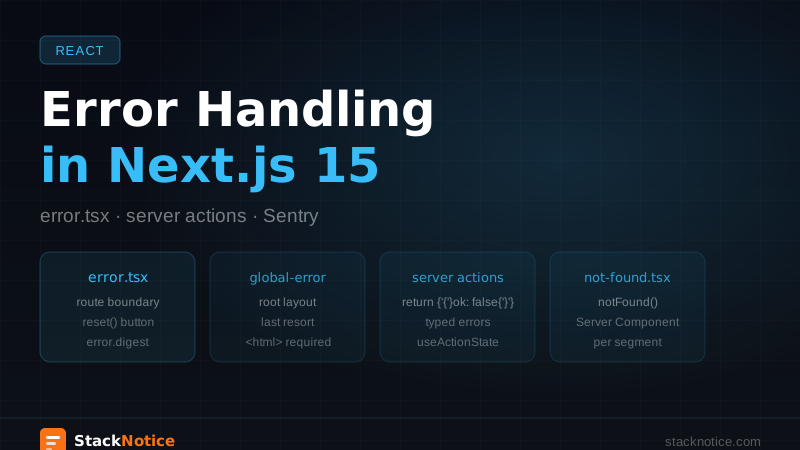
Proper error handling in Next.js 15 is spread across four different mechanisms that serve different purposes. Most guides cover one of them. This covers all four — and how they work together in a production app.
The Four Layers of Error Handling
- error.tsx — Client component that catches rendering errors in a route segment
- global-error.tsx — Catches errors in the root layout itself
- Server action errors — Errors that happen during mutations and form submissions
- not-found.tsx — Handles 404s from
notFound()calls
These are separate concerns with separate solutions. Confusing them leads to errors that silently fail or crash the wrong boundary.
error.tsx — Route-Level Boundaries
Every folder in your app/ directory can have its own error.tsx. When a component in that segment throws, Next.js renders the error.tsx instead.
// app/dashboard/error.tsx
'use client'

import { useEffect } from 'react'
import * as Sentry from '@sentry/nextjs'

interface ErrorProps {
  error: Error & { digest?: string }
  reset: () => void
}

export default function DashboardError({ error, reset }: ErrorProps) {
  useEffect(() => {
    Sentry.captureException(error, {
      tags: { section: 'dashboard', digest: error.digest },
    })
  }, [error])

  return (
    <div className="flex flex-col items-center justify-center min-h-[400px] gap-4">
      <h2 className="text-xl font-semibold text-gray-900">
        Something went wrong
      </h2>
      <p className="text-sm text-gray-500 max-w-md text-center">
        {error.message || 'An unexpected error occurred in the dashboard.'}
      </p>
      <button
        onClick={reset}
        className="px-4 py-2 bg-blue-600 text-white rounded-md text-sm hover:bg-blue-700"
      >
        Try again
      </button>
    </div>
  )
}
The reset function re-renders the segment. The error.digest is a server-side hash you can use to correlate client errors with server logs — useful when showing a support code to the user.
error.tsx must include 'use client' at the top. Error boundaries in React require client-side code — you can't use a Server Component here.
The error.tsx in app/dashboard/ catches errors in:
app/dashboard/page.tsx- Any nested routes under
app/dashboard/
It does not catch errors in app/dashboard/layout.tsx itself — that requires a parent boundary or try/catch inside the layout.
global-error.tsx — Root Layout Boundary
// app/global-error.tsx
'use client'

export default function GlobalError({
  error,
  reset,
}: {
  error: Error & { digest?: string }
  reset: () => void
}) {
  return (
    <html>
      <body>
        <div className="flex flex-col items-center justify-center min-h-screen gap-4 p-8">
          <h1 className="text-2xl font-bold">Something went wrong</h1>
          <p className="text-gray-600 text-center max-w-md">
            A critical error occurred. Please refresh the page or contact
            support if the problem persists.
          </p>
          <button
            onClick={reset}
            className="px-6 py-2 bg-red-600 text-white rounded-md hover:bg-red-700"
          >
            Refresh
          </button>
        </div>
      </body>
    </html>
  )
}
Notice it includes <html> and <body> — because it replaces the root layout entirely when it triggers. It's the last line of defense.
In development, Next.js shows its own error overlay instead of global-error.tsx. You'll only see your component in production builds.
not-found.tsx
The notFound() function from next/navigation throws a special error that Next.js catches to render not-found.tsx.
// app/blog/[slug]/page.tsx
import { notFound } from 'next/navigation'
import { getPost } from '@/lib/posts'

export default async function BlogPost({
  params,
}: {
  params: Promise<{ slug: string }>
}) {
  const { slug } = await params
  const post = await getPost(slug)

  if (!post) {
    notFound() // Renders app/blog/not-found.tsx or app/not-found.tsx
  }

  return <article>{/* render post */}</article>
}
// app/not-found.tsx
import Link from 'next/link'
export default function NotFound() {
return (
<div className="flex flex-col items-center justify-center min-h-[60vh] gap-4">
<h2 className="text-4xl font-bold text-gray-900">404</h2>
<p className="text-gray-600">The page you're looking for doesn't exist.</p>
<Link
href="/"
className="px-4 py-2 bg-gray-900 text-white rounded-md text-sm"
>
Go home
</Link>
</div>
)
}Unlike error.tsx, not-found.tsx is a Server Component by default. You can have one at the root app/ level and override it per route segment.
Server Action Errors
Server actions need their own error handling strategy. Throwing inside a server action in production shows the user nothing useful and leaks no information to the client — which is good for security, but bad for UX.
The pattern that works is returning a typed result object instead of throwing:
// lib/actions/auth.ts
'use server'

type ActionResult<T> =
  | { success: true; data: T }
  | { success: false; error: string }

export async function signIn(
  formData: FormData
): Promise<ActionResult<{ userId: string }>> {
  const email = formData.get('email') as string
  const password = formData.get('password') as string

  if (!email || !password) {
    return { success: false, error: 'Email and password are required' }
  }

  try {
    const user = await db.user.findUnique({ where: { email } })

    if (!user || !(await verifyPassword(password, user.passwordHash))) {
      return { success: false, error: 'Invalid credentials' }
    }

    return { success: true, data: { userId: user.id } }
  } catch (err) {
    // Log the real error server-side
    console.error('SignIn error:', err)
    // Return a safe message to the client
    return { success: false, error: 'Authentication failed. Please try again.' }
  }
}
On the client side, consume the result with useActionState:
// app/login/page.tsx
'use client'

import { useActionState } from 'react'
import { signIn } from '@/lib/actions/auth'

type State = { error?: string } | null

export default function LoginPage() {
  const [state, formAction, isPending] = useActionState(
    async (_prev: State, formData: FormData): Promise<State> => {
      const result = await signIn(formData)
      if (!result.success) {
        return { error: result.error }
      }
      return null
    },
    null
  )

  return (
    <form action={formAction} className="flex flex-col gap-4 max-w-sm mx-auto">
      <input
        name="email"
        type="email"
        placeholder="Email"
        className="border rounded-md px-3 py-2"
        required
      />
      <input
        name="password"
        type="password"
        placeholder="Password"
        className="border rounded-md px-3 py-2"
        required
      />
      {state?.error && (
        <p className="text-sm text-red-600">{state.error}</p>
      )}
      <button
        type="submit"
        disabled={isPending}
        className="px-4 py-2 bg-blue-600 text-white rounded-md disabled:opacity-50"
      >
        {isPending ? 'Signing in...' : 'Sign in'}
      </button>
    </form>
  )
}
See the React 19 form hooks guide for the full useActionState breakdown.
Typed Errors with Discriminated Unions
For complex apps, a typed error system prevents string error messages from becoming unmanageable:
// lib/errors.ts
export type AppError =
  | { code: 'NOT_FOUND'; resource: string }
  | { code: 'UNAUTHORIZED'; reason: string }
  | { code: 'VALIDATION_FAILED'; fields: Record<string, string> }
  | { code: 'RATE_LIMITED'; retryAfter: number }
  | { code: 'INTERNAL'; message: string }

export function getErrorMessage(error: AppError): string {
  switch (error.code) {
    case 'NOT_FOUND':
      return `${error.resource} not found`
    case 'UNAUTHORIZED':
      return `Unauthorized: ${error.reason}`
    case 'VALIDATION_FAILED':
      return Object.values(error.fields).join(', ')
    case 'RATE_LIMITED':
      return `Too many requests. Try again in ${error.retryAfter}s`
    case 'INTERNAL':
      return 'An unexpected error occurred'
  }
}
// lib/actions/posts.ts
'use server'
import * as Sentry from '@sentry/nextjs'
import type { AppError } from '@/lib/errors'
type ActionResult<T> =
| { ok: true; data: T }
| { ok: false; error: AppError }
export async function createPost(
formData: FormData
): Promise<ActionResult<{ id: string }>> {
const title = formData.get('title') as string
if (!title || title.length < 3) {
return {
ok: false,
error: {
code: 'VALIDATION_FAILED',
fields: { title: 'Title must be at least 3 characters' },
},
}
}
try {
const post = await db.post.create({ data: { title } })
return { ok: true, data: { id: post.id } }
} catch (err) {
Sentry.captureException(err, { tags: { action: 'createPost' } })
return { ok: false, error: { code: 'INTERNAL', message: 'Failed to create post' } }
}
}The discriminated union means TypeScript will enforce that you handle every error code on the client — no silent fallthrough.
Sentry Integration
In production, console.error is not enough. You need to know about errors before users report them.
npm install @sentry/nextjs
npx @sentry/wizard@latest -i nextjs
The wizard creates sentry.client.config.ts, sentry.server.config.ts, and sentry.edge.config.ts.
// sentry.client.config.ts
import * as Sentry from '@sentry/nextjs'

Sentry.init({
  dsn: process.env.NEXT_PUBLIC_SENTRY_DSN,
  tracesSampleRate: process.env.NODE_ENV === 'production' ? 0.1 : 1.0,
  replaysOnErrorSampleRate: 1.0,
  replaysSessionSampleRate: 0.05,
  integrations: [
    Sentry.replayIntegration({
      maskAllText: true,
      blockAllMedia: true,
    }),
  ],
})// app/dashboard/error.tsx
'use client'
import { useEffect } from 'react'
import * as Sentry from '@sentry/nextjs'
export default function DashboardError({
error,
reset,
}: {
error: Error & { digest?: string }
reset: () => void
}) {
useEffect(() => {
Sentry.captureException(error, {
tags: { section: 'dashboard', digest: error.digest },
})
}, [error])
return (
<div className="flex flex-col items-center justify-center min-h-[400px] gap-4">
<h2 className="text-xl font-semibold">Something went wrong</h2>
<p className="text-xs text-gray-400">Error ID: {error.digest}</p>
<button
onClick={reset}
className="px-4 py-2 bg-blue-600 text-white rounded-md text-sm"
>
Try again
</button>
</div>
)
}The error.digest shown to the user can be correlated in Sentry to find the exact server-side stack trace — useful when a user reports "I got an error" and you need to find it in your logs.
Handling Errors in Layouts
One edge case worth knowing: if app/dashboard/layout.tsx throws, the app/dashboard/error.tsx does not catch it — because the error boundary wraps the layout's children, not the layout itself.
To catch layout errors, you need either a parent error.tsx or try/catch inside the layout:
// app/dashboard/layout.tsx
import { redirect } from 'next/navigation'
import { getUser } from '@/lib/auth'

export default async function DashboardLayout({
  children,
}: {
  children: React.ReactNode
}) {
  let user

  try {
    user = await getUser()
  } catch {
    redirect('/login')
  }

  if (!user) {
    redirect('/login')
  }

  return (
    <div className="min-h-screen bg-gray-50">
      <nav>{/* nav */}</nav>
      <main className="container mx-auto py-8">{children}</main>
    </div>
  )
}
Loading States and Error States Together
A complete route segment has three states: loading, error, and content. The file structure makes this explicit:
app/
  dashboard/
    layout.tsx       ← shared layout
    page.tsx         ← content (async Server Component)
    loading.tsx      ← skeleton while page.tsx suspends
    error.tsx        ← error boundary
    not-found.tsx    ← 404 for this segment
// app/dashboard/loading.tsx
export default function DashboardLoading() {
  return (
    <div className="animate-pulse space-y-4 p-6">
      <div className="h-8 bg-gray-200 rounded w-1/3" />
      <div className="h-4 bg-gray-200 rounded w-2/3" />
      <div className="grid grid-cols-3 gap-4">
        {Array.from({ length: 3 }).map((_, i) => (
          <div key={i} className="h-32 bg-gray-200 rounded" />
        ))}
      </div>
    </div>
  )
}
Next.js automatically wraps page.tsx in a <Suspense> boundary when loading.tsx is present, and in an error boundary when error.tsx is present.
Testing Error Boundaries
Playwright makes it straightforward to test error states — see the Next.js testing guide for the full setup:
// e2e/dashboard-error.spec.ts
import { test, expect } from '@playwright/test'

test('shows error boundary when dashboard fails', async ({ page }) => {
  await page.route('**/api/dashboard/**', (route) => {
    route.fulfill({ status: 500 })
  })

  await page.goto('/dashboard')

  await expect(page.getByText('Something went wrong')).toBeVisible()
  await expect(page.getByRole('button', { name: 'Try again' })).toBeVisible()
})

test('reset re-renders the segment', async ({ page }) => {
  let callCount = 0

  await page.route('**/api/dashboard/**', (route) => {
    callCount++
    callCount === 1 ? route.fulfill({ status: 500 }) : route.continue()
  })

  await page.goto('/dashboard')
  await page.getByRole('button', { name: 'Try again' }).click()

  await expect(page.getByRole('heading', { name: 'Dashboard' })).toBeVisible()
})
Quick Reference
| Scenario | Solution |
|---|---|
| Route segment throws | error.tsx in same folder |
| Root layout throws | global-error.tsx |
| Resource not found | notFound() + not-found.tsx |
| Server action fails | Return { ok: false, error } |
| Track errors in production | Sentry in error.tsx + server actions |
| Layout error | try/catch in layout or parent error.tsx |
| TypeScript safety on errors | Discriminated union AppError type |
The Next.js App Router guide covers the broader routing architecture — this is the error handling layer that sits on top of it.
Production apps fail. The question is whether they fail gracefully with useful Sentry traces and clear user messages, or with a blank white screen and no context to debug from.