Every Claude Code user hits the same wall eventually. You're 40 minutes into a complex feature, Claude was tracking everything perfectly, and then it starts making mistakes that would have been impossible an hour earlier — suggesting code that contradicts its own earlier decisions, forgetting a constraint you explained in detail, re-asking questions you already answered.
This isn't a bug. It's the context window. And once you understand how it works, you can design sessions that never degrade.
How Claude Code uses context
Every time you send a message in Claude Code, the model receives the entire conversation history: every message, every file it read, every bash command output, every tool call result. The model processes all of this on each request to understand what's happening and what to do next.
The context window for Claude Sonnet 4 and Opus 4 is 200,000 tokens — roughly 150,000 words. That sounds enormous, but fill in some numbers:
- A 500-line TypeScript file: ~3,000 tokens
- The result of a
git diffon a medium PR: ~5,000–15,000 tokens - A full
npm installoutput: ~2,000–8,000 tokens - One back-and-forth debugging exchange: ~1,000–3,000 tokens
An intensive 45-minute session easily consumes 100,000+ tokens. Add a few large file reads, some exploration, a test run, and you're approaching the limit.
What happens as the context fills: Claude Code automatically starts compressing older messages to make room. Compression is lossy — precise details from early in the session get condensed into summaries. The constraints you explained, the architecture patterns you established, the decisions that seemed obvious at the time — they're still there in compressed form, but with less precision and confidence.
Reading the warning signs
Claude Code shows a context usage indicator. The numbers matter:
- 70–80% used: Normal, proceed as planned
- 80–90% used: Consider whether you need to finish the current task or start a new focused session
- 90%+ used: Quality will degrade. Either
/compactor start fresh.
The subtler warning signs are behavioral:
- Claude produces code with wrong variable names that it used correctly earlier
- It ignores a constraint you mentioned 30 minutes ago
- It suggests a solution that conflicts with an architectural decision already made
- It asks you to clarify something it clearly understood earlier
When you see these signs, context has already degraded. Acting earlier is always better.
/compact: what it actually does
The /compact command triggers an explicit summarization of your conversation history. Claude condenses everything into a shorter representation before continuing.
What /compact preserves:
- The high-level goals of the session
- Decisions that were made and why
- The current state of the task
- Recent messages with high precision
What /compact loses:
- The exact wording of instructions from early in the session
- File contents read earlier that aren't referenced in recent messages
- Subtle nuances from long explanations
When to use /compact:
- You've finished one phase of a task (exploration, design) and are starting the next (implementation)
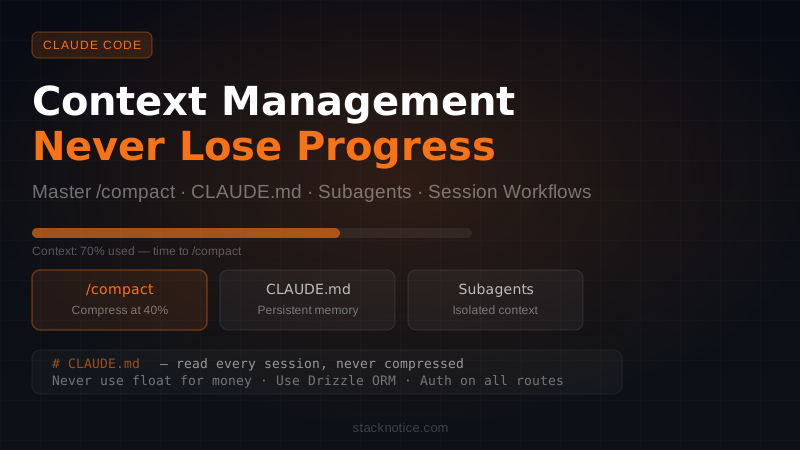
- Context is at 40–60% and the task has a lot more ground to cover
- The recent work is coherent and well-summarized, and you want to preserve space for what's ahead
When not to use /compact:
- You're nearly done with the task — just finish it
- Early context contains complex, exact constraints that need to stay precise
- You're about to do an irreversible operation and need the full decision trail
Run /compact proactively, not reactively. Waiting until quality degrades means compressing already-degraded context.
CLAUDE.md: the real solution to context loss
Anything you'd be upset to lose to context compression should be in a CLAUDE.md file. These files are read at the start of every session and never compressed — they stay in context with full fidelity for the entire session.
This is the most underutilized feature in Claude Code.
A well-structured project CLAUDE.md:
# Payment Service

## Tech stack
- Runtime: Node.js 22 with TypeScript strict mode
- API: Hono.js on Bun
- Database: PostgreSQL via Drizzle ORM (never raw SQL)
- Auth: JWT with 1h expiry + refresh tokens in httpOnly cookies

## Non-negotiable constraints
- All monetary values are stored and calculated as integers (cents)
- Never use `float` or `number` for money — use the Money class in /src/lib/money.ts
- Every API route requires auth middleware unless decorated with `@public`
- Database access only through repository classes in /src/db/repositories/

## Code patterns
- Use `cn()` from @/lib/utils for all className merging (never string concatenation)
- Error responses always use the `ApiError` class from /src/lib/errors.ts
- Log with the structured logger in /src/lib/logger.ts, never console.log

## Do NOT
- Import from barrel files (index.ts) — always import directly from the source file
- Use `any` type — if you don't know the type, define an interface
- Mutate function arguments
Every session starts with Claude knowing all of this. You never have to re-explain your codebase conventions.
CLAUDE.md hierarchy
Claude Code reads CLAUDE.md files at three levels, from most general to most specific:
Global: ~/.claude/CLAUDE.md
Applies to all projects. Good for personal preferences, toolchain choices, commit message style.
Project root: ./CLAUDE.md
Applies to the entire project. Architecture, stack, team conventions.
Subdirectory: ./src/billing/CLAUDE.md
Applies when Claude Code is working in that directory. Module-specific rules.
For large monorepos, subdirectory CLAUDE.md files are essential. Each package can define its own context without polluting the global project file:
# /packages/api-gateway/CLAUDE.md

This package is a Hono.js API targeting Cloudflare Workers (not Node).
Do not use Node.js APIs (fs, path, etc.) — use the Web Standard APIs instead.
Database access is through D1 (binding: `c.env.DB`), not PostgreSQL.
All routes are in /packages/api-gateway/src/routes/.
When Claude Code works in /packages/api-gateway, it loads this file automatically.
Subagents: isolating context for large tasks
When a task is too large for one session, subagents are the right tool. Each subagent runs in its own 200,000-token context window, completely separate from your main session. The main session orchestrates; subagents execute bounded tasks.
The pattern for large codebase exploration:
Main session (orchestrator context)
├── Subagent A: Read all files in /src/auth — return a summary of the auth flow
├── Subagent B: Read all files in /src/billing — return a summary of the billing flow
└── After both complete: combine summaries + write a migration plan
You'd prompt Claude Code something like:
"Use subagents to explore this codebase. Have one subagent read everything under /src/auth and summarize how authentication works. Have another subagent read /src/billing and summarize the billing flow. Then use those summaries to write a MIGRATION_PLAN.md."
The main session receives two clean summaries — not hundreds of individual file reads. Your main context stays clean for reasoning and writing, while subagents handle the exploration work in parallel.
Subagents also run in parallel by default, so this approach is faster than sequential exploration in a single session.
The session-per-phase workflow
For features that span hours or days, don't try to do everything in one session. Structure your work in phases, each with its own session:
Phase 1 — Exploration session
Start fresh, explore the relevant code, understand the patterns. At the end, write your findings to a file:
# Ask Claude Code to do this at the end of exploration
"Summarize everything we've learned about the codebase in TASK_CONTEXT.md.
Include: current architecture, relevant files, constraints we discovered,
and what needs to change."
End the session. Your context is preserved in a file, not in Claude's memory.
Phase 2 — Design session
Start fresh. Claude Code reads TASK_CONTEXT.md at your direction and designs the solution, writing it to DESIGN.md.
Phase 3 — Implementation session
Start fresh. Claude Code reads both files, then implements. Each sub-task is now bounded and clear.
Three focused sessions outperform one sprawling session every time. The fresh start is a feature, not a limitation.
Auto-memory: teaching Claude what to remember
Claude Code can save patterns and decisions to a persistent memory directory at ~/.claude/projects/[project]/memory/. The MEMORY.md file there is injected into every future session automatically.
You can populate it by telling Claude Code explicitly:
- "Remember that we always use
useShallowfrom Zustand when selecting multiple values" - "Save to memory: all our API routes use Zod validation through the
validateRequestmiddleware" - "Add to memory: never use React Context for state that changes frequently"
When Claude discovers something important on its own, it can save it too. Over time, your project memory file becomes a living document of every important convention your team follows — and Claude Code knows all of them before you say a single word. For the full Claude Projects memory system, see the Claude Projects memory guide.
Check and edit your memory file periodically. Wrong memories are worse than no memories:
cat ~/.claude/projects/[project-hash]/memory/MEMORY.mdLarge monorepos: keeping Claude focused
Monorepos amplify context problems because the codebase is vast and Claude might explore irrelevant packages. Three things help:
.claudeignore — like .gitignore for Claude Code:
node_modules/
dist/
.next/
build/
coverage/
**/*.snap
packages/legacy/**
packages/deprecated/**
Claude Code respects this file and won't read or explore anything matching these patterns.
Subdirectory CLAUDE.md — scope context to the package you're working in. Tell Claude explicitly not to read other packages unless asked.
Start from the right directory — if you're working on /packages/billing, launch Claude Code from that directory. Its initial codebase awareness will be scoped accordingly.
A full-day workflow
Here's how a senior developer might structure a full day of Claude Code work on a non-trivial feature:
Morning — Exploration (fresh session)
- Read the relevant areas of the codebase
- Understand current patterns and constraints
- Write
TASK_CONTEXT.mdwith everything learned /compactwhen context hits 60% if still exploring
Mid-morning — Design (fresh session)
- Read
TASK_CONTEXT.mdimmediately - Design the solution architecture
- Write
DESIGN.mdwith file structure, interfaces, approach
Afternoon — Implementation (fresh session, possibly multiple)
- Read both context files
- Implement one focused piece at a time
- Use subagents for parallel work (write tests while implementing a sibling module)
- End each session when a logical unit is complete
End of day — Review (fresh session)
- Read all the implemented code
- Run tests, fix issues
- Write a PR description using the git intelligence MCP server
Each session starts with exactly the context it needs. No compression artifacts. No degraded quality.
Quick reference
| Situation | Strategy |
|---|---|
| Context at 40%, more work ahead | /compact before the next phase |
| Recurring constraints | Put in CLAUDE.md (never re-explain in chat) |
| Exploring a large codebase | Subagents for parallel exploration |
| Multi-day feature | Write TASK_CONTEXT.md + DESIGN.md between sessions |
| Large monorepo | .claudeignore + subdirectory CLAUDE.md |
| Important patterns discovered | Ask Claude to save to memory |
| Context degrading noticeably | Start a fresh session with a summary file |
The mental shift that makes Claude Code dramatically more productive: treat sessions as tools with specific jobs, not as open-ended conversations you keep alive forever. Short, focused sessions with clear context beat long, degraded sessions every time.
For more on structuring complex Claude Code workflows, read the Claude Code subagents guide. For setting up persistent project context from day one, the CLAUDE.md ultimate guide covers every level of the hierarchy in depth. And if you're comparing Claude Code to other AI coding tools, see Claude Code vs Cursor vs Windsurf vs Copilot.