You run Claude Code on a new machine. It asks for permission before every bash command. You find --dangerously-skip-permissions in the docs, think "that sounds scary but also useful," and wonder whether to use it.
This article is the answer you're looking for — what the flag actually does, the three levels of risk, where it's completely fine, and where it will cause real damage.
What Claude Code's permission system does by default
Before diving into the flag, you need to understand what it's disabling.
Claude Code, by default, runs in an interactive approval mode. When it wants to take an action — write a file, run a shell command, read a directory — it pauses and tells you what it's about to do. You approve or deny each action.
Claude wants to run: npm install
Allow? (y/n)

Claude wants to write: src/components/Button.tsx
Allow? (y/n)

Claude wants to run: git add -A && git commit -m "add button component"
Allow? (y/n)
This is intentional. Claude Code can do a lot — read your filesystem, execute commands, modify files, make network requests through tools. The approval layer means you stay in control of what actually happens.
The permission system is your last line of defense against Claude doing something you didn't intend. It's not perfect, but it forces you to stay aware.
What --dangerously-skip-permissions removes
The flag does exactly what the name says: it skips all permission prompts.
claude --dangerously-skip-permissions "add error handling to all API routes"Claude runs, reads files, writes files, executes commands, and completes the task — without asking you once. No approval prompts. No pauses. Fully autonomous.
This makes Claude Code viable in environments where interactivity isn't possible: automated scripts, CI/CD pipelines, scheduled tasks, Docker containers.
Anthropic named it "dangerously" for a reason. The word is in the flag name itself. That's deliberate.
Three risk tiers
Not all uses of this flag carry the same risk. Think in tiers:
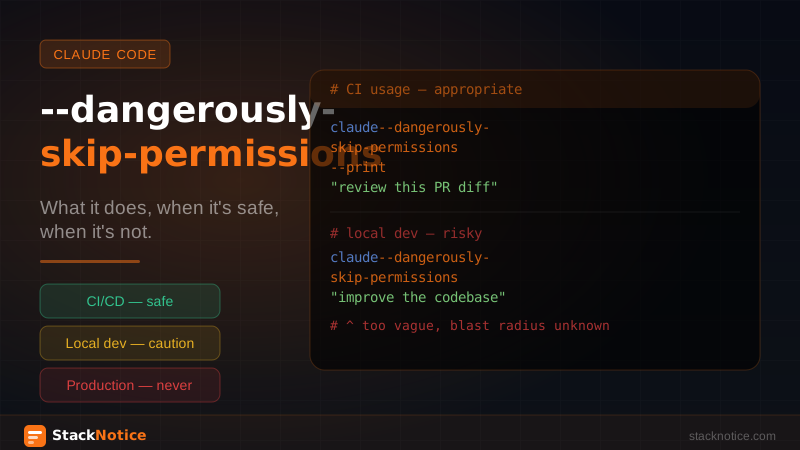
Tier 1 — Low risk (appropriate use)
Read-only analysis tasks in controlled environments:
claude --dangerously-skip-permissions --print \
  "analyze all TypeScript files and list any type safety issues"
Claude reads files, generates a report, outputs it. No writes, no commands, no state changes. If Claude makes a mistake, the output is just text — you can ignore it.
CI/CD code review on feature branches:
claude --dangerously-skip-permissions \
  "review the diff in this PR against the team CLAUDE.md conventions"
On an isolated branch in a clean CI environment, the blast radius of any mistake is minimal. The branch gets deleted anyway.
Generating files in a fresh, throwaway environment:
Docker container with a copy of the codebase. Claude generates files, you inspect the output, you decide what to keep. If it goes wrong, you throw the container away.
Tier 2 — Medium risk (use with caution)
Running Claude on your local dev environment with write access:
Claude has the ability to modify your files without you reviewing each change. If the prompt is well-defined and scoped, this is manageable. If the task is vague or large, Claude might make architectural decisions you didn't intend.
Before using the flag locally, scope the task tightly:
# Too vague — don't skip permissions
claude --dangerously-skip-permissions "improve the codebase"

# Scoped — more acceptable
claude --dangerously-skip-permissions \
  "add JSDoc comments to all exported functions in src/utils/"
Running Claude on a staging database or environment:
Staging is recoverable, but mistakes here can affect teammates and take time to undo. Use only when the task is well-understood and the staging environment has recent backups.
Tier 3 — High risk (don't use the flag)
Anything touching production systems. Not in scripts, not in "quick fixes," not in emergency deploys. Production has real consequences.
Tasks involving credentials, secrets, or auth tokens. Claude should never have the ability to read and exfiltrate your .env files, API keys, or database credentials without you reviewing each file access.
Unscoped or exploratory tasks on your main branch. "Refactor the whole codebase" with skip-permissions is asking for an irreversible mess.
Any environment you don't fully control. Unknown codebases, client machines, shared servers — don't.
The legitimate use case: CI/CD code review
This is where --dangerously-skip-permissions genuinely earns its keep. A CI job that runs Claude Code to review pull requests doesn't have a human sitting there to approve each action. The flag makes this possible.
Here's a real GitHub Actions setup:
# .github/workflows/claude-review.yml
name: Claude Code Review

on:
  pull_request:
    types: [opened, synchronize]

jobs:
  review:
    runs-on: ubuntu-latest
    permissions:
      pull-requests: write
      contents: read

    steps:
      - uses: actions/checkout@v4
        with:
          fetch-depth: 0

      - name: Install Claude Code
        run: npm install -g @anthropic-ai/claude-code

      - name: Get PR diff
        id: diff
        run: |
          git diff origin/${{ github.base_ref }}...HEAD > pr.diff

      - name: Run Claude review
        env:
          ANTHROPIC_API_KEY: ${{ secrets.ANTHROPIC_API_KEY }}
        run: |
          claude --dangerously-skip-permissions --print \
            "Review the following git diff against our team conventions.
            Focus on: type safety, error handling, security issues.
            Be specific. Reference line numbers. Skip style nits.
            $(cat pr.diff)" > review.txt

      - name: Post review comment
        uses: actions/github-script@v7
        with:
          script: |
            const review = require('fs').readFileSync('review.txt', 'utf8')
            await github.rest.issues.createComment({
              owner: context.repo.owner,
              repo: context.repo.repo,
              issue_number: context.issue.number,
              body: `## Claude Code Review\n\n${review}`
            })
This is safe because:
- The action only has
contents: readaccess — Claude can't push code - It runs on an isolated runner that's destroyed after the job
- The diff is scoped to the PR, not the whole codebase
- Claude outputs text only — no file writes, no command execution
For a deeper dive on the review patterns Claude uses, see the code review workflow guide.
Safer alternatives for specific scenarios
Before reaching for the flag, check if these work for your case:
Allowlisting specific commands instead of skipping everything:
Claude Code's settings let you pre-approve specific commands without disabling the whole permission system. In your CLAUDE.md or Claude Code settings:
Allowed bash commands (auto-approve):
- npm test
- npm run lint
- npm run typecheck
- git status
- git diff
Claude can run these without prompting, but still asks for approval on anything else. Much safer than skipping all permissions.
Using /auto mode selectively in interactive sessions:
For local development, you can enter an auto-approve mode for a specific task without passing a flag. Start Claude Code normally, use it interactively, and only switch to auto when you're confident about what you're asking.
Scoping with --print for read-only tasks:
The --print flag outputs Claude's response without executing changes. Combine it with a well-formed prompt for analysis tasks that don't need any writes.
claude --print "what's the most fragile part of the auth flow in this codebase?"No file writes, no commands, no permission needed.
The rule worth remembering
The name tells you everything: the word "dangerously" is not marketing. Anthropic could have named this --non-interactive or --auto-approve. They named it dangerously on purpose.
Use it in controlled, isolated, or read-only environments. Don't use it anywhere you wouldn't be comfortable with Claude having full unsupervised access. The flag doesn't make Claude less capable — it removes the mechanism that keeps you in control.
When you're unsure whether to use it: don't. Keep the prompts, keep the approvals, keep the awareness. Claude Code is fast enough that the permission prompts don't slow you down meaningfully on tasks where human review matters.
The one legitimate exception is automation — CI, scripts, scheduled jobs. There, --dangerously-skip-permissions is not dangerous at all. It's the right tool.
Related reading: