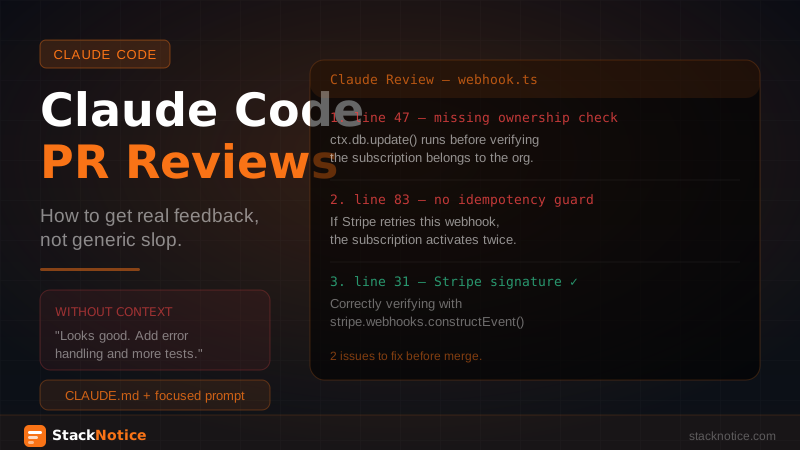
The first time you ask Claude to review code, you get something that sounds smart but says nothing: "This code looks good overall. Consider adding error handling and making sure tests are comprehensive."
That's not a review. That's a fortune cookie with TypeScript keywords.
The problem isn't Claude — it's the prompt and the context. Claude giving generic feedback is Claude working without information. Give it the right context and a focused prompt, and it gives feedback that's genuinely better than most human code reviews.
Here's how to get there.
Why most AI code reviews fail
Generic AI code reviews fail for the same reason a contractor gives you generic advice before seeing the house: they don't know what you're building or what matters to you.
When you paste a diff into Claude and say "review this," Claude has no idea:
- What your team's conventions are
- What the rest of the codebase looks like
- What this PR is supposed to accomplish
- What you've already discussed about the approach
- What trade-offs are acceptable in your project
So it falls back to universal best practices: add error handling, write tests, consider edge cases. True but useless.
The fix is context, not a better prompt.
The CLAUDE.md context advantage
Claude Code's built-in advantage over pasting into a chat window is that it reads your CLAUDE.md automatically. Every review session starts with Claude knowing your stack, conventions, and what you consider forbidden.
If your CLAUDE.md includes:
# Tech Stack
- Next.js 15 App Router
- Drizzle ORM + Neon Postgres
- Zustand for global state (no React Context)
- Zod for all validation

# Conventions
- Server actions for mutations, never API routes
- All DB queries go through the repository layer in src/db/
- No raw SQL outside of migrations

# Forbidden
- Never use React Context for shared state
- Never write to the DB directly from components
- Never skip ownership checks before mutations
Then every review Claude gives is checked against your actual rules, not generic ones. It flags the right things.
Start any review session by opening Claude Code in your project root — the CLAUDE.md context loads automatically.
Structure the review prompt properly
A good code review prompt has three parts:
- What changed and why
- What to focus on (be specific)
- What to ignore (be equally specific)
claude "Review the PR that adds Stripe webhook handling.

Context: we're adding subscription billing. This is the webhook endpoint
that handles payment_intent.succeeded and customer.subscription.deleted events.

Focus on:
- Idempotency: can these handlers be called twice safely?
- Error handling: what happens if the DB write fails after Stripe confirms?
- Auth: are we validating the Stripe signature correctly?
- Ownership: are we verifying the subscription belongs to the right org?

Skip: code style, naming conventions, test coverage (separate PR),
anything not in src/lib/stripe/ or app/api/webhooks/stripe/"
This prompt gives Claude a target. It won't spend output on indentation or variable names — it goes straight to the security and correctness issues that actually matter for a payment webhook.
The diff review pattern
For reviewing changes against a base branch, give Claude the actual diff:
git diff main...HEAD | claude --print \
  "Review this diff. We're adding a new user settings page.

   Check specifically:
   - Are we checking auth before loading user data?
   - Do we validate all inputs with Zod before passing to DB?
   - Is the optimistic update in the client component correct?

   Output issues as a numbered list with the file and line number.
   Skip anything that's not a correctness or security issue."
The --print flag outputs the review as text without Claude trying to make changes — appropriate for a review task.
For larger PRs, break it into focused chunks. Reviewing 50 files at once produces worse output than reviewing the auth changes, then the UI changes, then the API changes separately.
The two-Claude review pattern
The most powerful review pattern isn't about prompts — it's about using a second, fresh Claude session.
When Claude Code writes the feature, it has context about why decisions were made. It knows the trade-offs it considered. That context makes it a biased reviewer of its own work.
A fresh Claude session has none of that. It reads the code cold and flags anything that looks odd, inconsistent, or unexplained — exactly like a senior dev who wasn't in the original conversation.
# Session 1: write the feature
claude "implement the cart checkout flow with Stripe"

# Session 2: fresh review (new terminal, new session)
claude "review the code in src/lib/checkout/ and app/checkout/
against our CLAUDE.md conventions.
What would a senior dev flag in a PR review?
Be specific and direct. Don't soften issues."
The phrase "don't soften issues" matters. By default, Claude hedges feedback. Telling it to be direct gets you the version of feedback a blunt teammate would give.
This is covered in more detail in the Claude Code for teams guide — the same pattern that prevents architectural drift also produces better code reviews.
What to review vs what to skip
Claude reviews everything with equal weight by default. That's not how useful code review works. Prioritize:
Review hard with Claude:
- Authentication and authorization checks
- Data ownership verification (is this user allowed to see/modify this?)
- Input validation and sanitization
- Database mutation logic
- Error handling in payment flows, auth flows, file uploads
- Race conditions in concurrent operations
- Anything that touches money, credentials, or user data
Let Claude mention but don't block PRs on:
- Performance optimizations that aren't measured
- Naming preferences
- Code organization opinions
- Test coverage for happy paths (Claude often over-indexes on this)
Skip entirely:
- Style issues (that's what linters and formatters are for)
- Comments on framework boilerplate
- Feedback on code that's being deleted in the same PR
A focused review is more useful than a comprehensive one. When Claude flags 30 things, 5 are real and 25 are noise. When it flags 5 things, all 5 need attention.
GitHub Actions automation
For teams, running Claude review automatically on every PR removes the "I forgot to review this" problem:
# .github/workflows/claude-review.yml
name: Claude PR Review

on:
  pull_request:
    types: [opened, synchronize]
    paths:
      - 'src/**'
      - 'app/**'
      - 'convex/**'

jobs:
  review:
    runs-on: ubuntu-latest
    permissions:
      pull-requests: write
      contents: read

    steps:
      - uses: actions/checkout@v4
        with:
          fetch-depth: 0

      - uses: actions/setup-node@v4
        with:
          node-version: '20'

      - name: Install Claude Code
        run: npm install -g @anthropic-ai/claude-code

      - name: Generate diff
        run: git diff origin/${{ github.base_ref }}...HEAD > pr.diff

      - name: Claude review
        env:
          ANTHROPIC_API_KEY: ${{ secrets.ANTHROPIC_API_KEY }}
        run: |
          claude --dangerously-skip-permissions --print \
            "You are reviewing a pull request for a Next.js SaaS application.

            Team conventions from CLAUDE.md:
            - Zustand for state, never React Context
            - Server actions for mutations
            - Zod validation on all inputs
            - Always check ownership before DB mutations

            Review the diff below. Flag only real issues:
            security problems, missing auth checks, broken error handling,
            violated conventions. Skip style, naming, and test coverage.

            Format: numbered list, file:line, specific issue, why it matters.

            DIFF:
            $(cat pr.diff)" > claude-review.md

      - name: Comment on PR
        uses: actions/github-script@v7
        with:
          script: |
            const fs = require('fs')
            const review = fs.readFileSync('claude-review.md', 'utf8')
            if (review.trim().length < 50) return // skip if review is empty/tiny

            await github.rest.issues.createComment({
              owner: context.repo.owner,
              repo: context.repo.repo,
              issue_number: context.issue.number,
              body: `## Claude Code Review\n\n${review}\n\n---\n*Automated review — use judgment on each point*`
            })
The note "automated review — use judgment on each point" is important. Claude Code review is a first pass, not a final verdict. It catches what humans miss; humans catch what Claude misses. They're complementary, not interchangeable.
Note the use of --dangerously-skip-permissions in the CI context — appropriate here because it's a read-only task in an isolated runner. The full explanation of that flag is worth reading before setting this up.
Prompts that consistently produce good reviews
These work reliably across different types of PRs:
Security review:
Review src/api/ for security issues only.
Check: auth checks before data access, input validation,
SQL injection if any raw queries, XSS vectors in outputs.
Skip everything that isn't a security concern.
Be specific about what's missing and why it matters.
New feature review:
Review the [feature name] implementation.
Context: [what the feature does, who uses it].
Does the implementation match what CLAUDE.md says about [relevant convention]?
What would break if [realistic failure scenario]?
What's missing for production use?
Refactor review:
Compare the old implementation in git history with the new one.
Does the refactor preserve all existing behavior?
What edge cases from the original might not be handled?
Don't comment on the new structure — focus on behavior preservation.
Pre-deploy review:
This is going to production in 2 hours.
Review [files changed].
What would you absolutely not ship right now?
One sentence per issue, most critical first.
What Claude genuinely catches better than humans
In practice, Claude Code review is better than human review at specific things:
- Consistency across files — Claude reads the whole diff simultaneously. It notices when error handling is done one way in five places and a different way in the sixth.
- Ownership checks — It flags "this mutation doesn't verify the record belongs to the authenticated user" consistently, even in places where the check would be obvious to add and easy to miss in a tired human review.
- Convention violations — If your CLAUDE.md says no React Context and a PR adds a Context provider, Claude flags it every time.
- Missing validation — Input that arrives as
stringand goes straight to a DB query without Zod. Claude notices.
Humans are better at: understanding intent, flagging when the feature itself is the wrong approach, noticing when a solution is technically correct but architecturally wrong for your specific situation.
Both have blind spots. The combination catches more than either alone.
Related reading: