You start a Claude Code session sharp. An hour in, the responses get vague. Two hours in, Claude starts contradicting earlier decisions or losing track of what you agreed on.
This isn't Claude getting worse. It's what happens when a context window fills up and no one manages it.
Two commands fix this: /compact and /clear. They do different things, and knowing when to use each is one of the most underrated skills in working with Claude Code.
Why sessions degrade
Claude Code's context window holds your conversation history, the files Claude has read, the commands it's run, and all its responses. Every exchange adds to that window.
When the context gets long, several things happen:
- Earlier information gets less weight. The decisions you made at the start of the session compete with everything that's happened since. Claude doesn't forget earlier context, but it can be drowned out.
- Contradiction risk increases. If you've changed direction mid-session, earlier instructions and later ones can conflict. Claude tries to reconcile them, sometimes poorly.
- Response quality drops. With less room to reason, Claude produces shorter, less considered answers. You notice it as vagueness or repetition.
- Token usage increases per response. A fuller context means more to process on every message, which slows responses and costs more if you're on API billing.
The session that started great ends frustrating. The fix is context management, not a better prompt.
/compact — compress, don't clear
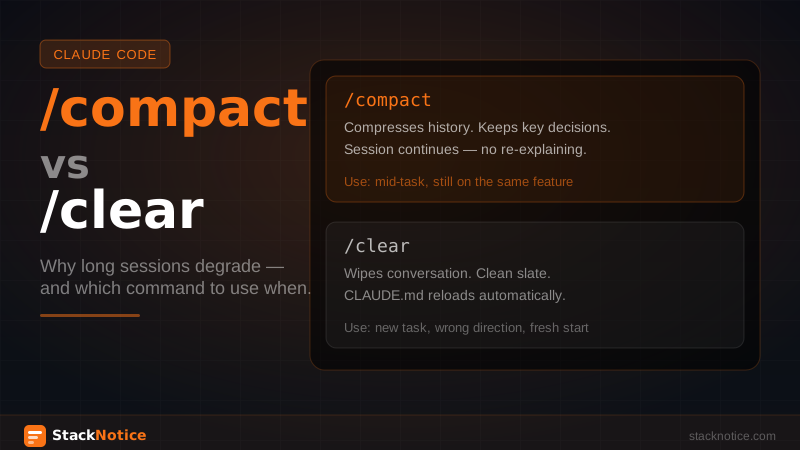
/compact tells Claude to summarize the earlier parts of the conversation while keeping the recent parts intact. The history gets compressed — key decisions, agreements, and context preserved in a shorter form — and the window has room to breathe again.
When to use /compact:
- The session has been going for 45-60+ minutes
- You're mid-task and don't want to lose the context you've built
- Responses are getting shorter or less precise
- Claude is referencing earlier parts of the conversation less accurately
What /compact preserves:
- The agreements you've reached (stack decisions, architectural choices)
- The current task state (what's done, what's next)
- Your CLAUDE.md conventions (loaded fresh, so always current)
- Recent conversation in full
What it loses:
- The detailed step-by-step reasoning from earlier in the session
- Exact wording of earlier exchanges
- File contents Claude read at the start (it will re-read if needed)
After /compact, the session continues from where you were. No restart, no re-explaining. Just a lighter context window.
> /compact

Claude: I've summarized our session. Here's what I've kept:
- We're building the checkout flow with Stripe
- Auth uses Clerk, DB uses Drizzle + Neon
- We agreed to use server actions, not API routes for mutations
- The webhook handler is done, working on the UI next

Ready to continue.
/clear — start fresh
/clear wipes the conversation completely. No history, no context, clean slate. Claude Code still has your CLAUDE.md (that's always loaded at session start), but everything from the conversation is gone.
When to use /clear:
- You've finished one task and starting something unrelated
- The session went in a wrong direction and you want to reset
- You've been debugging a specific issue and now want to work on a feature — different context
- The conversation is so long that
/compactisn't enough
What /clear preserves:
- Your CLAUDE.md conventions (reloaded automatically)
- The files in your project (Claude will re-read them as needed)
- Nothing from the conversation
What it loses:
- Everything. All agreements, context, current task state.
/clear is a hard reset. The next message after /clear is the first message of a new session. You'll need to re-establish context for whatever you're working on.
The practical decision tree
Session > 45 minutes and degrading?
  └── Still on the same task?
       ├── YES → /compact
       └── NO, new task → /clear

Responses vague or contradicting earlier decisions?
  └── /compact first, then /clear if it doesn't help

Finished a major task, starting something new?
  └── /clear

Something went badly wrong in the session?
  └── /clear
Structuring long sessions to minimize degradation
The best context management is not needing it as often. A few patterns that keep sessions sharp longer:
Front-load the important context. At the start of a session, tell Claude what you're building, what constraints matter, and what success looks like. This gets recorded early in the context where it has the most weight.
> We're adding multi-org support to the existing auth flow.
  Constraints: no new tables, use existing Clerk org data,
  all mutations go through server actions.
  Goal: user can switch between orgs without re-authenticating.
  Start by reading src/auth/ and tell me what we need to change.
Break large tasks into sessions. A feature that takes 4 hours of coding doesn't need to be one 4-hour Claude Code session. Finish the DB schema changes in one session, run /clear, start the API layer fresh in the next. Each session starts sharp.
Use /compact proactively, not reactively. Don't wait until quality drops. Run /compact after completing a meaningful chunk — finished the mutation layer, now moving to the UI. It's a natural checkpoint.
Reference CLAUDE.md instead of re-explaining. Your team conventions and stack choices live in CLAUDE.md and reload on every session and every /clear. Don't waste context re-explaining them in the conversation. Reference them: "follow the patterns in CLAUDE.md for this" instead of repeating the rules.
/compact vs starting a new terminal
Some developers just open a new terminal tab instead of using /compact. This works — it's a /clear with a fresh process — but you lose the current task state entirely. You have to re-explain where you are.
/compact is strictly better when you want continuity. Use a new terminal only when you want the same effect as /clear and prefer the visual separation.
Context management and extended thinking
Extended thinking (ultrathink) uses significantly more context than a regular response. If you're running extended thinking sessions, you'll fill the context window faster and hit the degradation point sooner.
When combining extended thinking with long sessions:
- Run
/compactmore aggressively — after every 2-3 extended thinking calls - Use extended thinking for the hard decisions at the start of the session, then switch to normal mode for execution
- Consider separate sessions: one for planning (extended thinking, then
/clear), one for execution
How this relates to the context management guide
The context management guide covers what Claude sees and how to shape it — which files to include, how to structure prompts for efficiency, how CLAUDE.md affects context loading.
This article is specifically about the runtime commands that manage session state once you're already inside a conversation. They're complementary: the context management guide shapes what goes in; /compact and /clear manage what stays.
The pattern that works
Long session, task finished:
> /compact

[continue to next task]

[another hour later — task complete]

> /clear

[new session, fresh context, next feature]
Short feedback loops, managed context, consistent quality across the whole day. That's the point.
Related: