Most developers use Claude Code for debugging the wrong way. They paste an error message, get a suggestion, try it, paste the next error, and repeat — building a fragile chain where Claude has no memory of what was tried. The session becomes noise.
This guide is about building a debugging workflow where Claude Code is genuinely useful: what context to give, how to structure the session, when to use hooks, and how to handle the hard cases.
The wrong way
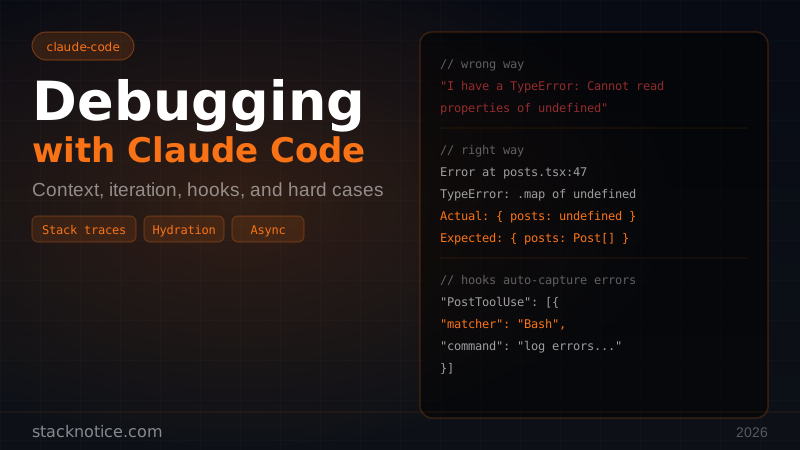
> I have a TypeError: Cannot read properties of undefined (reading 'map')
Claude can't help much here. It doesn't know:
- Which file, which line
- What data shape you expect vs what you're getting
- What you've already tried
- Whether this is a runtime error, a type error, or a timing issue
You'll get a generic answer about checking for null, and you'll waste five minutes.
What to always include
Before typing anything, run this in your head: what does Claude need to reproduce this problem mentally?
The minimum:
Error message + full stack trace
The function/component where it's failing
The data that's flowing into it (the actual value, not "some object")
What you expect to happen
A better opening message:
Getting this error in `app/dashboard/page.tsx` at line 47:

TypeError: Cannot read properties of undefined (reading 'map')

Stack trace:
  at DashboardPage (app/dashboard/page.tsx:47:22)
  at ...

The data comes from `getUserPosts(userId)` which returns:
  { posts: undefined }   ← actual value in logs
  { posts: Post[] }      ← what I expect

The function:
[paste the function]

Already tried: null check on posts — didn't fix because getUserPosts itself
throws before returning.
Claude now has enough to skip the basic suggestions and go straight to the root cause.
Read the error before Claude does
Before pasting anything to Claude, read the stack trace yourself — specifically:
- What is the actual error?
TypeError,ReferenceError,SyntaxError— each has a different meaning. - Where does it originate? The first line in your code (not node_modules) is where you start.
- What's the call chain? How did execution get there?
If you can answer these three questions, you often don't need Claude. If you can't, at least you know what you're confused about, which makes the question much better.
Iterating without losing context
Claude Code's context window is your debugging workspace. Keep it clean:
Don't: Paste a new error and say "now I have this". Claude has to reconcile the old problem with the new one.
Do: Update Claude on what changed:
The null check fixed that error. Now it's failing one step earlier —
getUserPosts is throwing instead of returning undefined:

Error: Prisma connection failed: Can't reach database server at ...

The call:
[paste the function]

This works locally but fails in production. The DATABASE_URL env var is set —
I can see it in the Vercel dashboard.
This is a different problem. State it clearly as a new problem, not a continuation.
Use Claude Code to read the whole context
When the error involves multiple files, don't paste everything manually. Let Claude Code read them:
I have a bug in the auth flow. Can you read these files and understand
the flow before I describe the problem?

- middleware.ts
- app/api/auth/[...nextauth]/route.ts
- lib/auth.ts
- types/next-auth.d.ts
Then describe the bug. Claude now has the actual source, not a truncated paste where you accidentally cut the important part.
Capture errors automatically with hooks
Claude Code hooks can automatically capture errors and add them to context. Set up a PostToolUse hook that logs failed commands:
// .claude/settings.json
{
  "hooks": {
    "PostToolUse": [
      {
        "matcher": "Bash",
        "hooks": [
          {
            "type": "command",
            "command": "if [ $CLAUDE_TOOL_EXIT_CODE -ne 0 ]; then echo \"FAILED: $CLAUDE_TOOL_OUTPUT\" >> .claude/error.log; fi"
          }
        ]
      }
    ]
  }
}
For Next.js development, capture console errors by adding this to your root layout:
// app/layout.tsx (dev only)
if (process.env.NODE_ENV === 'development') {
  const originalError = console.error
  console.error = (...args) => {
    // Write to a file Claude Code can read
    const fs = require('fs')
    fs.appendFileSync('.claude/console-errors.log',
      `[${new Date().toISOString()}] ${args.join(' ')}\n`
    )
    originalError(...args)
  }
}
Now you can say: "read .claude/console-errors.log and tell me what's wrong" — Claude gets the actual sequence of errors with timestamps, not just the last one.
Debugging React-specific issues
Hydration errors
Hydration errors are some of the most cryptic React errors. The error message tells you there's a mismatch but not where.
Give Claude this context:
Hydration error:
"Error: Hydration failed because the initial UI does not match what was rendered on the server."

Component tree (from React DevTools):
- Layout
  - Header
    - UserMenu    ← this is where it breaks visually

UserMenu code: [paste]

The issue is this renders a date with new Date() — I suspect that's the problem
but I want to confirm before changing it.
Claude can confirm the diagnosis (yes, new Date() differs between server and client) and suggest the fix (suppressHydrationWarning or moving to a client component with useEffect).
Stale closures
Stale closure bugs are subtle. The component renders but uses an old value.
Bug: clicking "Delete" deletes the wrong item. Always deletes the first one.

The handler: [paste]

I think it's a stale closure issue with the `id` variable in the click
handler, but I'm not sure where the stale reference is captured.
Claude will read the handler, spot the missing dependency in useCallback, and explain exactly why the closure captures the wrong id.
Infinite re-renders
Infinite re-render in PostList. React throws "Too many re-renders."

The component: [paste]
The custom hook it uses: [paste]

I added console.log before the setState call — it fires thousands of times.
The hook is called with the same props every time (I checked with JSON.stringify).
Paste both the component and the hook. Infinite renders are almost always caused by an object or function being recreated on every render and passed as a dependency, or a useEffect that updates state without a dependency array. Claude will find it faster with the full picture.
Debugging async code
Async bugs are hard because the error location rarely matches the actual problem.
Standard approach:
Async error in the data fetching pipeline:

Unhandled Promise Rejection: Cannot read properties of null (reading 'id')

The sequence:
1. User clicks "Load more"
2. fetchNextPage() is called (React Query)
3. getPostsPage() runs the query
4. Error somewhere in the transform step

Full pipeline: [paste fetchNextPage → getPostsPage → transform functions]

The null is probably in the transform step but I can't tell which field.
I added console.log(data) before the transform — it logs correctly.
Claude will trace through the async chain and identify which field can be null when the data is empty on the first fetch.
Production debugging without console.log
In production you don't have a local environment to test in. You have logs.
Effective prompt:
Production error from Vercel logs (last 20 lines):

[paste logs]

This started after yesterday's deploy. The commit diff:
[paste git diff or list changed files]

No errors in staging. The only difference between staging and prod is
the STRIPE_SECRET_KEY and DATABASE_URL values.
Claude can read the logs, correlate them with the diff, and identify the likely cause — usually an env var issue, a race condition that only manifests at production load, or a dependency that behaves differently outside dev mode.
Performance debugging
When something is slow:
The dashboard page takes 4.2 seconds to load in production (measured with
Lighthouse). Locally it's 300ms.

The page fetches:
1. User profile (auth check)
2. Posts list (paginated, 20 items)
3. Notifications count
4. Team members (if user has a team)

I think it's the N+1 query in team members but I want to confirm.
The Prisma query: [paste]
Claude will read the query, confirm the N+1, and write the fix with include or a manual join. Give it the actual query, not a description of the query.
TypeScript errors: read the error fully
TypeScript errors contain the answer — most devs stop reading at the first line.
TS error — Type 'string | undefined' is not assignable to type 'string'.

Full error: [paste the full error including the "Type ... is not assignable" chain]

The function signature:
  function createUser(email: string): Promise<User>

Where it's called:
  createUser(searchParams.get('email'))  // searchParams.get() returns string | null
Claude will see immediately that searchParams.get() returns string | null (not string | undefined) and suggest the fix: searchParams.get('email') ?? '' or a guard.
Never truncate a TypeScript error. The generic message at the top is useless. The specific type mismatch at the bottom is what matters.
When Claude Code gets stuck
Sometimes Claude will suggest fixes that don't work. Two to three failed attempts and you need a different approach:
Reset the context. Start a fresh session and re-describe the problem from scratch. Sometimes the session has accumulated wrong assumptions.
Narrow the problem. Create a minimal reproduction:
I've isolated the bug to this 20-line function. Everything else is irrelevant.
Here's the function and a failing test case: [paste]
A focused reproduction almost always gets a faster, more accurate answer.
Ask for the debugging approach, not the fix. If Claude keeps giving wrong fixes, ask instead:
Don't try to fix this yet. What are the possible causes of this error
given the code I've shown? List them in order of likelihood.
Then you can investigate each cause yourself and come back with what you found.
Checklist: debugging session setup
Before opening Claude Code for a debugging session:
- Reproduce the error consistently (can you make it happen on demand?)
- Capture the full stack trace, not just the message
- Know what data is flowing in (log it before the error point)
- Know what you've already tried
- Have the relevant files open (Claude Code can read them)
- Know what changed recently (git log or diff)
With this in place, most bugs get resolved in one or two exchanges instead of ten.
Next steps
Pair this debugging workflow with:
- Claude Code hooks to automate error capture and add context automatically
- Claude Code context management to keep your sessions clean on large codebases
- Claude Code subagents when debugging requires investigating multiple independent hypotheses in parallel
- Claude Code tips and tricks for more workflow patterns