React Router v7 rebranded as Remix. The team is focused on full-stack React with Remix, not client-side routing. For developers building React SPAs — or React apps that don't live inside Next.js — the ecosystem left a gap, and TanStack Router stepped in.
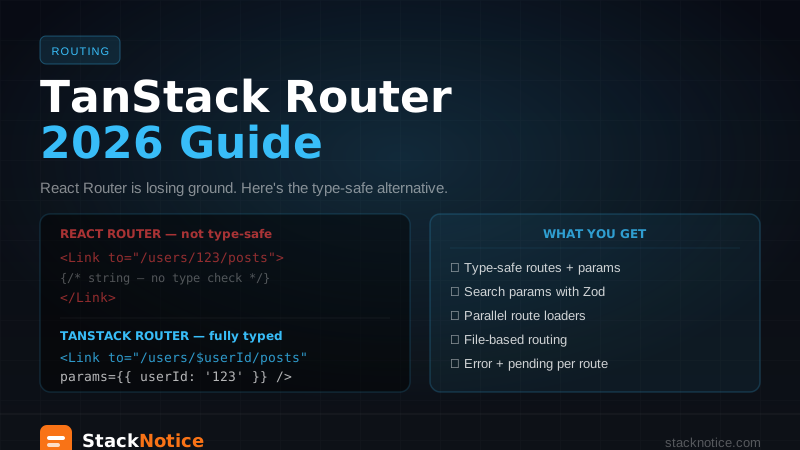
TanStack Router is built from the ground up with TypeScript. Route paths, route params, search params, loaders, and even <Link> props are all type-checked by the compiler. If you change a route's params, TypeScript finds every broken link in your codebase immediately.
This guide covers a complete setup: file-based routing, type-safe navigation, search params with Zod, route loaders, and error boundaries.
Why TanStack Router is gaining momentum
The core problem with React Router v6 and earlier:
// React Router — string-based, no type safety
<Link to="/users/123/posts?filter=published">Posts</Link>

// If you change the route to /user/:id/posts (missing 's')
// TypeScript finds nothing. Runtime error in production.
// TanStack Router — fully typed
<Link to="/users/$userId/posts" params={{ userId: '123' }} search={{ filter: 'published' }}>
Posts
</Link>
// Change the route? TypeScript errors everywhere it's used.
// Refactor routes safely across the entire codebase.This isn't a cosmetic improvement. In large codebases with many routes, type-safe navigation means route refactors that took hours of grep-and-pray become safe, compiler-verified operations.
Installation
npm install @tanstack/react-router
npm install -D @tanstack/router-devtools @tanstack/router-plugin
For file-based routing (recommended), install the Vite plugin:
npm install -D @tanstack/router-pluginSetup with Vite (file-based routing)
// vite.config.ts
import { defineConfig } from 'vite';
import react from '@vitejs/plugin-react';
import { TanStackRouterVite } from '@tanstack/router-plugin/vite';

export default defineConfig({
  plugins: [
    TanStackRouterVite(), // must be before react plugin
    react(),
  ],
});
File-based routing uses a src/routes/ directory. The plugin auto-generates the route tree from your files — no manual route registration.
Route file structure
src/routes/
├── __root.tsx          # Root layout (always rendered)
├── index.tsx           # / route
├── about.tsx           # /about route
├── users/
│   ├── index.tsx       # /users route
│   ├── $userId.tsx     # /users/:userId (dynamic param)
│   └── $userId/
│       └── posts.tsx   # /users/:userId/posts
└── _auth/              # Layout group (no URL segment)
    ├── dashboard.tsx   # /dashboard
    └── settings.tsx    # /settings
Underscore prefix (_auth) creates a layout group that wraps routes without adding a URL segment.
Root layout
// src/routes/__root.tsx
import { createRootRoute, Link, Outlet } from '@tanstack/react-router';
import { TanStackRouterDevtools } from '@tanstack/router-devtools';

export const Route = createRootRoute({
  component: () => (
    <div>
      <nav>
        <Link to="/" className="[&.active]:font-bold">Home</Link>
        <Link to="/about" className="[&.active]:font-bold">About</Link>
        <Link to="/users" className="[&.active]:font-bold">Users</Link>
      </nav>
      <hr />
      <Outlet />
      {/* Development only — remove for production */}
      <TanStackRouterDevtools />
    </div>
  ),
});
<Outlet /> renders the matched child route. The [&.active] className pattern applies styles when the link is active — TanStack Router adds the active class automatically.
Index and static routes
// src/routes/index.tsx
import { createFileRoute } from '@tanstack/react-router';

export const Route = createFileRoute('/')({
  component: HomePage,
});

function HomePage() {
  return <h1>Home</h1>;
}
// src/routes/about.tsx
import { createFileRoute } from '@tanstack/react-router';
export const Route = createFileRoute('/about')({
component: AboutPage,
});
function AboutPage() {
return <h1>About</h1>;
}Dynamic params
// src/routes/users/$userId.tsx
import { createFileRoute } from '@tanstack/react-router';

export const Route = createFileRoute('/users/$userId')({
  component: UserPage,
});

function UserPage() {
  // Fully typed — TypeScript knows userId is a string
  const { userId } = Route.useParams();

  return <div>User ID: {userId}</div>;
}
Route.useParams() is typed to the route's params. No useParams<{ userId: string }>() casting needed — TanStack Router infers the type from the route definition.
Route loaders
Route loaders fetch data before the component renders. They run in parallel when possible and the component only renders when the data is ready.
// src/routes/users/$userId.tsx
import { createFileRoute } from '@tanstack/react-router';
import { fetchUser } from '@/api/users';

export const Route = createFileRoute('/users/$userId')({
  loader: async ({ params }) => {
    // params.userId is typed as string
    const user = await fetchUser(params.userId);
    return { user };
  },
  component: UserPage,
});

function UserPage() {
  // loaderData is typed from the loader's return value
  const { user } = Route.useLoaderData();

  return (
    <div>
      <h1>{user.name}</h1>
      <p>{user.email}</p>
    </div>
  );
}
Route.useLoaderData() is typed from the loader's return value. TypeScript knows the shape of user without any manual type declarations.
Parallel loaders
When navigating to a route, all ancestor loaders run in parallel:
/users/$userId/posts
↓
Root loader → User loader → Posts loader
             ↑ these run simultaneously
This is a significant performance improvement over waterfall fetching in useEffect.
Type-safe search params
Search params in React Router are strings. Parse them yourself. Validate them yourself. No type safety.
TanStack Router validates search params with a schema and returns typed values:
// src/routes/users/index.tsx
import { createFileRoute } from '@tanstack/react-router';
import { z } from 'zod';

const searchSchema = z.object({
  page: z.number().int().min(1).default(1),
  filter: z.enum(['active', 'inactive', 'all']).default('all'),
  search: z.string().optional(),
});

export const Route = createFileRoute('/users/')({
  validateSearch: searchSchema,
  loader: async ({ context, deps: { page, filter } }) => {
    return fetchUsers({ page, filter });
  },
  loaderDeps: ({ search: { page, filter } }) => ({ page, filter }),
  component: UsersPage,
});

function UsersPage() {
  // search is typed from the schema — no casting
  const { page, filter, search } = Route.useSearch();

  return (
    <div>
      <p>Page {page} — Filter: {filter}</p>
      {search && <p>Searching for: {search}</p>}
    </div>
  );
}
And navigating with search params is also typed:
import { Link, useNavigate } from '@tanstack/react-router';

// Typed — TypeScript enforces the search param schema
<Link to="/users" search={{ page: 2, filter: 'active' }}>
  Next page
</Link>

// Programmatic navigation
const navigate = useNavigate();
navigate({ to: '/users', search: { page: 2, filter: 'active' } });
If you pass filter: 'invalid' or page: 'string', TypeScript catches it at compile time.
Error boundaries and pending states
// src/routes/users/$userId.tsx
import { createFileRoute, ErrorComponent } from '@tanstack/react-router';

export const Route = createFileRoute('/users/$userId')({
  loader: async ({ params }) => {
    const user = await fetchUser(params.userId);
    if (!user) throw new Error('User not found');
    return { user };
  },
  // Error boundary for this route
  errorComponent: ({ error }) => (
    <div>
      <h2>Failed to load user</h2>
      <p>{error.message}</p>
    </div>
  ),
  // Pending UI while loader runs
  pendingComponent: () => <div>Loading user...</div>,
  component: UserPage,
});
Each route has its own error and pending boundaries. An error in /users/$userId doesn't crash /users — it only affects that route's slot.
Protected routes with layout groups
// src/routes/_auth.tsx — layout group, no URL segment
import { createFileRoute, redirect } from '@tanstack/react-router';
import { getSession } from '@/lib/auth';

export const Route = createFileRoute('/_auth')({
  beforeLoad: async ({ context }) => {
    const session = await getSession();
    if (!session) {
      throw redirect({ to: '/sign-in', search: { redirect: location.href } });
    }
  },
  component: ({ children }) => <>{children}</>,
});
All routes under _auth/ run this beforeLoad check. Routes that require auth: put them in src/routes/_auth/.
// src/routes/_auth/dashboard.tsx
import { createFileRoute } from '@tanstack/react-router';

export const Route = createFileRoute('/_auth/dashboard')({
  component: DashboardPage,
});
// URL is /dashboard, not /_auth/dashboard
The router setup
// src/main.tsx
import { StrictMode } from 'react';
import ReactDOM from 'react-dom/client';
import { RouterProvider, createRouter } from '@tanstack/react-router';
import { routeTree } from './routeTree.gen'; // auto-generated by the plugin

const router = createRouter({
  routeTree,
  defaultPreload: 'intent', // preload on hover
});

// Type registration for type-safe Link
declare module '@tanstack/react-router' {
  interface Register {
    router: typeof router;
  }
}

ReactDOM.createRoot(document.getElementById('root')!).render(
  <StrictMode>
    <RouterProvider router={router} />
  </StrictMode>
);
routeTree.gen.ts is auto-generated when you run Vite. You never edit it manually — the plugin regenerates it when you add, remove, or rename route files.
TanStack Router vs React Router — when to choose each
| TanStack Router | React Router v7 (Remix) | |
|---|---|---|
| Type safety | End-to-end | Partial |
| Search params | Typed + validated | Strings |
| SSR | Via TanStack Start | Built-in (Remix) |
| Full-stack | TanStack Start (newer) | Remix (mature) |
| Loaders | Built-in, parallel | Via framework |
| File-based routing | ✅ | ✅ |
| Community size | Growing fast | Large, established |
Choose TanStack Router for client-side React SPAs, Vite-based apps, or any project where TypeScript correctness across routes matters.
Choose React Router / Remix if you want a mature full-stack framework with server-side rendering and a large ecosystem of tutorials and patterns.
Don't use TanStack Router in Next.js — Next.js has its own router. TanStack Router is for non-Next.js React apps.
TanStack Start — the full-stack option
TanStack Start is the full-stack framework built on TanStack Router (equivalent to what Remix is to React Router). It adds:
- Server-side rendering
- Server functions (like Server Actions in Next.js)
- API routes
- Streaming
If you need SSR with TanStack Router, look at TanStack Start. It's still maturing but has a stable v1 as of 2026.
Migrating from React Router
If you have an existing React Router v6 app:
- Install TanStack Router alongside React Router
- Migrate one route at a time — they can coexist during transition
- Start with leaf routes (no children) — they're the easiest to migrate
- Move parent routes last — after all children are migrated
The query API is different enough that you'll rewrite navigation calls, but the component code stays the same. Budget roughly 1 hour per route for a careful migration.
Related: TanStack Query v5 Complete Guide — data fetching from the same team · Next.js App Router Guide — if you're in Next.js, this is your router · React Hook Form + Zod Guide — validated forms that work with TanStack Router search params