Disclosure: This article contains affiliate links. If you sign up through them, I earn a small commission at no extra cost to you. I only recommend tools I use myself.
Most Next.js Docker tutorials show you a basic Dockerfile that produces a 2GB image. In production, that's a disaster: slow CI, expensive registry storage, and cold starts that kill your UX.
This guide covers what actually matters — multi-stage builds, Next.js standalone output, proper caching layers, health checks, Docker Compose for local environments, and the full CI/CD pipeline. Real production patterns used in apps serving millions of requests.
Why Docker for Next.js?
Vercel is the easiest deployment target for Next.js, but Docker gives you things Vercel can't:
- Full infrastructure control — run on any cloud, VPS, or on-prem
- Cost predictability — a $20/month DigitalOcean Droplet can serve tens of thousands of requests per day
- Private deployment — keep your app completely off public cloud platforms
- Custom runtimes — install system dependencies (FFmpeg, Puppeteer, Prisma binary, etc.)
- Multi-service architecture — bundle your Next.js app with Postgres, Redis, and a background worker in one Compose stack
If you're self-hosting (which pairs well with n8n on a VPS), Docker is the right tool.
Prerequisites
- Next.js 14 or 15 project
- Docker Desktop installed locally
- Basic familiarity with Dockerfiles
Step 1: Enable Next.js Standalone Output
The single biggest win for Docker + Next.js is standalone output. Without it, you're copying node_modules (often 500MB+) into your image. With it, Next.js bundles only the files your app actually uses.
// next.config.ts
import type { NextConfig } from 'next'

const nextConfig: NextConfig = {
  output: 'standalone',
}

export default nextConfig
This tells Next.js to produce a .next/standalone directory containing:
- A minimal
server.jsNode server - Only the required
node_modules(typically 20–50MB vs 500MB+)
After next build, your .next/standalone folder is self-contained — no extra npm install needed.
Step 2: The Production Dockerfile
Here's a battle-tested multi-stage Dockerfile for Next.js 15:
# syntax=docker/dockerfile:1

ARG NODE_VERSION=22
ARG ALPINE_VERSION=3.21

# ─── Stage 1: Dependencies ─────────────────────────────────────────────────────
FROM node:${NODE_VERSION}-alpine${ALPINE_VERSION} AS deps
WORKDIR /app

# Install only production deps in a separate layer for better caching
COPY package.json package-lock.json ./
RUN npm ci --frozen-lockfile

# ─── Stage 2: Builder ──────────────────────────────────────────────────────────
FROM node:${NODE_VERSION}-alpine${ALPINE_VERSION} AS builder
WORKDIR /app

# Copy deps from stage 1
COPY --from=deps /app/node_modules ./node_modules
COPY . .

# Build args for public env vars (baked into the bundle at build time)
ARG NEXT_PUBLIC_APP_URL
ENV NEXT_PUBLIC_APP_URL=${NEXT_PUBLIC_APP_URL}

# Disable Next.js telemetry in CI
ENV NEXT_TELEMETRY_DISABLED=1

RUN npm run build

# ─── Stage 3: Runner ───────────────────────────────────────────────────────────
FROM node:${NODE_VERSION}-alpine${ALPINE_VERSION} AS runner
WORKDIR /app

ENV NODE_ENV=production
ENV NEXT_TELEMETRY_DISABLED=1

# Non-root user for security
RUN addgroup --system --gid 1001 nodejs
RUN adduser --system --uid 1001 nextjs

# Copy only the standalone output
COPY --from=builder /app/.next/standalone ./
COPY --from=builder /app/.next/static ./.next/static
COPY --from=builder /app/public ./public

# Set correct ownership
RUN chown -R nextjs:nodejs /app

USER nextjs

EXPOSE 3000
ENV PORT=3000
ENV HOSTNAME="0.0.0.0"

# Health check
HEALTHCHECK --interval=30s --timeout=5s --start-period=15s --retries=3 \
  CMD wget -qO- http://localhost:3000/api/health || exit 1

CMD ["node", "server.js"]
Why multi-stage?
The final runner stage only contains:
- The compiled standalone Next.js server (
server.js+ bundled node_modules) - Static assets (
.next/static,public/) - A non-root system user
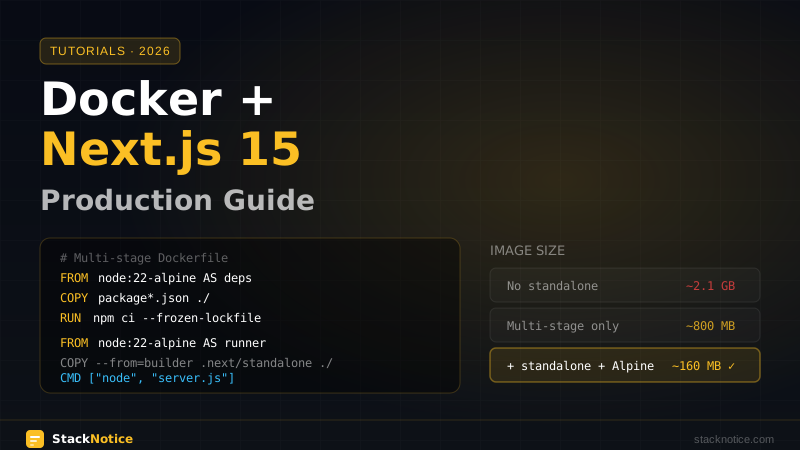
Your source code, dev dependencies, TypeScript compiler — none of it ends up in the final image. Typical result: 150–200MB final image vs 2GB+ without multi-stage.
Step 3: Health Check Endpoint
The Dockerfile references /api/health. Add it to your app:
// app/api/health/route.ts
import { NextResponse } from 'next/server'

export async function GET() {
  return NextResponse.json(
    {
      status: 'ok',
      timestamp: new Date().toISOString(),
      uptime: process.uptime(),
    },
    { status: 200 }
  )
}
Docker uses this endpoint to know when your container is healthy. Load balancers and orchestrators (Kubernetes, Fly.io, Railway) also use it to route traffic only to healthy instances.
Step 4: .dockerignore
Without a .dockerignore, Docker copies node_modules, .next, .git, and everything else into the build context. This slows down every build significantly.
# .dockerignore
.git
.gitignore
.env*
node_modules
.next
*.md
*.log
.DS_Store
Dockerfile
.dockerignore
coverage
.nyc_output
*.test.ts
*.spec.ts
__tests__
cypress
playwright
Step 5: Environment Variables
Next.js has two types of env vars and they're handled very differently in Docker:
NEXT_PUBLIC_ variables (baked at build time)
These are embedded into the JavaScript bundle during next build. They must be available as ARG or ENV in the builder stage:
# In the builder stage
ARG NEXT_PUBLIC_APP_URL
ENV NEXT_PUBLIC_APP_URL=${NEXT_PUBLIC_APP_URL}
Pass them when building the image:
docker build \
  --build-arg NEXT_PUBLIC_APP_URL=https://yourapp.com \
  -t myapp:latest .
Server-side variables (runtime)
Database URLs, API keys, secrets — these are read at runtime, not build time. Pass them as -e flags or in your Compose file:
docker run \
  -e DATABASE_URL=postgresql://... \
  -e NEXTAUTH_SECRET=... \
  -p 3000:3000 \
  myapp:latest
Never bake secrets into your image. They end up in layer history and are readable by anyone with image access.
Step 6: Docker Compose for Local Development
Use Docker Compose to replicate your production environment locally. This pairs your Next.js app with the services it depends on:
# docker-compose.yml
services:
  app:
    build:
      context: .
      dockerfile: Dockerfile
      target: runner
      args:
        NEXT_PUBLIC_APP_URL: http://localhost:3000
    ports:
      - "3000:3000"
    environment:
      DATABASE_URL: postgresql://postgres:postgres@db:5432/myapp
      NEXTAUTH_SECRET: dev-secret-change-in-production
      NEXTAUTH_URL: http://localhost:3000
    depends_on:
      db:
        condition: service_healthy
    restart: unless-stopped

  db:
    image: postgres:17-alpine
    environment:
      POSTGRES_USER: postgres
      POSTGRES_PASSWORD: postgres
      POSTGRES_DB: myapp
    volumes:
      - postgres_data:/var/lib/postgresql/data
    healthcheck:
      test: ["CMD-SHELL", "pg_isready -U postgres"]
      interval: 5s
      timeout: 5s
      retries: 10
    ports:
      - "5432:5432"

  redis:
    image: redis:7-alpine
    volumes:
      - redis_data:/data
    healthcheck:
      test: ["CMD", "redis-cli", "ping"]
      interval: 5s
      timeout: 3s
      retries: 5

volumes:
  postgres_data:
  redis_data:
Start everything with:
docker compose up -dStop everything (keeping volumes):
docker compose downNuclear reset (deletes all data):
docker compose down -vStep 7: Separate Compose Files for Dev vs Prod
For local development, you want hot reload — running next dev inside a container with volume mounts:
# docker-compose.dev.yml
services:
  app:
    build:
      context: .
      dockerfile: Dockerfile.dev
    volumes:
      - .:/app
      - /app/node_modules
      - /app/.next
    ports:
      - "3000:3000"
    environment:
      NODE_ENV: development
    command: npm run dev
# Dockerfile.dev — simple, just runs next dev
FROM node:22-alpine
WORKDIR /app
COPY package.json package-lock.json ./
RUN npm ci
COPY . .
EXPOSE 3000
CMD ["npm", "run", "dev"]Run dev:
docker compose -f docker-compose.yml -f docker-compose.dev.yml upFor production, use the multi-stage Dockerfile with the base docker-compose.yml.
Step 8: Building and Tagging Images
Consistent tagging makes rollbacks easy:
# Build with commit SHA tag (immutable, traceable)
docker build \
  --build-arg NEXT_PUBLIC_APP_URL=https://yourapp.com \
  -t myapp:$(git rev-parse --short HEAD) \
  -t myapp:latest \
  .

# Push to registry
docker push myapp:$(git rev-parse --short HEAD)
docker push myapp:latest
Using the git SHA as a tag means every deployed image is traceable to an exact commit. Rolling back is just changing which SHA you run.
Step 9: Running Migrations
Never run database migrations inside your app's startup. If you scale to 3 replicas, all 3 will try to migrate simultaneously. Instead, use an init container pattern:
# docker-compose.yml
services:
  migrate:
    build:
      context: .
      dockerfile: Dockerfile
      target: builder
    command: npx drizzle-kit migrate
    environment:
      DATABASE_URL: postgresql://postgres:postgres@db:5432/myapp
    depends_on:
      db:
        condition: service_healthy

  app:
    # ... (same as before)
    depends_on:
      migrate:
        condition: service_completed_successfully
      db:
        condition: service_healthy
The migrate service runs once, completes, and only then does app start. This works with Drizzle ORM or Prisma.
Step 10: GitHub Actions CI/CD
Automate building and pushing your image on every push to main:
# .github/workflows/deploy.yml
name: Build and Deploy

on:
  push:
    branches: [main]

env:
  REGISTRY: ghcr.io
  IMAGE_NAME: ${{ github.repository }}

jobs:
  build-and-push:
    runs-on: ubuntu-latest
    permissions:
      contents: read
      packages: write

    steps:
      - name: Checkout
        uses: actions/checkout@v4

      - name: Set up Docker Buildx
        uses: docker/setup-buildx-action@v3

      - name: Log in to GitHub Container Registry
        uses: docker/login-action@v3
        with:
          registry: ${{ env.REGISTRY }}
          username: ${{ github.actor }}
          password: ${{ secrets.GITHUB_TOKEN }}

      - name: Extract metadata
        id: meta
        uses: docker/metadata-action@v5
        with:
          images: ${{ env.REGISTRY }}/${{ env.IMAGE_NAME }}
          tags: |
            type=sha,prefix=sha-
            type=raw,value=latest,enable={{is_default_branch}}

      - name: Build and push
        uses: docker/build-push-action@v5
        with:
          context: .
          push: true
          tags: ${{ steps.meta.outputs.tags }}
          labels: ${{ steps.meta.outputs.labels }}
          cache-from: type=gha
          cache-to: type=gha,mode=max
          build-args: |
            NEXT_PUBLIC_APP_URL=${{ vars.NEXT_PUBLIC_APP_URL }}

  deploy:
    needs: build-and-push
    runs-on: ubuntu-latest

    steps:
      - name: Deploy to server
        uses: appleboy/ssh-action@v1
        with:
          host: ${{ secrets.SERVER_HOST }}
          username: ${{ secrets.SERVER_USER }}
          key: ${{ secrets.SSH_PRIVATE_KEY }}
          script: |
            cd /opt/myapp
            docker compose pull
            docker compose up -d --remove-orphans
            docker image prune -f
Key details:
cache-from: type=gha— GitHub Actions cache for Docker layers. Rebuilds are 3–5x faster after the first run.docker image prune -f— clean up old images on the server automatically- Deployment via SSH triggers
docker compose pull+up -dfor zero-downtime rolling restarts (when using Swarm or with a load balancer in front)
Step 11: Nginx as Reverse Proxy
Add Nginx in front of Next.js for SSL termination, gzip, and caching of static assets. You'll need a domain pointing to your server — if you don't have one yet, Namecheap offers .com domains from ~$10/year with a clean DNS management panel.
# nginx/default.conf
upstream nextjs {
  server app:3000;
}

server {
  listen 80;
  server_name yourapp.com www.yourapp.com;
  return 301 https://$host$request_uri;
}

server {
  listen 443 ssl http2;
  server_name yourapp.com www.yourapp.com;

  ssl_certificate /etc/letsencrypt/live/yourapp.com/fullchain.pem;
  ssl_certificate_key /etc/letsencrypt/live/yourapp.com/privkey.pem;

  # Cache static assets aggressively
  location /_next/static/ {
    proxy_pass http://nextjs;
    proxy_cache_valid 200 365d;
    add_header Cache-Control "public, max-age=31536000, immutable";
  }

  location /public/ {
    proxy_pass http://nextjs;
    proxy_cache_valid 200 7d;
  }

  # Proxy everything else to Next.js
  location / {
    proxy_pass http://nextjs;
    proxy_http_version 1.1;
    proxy_set_header Upgrade $http_upgrade;
    proxy_set_header Connection 'upgrade';
    proxy_set_header Host $host;
    proxy_set_header X-Real-IP $remote_addr;
    proxy_set_header X-Forwarded-For $proxy_add_x_forwarded_for;
    proxy_set_header X-Forwarded-Proto $scheme;
    proxy_cache_bypass $http_upgrade;
  }
}
Add Nginx to Compose:
services:
  nginx:
    image: nginx:alpine
    ports:
      - "80:80"
      - "443:443"
    volumes:
      - ./nginx/default.conf:/etc/nginx/conf.d/default.conf:ro
      - /etc/letsencrypt:/etc/letsencrypt:ro
    depends_on:
      - app
    restart: unless-stopped
Common Mistakes
Mistake 1: Forgetting output: 'standalone'
Without it, server.js from standalone mode doesn't exist. The image needs node_modules copied in, which bloats it to 1–2GB.
Mistake 2: Using ENV instead of ARG for build-time vars
ARG variables are only available during build. ENV variables persist into the final image. For NEXT_PUBLIC_ vars, use ARG to pass them to the build process and ENV to make them available during next build:
ARG NEXT_PUBLIC_APP_URL        # receives the --build-arg value
ENV NEXT_PUBLIC_APP_URL=${NEXT_PUBLIC_APP_URL}  # makes it available to next build
Mistake 3: Running as root
Never run your container as root in production. The non-root user in the Dockerfile (nextjs:nodejs) limits blast radius if there's ever a code execution vulnerability.
Mistake 4: No .dockerignore
Without it, COPY . . sends gigabytes to the Docker daemon including node_modules and .next. Add .dockerignore immediately.
Mistake 5: Copying .env files into the image
.env files contain secrets. Use Docker's --env-file flag at runtime or pass environment variables via Compose. Never COPY .env .env in a Dockerfile.
# Correct: pass at runtime
docker run --env-file .env.production myapp:latest
Image Size Comparison
| Approach | Final Image Size |
|---|---|
| No multi-stage, no standalone | ~2.1 GB |
| Multi-stage, no standalone | ~800 MB |
| Multi-stage + standalone | ~170 MB |
| Multi-stage + standalone + Alpine | ~160 MB |
Alpine-based Node images (node:22-alpine) are significantly smaller than the Debian-based default (node:22). The Alpine variants save ~200MB with no meaningful downside for Next.js apps.
Production Checklist
Before going live, verify:
-
output: 'standalone'innext.config.ts -
.dockerignoreincludesnode_modules,.next,.env*,.git - Final stage runs as non-root user
-
HEALTHCHECKdefined and/api/healthreturns 200 -
NEXT_PUBLIC_vars passed as--build-arg(not hardcoded) - Secrets passed at runtime via env, not baked into image
- Migrations run in separate init container, not on app startup
-
docker image prunescheduled in CI/CD - Nginx (or Traefik) in front with SSL
Related Articles
If you're deploying a full-stack app, also check out Drizzle ORM with Next.js for database setup, Supabase + Next.js 15 if you want a managed backend, and Next.js performance optimization for Lighthouse scores after deploying.