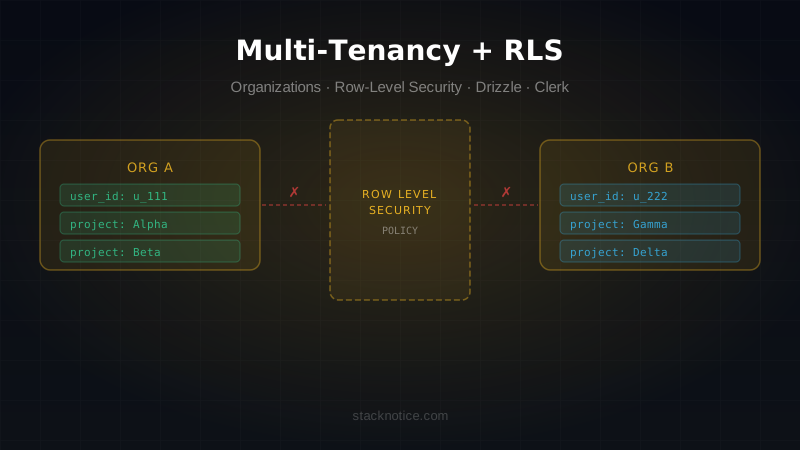
Multi-tenancy is one of those things that sounds simple — each user belongs to an organization, and they only see that organization's data — until you build it for real.
The naive implementation is a WHERE organization_id = ? sprinkled throughout your queries. It works until someone forgets the clause, or until a refactor moves code around, or until a bug in middleware passes the wrong organization ID. Senior engineers don't rely on application-level filtering alone. They use the database to enforce the boundary.
This is the pattern senior engineers use: organization-based access control at the application layer, backed by Row-Level Security at the database layer.
The data model
Every tenant-scoped table gets an organization_id foreign key. This is the fundamental building block:
// db/schema.ts
import { pgTable, text, timestamp, uuid } from 'drizzle-orm/pg-core'

export const organizations = pgTable('organizations', {
  id: uuid('id').primaryKey().defaultRandom(),
  name: text('name').notNull(),
  slug: text('slug').notNull().unique(),
  createdAt: timestamp('created_at').defaultNow().notNull(),
})

export const organizationMembers = pgTable('organization_members', {
  id: uuid('id').primaryKey().defaultRandom(),
  organizationId: uuid('organization_id')
    .notNull()
    .references(() => organizations.id, { onDelete: 'cascade' }),
  userId: text('user_id').notNull(), // Clerk user ID
  role: text('role', { enum: ['owner', 'admin', 'member'] }).notNull().default('member'),
  createdAt: timestamp('created_at').defaultNow().notNull(),
})

export const projects = pgTable('projects', {
  id: uuid('id').primaryKey().defaultRandom(),
  organizationId: uuid('organization_id')
    .notNull()
    .references(() => organizations.id, { onDelete: 'cascade' }),
  name: text('name').notNull(),
  createdAt: timestamp('created_at').defaultNow().notNull(),
})
Every tenant-scoped table has organizationId. No exceptions. If a table doesn't have it, it's either global (pricing plans, public configs) or it belongs to a user, not an organization.
Getting the current organization from Clerk
Clerk's organization feature maps directly to your multi-tenant model. In Next.js App Router:
// lib/auth.ts
import { auth } from '@clerk/nextjs/server'

export async function getCurrentOrg() {
  const { userId, orgId } = await auth()

  if (!userId || !orgId) {
    return null
  }

  return { userId, orgId }
}

export async function requireOrg() {
  const org = await getCurrentOrg()

  if (!org) {
    throw new Error('Unauthorized')
  }

  return org
}
In server actions and route handlers, always call requireOrg() before touching any tenant data. Never pass orgId as a parameter from the client — always read it from the auth session.
// app/actions/projects.ts
'use server'

import { db } from '@/db'
import { projects } from '@/db/schema'
import { eq, and } from 'drizzle-orm'
import { requireOrg } from '@/lib/auth'

export async function getProjects() {
  const { orgId } = await requireOrg()

  return db.query.projects.findMany({
    where: eq(projects.organizationId, orgId),
  })
}

export async function createProject(name: string) {
  const { orgId } = await requireOrg()

  const [project] = await db
    .insert(projects)
    .values({ organizationId: orgId, name })
    .returning()

  return project
}
The critical mistake: trusting client-supplied IDs
The most dangerous multi-tenancy bug: accepting an organization ID from the client and using it in queries.
// NEVER DO THIS
export async function getProject(id: string, orgId: string) {
  // orgId comes from the client — an attacker can send any value
  return db.query.projects.findFirst({
    where: and(eq(projects.id, id), eq(projects.organizationId, orgId)),
  })
}
Always derive the organization from the server-side auth session:
// Correct: orgId always comes from the server session
export async function getProject(id: string) {
  const { orgId } = await requireOrg()

  return db.query.projects.findFirst({
    where: and(eq(projects.id, id), eq(projects.organizationId, orgId)),
  })
}
Row-Level Security — the database enforces the boundary
Application-level filtering is the first line of defense. Row-Level Security (RLS) is the second — and it enforces isolation even if your application code has a bug.
RLS is a Postgres feature. When enabled on a table, Postgres evaluates a policy for every row returned or modified. Rows that don't pass the policy are invisible.
Setting up RLS with Supabase
If you're using Supabase, RLS integrates with their auth system directly. For a Next.js + Clerk setup, you'll use the app.current_setting approach to pass the organization ID from your application to Postgres:
-- Enable RLS on all tenant tables
ALTER TABLE projects ENABLE ROW LEVEL SECURITY;
ALTER TABLE organization_members ENABLE ROW LEVEL SECURITY;

-- Create a policy that uses a session variable
CREATE POLICY "org_isolation" ON projects
  USING (organization_id::text = current_setting('app.current_org_id', true));

CREATE POLICY "org_isolation" ON organization_members
  USING (organization_id::text = current_setting('app.current_org_id', true));
Setting the session variable from Drizzle
Before every query, set the app.current_org_id session variable:
// lib/db-with-rls.ts
import { db } from '@/db'
import { sql } from 'drizzle-orm'

export async function withRLS<T>(
  orgId: string,
  fn: () => Promise<T>
): Promise<T> {
  return db.transaction(async (tx) => {
    await tx.execute(sql`SELECT set_config('app.current_org_id', ${orgId}, true)`)
    return fn()
  })
}
// Usage in server actions
export async function getProjects() {
const { orgId } = await requireOrg()
return withRLS(orgId, () =>
db.query.projects.findMany()
// No WHERE clause needed — RLS filters automatically
)
}With this setup, even if you forget a WHERE organizationId = orgId clause, Postgres will still return only the correct organization's data.
The true third argument in set_config('app.current_org_id', orgId, true) makes the setting local to the transaction. Always use transactions with RLS — otherwise the setting persists for the connection and can leak between requests in a connection pool.
RLS with plain Neon (without Supabase)
If you're using Neon directly:
-- Same pattern, same policies
ALTER TABLE projects ENABLE ROW LEVEL SECURITY;

CREATE POLICY "org_isolation" ON projects
  FOR ALL
  USING (organization_id::text = current_setting('app.current_org_id', true))
  WITH CHECK (organization_id::text = current_setting('app.current_org_id', true));
The WITH CHECK clause applies to INSERT and UPDATE operations. Without it, RLS would prevent reading across organizations but still allow writing to the wrong one.
Drizzle migrations for RLS
RLS policies need to be in your migration files. Since Drizzle doesn't have native RLS support yet, use raw SQL migrations:
// db/migrations/0004_enable_rls.sql
ALTER TABLE projects ENABLE ROW LEVEL SECURITY;
ALTER TABLE organization_members ENABLE ROW LEVEL SECURITY;

CREATE POLICY "org_isolation" ON projects
  FOR ALL
  USING (organization_id::text = current_setting('app.current_org_id', true))
  WITH CHECK (organization_id::text = current_setting('app.current_org_id', true));

CREATE POLICY "org_isolation" ON organization_members
  FOR ALL
  USING (organization_id::text = current_setting('app.current_org_id', true))
  WITH CHECK (organization_id::text = current_setting('app.current_org_id', true));
Run this via Drizzle's custom migration support or with psql directly. Once it's applied, add it to version control like any other migration.
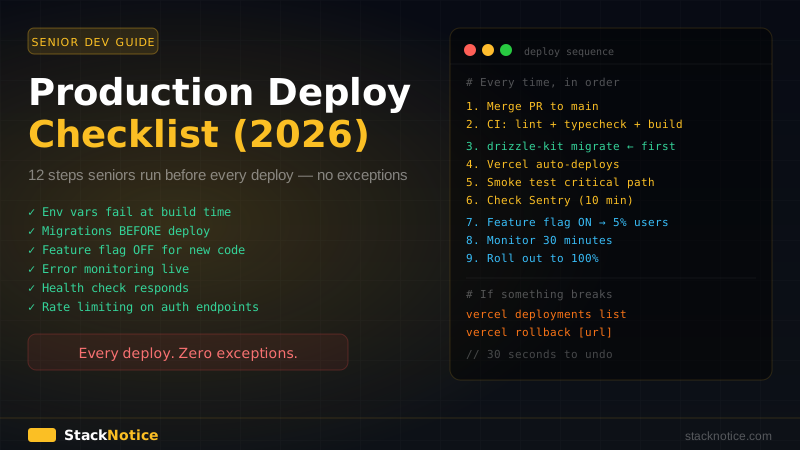
For the complete migrations-without-downtime guide, see database migrations zero downtime.
Role-based access within an organization
Members have roles: owner, admin, member. Enforce role checks in server actions:
// lib/auth.ts
import { db } from '@/db'
import { organizationMembers } from '@/db/schema'
import { and, eq } from 'drizzle-orm'

export type OrgRole = 'owner' | 'admin' | 'member'

export async function requireOrgRole(minimumRole: OrgRole) {
  const { userId, orgId } = await requireOrg()

  const member = await db.query.organizationMembers.findFirst({
    where: and(
      eq(organizationMembers.userId, userId),
      eq(organizationMembers.organizationId, orgId)
    ),
  })

  if (!member) throw new Error('Not a member of this organization')

  const roleHierarchy: Record<OrgRole, number> = {
    member: 0,
    admin: 1,
    owner: 2,
  }

  if (roleHierarchy[member.role] < roleHierarchy[minimumRole]) {
    throw new Error('Insufficient permissions')
  }

  return { userId, orgId, role: member.role as OrgRole }
}
// Only admins and owners can delete a project
export async function deleteProject(id: string) {
const { orgId } = await requireOrgRole('admin')
await db.delete(projects).where(
and(eq(projects.id, id), eq(projects.organizationId, orgId))
)
}Middleware: redirect to correct organization context
When a user lands on your app, they need to be in an organization context. Clerk handles this with active organization:
// middleware.ts
import { clerkMiddleware, createRouteMatcher } from '@clerk/nextjs/server'
import { NextResponse } from 'next/server'

const isPublicRoute = createRouteMatcher([
  '/',
  '/sign-in(.*)',
  '/sign-up(.*)',
])

export default clerkMiddleware(async (auth, req) => {
  if (isPublicRoute(req)) return

  const { userId, orgId } = await auth()

  if (!userId) {
    return NextResponse.redirect(new URL('/sign-in', req.url))
  }

  // User is authenticated but has no active organization
  if (!orgId && !req.nextUrl.pathname.startsWith('/onboarding')) {
    return NextResponse.redirect(new URL('/onboarding', req.url))
  }
})

export const config = {
  matcher: ['/((?!_next|[^?]*\\.(?:html?|css|js(?!on)|jpe?g|webp|png|gif|svg|ttf|woff2?|ico|csv|docx?|xlsx?|zip|webmanifest)).*)', '/(api|trpc)(.*)'],
}
Onboarding: creating the first organization
New users need to create or join an organization before they can use the app:
// app/onboarding/page.tsx
import { OrganizationList, CreateOrganization } from '@clerk/nextjs'

export default function OnboardingPage() {
  return (
    <div className="flex min-h-screen items-center justify-center">
      <div className="space-y-8">
        <h1 className="text-2xl font-bold">Get started</h1>
        <CreateOrganization afterCreateOrganizationUrl="/dashboard" />
        <OrganizationList
          afterSelectOrganizationUrl="/dashboard"
          hidePersonal
        />
      </div>
    </div>
  )
}
When a user creates an organization in Clerk, use a webhook to sync it to your database:
// app/api/webhooks/clerk/route.ts
import { Webhook } from 'svix'
import { headers } from 'next/headers'
import { db } from '@/db'
import { organizations, organizationMembers } from '@/db/schema'

export async function POST(req: Request) {
  const headerPayload = await headers()
  const svix_id = headerPayload.get('svix-id')
  const svix_timestamp = headerPayload.get('svix-timestamp')
  const svix_signature = headerPayload.get('svix-signature')

  const body = await req.text()
  const wh = new Webhook(process.env.CLERK_WEBHOOK_SECRET!)

  let evt: any
  try {
    evt = wh.verify(body, {
      'svix-id': svix_id!,
      'svix-timestamp': svix_timestamp!,
      'svix-signature': svix_signature!,
    })
  } catch {
    return new Response('Invalid signature', { status: 400 })
  }

  if (evt.type === 'organization.created') {
    await db.insert(organizations).values({
      id: evt.data.id,
      name: evt.data.name,
      slug: evt.data.slug,
    }).onConflictDoNothing()
  }

  if (evt.type === 'organizationMembership.created') {
    await db.insert(organizationMembers).values({
      organizationId: evt.data.organization.id,
      userId: evt.data.public_user_data.user_id,
      role: evt.data.role === 'org:admin' ? 'admin' : 'member',
    }).onConflictDoNothing()
  }

  return new Response('OK')
}
Switching organizations
When a user switches between organizations, Clerk updates the session. Your server components and actions automatically pick up the new orgId from auth() — no extra work needed.
For the UI, use Clerk's <OrganizationSwitcher />:
import { OrganizationSwitcher } from '@clerk/nextjs'

export function Navbar() {
  return (
    <nav className="flex items-center justify-between p-4">
      <span>Your App</span>
      <OrganizationSwitcher
        hidePersonal
        afterSelectOrganizationUrl="/dashboard"
        afterCreateOrganizationUrl="/dashboard"
      />
    </nav>
  )
}
Testing multi-tenancy
The most important thing to test: data from organization A never leaks to organization B.
// tests/multi-tenancy.test.ts
import { describe, it, expect, beforeEach } from 'vitest'
import { db } from '@/db'
import { organizations, organizationMembers, projects } from '@/db/schema'

describe('multi-tenancy isolation', () => {
  let orgAId: string
  let orgBId: string

  beforeEach(async () => {
    // Create two organizations
    const [orgA] = await db.insert(organizations).values({ name: 'Org A', slug: 'org-a' }).returning()
    const [orgB] = await db.insert(organizations).values({ name: 'Org B', slug: 'org-b' }).returning()
    orgAId = orgA.id
    orgBId = orgB.id

    // Create a project in each
    await db.insert(projects).values([
      { organizationId: orgAId, name: 'Project A' },
      { organizationId: orgBId, name: 'Project B' },
    ])
  })

  it('org A cannot see org B projects', async () => {
    const orgAProjects = await withRLS(orgAId, () =>
      db.query.projects.findMany()
    )

    expect(orgAProjects).toHaveLength(1)
    expect(orgAProjects[0].name).toBe('Project A')
    // Project B is invisible — RLS filters it
  })

  it('org B cannot see org A projects', async () => {
    const orgBProjects = await withRLS(orgBId, () =>
      db.query.projects.findMany()
    )

    expect(orgBProjects).toHaveLength(1)
    expect(orgBProjects[0].name).toBe('Project B')
  })
})
These tests verify that RLS is working correctly. If you ever remove or break a policy, these fail.
What to never do
| Anti-pattern | Why it's dangerous |
|---|---|
Accept orgId from request body or query params | Attacker can enumerate any org's data |
WHERE org_id = ? without RLS | One missing clause = data leak |
Use bypassRLS for "convenience" | Removes the safety net entirely |
| Share a single DB user across all tenants without RLS | No isolation at the DB level |
Trust localStorage or cookies for org context | Client-controlled, easily spoofed |
The complete picture
A production multi-tenant setup has three layers of isolation:
- Auth layer — Clerk ensures only authenticated members of an organization can request data for that organization
- Application layer — server actions always read
orgIdfrom the session, never from the client - Database layer — RLS ensures even a bug in application code cannot return cross-tenant data
Each layer catches what the previous one might miss. Together they make cross-tenant data leaks essentially impossible.
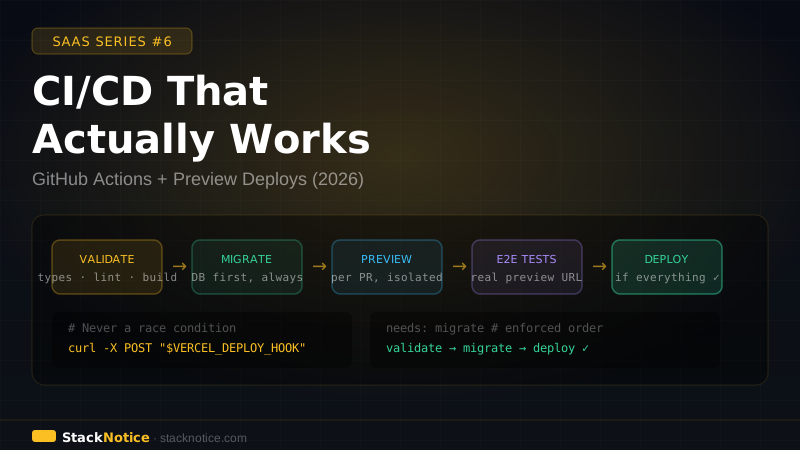
This pattern pairs directly with the CI/CD setup guide — every PR that touches tenant data should run E2E tests that verify isolation. And for auth patterns in depth, see auth in production with Clerk.