Most CI/CD setups are theater.
They run a linter, maybe some unit tests, then push to production regardless of what those tests found. Senior engineers build pipelines that enforce quality — and that run in a specific order so that a broken migration can never reach production.
Here's the complete setup for a Next.js SaaS in 2026.
What a real CI/CD pipeline does
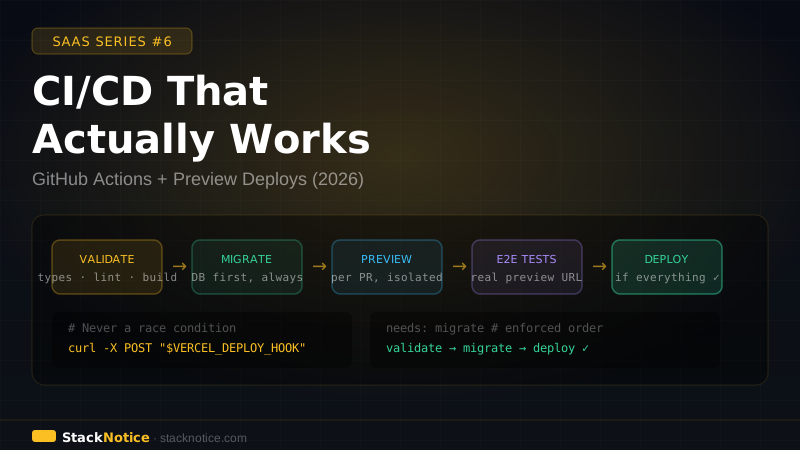
A production-grade pipeline does five things, in order:
- Validates — types, lint, build (catches configuration errors early)
- Migrates — database changes run before any new code ships
- Previews — every PR gets a real, isolated environment
- Tests — E2E tests run against the preview environment, not a mock
- Gates — production only ships when everything passes
Most setups do step 1 and call it done.
The workflow structure
.github/
└── workflows/
    ├── ci.yml        # runs on every PR
    └── deploy.yml    # runs on push to main
Two separate workflows. ci.yml validates and tests PRs before they merge. deploy.yml migrates and deploys when code lands on main.
ci.yml — the PR workflow
name: CI

on:
  pull_request:
    branches: [main]

jobs:
  validate:
    name: Validate
    runs-on: ubuntu-latest
    steps:
      - uses: actions/checkout@v4

      - uses: actions/setup-node@v4
        with:
          node-version: '22'
          cache: 'npm'

      - run: npm ci

      - name: Type check
        run: npm run typecheck

      - name: Lint
        run: npx biome check .

      - name: Build (validates env vars via t3-env)
        run: npm run build
        env:
          DATABASE_URL: ${{ secrets.DATABASE_URL_PREVIEW }}
          CLERK_SECRET_KEY: ${{ secrets.CLERK_SECRET_KEY_PREVIEW }}
          NEXT_PUBLIC_CLERK_PUBLISHABLE_KEY: ${{ secrets.NEXT_PUBLIC_CLERK_PUBLISHABLE_KEY_PREVIEW }}
          STRIPE_SECRET_KEY: ${{ secrets.STRIPE_SECRET_KEY_TEST }}
          STRIPE_WEBHOOK_SECRET: ${{ secrets.STRIPE_WEBHOOK_SECRET_TEST }}
          NEXT_PUBLIC_APP_URL: ${{ vars.PREVIEW_APP_URL }}

  migrate-preview:
    name: Migrate preview database
    runs-on: ubuntu-latest
    needs: validate
    steps:
      - uses: actions/checkout@v4
      - uses: actions/setup-node@v4
        with:
          node-version: '22'
          cache: 'npm'
      - run: npm ci
      - name: Run migrations
        run: npx drizzle-kit migrate
        env:
          DATABASE_URL: ${{ secrets.DATABASE_URL_PREVIEW }}

  e2e:
    name: E2E tests on preview
    runs-on: ubuntu-latest
    needs: migrate-preview
    steps:
      - uses: actions/checkout@v4
      - uses: actions/setup-node@v4
        with:
          node-version: '22'
          cache: 'npm'
      - run: npm ci
      - run: npx playwright install --with-deps chromium
      - name: Run E2E tests against preview URL
        run: npx playwright test
        env:
          BASE_URL: ${{ vars.PREVIEW_APP_URL }}
          TEST_USER_EMAIL: ${{ secrets.TEST_USER_EMAIL }}
          TEST_USER_PASSWORD: ${{ secrets.TEST_USER_PASSWORD }}
The needs chain enforces order: validate → migrate-preview → e2e. Nothing runs out of sequence.
deploy.yml — the production workflow
name: Deploy

on:
  push:
    branches: [main]

jobs:
  validate:
    name: Validate
    runs-on: ubuntu-latest
    steps:
      - uses: actions/checkout@v4
      - uses: actions/setup-node@v4
        with:
          node-version: '22'
          cache: 'npm'
      - run: npm ci
      - run: npm run typecheck
      - run: npx biome check .
      - name: Build
        run: npm run build
        env:
          DATABASE_URL: ${{ secrets.DATABASE_URL_PRODUCTION }}
          CLERK_SECRET_KEY: ${{ secrets.CLERK_SECRET_KEY }}
          NEXT_PUBLIC_CLERK_PUBLISHABLE_KEY: ${{ secrets.NEXT_PUBLIC_CLERK_PUBLISHABLE_KEY }}
          STRIPE_SECRET_KEY: ${{ secrets.STRIPE_SECRET_KEY }}
          STRIPE_WEBHOOK_SECRET: ${{ secrets.STRIPE_WEBHOOK_SECRET }}
          NEXT_PUBLIC_APP_URL: https://yourapp.com

  migrate:
    name: Migrate production database
    runs-on: ubuntu-latest
    needs: validate
    steps:
      - uses: actions/checkout@v4
      - uses: actions/setup-node@v4
        with:
          node-version: '22'
          cache: 'npm'
      - run: npm ci
      - name: Run migrations
        run: npx drizzle-kit migrate
        env:
          DATABASE_URL: ${{ secrets.DATABASE_URL_PRODUCTION }}

  deploy:
    name: Deploy to Vercel
    runs-on: ubuntu-latest
    needs: migrate
    steps:
      - name: Trigger Vercel deploy hook
        run: curl -X POST "${{ secrets.VERCEL_DEPLOY_HOOK }}"
The deploy job only runs after migrate succeeds. Migrations always win.
Guaranteed deploy order: the key detail
The naive approach — letting both Vercel's auto-deploy and GitHub Actions react to the same push event — has a race condition. Both start at the same time. Sometimes Vercel deploys before migrations finish.
The safe setup:
- Disable Vercel's automatic GitHub push deployment (Vercel dashboard → Project → Settings → Git → turn off auto-deploy on push)
- Add a Vercel deploy hook (Vercel dashboard → Settings → Git → Deploy Hooks → create one)
- Store it as
VERCEL_DEPLOY_HOOKsecret in GitHub - Trigger it at the end of the
migratejob (as shown above)
Now the sequence is guaranteed: validate → migrate → Vercel deploys. Migrations always complete first.
A deploy hook is a unique URL that triggers a Vercel deployment when POSTed to. It's the cleanest way to control exactly when Vercel deploys, instead of relying on git push timing.
Preview environments per PR
Vercel creates a preview environment for every PR automatically when your GitHub repo is connected. Each preview gets a unique URL:
https://myapp-git-feat-login-yourorg.vercel.app
Configure preview environment variables separately in Vercel dashboard:
| Variable | Production | Preview |
|---|---|---|
DATABASE_URL | Neon production | Neon preview branch |
CLERK_SECRET_KEY | Clerk production | Clerk development |
STRIPE_SECRET_KEY | Stripe live key | Stripe test key |
Never use production credentials in preview environments. A broken test in CI should never touch real user data.
Database branching per PR with Neon
With Neon's database branching, you can give every PR its own database branch — isolated, seeded from production schema, no shared state between PRs:
  create-db-branch:
    runs-on: ubuntu-latest
    outputs:
      branch-url: ${{ steps.branch.outputs.url }}
    steps:
      - name: Create Neon branch for this PR
        id: branch
        run: |
          URL=$(npx neonctl branches create \
            --project-id ${{ secrets.NEON_PROJECT_ID }} \
            --name pr-${{ github.event.number }} \
            --output json | jq -r '.connection_uri')
          echo "url=$URL" >> $GITHUB_OUTPUT
        env:
          NEON_API_KEY: ${{ secrets.NEON_API_KEY }}

  cleanup-db-branch:
    runs-on: ubuntu-latest
    if: github.event_name == 'pull_request' && github.event.action == 'closed'
    steps:
      - name: Delete Neon branch when PR closes
        run: |
          npx neonctl branches delete pr-${{ github.event.number }} \
            --project-id ${{ secrets.NEON_PROJECT_ID }}
        env:
          NEON_API_KEY: ${{ secrets.NEON_API_KEY }}
Each PR gets its own database. Migrations run against it. E2E tests hit it. When the PR closes, the branch deletes automatically.
E2E tests on the real preview URL
The value of preview environments is running E2E tests against a real deployed app — not a local server, not a mock:
// playwright.config.ts
import { defineConfig, devices } from '@playwright/test'

export default defineConfig({
  use: {
    baseURL: process.env.BASE_URL ?? 'http://localhost:3000',
    trace: 'on-first-retry',
  },
  projects: [
    { name: 'chromium', use: { ...devices['Desktop Chrome'] } },
  ],
})
// tests/critical-path.spec.ts
import { test, expect } from '@playwright/test'
test('user can sign up and create a project', async ({ page }) => {
// This test runs against the real preview URL
await page.goto('/')
await page.getByRole('link', { name: 'Get started' }).click()
await page.getByLabel('Email address').fill(process.env.TEST_USER_EMAIL!)
await page.getByLabel('Password').fill(process.env.TEST_USER_PASSWORD!)
await page.getByRole('button', { name: 'Sign in' }).click()
await expect(page).toHaveURL('/dashboard')
await page.getByRole('button', { name: 'New project' }).click()
await page.getByLabel('Project name').fill('Test Project')
await page.getByRole('button', { name: 'Create' }).click()
await expect(page.getByText('Test Project')).toBeVisible()
})Test the critical path: log in → do the core action → verify the outcome. If this breaks in the preview, it doesn't reach production.
For a full Next.js testing guide with Vitest and Playwright.
Branch protection rules
In GitHub → repository → Settings → Branches → Add rule for main:
✅ Require a pull request before merging
✅ Require status checks to pass before merging
   Required checks: validate, migrate-preview, e2e
✅ Require branches to be up to date before merging
✅ Do not allow bypassing the above settings
With these rules, no one ships broken code to main — not even admins. The pipeline is the gatekeeper, not individual discipline.
Secrets management
Never hardcode secrets in workflow files. Use GitHub's secret store:
Repository → Settings → Secrets and variables → Actions
Organize by environment:
| Secret | Used in |
|---|---|
DATABASE_URL_PRODUCTION | deploy.yml migrate job |
DATABASE_URL_PREVIEW | ci.yml migrate-preview job |
CLERK_SECRET_KEY | Production builds |
CLERK_SECRET_KEY_PREVIEW | Preview builds |
STRIPE_SECRET_KEY | Production |
STRIPE_SECRET_KEY_TEST | Preview (test mode) |
VERCEL_DEPLOY_HOOK | deploy.yml deploy job |
NEON_API_KEY | Database branching |
TEST_USER_EMAIL | E2E tests |
TEST_USER_PASSWORD | E2E tests |
Use vars (not secrets) for non-sensitive values like PREVIEW_APP_URL. GitHub Actions has separate stores for secrets (encrypted, never logged) and variables (visible in logs). Don't put sensitive values in vars.
npm scripts to add
{
  "scripts": {
    "typecheck": "tsc --noEmit",
    "lint": "biome check .",
    "lint:fix": "biome check --write .",
    "build": "next build",
    "migrate": "drizzle-kit migrate",
    "migrate:generate": "drizzle-kit generate",
    "test": "vitest run",
    "test:e2e": "playwright test",
    "test:e2e:ui": "playwright test --ui"
  }
}
Common mistakes
| Mistake | Fix |
|---|---|
| Vercel auto-deploys before migrations | Use deploy hook, not auto-deploy |
| Same secrets for preview and production | Separate Clerk app + Stripe test mode + Neon branch |
| No E2E tests on preview | Run Playwright against preview URL before merge |
| No branch protection rules | Required status checks in GitHub settings |
| Single workflow for CI and CD | Separate ci.yml (PRs) and deploy.yml (main) |
run: npm run test || true | Never ignore failing tests |
What to add as the team grows
| Team size | Addition |
|---|---|
| 1-3 devs | The setup above |
| 3-8 devs | Slack notifications on failure, Neon branch per PR |
| 8+ devs | Canary deployments, automated rollback, staging environment |
The result
Every PR gets:
- Type checking, lint, build validation
- Its own database branch
- A real preview URL
- E2E tests against that preview
Every push to main gets:
- Migrations run first, guaranteed
- Vercel deploys after migrations complete
- No code ships without passing the full pipeline
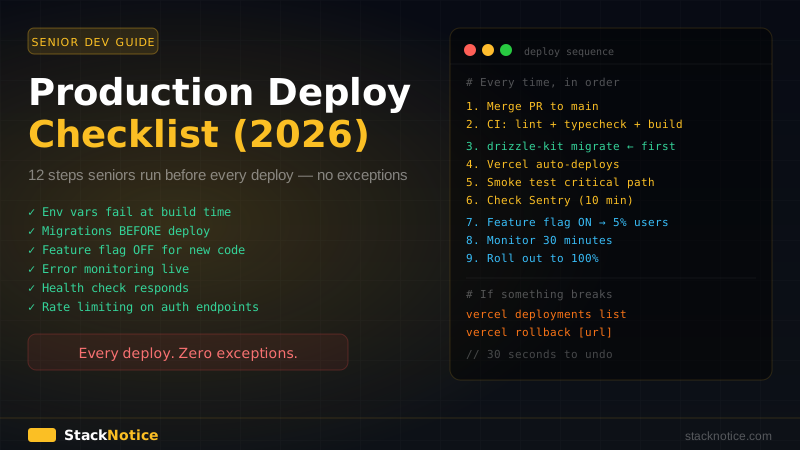
The pipeline becomes the authority. Deploying stops being stressful because you've already proven the code works in a real environment — before it ever touches production.
This CI/CD setup works best when paired with the production deployment checklist and the zero-downtime migrations guide. If you want to integrate Claude Code into this pipeline for automated code review and PR summaries, see the Claude Code + GitHub Actions guide.