Auth is one of those decisions that feels boring until it bites you. Choose wrong and you're rewriting it six months in — or worse, you're dealing with a breach.
In 2026, two names dominate Next.js auth conversations: Clerk (the polished hosted solution everyone reaches for) and Better Auth (the open-source challenger that's growing fast). Both are genuinely good. But they're built on different philosophies, and picking the wrong one for your use case is a real mistake.
This is the comparison I wish existed when I was making this decision. No fluff — just the tradeoffs that actually matter in production.
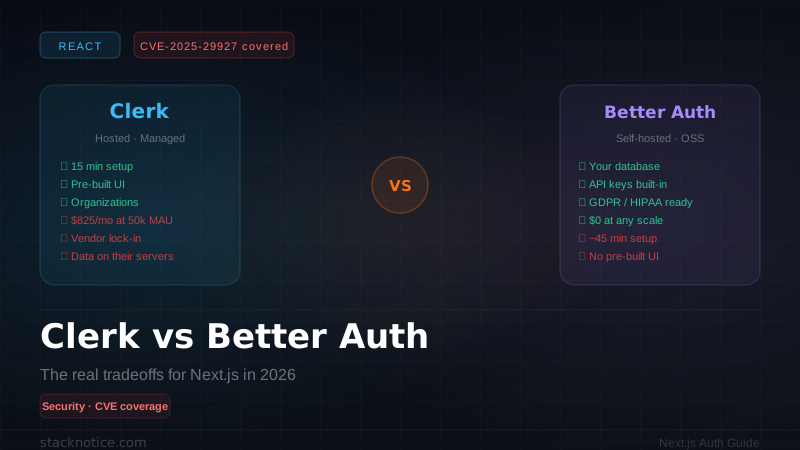
In March 2025, a critical Next.js vulnerability (CVE-2025-29927) allowed attackers to bypass middleware-based auth by manipulating the x-middleware-subrequest header. This affected every Next.js auth solution that relied solely on middleware for protection — including Clerk's default setup at the time. Both Clerk and Better Auth have since patched their guidance, but it's worth understanding why middleware-only auth is dangerous before choosing your architecture.
Quick verdict
| Use case | Winner |
|---|---|
| SaaS MVP, ship fast | Clerk |
| Enterprise / compliance | Better Auth (self-hosted) |
| Budget-sensitive (100k+ MAU) | Better Auth |
| B2B multi-tenant | Clerk (Organizations) |
| Full control over data | Better Auth |
| Smallest possible codebase | Clerk |
If you're building a side project or early-stage SaaS: start with Clerk. The DX is excellent, you'll ship faster, and you can migrate later.
If you're building something where data residency, compliance, or scale costs matter: Better Auth is worth the extra setup time.
What is Clerk?
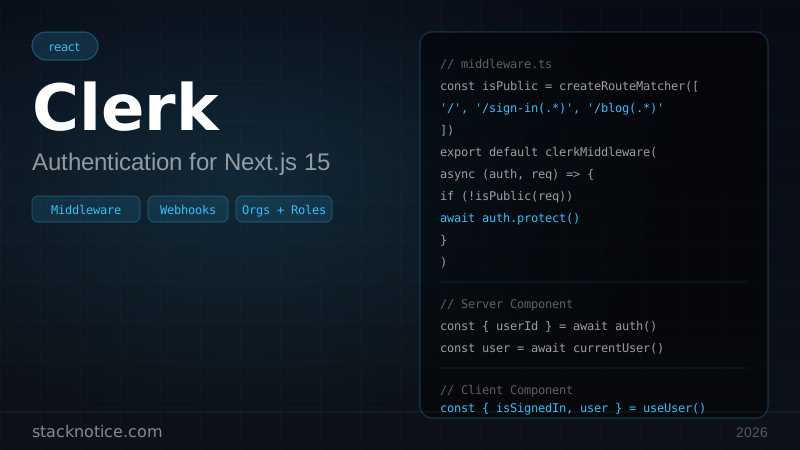
Clerk is a hosted authentication SaaS. You get a dashboard, pre-built UI components, user management, organizations, SSO, MFA, and a generous free tier — all without writing a single database schema.
It launched in 2021 and became the default recommendation in the Next.js ecosystem almost immediately. The DX is genuinely excellent: 15 minutes from npm install to working auth.
What is Better Auth?
Better Auth is a TypeScript-first, framework-agnostic auth library you run yourself. Think of it as the missing piece between rolling your own auth and using a hosted service. It handles:
- Session management (database or JWT)
- OAuth providers (Google, GitHub, Discord, 40+ others)
- Email/password with email verification
- Magic links, passkeys, 2FA/TOTP
- Multi-tenant organizations
- API key management
You own the database. You own the sessions. You own everything.
It's growing fast — v1.0 shipped in late 2024, and by mid-2026 it has 25k+ GitHub stars and is the go-to answer for "I want something like Clerk but self-hosted."
Setup comparison
Clerk — 4 files to working auth
npm install @clerk/nextjsNEXT_PUBLIC_CLERK_PUBLISHABLE_KEY=pk_test_...
CLERK_SECRET_KEY=sk_test_...import { clerkMiddleware, createRouteMatcher } from '@clerk/nextjs/server'
const isProtectedRoute = createRouteMatcher([
'/dashboard(.*)',
'/api/protected(.*)',
])
export default clerkMiddleware(async (auth, req) => {
if (isProtectedRoute(req)) {
await auth.protect()
}
})
export const config = {
matcher: ['/((?!_next|[^?]*\\.(?:html?|css|js(?!on)|jpe?g|webp|png|gif|svg|ttf|woff2?|ico|csv|docx?|xlsx?|zip|webmanifest)).*)', '/(api|trpc)(.*)'],
}import { ClerkProvider } from '@clerk/nextjs'
export default function RootLayout({ children }: { children: React.ReactNode }) {
return (
<ClerkProvider>
<html lang="en">
<body>{children}</body>
</html>
</ClerkProvider>
)
}That's it. Sign in, sign up, user management — all handled. You get pre-built <SignIn />, <SignUp />, <UserButton /> components that match your brand.
Better Auth — more setup, full control
npm install better-auth
npm install drizzle-orm @vercel/postgres # or your ORM of choiceimport { betterAuth } from 'better-auth'
import { drizzleAdapter } from 'better-auth/adapters/drizzle'
import { db } from './db'
import { nextCookies } from 'better-auth/next-js'
export const auth = betterAuth({
database: drizzleAdapter(db, {
provider: 'pg',
}),
emailAndPassword: {
enabled: true,
requireEmailVerification: true,
},
socialProviders: {
google: {
clientId: process.env.GOOGLE_CLIENT_ID!,
clientSecret: process.env.GOOGLE_CLIENT_SECRET!,
},
github: {
clientId: process.env.GITHUB_CLIENT_ID!,
clientSecret: process.env.GITHUB_CLIENT_SECRET!,
},
},
plugins: [nextCookies()],
})import { auth } from '@/lib/auth'
import { toNextJsHandler } from 'better-auth/next-js'
export const { GET, POST } = toNextJsHandler(auth)import { createAuthClient } from 'better-auth/react'
export const authClient = createAuthClient({
baseURL: process.env.NEXT_PUBLIC_APP_URL!,
})
export const { signIn, signOut, signUp, useSession } = authClientimport { auth } from '@/lib/auth'
import { NextRequest, NextResponse } from 'next/server'
export async function middleware(request: NextRequest) {
const session = await auth.api.getSession({
headers: request.headers,
})
if (!session && request.nextUrl.pathname.startsWith('/dashboard')) {
return NextResponse.redirect(new URL('/login', request.url))
}
return NextResponse.next()
}
export const config = {
matcher: ['/dashboard/:path*'],
}You also need to run the database migration:
npx better-auth generate  # generates migration files
npx drizzle-kit migrate   # applies them
Better Auth creates these tables: user, session, account, verification.
Setup takes ~45 minutes vs ~15 for Clerk. But after that, you have zero vendor lock-in.
The CVE-2025-29927 deep dive
This is worth understanding even if the patched versions protect you now.
The vulnerability: Next.js middleware uses an internal header x-middleware-subrequest to track recursive middleware calls. An attacker could send this header directly, making Next.js believe the request had already been through middleware — and skip it entirely.
GET /dashboard/admin HTTP/1.1
Host: target.com
x-middleware-subrequest: middleware
If your auth was only in middleware, the attacker now has unauthenticated access to every route.
Who was affected: Everyone doing middleware-only auth. Clerk's early documentation showed this pattern. Better Auth's middleware helper had the same exposure.
The real fix isn't just a patch — it's defense in depth:
import { auth } from '@/lib/auth'
import { headers } from 'next/headers'
import { redirect } from 'next/navigation'

// ✅ Always verify auth in the Server Component/Route Handler too
export default async function DashboardPage() {
  const session = await auth.api.getSession({
    headers: await headers(),
  })

  if (!session) {
    redirect('/login')
  }

  return <Dashboard user={session.user} />
}import { auth } from '@/lib/auth'
import { headers } from 'next/headers'
export async function GET(req: Request) {
// ✅ Verify in the route handler, not just middleware
const session = await auth.api.getSession({
headers: await headers(),
})
if (!session) {
return Response.json({ error: 'Unauthorized' }, { status: 401 })
}
// safe to proceed
}Middleware runs on the edge and is excellent for redirects, A/B testing, and request logging. It is not a reliable security boundary. Always verify auth in your Server Components and Route Handlers. Middleware should be your UX layer, not your security layer.
Both Clerk and Better Auth now document this clearly. Clerk's auth() and currentUser() helpers verify server-side. Better Auth's auth.api.getSession() does the same.
Pricing reality
This is where Clerk gets uncomfortable at scale.
Clerk pricing (2026)
- Free: 10,000 MAU — covers most side projects
- Pro: $25/month + $0.02 per MAU after 10k
- Enterprise: custom pricing
At 50k MAU: $25 + (40,000 × $0.02) = $825/month At 100k MAU: $25 + (90,000 × $0.02) = $1,825/month At 500k MAU: ~$10,025/month
That's a real business cost. For a SaaS charging $10/user/month, 50k MAU might mean $500k ARR — and you're spending $10k/year on auth alone. That's fine. But it's worth knowing upfront.
Better Auth pricing
Zero. It's MIT licensed. Your costs are:
- Hosting your database (Neon free tier: $0 up to 0.5 GB)
- Your own server/edge function (Vercel hobby: $0)
- Transactional email for verification (Resend free tier: $0 up to 3k/month)
At 500k MAU, you're paying for database compute and maybe a dedicated email plan — probably $20-50/month total.
Start with Clerk. If/when you hit 10k MAU and start paying, evaluate the migration effort. Better Auth has a migration guide and the data model is standard enough that moving sessions is straightforward. The better problem to have is needing to migrate because you grew.
Feature comparison
Real-world patterns
Pattern 1: B2B SaaS with organizations (Clerk wins)
If you're building workspace-based SaaS (like Notion, Linear, Vercel), Clerk's Organizations feature is genuinely excellent:
import { auth } from '@clerk/nextjs/server'

export default async function OrgDashboard({
  params,
}: {
  params: { org: string }
}) {
  const { orgId, orgRole } = await auth()

  if (!orgId) redirect('/select-org')

  // Check role-based access
  if (orgRole !== 'org:admin' && request.includes('/settings')) {
    redirect('/dashboard')
  }

  return <OrgDashboard orgId={orgId} role={orgRole} />
}
Building this from scratch with Better Auth is possible but takes real work.
Pattern 2: API-first product (Better Auth wins)
If you're building something where developers will use your API — and they need API keys — Better Auth has this built in:
import { betterAuth } from 'better-auth'
import { apiKey } from 'better-auth/plugins'

export const auth = betterAuth({
  // ... base config
  plugins: [
    apiKey({
      // Each user can create API keys
      // Keys are hashed in DB, prefix shown to user
      defaultPrefix: 'sk_',
      rateLimit: {
        enabled: true,
        window: 60,
        max: 100,
      },
    }),
  ],
})import { auth } from '@/lib/auth'
export async function GET(req: Request) {
// Automatically handles both session cookies AND API keys
const session = await auth.api.getSession({
headers: req.headers,
})
if (!session) {
return Response.json({ error: 'Unauthorized' }, { status: 401 })
}
// session.user is always present
}Clerk has no native API key management. You'd need a separate system (like Unkey) — another dependency, another cost.
Pattern 3: Self-hosted for compliance (Better Auth wins)
If your customers are in healthcare, finance, or EU-regulated industries:
export const auth = betterAuth({
  database: drizzleAdapter(db, { provider: 'pg' }),

  // All data stays in your infrastructure
  // Deploy to your own region (EU, US, etc.)

  advanced: {
    // Use database sessions (no JWT) — auditable
    useSecureCookies: true,
    cookiePrefix: 'myapp',
    defaultCookieAttributes: {
      sameSite: 'strict',
      httpOnly: true,
      secure: true,
    },
  },

  rateLimit: {
    enabled: true,
    window: 60,
    max: 10, // strict for auth endpoints
    storage: 'database', // auditable
  },
})
With Clerk, your user data lives on Clerk's infrastructure. For HIPAA Business Associate Agreements, you'd need Enterprise tier and additional contracts. With Better Auth, you control the data residency entirely.
Migration: Clerk → Better Auth
If you built with Clerk and need to migrate, here's the realistic path:
Clerk's dashboard lets you export users as CSV/JSON. You get: email, name, created_at, external_accounts (OAuth connections).
import { auth } from '../lib/auth'
import clerkUsers from './clerk-export.json'
import * as bcrypt from 'bcryptjs'

async function migrate() {
  for (const clerkUser of clerkUsers) {
    // Create user in Better Auth's database
    await auth.api.createUser({
      body: {
        email: clerkUser.email_addresses[0].email_address,
        name: `${clerkUser.first_name} ${clerkUser.last_name}`,
        emailVerified: true,
        // Users will need to reset password
        // (Clerk hashes are not exportable — by design)
        image: clerkUser.image_url,
      },
    })
  }
}Clerk doesn't export password hashes (correct security practice). You'll need to trigger password resets for all email/password users. OAuth users can just re-authorize.
// Send password reset email to all migrated users
// Use Resend, SendGrid, etc.Keep both systems running for 2-4 weeks. New signups go to Better Auth. Existing sessions in Clerk remain valid. When a Clerk session expires, the user lands on the new auth flow.
This is the cleanest migration path — no forced logout for existing users.
Once Clerk session activity drops below 5%, cancel the subscription and remove the dependency.
Google/GitHub users don't need a password reset — they just click "Continue with Google" on the new system and get a new session. The friction is almost zero for OAuth users.
My recommendation
Start with Clerk if:
- You're building a side project or MVP
- You value pre-built UI components
- You're under 10k MAU
- You need B2B organization features quickly
- You don't have compliance requirements
Start with Better Auth if:
- You have compliance requirements (GDPR strict, HIPAA, SOC 2)
- You're building an API-first product that needs API keys
- You're building for scale and want to know your auth cost is flat
- You want full control over user data
- Your team has the bandwidth for a 45-minute setup vs 15
The pragmatic path: Most people should start with Clerk. The DX advantage is real. Set a trigger: "If we hit 25k MAU or if a customer asks about data residency, we evaluate the migration." By then you'll have the resources to do it right.
If you're building out your full auth setup for a Next.js SaaS, check out the SaaS tech stack decisions guide — it covers where auth fits in the bigger picture, plus the database, payments, and API layer choices that go with it.
For the authentication deep-dive on Next.js patterns (middleware, Server Components, RSC cookies), see the NextAuth.js + Next.js 15 authentication guide.
And if you're coming from Clerk and want to understand how the session model works under the hood — including why cookie-based sessions beat JWTs for most web apps — the Clerk + Next.js complete guide has the full breakdown.