Every production app eventually needs real-time features. The problem is most guides were written for Pages Router, most examples use Express, and the "SSE vs WebSockets" debate usually skips the one thing that matters most for Next.js developers: where you're deploying.
This guide covers both approaches with real App Router code — and explains what actually breaks on Vercel and why.
The fundamental difference
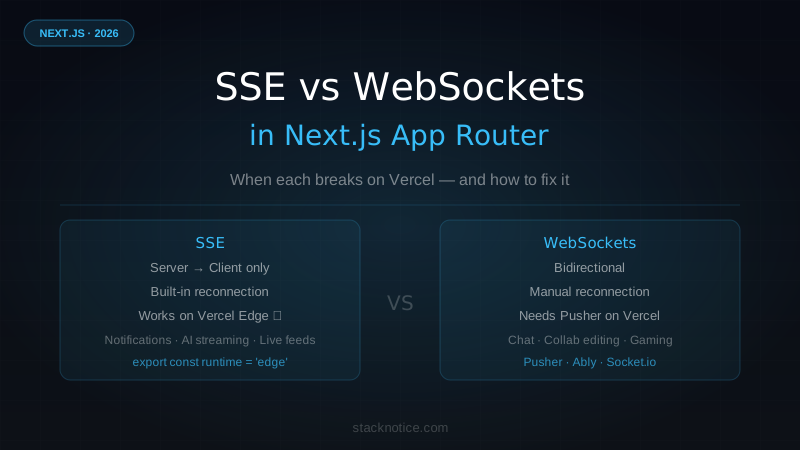
Server-Sent Events (SSE) are a browser-native feature built on HTTP. The client makes a single request, the server keeps the connection open and pushes data whenever it wants. One direction only: server → client.
WebSockets are a separate protocol. After an HTTP handshake, both sides can send data at any time. Truly bidirectional, persistent connection.
| SSE | WebSockets | |
|---|---|---|
| Direction | Server → Client only | Bidirectional |
| Protocol | HTTP | ws:// or wss:// |
| Reconnection | Automatic (built-in) | Manual |
| Browser support | All modern | All modern |
| Load balancing | Easy (stateless per connection) | Hard (needs sticky sessions) |
| Vercel Serverless | ❌ 10s hard timeout | ❌ Not supported |
| Vercel Edge | ✅ Works | ❌ Not supported |
The Vercel problem no one tells you
Here's what happens when you naively implement SSE in a Next.js Route Handler on Vercel:
// app/api/events/route.ts — THIS BREAKS ON VERCEL SERVERLESS
export async function GET(request: Request) {
  const encoder = new TextEncoder();
  const stream = new ReadableStream({
    start(controller) {
      // This will be killed after 10 seconds on Vercel Serverless (free tier)
      // 60 seconds on Pro — still not enough for persistent connections
      const interval = setInterval(() => {
        controller.enqueue(encoder.encode('data: ping\n\n'));
      }, 1000);
    },
  });

  return new Response(stream, {
    headers: { 'Content-Type': 'text/event-stream' },
  });
}
Vercel Serverless Functions have a 10-second execution timeout on the free plan, 60 seconds on Pro. Your SSE connection dies silently after that — the client reconnects, dies again, and you end up with a flood of reconnection attempts that never actually maintain state.
The fix is one line: Edge Runtime.
// app/api/events/route.ts
export const runtime = 'edge'; // This line changes everything

export async function GET(request: Request) {
  // Now this stays open as long as the client is connected
}
Edge Functions run on Vercel's edge network with a different execution model — they don't have the same hard timeout constraints for streaming responses. SSE connections work correctly.
For WebSockets: Vercel doesn't support them at all, regardless of runtime. The WebSocket protocol requires a persistent TCP connection that Vercel's serverless and edge architecture doesn't support. You need an external service.
When to use SSE
SSE is the right choice when:
- Server pushes, client only listens — notifications, live feeds, dashboards that update automatically
- You're on Vercel — works with Edge Runtime, zero extra infrastructure
- You want simplicity — HTTP-native, no extra libraries, built-in reconnection
- You need horizontal scale — each SSE connection is independent, no sticky sessions needed
Real production use cases:
- Activity feed ("User X just joined the team")
- Progress updates for background jobs or AI processing
- Live stats or monitoring dashboards
- AI streaming responses (the ChatGPT-style streamed output)
- Real-time log tailing
When to use WebSockets
WebSockets are the right choice when:
- The client sends data frequently — chat, collaborative editing, live cursors
- Latency is critical — gaming, financial trading, real-time collaboration tools
- You control your infrastructure — self-hosted or using Railway/Render/a VPS
Real production use cases:
- Chat applications
- Collaborative document or whiteboard editing
- Multiplayer browser games
- Live code collaboration (like VS Code Live Share)
- Real-time bidding or auction systems
If you need WebSockets on Vercel, you need an external service. Pusher and Ably are the standard choices, or host your own Socket.io server on Railway and connect to it from your Next.js app.
Implementing SSE in Next.js App Router
Here's a complete SSE implementation with Edge Runtime that actually works in production:
// app/api/notifications/route.ts
export const runtime = 'edge';

export async function GET(request: Request) {
  const { searchParams } = new URL(request.url);
  const userId = searchParams.get('userId');

  // Always validate auth — don't trust URL params blindly
  const session = await getServerSession(); // your auth library
  if (!session || session.userId !== userId) {
    return new Response('Unauthorized', { status: 401 });
  }

  const encoder = new TextEncoder();

  const stream = new ReadableStream({
    start(controller) {
      // Send initial connection confirmation
      controller.enqueue(
        encoder.encode('data: {"type":"connected"}\n\n')
      );

      // Check for new events every 2 seconds
      // In production: poll Redis, your DB, or subscribe to a message queue
      const interval = setInterval(async () => {
        try {
          const events = await getNewEvents(userId);

          if (events.length > 0) {
            const payload = JSON.stringify({
              type: 'events',
              data: events,
            });
            controller.enqueue(encoder.encode(`data: ${payload}\n\n`));
          }
        } catch (error) {
          // Close stream on unrecoverable errors
          clearInterval(interval);
          controller.close();
        }
      }, 2000);

      // Clean up when client disconnects
      request.signal.addEventListener('abort', () => {
        clearInterval(interval);
        controller.close();
      });
    },
  });

  return new Response(stream, {
    headers: {
      'Content-Type': 'text/event-stream',
      'Cache-Control': 'no-cache, no-store',
      'Connection': 'keep-alive',
    },
  });
}Edge Functions can't use Node.js APIs like fs, native crypto, or native addons. Most database clients that use TCP connections (Prisma, standard pg) won't work directly — use HTTP-based clients like Neon's serverless driver or Drizzle with a compatible adapter.
For AI streaming specifically — the most common SSE use case in 2026 — the Vercel AI SDK handles all of this with a much cleaner API. Check the Vercel AI SDK guide for the full streaming chat implementation.
Client-side SSE
The browser's EventSource API is simple and handles reconnection automatically:
// hooks/useNotifications.ts
'use client';

import { useEffect, useState, useCallback } from 'react';

interface AppEvent {
  id: string;
  type: string;
  message: string;
  timestamp: string;
}

export function useNotifications(userId: string | undefined) {
  const [events, setEvents] = useState<AppEvent[]>([]);
  const [connected, setConnected] = useState(false);
  const [error, setError] = useState<string | null>(null);

  useEffect(() => {
    if (!userId) return;

    const eventSource = new EventSource(
      `/api/notifications?userId=${encodeURIComponent(userId)}`
    );

    eventSource.onopen = () => {
      setConnected(true);
      setError(null);
    };

    eventSource.onmessage = (event) => {
      try {
        const data = JSON.parse(event.data);

        if (data.type === 'events') {
          setEvents(prev => [...data.data, ...prev].slice(0, 100)); // keep last 100
        }
      } catch {
        // Malformed event — ignore
      }
    };

    eventSource.onerror = () => {
      setConnected(false);
      setError('Connection lost — reconnecting...');
      // EventSource reconnects automatically after ~3 seconds
      // You don't need to handle this manually
    };

    return () => {
      eventSource.close();
      setConnected(false);
    };
  }, [userId]);

  return { events, connected, error };
}
EventSource reconnects automatically on error with exponential backoff. This is one of SSE's biggest advantages over raw WebSockets — you get resilient reconnection for free.
Implementing WebSockets with Pusher
Pusher is the lowest-friction path for WebSockets on Vercel. Free tier includes 200k messages/day and 100 concurrent connections — enough to validate any feature before paying.
npm install pusher pusher-js// lib/pusher.ts
import Pusher from 'pusher';
import PusherJs from 'pusher-js';
// Server-side client (has the secret — never expose to client)
export const pusherServer = new Pusher({
appId: process.env.PUSHER_APP_ID!,
key: process.env.NEXT_PUBLIC_PUSHER_KEY!,
secret: process.env.PUSHER_SECRET!,
cluster: process.env.NEXT_PUBLIC_PUSHER_CLUSTER!,
useTLS: true,
});
// Client-side instance (only uses the public key)
export const pusherClient = new PusherJs(
process.env.NEXT_PUBLIC_PUSHER_KEY!,
{
cluster: process.env.NEXT_PUBLIC_PUSHER_CLUSTER!,
}
);// app/api/messages/route.ts — Trigger WebSocket events from the server
import { pusherServer } from '@/lib/pusher';
import { db } from '@/lib/db';
import { messages } from '@/lib/db/schema';
export async function POST(request: Request) {
const session = await getServerSession();
if (!session) return new Response('Unauthorized', { status: 401 });
const { content, channelId } = await request.json();
// Persist first, then broadcast
const [saved] = await db.insert(messages).values({
content,
channelId,
userId: session.userId,
}).returning();
// Trigger event — all Pusher subscribers on this channel receive it
await pusherServer.trigger(`channel-${channelId}`, 'new-message', {
id: saved.id,
content,
userId: session.userId,
timestamp: saved.createdAt,
});
return Response.json({ success: true });
}// hooks/useMessages.ts
'use client';
import { useEffect, useState } from 'react';
import { pusherClient } from '@/lib/pusher';
interface Message {
id: string;
content: string;
userId: string;
timestamp: string;
}
export function useMessages(channelId: string, initialMessages: Message[]) {
const [messages, setMessages] = useState<Message[]>(initialMessages);
useEffect(() => {
const channel = pusherClient.subscribe(`channel-${channelId}`);
channel.bind('new-message', (data: Message) => {
setMessages(prev => [...prev, data]);
});
return () => {
channel.unbind_all();
pusherClient.unsubscribe(`channel-${channelId}`);
};
}, [channelId]);
return messages;
}Pass initialMessages from a Server Component via props — the page loads with existing history, then live updates via Pusher. Clean separation.
Self-hosted WebSockets with Socket.io
For full control — or when Pusher's free tier isn't enough — run Socket.io on a separate service. The Next.js app lives on Vercel, the WebSocket server lives on Railway or a VPS.
// websocket-server/src/index.ts (separate project)
import { createServer } from 'http';
import { Server } from 'socket.io';

const httpServer = createServer();
const io = new Server(httpServer, {
  cors: {
    origin: process.env.NEXT_PUBLIC_APP_URL,
    methods: ['GET', 'POST'],
    credentials: true,
  },
});

io.on('connection', (socket) => {
  // Validate auth token on connection
  const token = socket.handshake.auth.token;
  const userId = verifyToken(token); // your JWT verification
  if (!userId) {
    socket.disconnect();
    return;
  }

  socket.data.userId = userId;

  socket.on('join-room', (roomId: string) => {
    socket.join(roomId);
    socket.to(roomId).emit('user-joined', { userId });
  });

  socket.on('message', ({ roomId, content }) => {
    io.to(roomId).emit('new-message', {
      content,
      userId: socket.data.userId,
      timestamp: Date.now(),
    });
  });

  socket.on('disconnect', () => {
    // Broadcast departure to rooms the socket was in
  });
});

httpServer.listen(process.env.PORT || 3001);
// lib/socket.ts (Next.js client)
import { io, Socket } from 'socket.io-client';
let socket: Socket | null = null;
export function getSocket(token: string): Socket {
if (!socket) {
socket = io(process.env.NEXT_PUBLIC_SOCKET_URL!, {
auth: { token },
transports: ['websocket'], // skip polling, go straight to WS
reconnection: true,
reconnectionAttempts: 5,
reconnectionDelay: 1000,
});
}
return socket;
}
export function disconnectSocket() {
if (socket) {
socket.disconnect();
socket = null;
}
}For deploying the WebSocket server separately, the Docker + Next.js production guide covers containerization patterns that work for both services. And check Vercel vs Railway vs Netlify for where to host your Socket.io server — Railway handles Node.js servers with persistent connections well.
Decision framework
Real-time feature needed
         │
         ▼
Does the client send data to the server in real time?
         │
    ┌────┴────┐
   YES        NO
    │          │
    ▼          ▼
WebSockets    SSE
    │          │
    ▼          ▼
On Vercel?   On Vercel?
    │          │
   YES        YES
    │          │
    ▼          ▼
Use Pusher   Add export const
or Ably      runtime = 'edge'
Use SSE when:
- Notifications, activity feeds, live dashboard numbers
- AI streaming responses (token by token output)
- Progress updates for background jobs
- Anything where the server talks, the client listens
Use WebSockets when:
- Chat or collaborative editing
- Presence features (who's online, live cursors)
- Anything bidirectional and frequent
- You have your own server infrastructure
Use a managed service (Pusher, Ably, PartyKit) when:
- You need WebSockets on Vercel
- You need presence and online status
- You don't want to manage WebSocket server infrastructure
PartyKit is worth evaluating for complex collaborative features. It handles WebSockets, shared state, and presence with an excellent developer experience — and it's built on Cloudflare Workers so it scales without server management.
Common mistakes
Polling instead of streaming — Using setInterval + fetch when you need real-time is 10x more expensive and 10x slower than SSE. If the data updates continuously, use SSE.
Missing the Edge Runtime export — The most common bug. If SSE works locally but dies after ~10 seconds on Vercel, you forgot export const runtime = 'edge'.
No cleanup in useEffect — Always close EventSource and disconnect WebSocket clients in the useEffect cleanup. Memory leaks and duplicate connections cause subtle bugs that are hard to debug.
Trusting URL parameters for auth — Always validate auth inside the SSE route handler. Don't assume the userId in the query string is the actual authenticated user.
// Always do this in SSE and WebSocket handlers
export async function GET(request: Request) {
  const session = await getServerSession();
  if (!session) return new Response('Unauthorized', { status: 401 });

  const requestedUserId = new URL(request.url).searchParams.get('userId');
  if (requestedUserId !== session.userId) {
    return new Response('Forbidden', { status: 403 });
  }

  // Safe to proceed
}
Not handling SSE event types — The SSE spec supports named events (event: notification\ndata: {...}\n\n) which let you handle different message types cleanly on the client without parsing JSON to check a type field. Use them.
Summary
Most Next.js apps in 2026 need real-time features but don't actually need WebSockets. SSE with Edge Runtime covers 80% of real-time use cases — notifications, live updates, AI streaming — with zero external dependencies and automatic reconnection.
Use WebSockets (via Pusher or a self-hosted Socket.io server) when you genuinely need bidirectional communication: chat, collaborative editing, or anything where the client pushes frequent updates to the server.
The Vercel + Edge Runtime combination is mature enough to build real production real-time features without leaving your Next.js app — as long as you add that one line and understand the constraints.
For the full Next.js App Router architecture that ties this all together, see the Next.js App Router complete guide.