Your Next.js project probably has this setup: ESLint with 6 plugins, Prettier, .eslintrc.json, .prettierrc, .prettierignore, eslint-config-next, @typescript-eslint/eslint-plugin, @typescript-eslint/parser, and a lint-staged config that still randomly fails in CI.
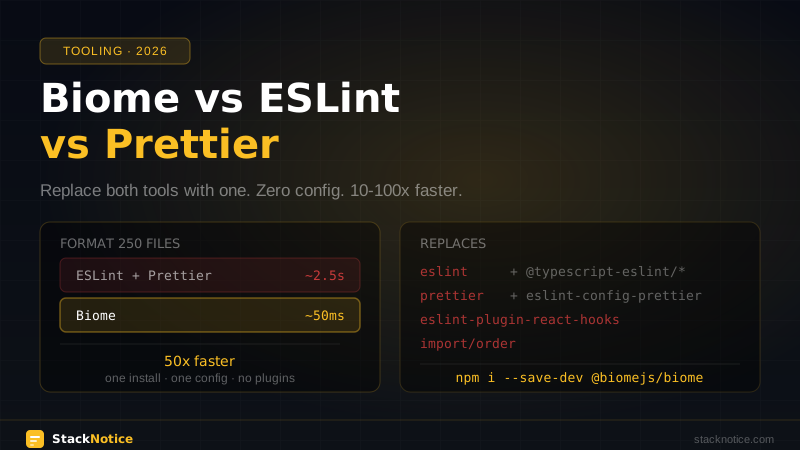
Biome replaces all of it. One tool, one config file, zero plugins to install. And it runs in milliseconds instead of seconds.
This guide covers what Biome actually is, how it compares to ESLint and Prettier in practice, the full migration path, and the cases where you should still use ESLint.
What Is Biome?
Biome is a unified linter and formatter for JavaScript, TypeScript, JSX, TSX, JSON, and CSS — written in Rust. It started as Rome (a 2020 initiative to consolidate JS tooling) and was reborn as Biome in 2023 after the original project stalled.
What makes it different:
- One binary, no plugins — lint + format from a single
biomeexecutable - Zero configuration — sensible defaults out of the box, one optional
biome.json - Rust performance — formats a 50k line codebase in under 100ms
- TypeScript-native — no separate parser to install, TypeScript is a first-class target
- Stable API — the project is maintained and actively developed, v2 released in 2025
It is not a drop-in replacement for every ESLint configuration. If you rely on specific plugins (jest, testing-library, storybook, custom rules), read the "when to stay on ESLint" section first.
Performance: Real Numbers
These are consistent with what the Biome team publishes and what projects report in practice:
| Task | ESLint + Prettier | Biome |
|---|---|---|
| Format 250 files | ~2.5s | ~50ms |
| Lint 250 files | ~4s | ~100ms |
| Format + lint | ~6s | ~120ms |
The difference is most noticeable in --watch mode and lint-staged pre-commit hooks. Instead of waiting 3–6 seconds on every commit, hooks run in under 200ms.
Install Biome
npm install --save-dev --save-exact @biomejs/biomePin the exact version (--save-exact) — Biome follows semantic versioning but the config format can change between minors.
Initialize the config file:
npx @biomejs/biome initThis creates biome.json:
{
  "$schema": "https://biomejs.dev/schemas/2.0.0/schema.json",
  "vcs": {
    "enabled": false,
    "clientKind": "git",
    "useIgnoreFile": false
  },
  "files": {
    "ignoreUnknown": false,
    "ignore": []
  },
  "formatter": {
    "enabled": true,
    "indentStyle": "space"
  },
  "organizeImports": {
    "enabled": true
  },
  "linter": {
    "enabled": true,
    "rules": {
      "recommended": true
    }
  },
  "javascript": {
    "formatter": {
      "quoteStyle": "double"
    }
  }
}
Add scripts to package.json:
{
  "scripts": {
    "lint": "biome lint --write .",
    "format": "biome format --write .",
    "check": "biome check --write ."
  }
}
biome check runs both lint and format together — this is the command you'll use most.
biome.json — Full Configuration
A production-ready config for a TypeScript/Next.js project:
{
  "$schema": "https://biomejs.dev/schemas/2.0.0/schema.json",
  "vcs": {
    "enabled": true,
    "clientKind": "git",
    "useIgnoreFile": true
  },
  "files": {
    "ignore": [
      "node_modules",
      ".next",
      "dist",
      "build",
      "coverage",
      "*.min.js"
    ]
  },
  "formatter": {
    "enabled": true,
    "formatWithErrors": false,
    "indentStyle": "space",
    "indentWidth": 2,
    "lineEnding": "lf",
    "lineWidth": 100,
    "attributePosition": "auto"
  },
  "organizeImports": {
    "enabled": true
  },
  "linter": {
    "enabled": true,
    "rules": {
      "recommended": true,
      "correctness": {
        "noUnusedVariables": "error",
        "noUnusedImports": "error",
        "useExhaustiveDependencies": "warn"
      },
      "style": {
        "noNonNullAssertion": "warn",
        "useConst": "error",
        "useTemplate": "error"
      },
      "suspicious": {
        "noExplicitAny": "warn",
        "noConsoleLog": "warn"
      },
      "performance": {
        "noAccumulatingSpread": "error"
      },
      "a11y": {
        "useAltText": "error",
        "useButtonType": "error"
      }
    }
  },
  "javascript": {
    "formatter": {
      "quoteStyle": "single",
      "trailingCommas": "all",
      "semicolons": "asNeeded"
    }
  },
  "overrides": [
    {
      "include": ["**/*.test.ts", "**/*.spec.ts", "**/*.test.tsx"],
      "linter": {
        "rules": {
          "suspicious": {
            "noExplicitAny": "off"
          }
        }
      }
    }
  ]
}
vcs.useIgnoreFile: true makes Biome respect your .gitignore automatically.
Migrating from ESLint + Prettier
Biome has a migration command that reads your existing ESLint config and maps rules to Biome equivalents:
npx @biomejs/biome migrate eslint --write
npx @biomejs/biome migrate prettier --write
This reads .eslintrc.* and .prettierrc.* and generates a biome.json with the closest equivalent rules. Rules that Biome doesn't support are listed in the output so you know what you're losing.
After migration:
- Remove ESLint and Prettier dependencies:
npm uninstall eslint prettier eslint-config-next @typescript-eslint/eslint-plugin @typescript-eslint/parser eslint-plugin-react eslint-plugin-react-hooks- Delete config files:
rm .eslintrc.json .eslintignore .prettierrc .prettierignore- Run Biome on your entire codebase to auto-fix:
npx @biomejs/biome check --write .- Review the changes, commit, done.
VS Code Integration
Install the Biome extension: marketplace.visualstudio.com/items?itemName=biomejs.biome
Update .vscode/settings.json:
{
  "editor.defaultFormatter": "biomejs.biome",
  "editor.formatOnSave": true,
  "editor.codeActionsOnSave": {
    "source.fixAll.biome": "explicit",
    "source.organizeImports.biome": "explicit"
  },
  "[javascript]": { "editor.defaultFormatter": "biomejs.biome" },
  "[typescript]": { "editor.defaultFormatter": "biomejs.biome" },
  "[typescriptreact]": { "editor.defaultFormatter": "biomejs.biome" },
  "[json]": { "editor.defaultFormatter": "biomejs.biome" }
}
Disable Prettier in VS Code for this project to avoid conflicts:
{
  "prettier.enable": false
}
CI Integration
# .github/workflows/ci.yml
- name: Biome check
  run: npx @biomejs/biome ci .
biome ci is like biome check but exits with a non-zero code on any issue and doesn't write changes — exactly what you want in CI.
Pre-commit Hooks with lint-staged
npm install --save-dev lint-staged husky// package.json
{
"lint-staged": {
"*.{js,ts,jsx,tsx,json}": ["biome check --write --no-errors-on-unmatched"]
}
}This runs in ~100ms on staged files instead of 3–6 seconds with ESLint.
Biome vs ESLint: Rule Coverage
Biome's recommended rules cover the most common issues. Here's how the major categories map:
| Category | ESLint equivalent | Biome coverage |
|---|---|---|
| Unused vars/imports | no-unused-vars, @typescript-eslint/no-unused-vars | ✅ noUnusedVariables, noUnusedImports |
| React hooks | eslint-plugin-react-hooks | ✅ useExhaustiveDependencies, useHookAtTopLevel |
| Accessibility | eslint-plugin-jsx-a11y | ✅ 20+ a11y rules |
| TypeScript | @typescript-eslint/* | ✅ Most common rules |
no-console | no-console | ✅ noConsoleLog |
| Import order | import/order | ✅ organizeImports |
| Complexity | complexity | ✅ noExcessiveCognitiveComplexity |
Biome vs Prettier: Formatting Differences
Biome is compatible with Prettier for most cases, but there are some differences in output. Running biome migrate prettier handles most of them.
Key differences to be aware of:
- Biome formats template literals differently in some edge cases
- Biome's JSX formatting is slightly different for multi-attribute elements
- Trailing commas behavior is configurable (same as Prettier's
trailingComma)
The output is functionally identical in the vast majority of cases. If you have existing Prettier-formatted code, run biome format --write . and review the diff — it'll be minimal.
When to Stay on ESLint
Biome doesn't support plugins, so if your project depends on any of these, you'll need to keep ESLint (or run both):
eslint-plugin-jest— test-specific rules (no test.only, proper matchers)eslint-plugin-testing-library— React Testing Library best practiceseslint-plugin-storybook— Storybook-specific ruleseslint-plugin-security— Security audit rules- Custom rules your team wrote
eslint-plugin-tailwindcss— Tailwind class ordering/validation
Biome's roadmap includes a plugin system, but it's not available yet in a stable form. Until then, for Jest-heavy codebases or teams with custom rules, ESLint remains the more complete solution.
You can run both in the same project — use Biome for formatting and basic linting, ESLint only for the specific plugins you need:
// package.json
{
  "scripts": {
    "lint": "biome check . && eslint . --ext .ts,.tsx"
  }
}
Biome in Monorepos
For Turborepo or Nx monorepos, you can have a root biome.json and override settings per package. See the Turborepo monorepo guide for the full workspace setup.
// packages/api/biome.json
{
  "extends": ["../../biome.json"],
  "linter": {
    "rules": {
      "suspicious": {
        "noConsoleLog": "off"
      }
    }
  }
}
# Run from root
biome check --write .
# Run for specific package
biome check --write packages/webDisabling Rules Per Line
Same syntax as ESLint:
// biome-ignore lint/suspicious/noExplicitAny: third-party type is broken
function process(data: any) { ... }

// biome-ignore lint: entire line ignored
const x = eval(code)

// biome-ignore format: keep this formatted manually
const matrix = [
  1, 0, 0,
  0, 1, 0,
  0, 0, 1,
]
Should You Switch?
| Scenario | Recommendation |
|---|---|
| New project, TypeScript + React | Use Biome from day one |
| Existing project, mostly standard ESLint | Migrate — the biome migrate command handles it |
| Existing project, heavy Jest/Testing Library rules | Keep ESLint for those, consider Biome for formatting |
| Monorepo with custom lint rules | Evaluate per package |
| Large team with established ESLint config | Benchmark first, migrate gradually |
For any new project in 2026, Biome is the default choice. The tooling is stable, the performance difference is real, and the zero-config experience is a genuine improvement over the ESLint plugin ecosystem.
For projects using Hono.js or Bun, Biome pairs especially well — the entire toolchain becomes Rust-native or Bun-native, and CI times drop dramatically.