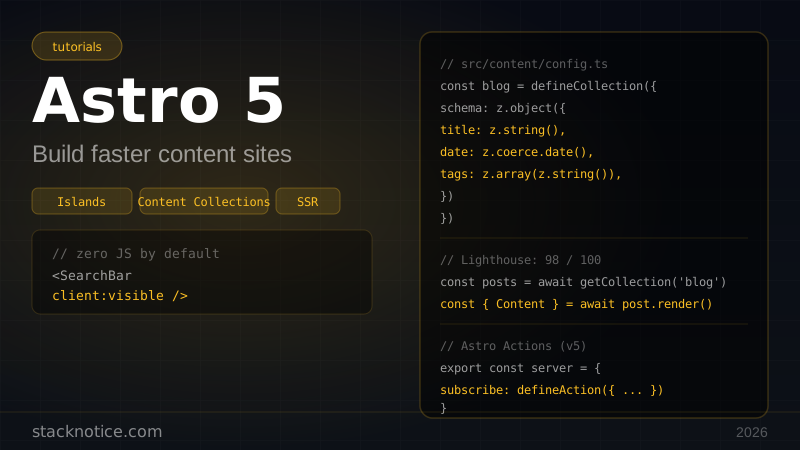
If you're building a blog, docs site, marketing page, or anything content-heavy, Astro is the right tool. It ships zero JavaScript by default. Pages are static HTML unless you explicitly opt in to interactivity. The result: Lighthouse scores in the high 90s without any optimization effort.
This guide covers Astro 5 from setup to production — project structure, Content Collections, components, islands, SSR, and deployment.
What makes Astro different
Most frameworks ship a JavaScript runtime to the browser and hydrate everything. Astro flips this: it renders everything to HTML at build time and only ships JS for the specific components that need it.
| Astro | Next.js | Remix | |
|---|---|---|---|
| Default output | Static HTML | SSR/SSG | SSR |
| JS sent to browser | Zero (by default) | Full bundle | Full bundle |
| Framework support | React, Vue, Svelte, Solid | React only | React only |
| Best for | Content sites | Web apps | Web apps |
| Lighthouse score | 95–100 | 70–90 | 75–90 |
Use Astro when content is the product. Use Next.js when the app is the product. They solve different problems — there's no winner, just the right tool for the job. Our Next.js App Router guide covers the app-first approach.
Setup
npm create astro@latest my-site
cd my-site
npm run dev
The CLI will ask about templates, TypeScript, and dependencies. Choose the "blog" or "minimal" template to start clean.
Add Tailwind CSS:
npx astro add tailwindThis installs @astrojs/tailwind and updates your astro.config.mjs automatically.
Add React (optional — for interactive islands):
npx astro add reactYou can use React, Vue, Svelte, Solid, or Preact — in the same project. Each only ships to the browser if you mark it as interactive.
Project structure
my-site/
├── src/
│   ├── content/         ← Content Collections (markdown, MDX)
│   │   └── blog/
│   │       ├── first-post.md
│   │       └── second-post.mdx
│   ├── pages/           ← File-based routing
│   │   ├── index.astro
│   │   ├── blog/
│   │   │   ├── index.astro
│   │   │   └── [slug].astro
│   │   └── api/         ← API endpoints
│   │       └── search.ts
│   ├── layouts/
│   │   └── BaseLayout.astro
│   └── components/
│       ├── Header.astro
│       └── SearchBar.tsx  ← React island
├── public/              ← Static assets (no processing)
└── astro.config.mjs
Files in src/pages/ become routes. index.astro → /. blog/[slug].astro → /blog/my-post.
Astro components
Astro files have two parts: a frontmatter fence (runs at build time on the server) and a template (outputs HTML).
---
// src/components/PostCard.astro
// This code runs at BUILD TIME — not in the browser
import { formatDate } from '../lib/utils'

interface Props {
  title: string
  date: Date
  slug: string
  description: string
}

const { title, date, slug, description } = Astro.props
---

<article class="border border-gray-200 rounded-lg p-6 hover:shadow-md transition-shadow">
  <a href={`/blog/${slug}`}>
    <time class="text-sm text-gray-500">{formatDate(date)}</time>
    <h2 class="text-xl font-bold mt-1">{title}</h2>
    <p class="text-gray-600 mt-2">{description}</p>
  </a>
</article>
The frontmatter can import Node.js modules, read files, call APIs, query databases — anything. It executes at build time, not in the browser. The HTML template below the fence is pure static output.
Pages and layouts
---
// src/pages/index.astro
import BaseLayout from '../layouts/BaseLayout.astro'
import PostCard from '../components/PostCard.astro'
import { getCollection } from 'astro:content'

const posts = await getCollection('blog')
const sorted = posts.sort((a, b) =>
  b.data.date.getTime() - a.data.date.getTime()
)
---

<BaseLayout title="My Blog">
  <main class="max-w-3xl mx-auto px-4 py-16">
    <h1 class="text-4xl font-bold mb-12">Latest posts</h1>
    <div class="space-y-6">
      {sorted.map(post => (
        <PostCard
          title={post.data.title}
          date={post.data.date}
          slug={post.slug}
          description={post.data.description}
        />
      ))}
    </div>
  </main>
</BaseLayout>
---
// src/layouts/BaseLayout.astro
interface Props {
title: string
description?: string
}
const { title, description = 'My blog' } = Astro.props
---
<!DOCTYPE html>
<html lang="en">
<head>
<meta charset="UTF-8" />
<meta name="viewport" content="width=device-width, initial-scale=1.0" />
<title>{title}</title>
<meta name="description" content={description} />
</head>
<body class="bg-white text-gray-900">
<slot />
</body>
</html><slot /> is where child content gets injected — same concept as React children.
Content Collections
Content Collections are Astro's structured content system. You define a schema for your markdown frontmatter, and Astro validates it at build time and generates TypeScript types.
Define a collection:
// src/content/config.ts
import { defineCollection, z } from 'astro:content'

const blog = defineCollection({
  type: 'content',
  schema: z.object({
    title: z.string(),
    description: z.string(),
    date: z.coerce.date(),
    tags: z.array(z.string()).default([]),
    cover: z.string().optional(),
    featured: z.boolean().default(false),
    draft: z.boolean().default(false),
  }),
})

export const collections = { blog }
A blog post:
---
title: "My First Post"
description: "An introduction to what this blog is about"
date: 2026-05-18
tags: [javascript, typescript]
featured: true
---

# My First Post

Content goes here. Standard markdown, or MDX if you use `.mdx`.
Astro validates the frontmatter against the Zod schema at build time. If a required field is missing or has the wrong type, the build fails — not a runtime error.
Query the collection:
import { getCollection, getEntry } from 'astro:content'

// All posts
const posts = await getCollection('blog')

// Filter drafts in production
const published = await getCollection('blog', ({ data }) =>
  import.meta.env.PROD ? !data.draft : true
)

// Single post by slug
const post = await getEntry('blog', 'my-first-post')
Dynamic routes for posts:
---
// src/pages/blog/[slug].astro
import { getCollection } from 'astro:content'
import type { CollectionEntry } from 'astro:content'
import BaseLayout from '../../layouts/BaseLayout.astro'

export async function getStaticPaths() {
  const posts = await getCollection('blog', ({ data }) => !data.draft)
  return posts.map(post => ({
    params: { slug: post.slug },
    props: { post },
  }))
}

interface Props {
  post: CollectionEntry<'blog'>
}

const { post } = Astro.props
const { Content } = await post.render()
---

<BaseLayout title={post.data.title} description={post.data.description}>
  <article class="max-w-3xl mx-auto px-4 py-16 prose prose-gray lg:prose-lg">
    <h1>{post.data.title}</h1>
    <time>{post.data.date.toLocaleDateString()}</time>
    <Content />
  </article>
</BaseLayout>
getStaticPaths() tells Astro which pages to generate. post.render() converts the markdown/MDX to a React-like component you can render with <Content />.
The Islands architecture
By default, every component is rendered to static HTML. To add interactivity, you mark a component as an island with a client:* directive.
---
import SearchBar from '../components/SearchBar.tsx'
import Newsletter from '../components/Newsletter.tsx'
import StaticCard from '../components/PostCard.astro'
---

<!-- Static — zero JS -->
<StaticCard title="Hello" />

<!-- Hydrates immediately on load -->
<SearchBar client:load />

<!-- Hydrates when visible in viewport -->
<Newsletter client:visible />

<!-- Hydrates when the browser is idle -->
<Comments client:idle />

<!-- Only hydrates on specific breakpoint -->
<MobileMenu client:media="(max-width: 768px)" />| Directive | When it hydrates | Use case |
|---|---|---|
client:load | Immediately | Critical interactive UI |
client:idle | Browser idle | Comments, chat |
client:visible | When in viewport | Below-the-fold widgets |
client:media | At a media query | Responsive components |
client:only | Client only (no SSR) | Auth-dependent UI |
This is why Astro sites have tiny JS bundles: you're shipping JS for three interactive components, not a full SPA runtime.
A React island:
// src/components/SearchBar.tsx
import { useState } from 'react'

interface Props {
  posts: { title: string; slug: string; description: string }[]
}

export function SearchBar({ posts }: Props) {
  const [query, setQuery] = useState('')

  const results = posts.filter(post =>
    post.title.toLowerCase().includes(query.toLowerCase()) ||
    post.description.toLowerCase().includes(query.toLowerCase())
  )

  return (
    <div>
      <input
        type="search"
        value={query}
        onChange={e => setQuery(e.target.value)}
        placeholder="Search posts..."
        className="w-full border border-gray-300 rounded-lg px-4 py-2"
      />
      {query && (
        <ul className="mt-4 space-y-2">
          {results.map(post => (
            <li key={post.slug}>
              <a href={`/blog/${post.slug}`} className="text-blue-600">
                {post.title}
              </a>
            </li>
          ))}
        </ul>
      )}
    </div>
  )
}
---
// Usage in a page
import { SearchBar } from '../components/SearchBar.tsx'
import { getCollection } from 'astro:content'
const posts = await getCollection('blog')
const postData = posts.map(p => ({
title: p.data.title,
slug: p.slug,
description: p.data.description,
}))
---
<SearchBar posts={postData} client:load />Note: you pass the data from the build-time Astro context to the client-side React component as props. The React component only handles interactivity — the data is fetched at build time.
Server-Side Rendering
By default Astro is static (SSG). Enable SSR for pages that need it:
// astro.config.mjs
import { defineConfig } from 'astro/config'
import vercel from '@astrojs/vercel/serverless'
import tailwind from '@astrojs/tailwind'

export default defineConfig({
  output: 'hybrid',  // static by default, opt-in to SSR per page
  adapter: vercel(),
  integrations: [tailwind()],
})
With output: 'hybrid', pages are static by default. Opt individual pages into SSR:
---
// src/pages/dashboard.astro
export const prerender = false  // this page is server-rendered

const user = Astro.cookies.get('session')?.value
if (!user) return Astro.redirect('/login')

const data = await fetch(`https://api.example.com/user/${user}`)
const profile = await data.json()
---

<BaseLayout title="Dashboard">
  <h1>Welcome, {profile.name}</h1>
</BaseLayout>
On SSR pages, Astro.request, Astro.cookies, Astro.redirect(), and Astro.locals are all available.
API endpoints
Create API routes with .ts or .js files in src/pages/api/:
// src/pages/api/subscribe.ts
import type { APIRoute } from 'astro'

export const POST: APIRoute = async ({ request }) => {
  const body = await request.json()
  const { email } = body

  if (!email || !email.includes('@')) {
    return new Response(JSON.stringify({ error: 'Invalid email' }), {
      status: 400,
      headers: { 'Content-Type': 'application/json' },
    })
  }

  // Add to your email list
  await addToMailingList(email)

  return new Response(JSON.stringify({ success: true }), {
    status: 200,
    headers: { 'Content-Type': 'application/json' },
  })
}
Routes follow the same file-based pattern as pages. src/pages/api/subscribe.ts → POST /api/subscribe.
Astro Actions (Astro 5)
Astro 5 introduced Actions — type-safe server functions similar to React Server Actions. Define them once, call them from any component:
// src/actions/index.ts
import { defineAction } from 'astro:actions'
import { z } from 'astro:schema'

export const server = {
  newsletter: {
    subscribe: defineAction({
      accept: 'form',
      input: z.object({
        email: z.string().email(),
      }),
      handler: async ({ email }) => {
        await addToMailingList(email)
        return { success: true }
      },
    }),
  },
}
Call from a React island:
import { actions } from 'astro:actions'

export function NewsletterForm() {
  const [status, setStatus] = useState<'idle' | 'loading' | 'done'>('idle')

  const handleSubmit = async (e: React.FormEvent<HTMLFormElement>) => {
    e.preventDefault()
    setStatus('loading')
    const formData = new FormData(e.currentTarget)
    const { error } = await actions.newsletter.subscribe(formData)
    setStatus(error ? 'idle' : 'done')
  }

  if (status === 'done') return <p>You're subscribed.</p>

  return (
    <form onSubmit={handleSubmit}>
      <input type="email" name="email" required placeholder="you@example.com" />
      <button type="submit" disabled={status === 'loading'}>Subscribe</button>
    </form>
  )
}
Or from a plain HTML form with no JavaScript (progressive enhancement):
---
import { actions } from 'astro:actions'
---

<form method="POST" action={actions.newsletter.subscribe}>
  <input type="email" name="email" required />
  <button type="submit">Subscribe</button>
</form>
This form works with JS disabled. Astro handles the form POST server-side.
MDX support
For rich markdown with React components embedded:
npx astro add mdx---
title: "A post with interactive components"
date: 2026-05-18
---
import { Counter } from '../../components/Counter.tsx'
Regular markdown works as usual.
<Counter client:load initialCount={5} />
Back to markdown after the component.Use type: 'content' in your collection config for both .md and .mdx files.
Performance — why Astro is fast
- No hydration overhead — pages that don't need JS don't load any
- Automatic image optimization —
<Image>component fromastro:assetsresizes, converts to WebP, and adds lazy loading - CSS scoping — styles in
<style>tags in.astrofiles are automatically scoped, preventing bloat - Build-time data fetching — API calls happen at build time, not on every request
---
import { Image } from 'astro:assets'
import hero from '../assets/hero.jpg'
---

<!-- Automatically optimized: WebP, correct dimensions, lazy loading -->
<Image src={hero} alt="Hero" width={1200} height={600} />
Deployment
Vercel (with SSR):
npx astro add vercel// astro.config.mjs
import vercel from '@astrojs/vercel/serverless'
export default defineConfig({
output: 'hybrid',
adapter: vercel(),
})Netlify:
npx astro add netlifyStatic deploy (GitHub Pages, Cloudflare Pages, S3):
export default defineConfig({
  output: 'static',  // no adapter needed
  site: 'https://mysite.com',
})
Run npm run build — the output goes to dist/. Upload that directory anywhere.
Comparison with Next.js
| Scenario | Astro | Next.js |
|---|---|---|
| Blog / docs | Best choice | Overkill |
| Marketing site | Best choice | Overkill |
| SaaS dashboard | Use islands carefully | Better choice |
| E-commerce | Good with SSR | Good |
| Real-time features | Not ideal | Better choice |
| Multiple UI frameworks | Native support | React only |
The bottom line: if a page is mostly content and mostly static, Astro is faster to build and faster in production. If a page is mostly app logic, Next.js gives you more tooling.
Next steps
From here:
- Add Tailwind CSS v4 for styling — Astro's Tailwind integration is one-command setup
- Deploy to Vercel or Netlify — both have Astro-specific adapters
- Check Next.js App Router if you're building something more app-like to compare approaches