Every SaaS application hits the same wall eventually: you need to do work that doesn't fit inside a request-response cycle. Sending welcome emails. Processing uploaded files. Running AI pipelines. Generating PDFs. Syncing data from third-party APIs. Charging subscription renewals.
You can't do any of this synchronously in a Next.js API route — you'll hit timeouts, block users, and lose work silently when things fail. You need background jobs.
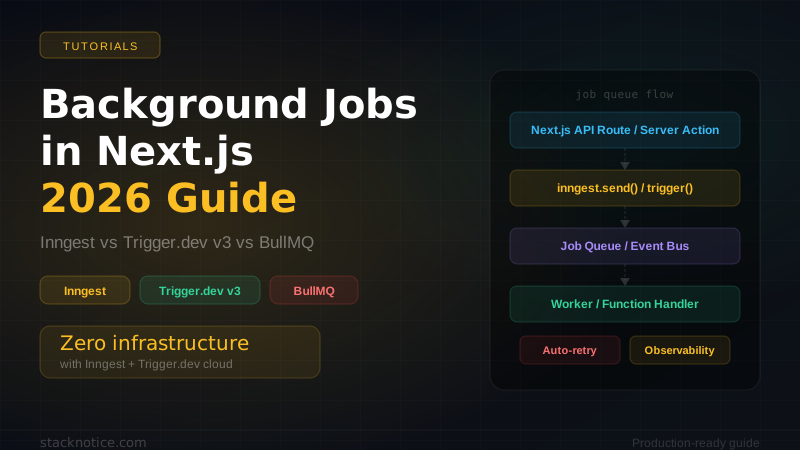
In 2026 the ecosystem has consolidated around three solid options, each with a genuinely different philosophy: Inngest (event-driven, serverless-native), Trigger.dev v3 (TypeScript-first, long-running tasks), and BullMQ (Redis-backed, battle-tested). This guide gives you real production code for each, honest tradeoffs, and a clear decision framework.
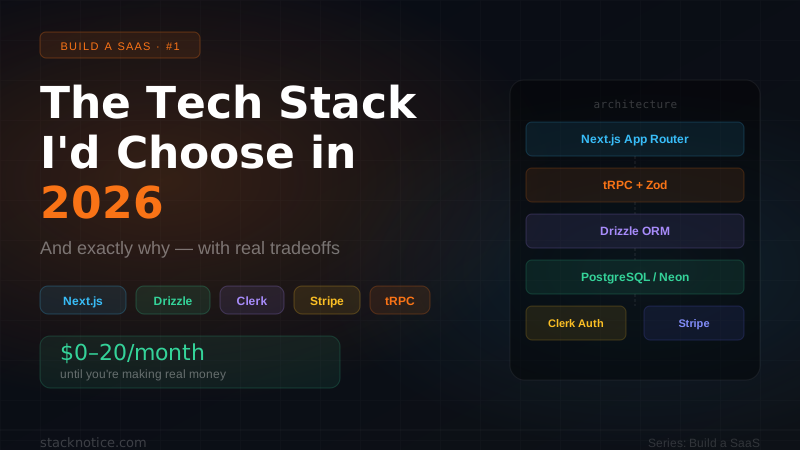
This is a companion to The Tech Stack I'd Choose for a SaaS in 2026. Background jobs are one of the layers every SaaS needs but most tutorials skip.
Why Vercel Cron Jobs Are Not Enough
Before we dive in, let's kill the misconception: Vercel Cron Jobs and setTimeout are not background job solutions.
Vercel Cron: runs on a schedule, maximum 5-minute execution (Hobby plan), no retry logic, no observability, no guaranteed execution. Fine for send daily digest email — completely wrong for anything that needs reliability.
setTimeout in a Route Handler: killed when the serverless function shuts down. Your job disappears silently. Never do this.
What you actually need:
- Guaranteed execution — if the job fails, it retries automatically
- Observability — you can see every job that ran, failed, or is queued
- Long-running tasks — beyond the 10-30s serverless timeout
- Fan-out — trigger thousands of jobs from a single event
- Dead letter queue — jobs that exhaust retries go somewhere you can inspect
Option 1: Inngest
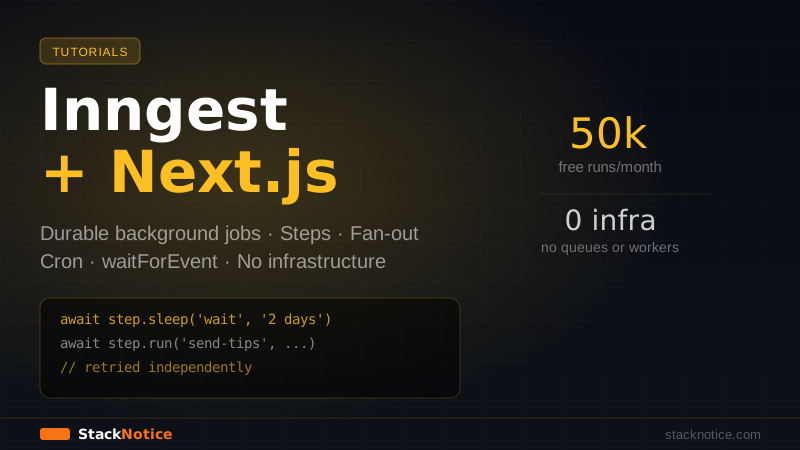
Inngest is event-driven and serverless-native. Your functions run in your existing Next.js deployment — Inngest's cloud orchestrates retries, scheduling, and state. No separate worker process, no Redis, no queue to manage.
Setup
npm install inngestimport { Inngest } from 'inngest'
export const inngest = new Inngest({ id: 'my-saas' })import { serve } from 'inngest/next'
import { inngest } from '@/lib/inngest'
import { sendWelcomeEmail } from '@/lib/jobs/welcome-email'
import { processUpload } from '@/lib/jobs/process-upload'
export const { GET, POST, PUT } = serve({
client: inngest,
functions: [sendWelcomeEmail, processUpload],
})Defining a Function
import { inngest } from '@/lib/inngest'
import { Resend } from 'resend'

const resend = new Resend(process.env.RESEND_API_KEY!)

export const sendWelcomeEmail = inngest.createFunction(
  {
    id: 'send-welcome-email',
    retries: 3,
    // Throttle: max 10 emails per second
    throttle: { limit: 10, period: '1s' },
  },
  { event: 'user/signed-up' },
  async ({ event, step }) => {
    const { userId, email, name } = event.data

    // step.run is a unit of work — automatically retried if it fails
    // Results are memoized: if this step succeeds but a later one fails,
    // on retry Inngest skips directly to the failed step
    const user = await step.run('fetch-user', async () => {
      return db.query.users.findFirst({ where: eq(users.id, userId) })
    })

    await step.run('send-email', async () => {
      await resend.emails.send({
        from: 'hello@yoursaas.com',
        to: email,
        subject: `Welcome to YouSaaS, ${name}!`,
        react: WelcomeEmailTemplate({ name }),
      })
    })

    // Wait 3 days, then check if user completed onboarding
    await step.sleep('wait-for-onboarding', '3d')

    const hasCompleted = await step.run('check-onboarding', async () => {
      const u = await db.query.users.findFirst({ where: eq(users.id, userId) })
      return u?.onboardingCompletedAt !== null
    })

    if (!hasCompleted) {
      await step.run('send-reminder', async () => {
        await resend.emails.send({
          from: 'hello@yoursaas.com',
          to: email,
          subject: 'Still getting started?',
          react: OnboardingReminderTemplate({ name }),
        })
      })
    }
  }
)
Triggering Events
import { inngest } from '@/lib/inngest'

// After Clerk fires user.created webhook
export async function POST(req: Request) {
  const event = await req.json()

  if (event.type === 'user.created') {
    await inngest.send({
      name: 'user/signed-up',
      data: {
        userId: event.data.id,
        email:  event.data.email_addresses[0].email_address,
        name:   `${event.data.first_name} ${event.data.last_name}`,
      },
    })
  }

  return Response.json({ ok: true })
}step.sleep('3d') pauses execution for 3 days without holding a serverless function open. Inngest resumes it automatically. Building this with BullMQ requires a separate delayed queue and a scheduler — Inngest makes it a one-liner.
Fan-out: Processing Every User in a Subscription Renewal
export const processRenewal = inngest.createFunction(
  { id: 'process-renewal', retries: 5 },
  { cron: '0 9 1 * *' }, // 9am on the 1st of every month
  async ({ step }) => {
    const subscriptions = await step.run('fetch-subscriptions', async () => {
      return db.query.subscriptions.findMany({
        where: eq(subscriptions.status, 'active'),
      })
    })

    // Fan-out: send one event per subscription, processed in parallel
    await step.sendEvent(
      'fan-out-renewals',
      subscriptions.map((sub) => ({
        name: 'subscription/renew',
        data: { subscriptionId: sub.id },
      }))
    )

    return { processed: subscriptions.length }
  }
)
Inngest Pricing (May 2026)
- Free: 50,000 function runs/month
- Basic: $30/month — higher limits, longer retention
- Pro: $300/month — production SaaS scale
Option 2: Trigger.dev v3
Trigger.dev v3 runs your jobs in dedicated containers — not inside your Next.js serverless function. This means unlimited execution time, no timeout constraints, and the ability to run heavy workloads (AI inference, video processing, large file parsing) that would be impossible in a serverless environment.
Setup
npm install @trigger.dev/sdk@v3
npx trigger.dev@latest init
This creates a trigger/ directory at your project root:
import { task, wait } from '@trigger.dev/sdk/v3'
import { Resend } from 'resend'

const resend = new Resend(process.env.RESEND_API_KEY!)

export const welcomeEmailTask = task({
  id: 'welcome-email',
  maxDuration: 300, // 5 minutes max (no serverless timeout)
  retry: {
    maxAttempts: 3,
    factor: 2,
    minTimeoutInMs: 1000,
    maxTimeoutInMs: 30000,
  },
  run: async (payload: { userId: string; email: string; name: string }) => {
    const { userId, email, name } = payload

    // Direct database access — runs in a container, not a Lambda
    const user = await db.query.users.findFirst({
      where: eq(users.id, userId),
    })

    await resend.emails.send({
      from: 'hello@yoursaas.com',
      to: email,
      subject: `Welcome, ${name}!`,
      react: WelcomeEmailTemplate({ name }),
    })

    // Wait 3 days — Trigger.dev handles the scheduling
    await wait.for({ days: 3 })

    const refreshedUser = await db.query.users.findFirst({
      where: eq(users.id, userId),
    })

    if (!refreshedUser?.onboardingCompletedAt) {
      await resend.emails.send({
        from: 'hello@yoursaas.com',
        to: email,
        subject: 'Need help getting started?',
        react: OnboardingReminderTemplate({ name }),
      })
    }
  },
})
Triggering from Next.js
import { welcomeEmailTask } from '@/trigger/welcome-email'

export async function POST(req: Request) {
  const event = await req.json()

  if (event.type === 'user.created') {
    await welcomeEmailTask.trigger({
      userId: event.data.id,
      email:  event.data.email_addresses[0].email_address,
      name:   `${event.data.first_name} ${event.data.last_name}`,
    })
  }

  return Response.json({ ok: true })
}
Where Trigger.dev Shines: AI Workloads
This is where Trigger.dev genuinely has no competition. Running an AI pipeline — multiple LLM calls, embeddings, vector search, file processing — in a container with no timeout:
import { task } from '@trigger.dev/sdk/v3'
import Anthropic from '@anthropic-ai/sdk'

const anthropic = new Anthropic()

export const processDocument = task({
  id: 'process-document',
  maxDuration: 600, // 10 minutes — impossible in serverless
  run: async (payload: { documentUrl: string; userId: string }) => {
    // 1. Download the document (could be large)
    const buffer = await fetch(payload.documentUrl).then(r => r.arrayBuffer())

    // 2. Extract text (heavy CPU work)
    const text = await extractTextFromPdf(buffer)

    // 3. Generate embeddings
    const embeddings = await generateEmbeddings(text)

    // 4. Store in vector DB
    await storeEmbeddings(payload.userId, embeddings)

    // 5. Generate summary with Claude
    const summary = await anthropic.messages.create({
      model: 'claude-sonnet-4-6',
      max_tokens: 1024,
      messages: [{ role: 'user', content: `Summarize this document:\n\n${text.slice(0, 50000)}` }],
    })

    // 6. Store everything
    await db.insert(documents).values({
      userId:    payload.userId,
      url:       payload.documentUrl,
      summary:   summary.content[0].type === 'text' ? summary.content[0].text : '',
      processed: true,
    })

    return { success: true }
  },
})
Trigger.dev Pricing (May 2026)
- Free: 50,000 task runs/month, 1,000 steps per run
- Basic: $30/month
- Pro: $300/month
Option 3: BullMQ
BullMQ is the Redis-backed veteran. 1 million weekly npm downloads because it's been solving this problem since 2017. No external cloud dependency — you own the queue, you own the workers.
Setup
npm install bullmq ioredisimport { Queue, Worker, Job } from 'bullmq'
import { Redis } from 'ioredis'
// Use Upstash Redis for serverless compatibility
const connection = new Redis(process.env.REDIS_URL!, {
maxRetriesPerRequest: null, // Required for BullMQ
})
// Create queues
export const emailQueue = new Queue('email', { connection })
export const processQueue = new Queue('process', { connection })
export const scheduledQueue = new Queue('scheduled', { connection })// This runs as a separate process — not inside Next.js
import { Worker } from 'bullmq'
import { Redis } from 'ioredis'
const connection = new Redis(process.env.REDIS_URL!, { maxRetriesPerRequest: null })
const emailWorker = new Worker(
'email',
async (job: Job) => {
const { type, payload } = job.data
switch (type) {
case 'welcome':
await sendWelcomeEmail(payload)
break
case 'reminder':
await sendReminderEmail(payload)
break
default:
throw new Error(`Unknown email job type: ${type}`)
}
},
{
connection,
concurrency: 10,
limiter: { max: 50, duration: 1000 }, // 50 jobs/second max
}
)
emailWorker.on('failed', (job, err) => {
console.error(`Job ${job?.id} failed:`, err.message)
// Alert via Sentry, Slack, etc.
})
emailWorker.on('completed', (job) => {
console.log(`Job ${job.id} completed`)
})Adding Jobs from Next.js
import { emailQueue } from '@/lib/queue'

export async function POST(req: Request) {
  const event = await req.json()

  if (event.type === 'user.created') {
    await emailQueue.add(
      'welcome-email',
      {
        type: 'welcome',
        payload: {
          email: event.data.email_addresses[0].email_address,
          name:  event.data.first_name,
        },
      },
      {
        attempts: 3,
        backoff: { type: 'exponential', delay: 2000 },
        removeOnComplete: { count: 1000 }, // Keep last 1000 completed jobs
        removeOnFail: { count: 5000 },     // Keep last 5000 failed jobs
      }
    )
  }

  return Response.json({ ok: true })
}
Delayed Jobs and Scheduling
// Send reminder 3 days after signup
await emailQueue.add(
  'onboarding-reminder',
  { type: 'reminder', payload: { userId, email } },
  { delay: 3 * 24 * 60 * 60 * 1000 } // 3 days in ms
)

// Recurring job: daily digest at 9am
import { QueueScheduler } from 'bullmq'
await scheduledQueue.add(
  'daily-digest',
  {},
  { repeat: { cron: '0 9 * * *' } }
)Unlike Inngest and Trigger.dev, BullMQ workers are separate Node.js processes. On Vercel, you can't run persistent workers — you need Railway, Fly.io, or a VPS. Factor this into your infrastructure cost and complexity.
BullMQ + Bull Board (Observability)
import { createBullBoard } from '@bull-board/api'
import { BullMQAdapter } from '@bull-board/api/bullMQAdapter'
import { createNextjsHandler } from '@bull-board/nextjs'
import { emailQueue, processQueue } from '@/lib/queue'

const { serverAdapter } = createBullBoard({
  queues: [new BullMQAdapter(emailQueue), new BullMQAdapter(processQueue)],
  serverAdapter: createNextjsHandler(),
})

// Protect with auth in production
export const { GET } = serverAdapter.registerPlugin()
Head-to-Head Comparison
The Decision Framework
Use Inngest when:
- You're on Vercel and don't want to manage infrastructure
- You need multi-step workflows with
step.sleep(onboarding sequences, drip campaigns) - Fan-out patterns: one event → thousands of jobs
- You want best-in-class local dev experience
- Your jobs complete within minutes (not hours)
Use Trigger.dev v3 when:
- You're running AI workloads — document processing, LLM pipelines, embeddings
- You need jobs that run longer than 10-15 minutes
- You want the option to self-host
- Real-time progress streaming to the frontend matters
Use BullMQ when:
- You're not on Vercel (Railway, Fly.io, own servers)
- You need zero vendor dependency
- Your team already knows Redis
- You need precise control over concurrency, priorities, and rate limiting
- Cost at scale matters — BullMQ + Upstash Redis is cheaper than managed solutions at high volume
You ship faster with Inngest. No Redis, no separate workers, no extra infrastructure. At the point where you outgrow it (vendor lock-in, cost, self-hosting), you have the revenue to invest in migration. Optimize for shipping.
Production Patterns That Apply to All Three
Always validate job payloads with Zod
import { z } from 'zod'

const WelcomeEmailPayload = z.object({
  userId: z.string(),
  email:  z.string().email(),
  name:   z.string(),
})

// At the start of every job handler
const payload = WelcomeEmailPayload.parse(job.data)
Make jobs idempotent
Jobs retry on failure. If your job sends an email and then fails saving to the database, it'll retry and send the email twice. Design for this:
// Bad: sends email every time the job runs
await sendEmail(userId)
await db.update(users).set({ welcomeEmailSentAt: new Date() })

// Good: check before sending
const user = await db.query.users.findFirst({ where: eq(users.id, userId) })
if (!user?.welcomeEmailSentAt) {
  await sendEmail(userId)
  await db.update(users).set({ welcomeEmailSentAt: new Date() })
}
Alert on dead letter queue exhaustion
Jobs that exhaust all retries should page someone:
// Inngest
export const criticalJob = inngest.createFunction(
  {
    id: 'critical-job',
    retries: 5,
    onFailure: async ({ event, error }) => {
      await notifySlack(`Job failed after 5 retries: ${error.message}`)
      await Sentry.captureException(error)
    },
  },
  { event: 'critical/event' },
  async ({ event }) => { /* ... */ }
)
Never put secrets in job payloads
// Bad: Stripe customer ID in payload, fetched each time anyway
await queue.add({ stripeCustomerId: 'cus_...', secretKey: process.env.STRIPE_SECRET_KEY })

// Good: only pass IDs — fetch everything else inside the job
await queue.add({ userId: 'user_...' })
// Inside job: look up stripeCustomerId from DB
Conclusion
Background jobs are not optional for a production SaaS — they're load-bearing infrastructure. The right choice depends on your deployment target and workload type, not on hype.
For most teams shipping on Vercel: Inngest. The local dev experience, the step.sleep API, and zero infrastructure overhead are hard to beat early on.
For AI-heavy workloads or long-running jobs: Trigger.dev v3. Containers beat serverless when you're pushing LLMs, processing files, or need predictable execution environments.
For full control and cost optimization at scale: BullMQ. More setup, but it's yours entirely.
Related reading:
- The Tech Stack for a SaaS in 2026 — where background jobs fit in the full architecture
- Claude API complete guide — integrating Claude into your Trigger.dev AI pipelines
- Hono.js complete guide — if you need a dedicated API layer separate from Next.js